


 Video Converter Ultimate
 Screen Recorder
 Videó javítás
 Biztonságos letöltés
Kiváló alkalmazás a kép átméretezéséhez – FastStone Photo Resizer
Könnyű fotóméretezőt keresni az interneten. Különösen manapság rengeteg online elérhető fotószerkesztő szoftver létezik. Ha képek átméretezéséről és konvertálásáról van szó, számos kiváló online és offline eszközt találhatsz. Ha azonban nehezen tudsz választani közülük, megkönnyítjük a dolgod. A FastStone egy képszerkesztő platform, amelyet használhatsz a képeid átméretezésére. Ebben a bejegyzésben pedig részletesen bemutatjuk a FastStone-t, és azt is, hogyan használd a FastStone Photo Resizer programot.

1. rész. FastStone Photo Resizer Review
A FastStone Photo Resizer egy kötelezően használható képszerkesztő alkalmazás. Használhatja Windows asztalán, és egyszerűen letöltheti. Ezenkívül tiszta és könnyen használható felülettel rendelkezik, így felhasználóbarát eszköz. A FastStone Photo Resizer különféle képformátumokat támogat, például JPEG, BMP, PNG, TIFF és GIF. Számos szerkesztési funkciót is tartalmaz, amelyek segítségével konvertálhat, átnevezhet, körbevághat, szöveget adhat hozzá, színt módosíthat, vízjelet adhat hozzá stb.
Ezenkívül kötegelt feldolgozást is kínál, ahol két vagy több kép egyidejű feldolgozása lehetséges. És ha meg szeretné tekinteni az éppen végrehajtott átalakítást, a FastStone lehetővé teszi ezt. A FastStone képátméretező ingyenesen letölthető Windows számítógépére, de az explicit funkcióinak használatához meg kell vásárolnia az alkalmazást. Kövesse az alábbi oktatóanyagot, ha tudni szeretné, hogyan lehet átméretezni a képeket a FastStone segítségével.
Előnyök
- Számos szerkesztési funkciót és eszközt kínál.
- Alacsony ára van.
- Egyszerű felhasználói felülettel rendelkezik.
- Egyszerű fájlmegosztási folyamattal rendelkezik.
Hátrányok
- Csak korlátozott támogatási és segítségnyújtási lehetőséggel rendelkezik.
- Használata nem ingyenes.
- Csak Windows szoftveren érhető el
A FastStone Photo Resizer használata képek átméretezéséhez:
1. lépés. Először töltsd le és telepítsd a FastStone Photo Resizer programot a Windows asztali gépedre. Az alkalmazás telepítése után indítsd el a számítógépeden. Ezután az alkalmazás fő felületén kattints a Batch Convert gombra a Menu menüben, hogy feltöltsd az átméretezni kívánt képet.
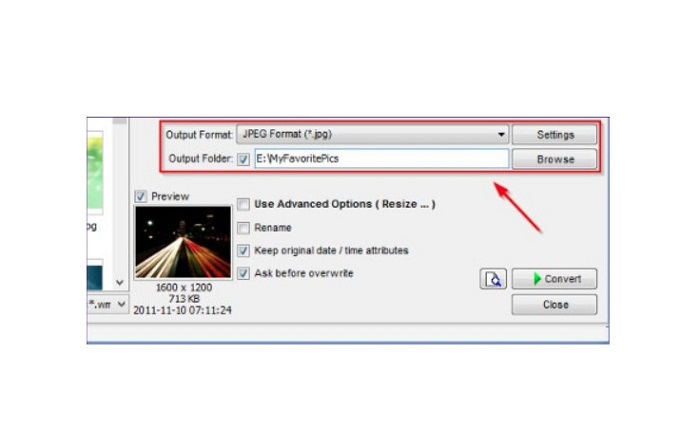
2. lépés. A képed/képeid importálása után megjelennek a felületen. Ezután kattints az Output Format legördülő nyílra, és válaszd ki a kívánt kimeneti fájlformátumot. A kimeneti fájl célmappájának kiválasztásához kattints a Browse gombra az Output Folder mellett.
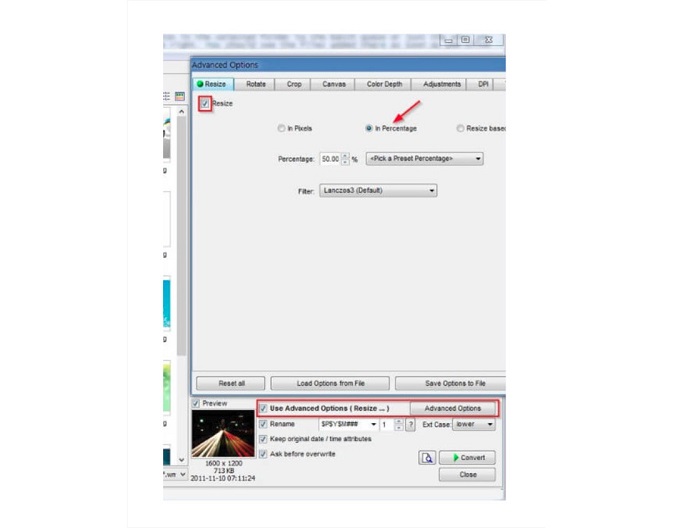
3. lépés. Ezután kattints az Advanced Options opcióra, ekkor egy új lap jelenik meg. A Resize fülön pipáld be az In Percentage lehetőséget, hogy a kép méretét százalékosan változtasd meg. Szűrőt is választhatsz a Filter melletti legördülő nyílra kattintva.
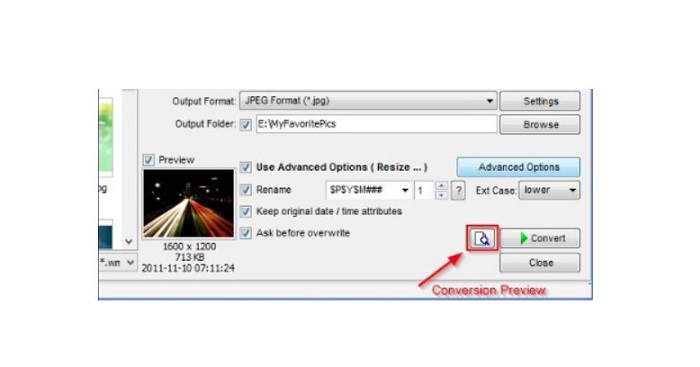
4. lépés. Ezután előnézetben megtekintheted a képet, és összehasonlíthatod az eredetivel a Preview ikonra kattintva, amely a Convert gomb mellett található.
5. lépés. Végül kattints a Convert gombra az átméretezési folyamat elindításához. A program ekkor a képfájlodat is átkonvertálja arra a formátumra, amelyet az előző lépésben kiválasztottál. Miután a FastStone átméretezte a képedet, egy új ablak jelenik meg, ahol látni fogod a kimeneti képet és azok méretét.
És ezzel véget is ért a FastStone Photo Resizer bemutatója. A fenti lépéseket követve könnyedén átméretezheti a képet a FastStone segítségével.
2. rész. A FastStone Photo Resizer alternatívái
A FastStone Photo Resizer csak Windows asztali számítógépeken érhető el. Egy másik hátrány, hogy meg kell vásárolnia az alkalmazást, mielőtt hozzáférne a többi szerkesztési funkciójához. Tehát, ha inkább Windows, Mac vagy Linux eszközökön elérhető és online elérhető videovágó alkalmazást szeretne használni, olvassa el alaposan ezt a részt.
FVC Free Image Upscaler
A FVC Free Image Upscaler az egyik leggyakrabban használt online képméretező alkalmazás, amely minden böngészőből elérhető, többek között a Google Chrome-ból, a Firefoxból és a Safariból. Ez az online eszköz a homályos képeiden is segíthet. Ha életlen vagy alacsony minőségű fotód van, ezzel az online eszközzel élesebbé teheted és javíthatod a minőségét. Emellett 2x, 4x, 6x és 8x nagyítással is felnagyíthatod a képedet. Az FVC Free Image Upscaler-ben az az igazán lenyűgöző, hogy mesterségesintelligencia-alapú technológiát használ, amely automatikusan felismeri a kép életlen részeit, majd feljavítja azokat.
Ezenkívül minden képformátumot támogat, például PNG, JPG, JPEG és BMP. Ezenkívül nem kell regisztrálnia vagy bejelentkeznie egy fiókhoz az eszköz használatához. És ha szeretné ellenőrizni a kimenet előnézetét, mielőtt elmentené, ezt megteheti az alkalmazás használata közben. Ezenkívül biztonságos és kényelmes a használata. És annak ellenére, hogy ez egy internetfüggő alkalmazás, gyors feldolgozási felülettel rendelkezik, ahol nem lesz nehéz átméretezni a képeket.
1. lépés. Nyisd meg a böngésződet, és írd be a keresőmezőbe, hogy FVC Free Image Upscaler. Kattints a megadott linkre, hogy közvetlenül a főoldalra juss.
2. lépés. Indítsd el a programot az asztalodon azzal, hogy a Upload Photo gombra kattintasz. Az alkalmazás elindítása után kattints ismét az Upload Photo gombra, hogy feltöltsd az átméretezni/élesíteni kívánt képet.
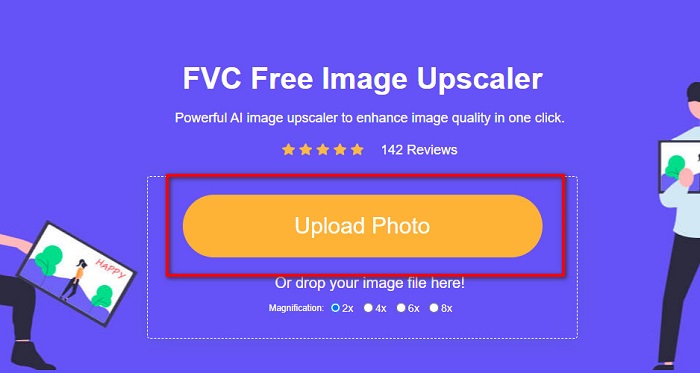
3. lépés. Ezután látni fogod az előre beállított nagyítási értékeket, amelyek közül választhatsz. A következő lehetőségek közül választhatsz: 2x, 4x, 6x vagy 8x.
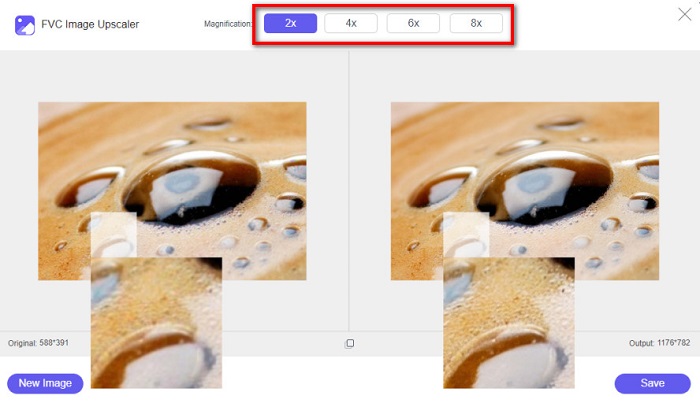
4. lépés. Mozgasd a kurzort, hogy lásd a képed előnézetét. Ha elégedett vagy az eredménnyel, kattints a Save gombra a felület jobb alsó sarkában.
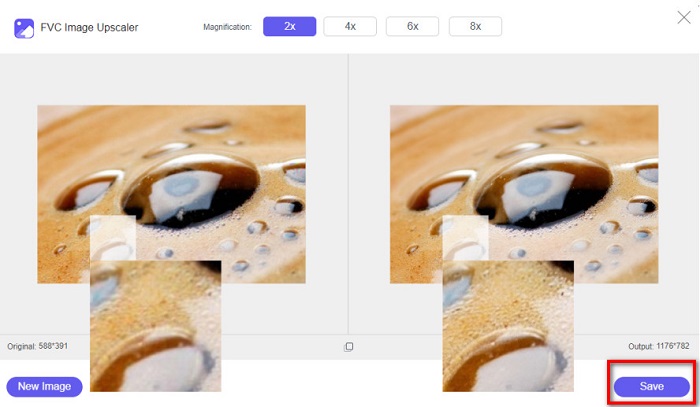
Image Resizer.com
Egy másik remek online képméretező eszköz, amelyet használhatsz, az Image Resizer.com. Az Image Resizer.com lehetővé teszi, hogy átméretezd a képedet a kép méreteinek módosításával. Ezenfelül lehetőséget biztosít a fotó kivágására vagy elforgatására is. Emellett kifejezetten kezdőbarát eszköz, mivel nagyon egyszerű a kezelőfelülete. Hátránya azonban, hogy sok zavaró reklámot tartalmaz, amelyek elvonhatják a figyelmedet.
1. lépés. A böngésződben keresd meg az Image Resizer.com oldalt. A fő felületen kattints a Select Image gombra, hogy feltöltsd az átméretezni kívánt fotót.
2. lépés. A következő felületen a képed méreteit dimenzió vagy százalék alapján is módosíthatod. Ezután írd be a képhez kívánt Width and Height (szélesség és magasság) értékeket.
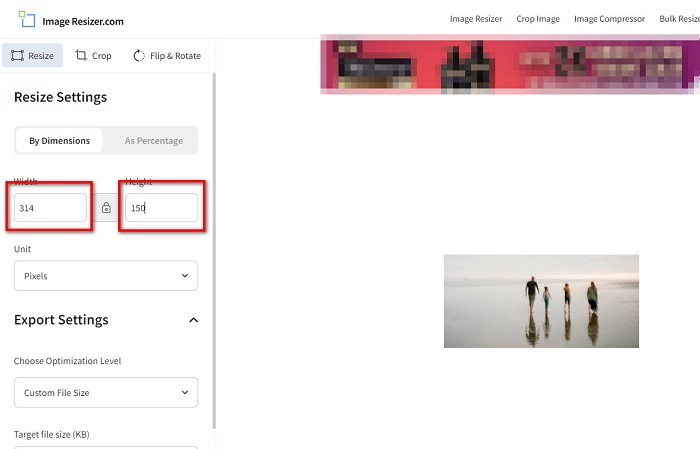
3. lépés. Ha végeztél a kép átméretezésével, kattints a Resize Image gombra a folyamat befejezéséhez.
3. rész. GYIK a FastStone Photo Resizerről
Mennyibe kerül a FastStone Photo Resizer?
Megvásárolhatja a FastStone Photo Resizer teljes verzióját $19.95-ért (élettartamú licenc)
Ingyenes a FastStone néző?
A FastStone Image Viewer egy Microsoft Windows rendszerhez használt képnézegető. A FastStone Image Viewer ingyenesen és díjmentesen használható.
A FastStone Photo Resizer rontja a fényképek minőségét?
Nem. Ha a FastStone Photo Resizer segítségével optimalizálod a képedet, nem fog romlani a kép minősége.
Következtetés
A FastStone Photo Resizer kiváló alkalmazás, ha a Windows asztali gépeden szeretnéd átméretezni a képeidet. Emellett számos szerkesztési funkcióval rendelkezik, és felhasználóbarát eszköz is. Ha azonban arra vagy kíváncsi, hogy létezik-e FastStone Photo Resizer Macre, a válasz: nem. Tehát ha olyan képméretezőt szeretnél, amely minden platformon elérhető, használd most az FVC Free Image Upscaler eszközt.
-
 Az Imglarger teljes útmutatója – Megoldás fotótervezőknek
 Az Imglarger az egyik legkiválóbb képmegoldó eszköz. Kattintson erre az oldalra, hogy megtudja az Imglarger teljes leírását, előnyeit és hátrányait, árát és alternatíváit.
-
 A legjobb Photo Resizer alkalmazás online, offline, Android és iPhone-on
 Melyek a legjobb fényképátméretező alkalmazások? Kattintson az oldalra, hogy megismerje az öt leghatékonyabb fényképátméretező alkalmazást, amellyel javíthatja vagy átméretezheti a fájlt.
-
 6 módszer a kép méretére az interneten és offline módban [100% Working]
 Az itt hozzáadott oktatóanyag segítségével könnyedén átméretezheti a képet a kívánt méret alapján. Itt megtudhatja, hogyan kell csinálni!
