


 Video Converter Ultimate
 Screen Recorder
 Videó javítás
 Biztonságos letöltés
Hogyan távolítsuk el a WOW Slider vízjelet ingyen
A WOW Slider az egyik legnépszerűbb diavetítés‑készítő, amellyel lenyűgöző képes diavetítéseket hozhatsz létre. Az alkalmazás ingyenesen letölthető, és nem foglal sok tárhelyet az eszközödön. Emellett intuitív felhasználói felülettel rendelkezik, így könnyű vele diavetítéseket készíteni. A többi képes platformtól eltérően a WOW Slider nem használ Flash‑t, és nem igényel bővítményeket. A WOW Slider azonban vízjelet helyez el az általad készített diavetítésen. Ezért sok felhasználó keres módszert arra, hogyan tudná ingyen eltávolítani a WOW Slider vízjelét. Olvass tovább, hogy megtudd, hogyan távolíthatod el a WOW Slider vízjelét ingyen.

1. rész: A WOW Slider vízjel eltávolítása vásárlás nélkül
Az alkalmazás segítségével eltávolíthatja a vízjelet, ha megvásárolta a WOW Slidert. De ha nem, akkor eszközökkel eltávolíthatja a WOW Slider vízjelet a diavetítésről. Ezért olvassa el ezt a részt átfogóan, hogy megtudja, hogyan távolítsa el a WOW Slidert vásárlás nélkül.
FVC ingyenes vízjel eltávolító
Az FVC Free Watermark Remover az egyik legnépszerűbb online vízjel‑eltávolító, amely elérhető minden böngészőben, például a Google Chrome‑ban, a Firefoxban és a Safariban. Ez az online eszköz biztonságos, ingyenes, és nem igényel előfizetést. Emellett kezdőbarát alkalmazás, mert intuitív felhasználói felülete van. Számos képformátumot támogat, többek között a PNG, JPG, JPEG, BMP stb. formátumokat. Ami igazán lenyűgöző benne, hogy többféle kijelölő eszköz közül választhatsz a vízjel eltávolításához a képről. Ha tehát szeretnéd használni ezt az ingyenes vízjel‑eltávolítót, kövesd az alábbi lépéseket.
A WOW Slider vízjel eltávolítása az FVC Free Watermark Remover segítségével:
1. lépés. Először nyisd meg a böngésződet, és keresd meg az FVC Free Watermark Remover oldalt. A gyors eléréshez kattints a megadott hivatkozásra.
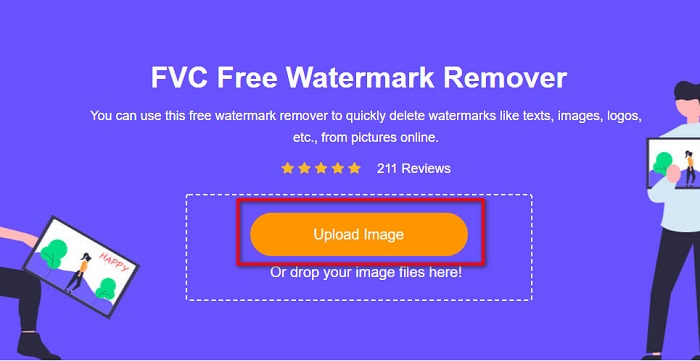
2. lépés. Ezután kattints az Upload Image (Kép feltöltése) gombra, és töltsd fel azt a WOW Slider képet, amelyről el szeretnéd távolítani a vízjelet.
3. lépés. Miután feltöltötted a képet, válaszd ki azt a kijelölő eszközt, amelyet a vízjel eltávolításához szeretnél használni. Választhatsz a Lasso, Polygonal vagy Brush eszközök közül.
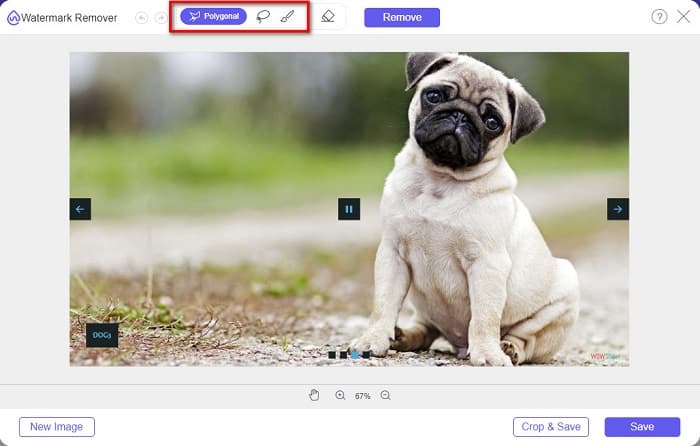
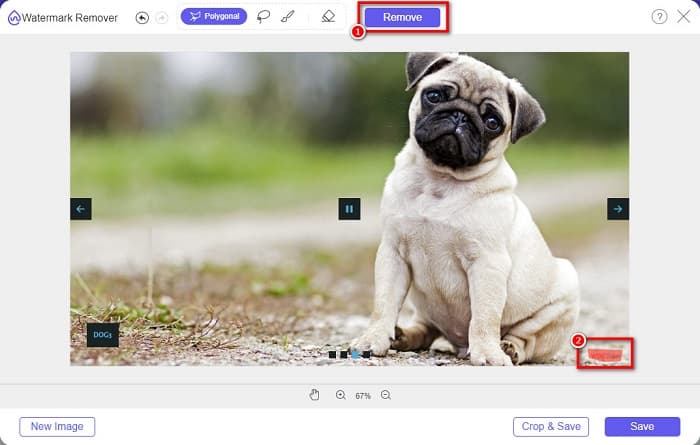
4. lépés. Ezután rajzold körbe azt a területet, ahol a WOW Slider vízjele található. Majd kattints a Remove (Eltávolítás) gombra, hogy töröld a vízjelet a képről.
5. lépés. Végül kattints a Save (Mentés) gombra, hogy elmentsd a képet a számítógépedre.
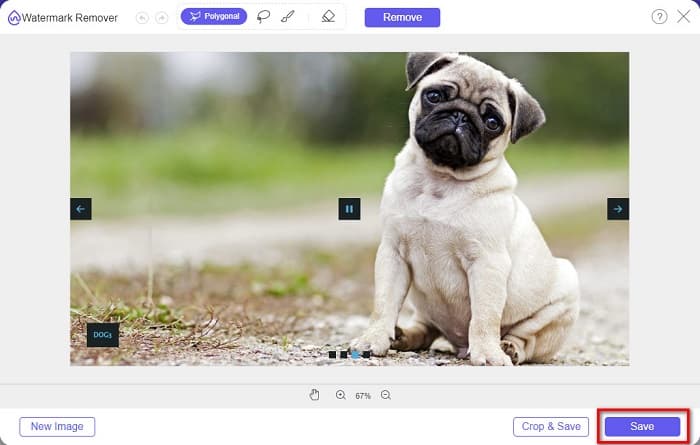
És ez az! Mostantól megtekintheti a WOW Slider képét a WOW Slider vízjel nélkül.
Bitwar vízjel szakértő
A Bitwar Watermark Expert egy olyan vízjel‑eltávolító, amellyel eltávolíthatod a WOW Slider vízjelét a diavetítésedről. Ez az offline vízjel‑eltávolító egyszerű felhasználói felülettel rendelkezik, ezért kezdők számára is könnyen használható. Emellett lehetővé teszi vízjelek eltávolítását vagy hozzáadását a képeidhez és videóidhoz. A VIP verzióban kötegelt feldolgozással több videóról is eltávolíthatod a vízjelet. Ezt a szoftvert Windows számítógépre töltheted le. Azonban az alkalmazást meg kell vásárolnod, mielőtt minden funkcióját elérnéd. Mindezek ellenére a Bitwar Watermark Expert kiváló eszköz a vízjelek eltávolítására a WOW Slider diavetítéseidről.
Törölje a WOW Slider vízjelet a diavetítésből a Bitwar Watermark Expert segítségével:
1. lépés. Töltsd le a Bitwar Watermark Expert programot az eszközödre, majd a letöltés után nyisd meg.
2. lépés. A program fő felületén négy lehetőséget fogsz látni. Kattints a Photo Watermark Remover (Képes vízjel‑eltávolító) opcióra.
3. lépés. Ezután kattints a képernyő közepén lévő + jelre, hogy feltöltsd a WOW Slider képet.
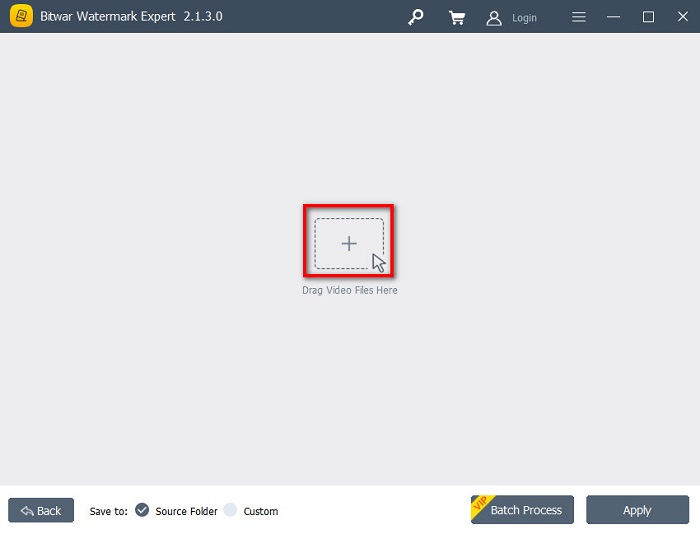
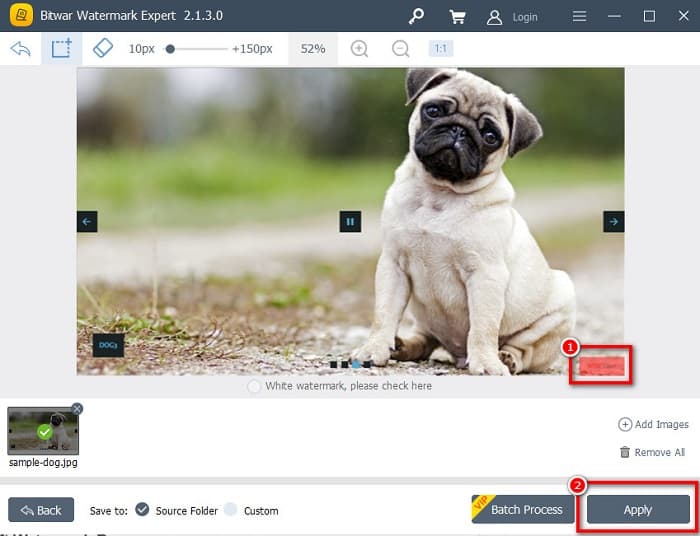
4. lépés. Ezután válaszd ki azt a kijelölő eszközt, amellyel el szeretnéd távolítani a vízjelet a képről. Majd jelöld ki a vízjeles területet a képen.
5. lépés. Végül kattints az Apply (Alkalmaz) gombra, hogy eltávolítsd a vízjelet a WOW Slider diavetítésedről. Ezzel a módszerrel a Placeit vízjeleit is eltávolíthatod.
Apowersoft vízjel eltávolító
Egy másik offline vízjel‑eltávolító, amelyet használhatsz, az Apowersoft Watermark Remover. Ez a program lehetővé teszi bármilyen vízjel (logó, szöveg, kép) egyszerű eltávolítását a videóidról. Emellett szinte minden főbb platformra letölthető, többek között Windowsra és Macre. Van egy olyan funkciója is, amellyel vízjeleket távolíthatsz el, illetve adhatsz hozzá a képeidhez. Háromféle vízjel‑kijelölő eszközzel rendelkezik, hogy eltávolíthasd a WOW Slider vízjelét a diavetítésedről. Továbbá felhasználóbarát eszköz, könnyen kezelhető felülettel. Hátránya, hogy kevés szerkesztési funkciót kínál.
A WOW Slider vízjel logó eltávolítása az Apowersoft Watermark Remover segítségével:
1. lépés. Töltsd le az Apowersoft Watermark Remover programot az eszközödre. Kövesd a telepítési folyamatot, majd nyisd meg az alkalmazást.
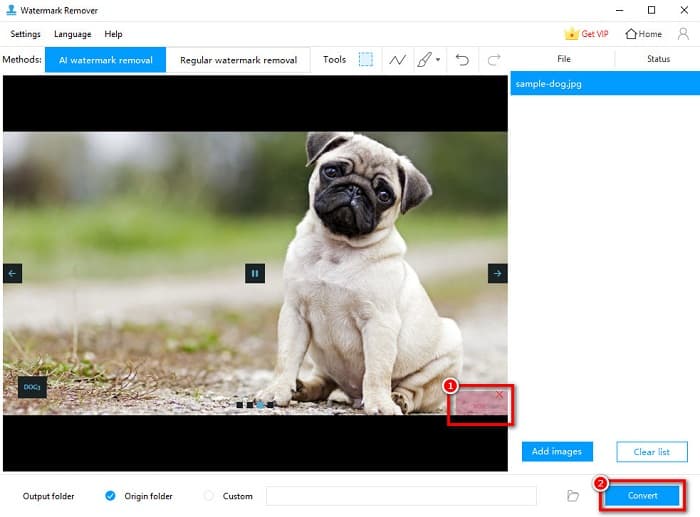
2. lépés. Ezután kattints a „Remove watermark from image” (Vízjel eltávolítása képről) opcióra. Majd húzd be vagy dobd be azt a fotót, amelyről el szeretnéd távolítani a vízjelet.
3. lépés. A Tools (Eszközök) panelen látni fogod a vízjel‑eltávolító eszközöket. Kattints arra a kijelölő eszközre, amelyet használni szeretnél, majd jelöld ki a vízjelet a képen.
4. lépés. Ha elkészültél, kattints a Convert (Konvertálás) gombra, hogy elmentsd az eredményt.
2. rész: Hogyan távolítsuk el a vízjelet a WOW Slider-ről vásárlással
Érdemes elolvasni ezt a részt, ha azt keresi, hogyan távolíthatja el a vízjelet a WOW Sliderből.
A WOW Slider használatával csodálatos diavetítéseket készíthet elképesztő minőségben. Könnyen használható szoftveres felületével kiváló minőségű diavetítéseket készíthet, amelyeket megoszthat barátaival. Továbbá, ha emléket szeretnél készíteni a legjobb barátodnak, érdemes diavetítést készíteni a WOW Slider segítségével.
A WOW Slider használatának szomorú oldala, hogy vízjelet tesz a diavetítésedre. Ha azonban megvásárolod a WOW Slider alkalmazást, többé nem kell vízjelet eltávolítanod, mert a kimeneti fájlokon nem lesz WOW Slider vízjel. Ezért most megmutatjuk, hogyan tudod eltávolítani a vízjelet megvásárlással.
1. lépés. Töltsd le a WOW Slider programot az eszközödre, és közvetlenül a letöltés után fizess, majd add meg a licenckódot a regisztrációhoz.
2. lépés. A regisztráció után kapcsold ki a vízjelet a Menu panel > Slider > Properties menüpont alatt.
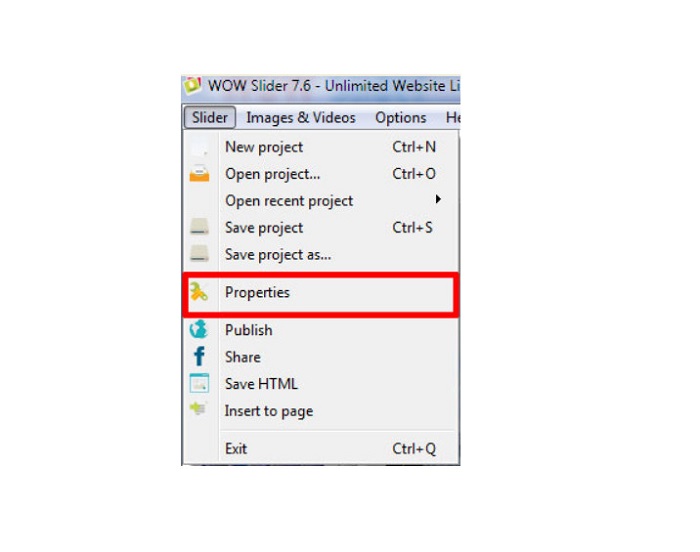
3. lépés. Megjelenik egy Tulajdonságok (Properties) ablak, itt kattints a Design fülre. választási lehetőség.
4. lépés. A Design fülön látsz egy „Watermark” feliratú jelölőnégyzetet. Vedd ki a pipát a négyzetből, hogy kikapcsold a vízjelet a diavetítésen.
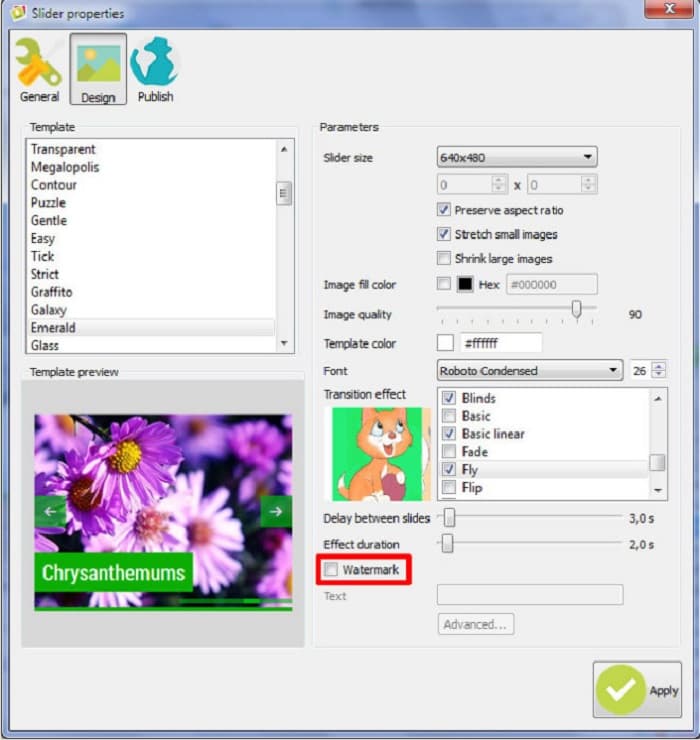
5. lépés. Ezután már közzéteheted a diavetítésedet a weboldaladon a WOW Slider vízjele nélkül.
3. rész. GYIK a WOW Slider vízjel eltávolításával kapcsolatban
Miért tesz a WOW Slider vízjeleket az elkészített diavetítésekre?
A WOW Slider vízjelet ágyaz be a diavetítés kimeneteibe, így a felhasználókat a vízjel nélküli verzióra ösztönzik. Az alkalmazás nem hagy vízjelet a kimenetén, ha megvásárolja az alkalmazást.
Eltávolíthatsz több vízjelet a videódból?
Igen. A vízjeleltávolítók lehetővé teszik két vagy több vízjel eltávolítását a videóról. Ha több vízjelet szeretne eltávolítani a videóról, használja az FVC Video Converter Ultimate alkalmazást.
Melyik a legjobb online vízjeleltávolító?
Sok online vízjel‑eltávolítót találsz az interneten, de sokan az FVC Free Watermark Remover használatát ajánlják, mert biztonságos és ingyenes.
Következtetés
Mostanra megoldódott a problémád azzal kapcsolatban, hogyan távolítsd el a WOW Slider vízjelét! A fent említett vízjel‑eltávolítók segítségével könnyedén eltávolíthatod a WOW Slider vízjelét a diavetítésedről. Ha pedig ingyenes és biztonságosan használható online alkalmazást keresel, válaszd az FVC Free Watermark Remover eszközt.
-
 Ingyenes módszerek a VideoShop vízjel eltávolítására a videókon [könnyen]
 A VideoShop vízjel eltávolításához az eszköznek vízjeleltávolítóra lesz szüksége. Ha tudni szeretné, mik ezek, olvassa el ezt a cikket.
-
 3 módszer a Viva videó vízjel eltávolítására a videókon [leggyorsabb módszer]
 A videókon található Viva Video vízjel eltávolításához külön vízjeleltávolítóra lesz szüksége. Olvassa el ezt a cikket, hogy többet megtudjon róla!
-
 Végső eszközök a vízjel eltávolítására a Renderforestből exportált videókból
 A vízjel eltávolításához a Renderforestből vízjel-eltávolítóra lesz szüksége az eszközén, az összes használható eszköz itt található.
