


 Video Converter Ultimate
 Screen Recorder
 Videó javítás
Fedezze fel az MKV-fájlok lejátszásának módjait PS4-en
Nemcsak az Xbox One S támogatja a filmlejátszást. Most már a PS4 is igyekszik lépést tartani a trenddel. USB‑kábellel és DLNA-n keresztül a PS4 már képes lejátszani MKV, MP4, AVI és még sok más formátumot. Ez azt jelenti, hogy az MKV is azok közé a fájlok közé tartozik, amelyeket le tudsz játszani. A teljesen támogatott formátumok listáját a PS4 hivatalos weboldalán találod. Ráadásul, ha nem érdekelne egy MKV fájl PS4-en való lejátszása, nem olvasnád tovább ezt a cikket. Folytasd, mert ahogy haladsz előre, meg fogod ismerni, hogyan tudsz MKV-t lejátszani PS4-en.

1. rész. Minden MKV fájl lejátszható PS4-en?
Lejátszhatom az MKV fájlokat PS4-en? Biztosan tudsz. Az MKV fájlformátumot a PS4 támogatja. De nem minden MKV fájl játszható le megfelelően. Előfordulhat, hogy kudarcot szenved a játék során. Ennek az az oka, hogy meg kell felelnie a PS4 által felállított szabványnak. Leginkább a H.264/MPEG-4 AVC támogatott. Ugyanezek a szabályok érvényesek, ha MKV-fájlokat szeretne lejátszani USB-meghajtóról. Mindeközben audio MP3, AAC LC, AC-3 támogatott. A legtöbb ilyen formátum Dolby Digital formátum. Ha úgy gondolja, hogy megfelelt a szabványnak, folytathatja az MKV lejátszásának lépéseit közvetlenül PS4-en.
1. lépés. Töltsd le és telepítsd a DivX Media Servert, majd indítsd el a lejátszót. Ezután engedélyezd a megosztást a számítógépeden.
2. lépés. Töltsd fel vagy importáld az MKV fájlt a szerverre.
3. lépés. Mielőtt a következő lépésre térnél, győződj meg róla, hogy a számítógép és a PS4 is ugyanahhoz a Wi‑Fi hálózathoz csatlakozik. Ezután töltsd le és telepítsd a DivX médialejátszót a PS4-re. Ezt követően nyisd meg a PS4 médialejátszó alkalmazását, és válaszd ki a listában megjelenő eszközök közül a DivX Media Servert.
4. lépés. Végül keresd meg a Videó menüpontot, majd jelöld ki a lejátszani kívánt videót, és kezdd el a streamelést.
2. rész Lépésről lépésre, hogyan játszhat MKV-t PS4-en USB-ről
Eközben, ha USB-tárolót használ, győződjön meg arról, hogy az FAT vagy exFAT formátumú, különben a rendszer nem észleli. Ha úgy gondolja, hogy készen áll, és a flash meghajtó kompatibilis, tekintse meg az alábbi lépésről lépésre szóló útmutatót.
1. lépés. Kapcsold be a PS4-et, és helyezd be az USB-meghajtót. Lépj a fő Menü pontra. Ezután válaszd a Videó menüt, és keresd meg az USB-meghajtód nevét.
2. lépés. Amint látod a fájlnevek listáját, kattints a Display All (Összes megjelenítése) opcióra, hogy lásd az összes fájlt, amelyet az USB-re mentettél. Másold ki a fájlt, és helyezd át a PS4-re.
3. lépés. Végül győződj meg róla, hogy van még elegendő tárhely az átvitel befejezéséhez.
3. rész. Alternatív módja az MKV lejátszásának PS4-en Plex Serveren keresztül
A DivX mellett létezik egy másik lejátszó is, amellyel MKV-t játszhatsz le PS4-en. Ez a Plex nevű streaming médiaszerver. Ez a médiaszerver lehetővé teszi, hogy számítógépedről nagy felbontású videókat, zenéket, tévéműsorokat és podcasteket streamelj. Bár egyeseknél problémák adódnak bizonyos MKV fájlok lejátszásakor, még így is használhatod alternatívaként. Ha viszont mindenképpen Plexet szeretnél használni, és egy nem kompatibilis fájlt akarsz lejátszani, érdemes megfontolni a videó konvertálását. Néhány konverter képes az MKV fájlokat Plex által támogatott formátumba átalakítani. A videokodek, a képfrissítési sebesség, a bitráta és egyéb paraméterek módosításával ez megoldható. Létezik olyan eszköz, amely erre képes? Igen, létezik, ez a Video Converter Ultimate. Igen, ez az eszköz képes erre. Próbáld ki, hogy megoldja ezt a problémát.
1. lépés. Töltsd le és telepítsd a Video Converter Ultimate programot a számítógépedre.
Ingyenes letöltés Windows 7 vagy újabb rendszerre Biztonságos letöltés
Ingyenes letöltés macOS 10.7 vagy újabb rendszerre Biztonságos letöltés
2. lépés. Add hozzá a konvertálni kívánt fájlokat az Add files (Fájlok hozzáadása) gombra kattintva, vagy egyszerűen húzd és ejtsd őket a felületre.
3. lépés. Ezután válaszd ki a Plex által támogatott formátumot a Convert to All legördülő menüre kattintva.
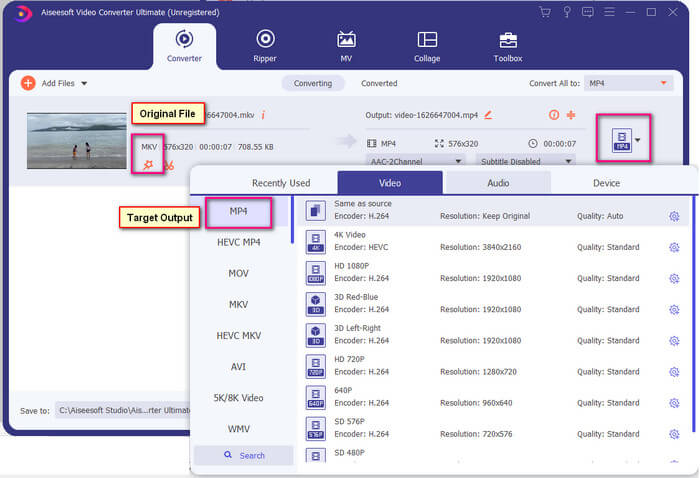
4. lépés. Miután beállítottad a formátumot, kattints a Convert All gombra a konvertálási folyamat elindításához. Ha a konvertálás befejeződött, automatikusan megnyílik a mappa, ahová a fájl mentésre került.
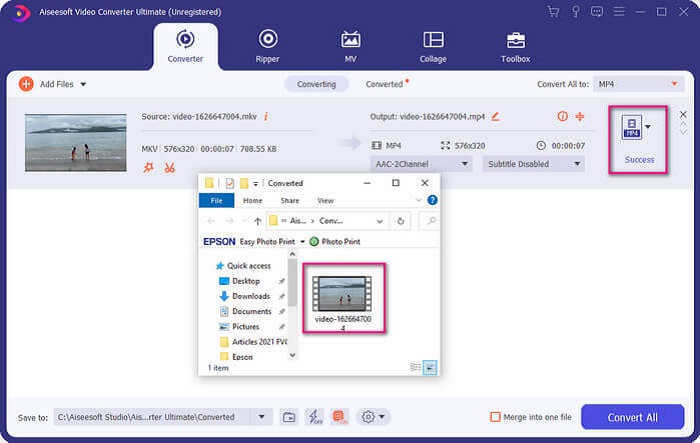
Az Ultimate video konverterrel több lehetőség van. Az alábbi előnyök és hátrányok listáját megtekintheti, hogy megismerje egyéb jó tulajdonságait.
● Ez az eszköz három másodpercig konvertál.
● Gyorsító technológiával rendelkezik, amely javíthatja a konvertált fájlt.
● Támogatja a HD minőséget.
● Szerkesztési funkciókkal rendelkezik, mint például szűrők és alapvető effektusok hozzáadása.
● Beállíthatja a feliratokat és a hangsávot.
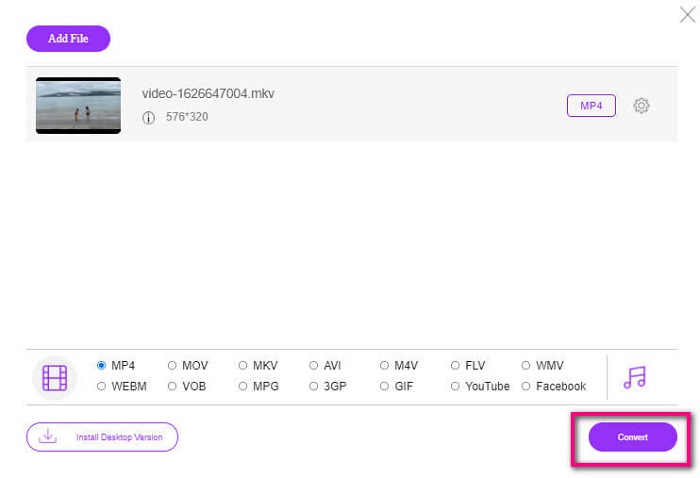
Ha ingyenes konvertert keresel, megfontolhatod a FVC Free Online Video Converter használatát is. Még ha nem is olyan jó, mint az Ultimate Video Converter, nagyjából fel tud érni hozzá. Képes a fájlokat konvertálni, és kompatibilissé tenni azokat a Plexszel vagy a DivX-szel. Csak annyit kell tenned, hogy…
1. lépés. Indítsd el az eszközt azáltal, hogy felkeresed a hivatalos oldalt a leírásban megadott linken.
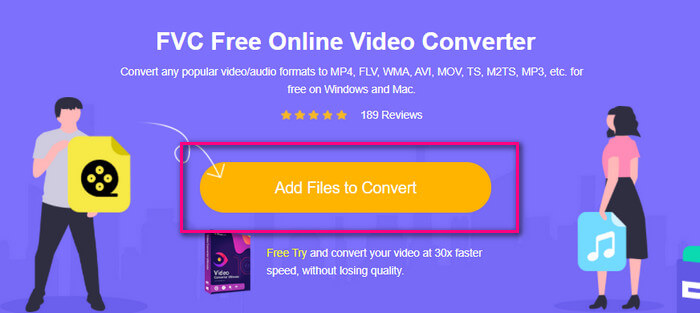
2. lépés. Töltsd fel a videót az Add Files to Convert (Fájlok hozzáadása konvertáláshoz) gombra kattintva.
3. lépés. Változtasd meg a formátumot az alatta lévő kör bejelölésével.
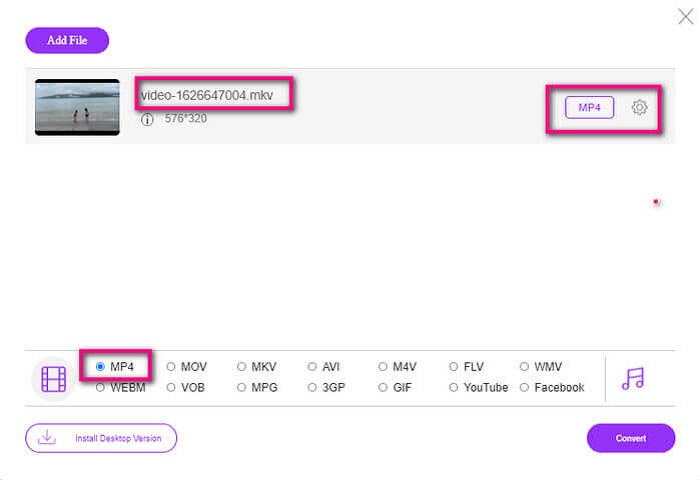
4. lépés. Végül kattints a Convert (Konvertálás) gombra, és válaszd ki azt a helyet, ahová menteni szeretnéd a fájlt. Ezután kattints az Okay (OK) gombra. A konvertált fájlt a Folder (Mappa) ikonra kattintva tekintheted meg.
További olvasnivaló
MKV lejátszása a Windows Media Playerben
4. rész. További információ az MKV-fájlok lejátszásáról PS4-en
Mennyibe kerül egy PS4?
A piaci kiskereskedelmi ár az Egyesült Államokban 399,99 USD, Kanadában pedig 399,99 CAD. Az árak az Ön országában érvényes kiskereskedelmi ártól függően változhatnak.
Van lehetőség CC vagy Close Caption MKV lejátszására PS4-en?
Igen, van. A Accessibility Settings (Akadálymentesítési beállítások) menüben található. Útvonal: menj a PS4 Settings (Beállítások) menüjébe, válaszd az Accessibility (Akadálymentesítés) opciót, majd a Display Closed Captions (Feliratozás megjelenítése) pontot. Ott kattints az Options gombra a feliratok aktiválásához.
Ha a PS4 támogatja az MKV-t, miért nem játszanak le a fájlok?
Mint fentebb említettük, meg kell győződnie arról, hogy az MKV fájl megfelel a használt lejátszó szabványának. Csak ellenőriznie kell a PS4 vagy más média streaming szerver követelményeit. A legtöbb médiaszerver besorolással is rendelkezik az MKV fájlok lejátszásához.
Milyen formátumokat támogat a PS4?
A PS4 számos fájlformátumot támogat. De észre fogja venni, hogy a legtöbb formátum nincs tömörítve, és nagy fájlokat tartalmaz. Bár támogatja a tömörítetleneket is, például az Mp4-et. Eközben itt van a formátumok listája, amelyekről beszélünk: MKV, AVI, MPEG-2 PS, MPEG-2 TS, AVCHD, valamint XAVC és MP4.
Következtetés
Összefoglalva, sokféleképpen játszhat le közvetlenül vagy közvetve MKV fájlokat a PS4-en. A felsoroltak a leggyakrabban használt médiumok. A DivX Stream Server és a Plex csak néhány használható alternatíva. Erősen javasolt a fájl konvertálása a szóváltás és a túl sok folyamat elkerülése érdekében.
-
 [Megoldva] A VLC Player nem játssza le az MKV-t, hogyan javítható
 Támogatja a VLC lejátszó az MKV fájlokat? Miért nem játssza le a VLC az MKV-t? Ez a bejegyzés 4 hasznos tippet oszt meg Önnek a VLC-lejátszó kijavításához, amely nem játszik le MKV fájlokat.
-
 Hogyan játszhat le MKV fájlokat iPad 2025-ön
 Hogyan lehet MKV fájlokat lejátszani iPad 2-en? Konvertálhatom az MKV-t MP4-be iPad Pro / Air / 2-n való lejátszáshoz? Ez a bejegyzés 2 egyszerű módszert oszt meg az MKV lejátszására iPad-en.
-
 Az MKV kodek letöltése a Windows Media Player alkalmazásban a sima lejátszás érdekében
 Nem lehet MKV videót lejátszani a Windows Media Player programban? Ingyenesen letölthető MKV kodek a Windows Media Player programhoz. Ellenben konvertálja az MKV-t, hogy lejátszhatóvá váljon a Windows Media Player-ben.
