


 Video Converter Ultimate
 Screen Recorder
 Videó javítás
Egyszerű és professzionális módszerek az MKV-fájlok lejátszására Xbox One S-en
A Microsoft nemrégiben kiadta új játékkonzolját, az Xbox One S-t. Ez az eddig megjelent Xbox-generációkhoz csatlakozik kiegészítésként. Gyorsabb betöltési idők, a játékok közötti egyszerű váltás és a tárhely bővíthetősége csak néhány a legjobb továbbfejlesztett funkciók közül. Ezeken a nagyszerű fejlesztéseken túl van egy olyan beépített funkció, amit különösen hasznosnak találhatsz: a beépített médialejátszó. A legtöbb felhasználó közvetlenül ezen fog videókat lejátszani, főleg mivel több videó- és filmstreaming alkalmazás is elérhető rajta. Így sokan keresik a módját, hogyan lehet MKV fájlokat lejátszani Xbox One S-en külső meghajtóról vagy más csatlakoztatott forrásból. Ezt szem előtt tartva felsoroltunk néhány megoldást arra az esetre, ha az éppen lejátszani kívánt videót nem támogatja a készülék.

1. rész. 4 módszer az MKV konvertálására Xbox One által támogatott formátumokká és kodekekké
Az eszköz által lefedett formátumok közül az MKV sajnos az egyik olyan formátum, amelyet az Xbox One nem támogat. Az általa támogatott formátumok: 3GP audio, 3GP videó, 3GP2, AAC, ADTS, animált GIF, .asf, AVI DivX, DV, AVI, AVI tömörítetlen, AVI Xvid, BMP, JPEG, GIF, H.264 AVCHD, M -JPEG, MKV, MOV, MP3, MPEG-PS, MPEG-2, MPEG-2 HD, MPEG-2 TS, H.264/MPEG-4 AVC, MPEG, SP, PNG, TIFF, WAV, WMA, WMA veszteségmentes , MA Pro, WMA Voice, WMV és WMV HD. Ezért javasolta a fájl konvertálását az Xbox One Player támogatott formátumára. Ennek ellenére nem kell aggódnia, felsoroltunk néhány használható konvertert.
Ingyenes Way-FVC ingyenes online videó konverter
Az első megoldás a sorban az FVC Free Online Video Converter, egy ingyenes, online elérhető konverter. Három egyszerű lépésben elvégezheted az átalakítást, akár 3 másodpercen belül. A konvertálási folyamat zökkenőmentes, amennyiben stabil az internetkapcsolatod. A támogatott formátumok között szerepel többek között az MP4, FLV, MKV, MOV, M4V, MTS, TS, M2TS, WMV, ASF, VOB, MP3, AAC és még sok más. Emellett a videót is testre szabhatod, finomhangolhatod és szerkesztheted. Többek között módosíthatod a bitrátát, a képkockasebességet, és veszteségmentes fájlként is letöltheted az anyagot. Hogy lásd, milyen hasznos ez az eszköz, kövesd az alábbi útmutatót.
1. lépés. A használathoz először is nyisd meg a FVC Free Online Video Converter hivatalos weboldalát a linkre kattintva.
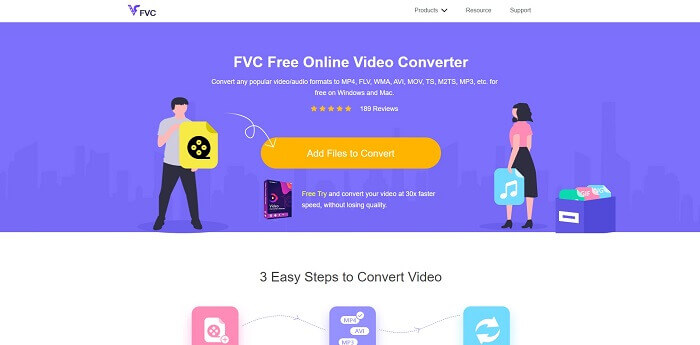
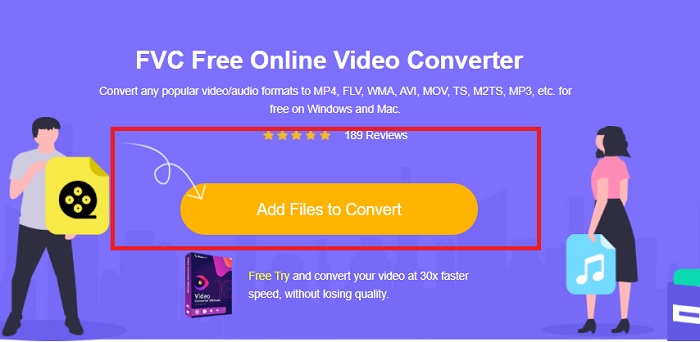
2. lépés. Miután megérkeztél az oldalra, kattints az Add Files to Convert gombra. Keresd meg a konvertálni kívánt fájlt, majd kattints az Open gombra.
3. lépés. A videó ezután feltöltődik az eszközre. A formátumot MP4-re változtathatod úgy, hogy a beállítások közül az MP4 melletti kört jelölöd be.
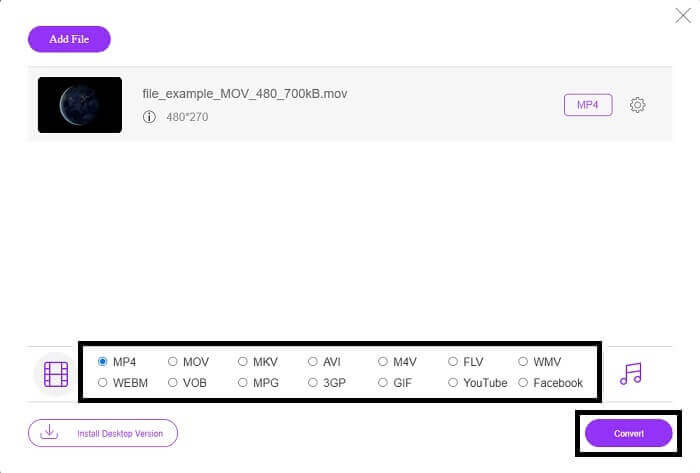
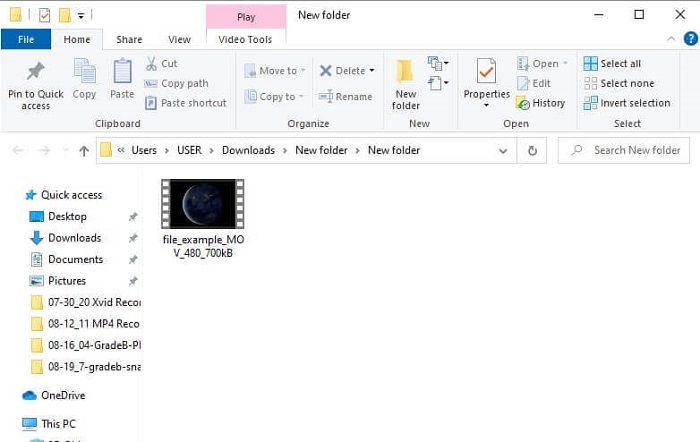
4. lépés. Végül kattints a Convert gombra, és válaszd ki a mappát, ahová a fájlt menteni szeretnéd. Várd meg, amíg a fájl átalakul. Amint elkészült, automatikusan felugrik az a mappa, ahová a videó mentésre került. Kattints a videóra, hogy előnézetben lejátszd az átkonvertált fájlt.
Professzionális út - Video Converter Ultimate
A professzionális szintű konvertáláshoz érdemes az Aiseesoft Video Converter Ultimate programját használni. Ez egy átfogó, kompakt eszköz, amely Mac-en és Windows számítógépeken egyaránt működik. Többé nem kell amiatt aggódnod, ha egy videóformátum nem játszható le Xbox One S-en, mert a Video Converter Ultimate szinte mindent kezel. A konverter a legkorszerűbb videokódolási technológiát használja, így csakis kiváló minőségű kimenetet biztosít. Ráadásul egy videójavító funkciót is tartalmaz, amellyel tovább növelheted a minőséget. Mindezek mellett több formátumot támogat, mint egy ingyenes eszköz. További előnye a videóminőség: a videókat akár 4K minőségben is átkonvertálhatod, a legalacsonyabb felbontás pedig 1080p. Az MKV-videók konvertálása gyerekjáték a Video Converter Ultimate számára.
1. lépés. Töltsd le az alkalmazást az asztali gépedre, majd telepítsd.
Ingyenes letöltés Windows 7 vagy újabb rendszerre Biztonságos letöltés
Ingyenes letöltés macOS 10.7 vagy újabb rendszerre Biztonságos letöltés
2. lépés. Ezután töltsd fel a fájlt az Add Files gombra kattintva, vagy húzd át a fájlt közvetlenül a fő felületre.
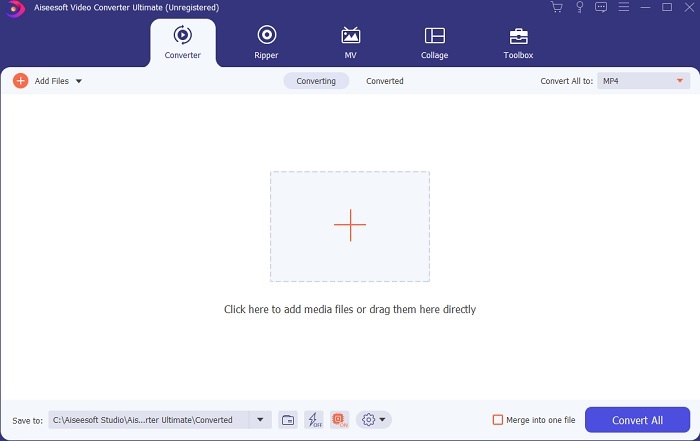
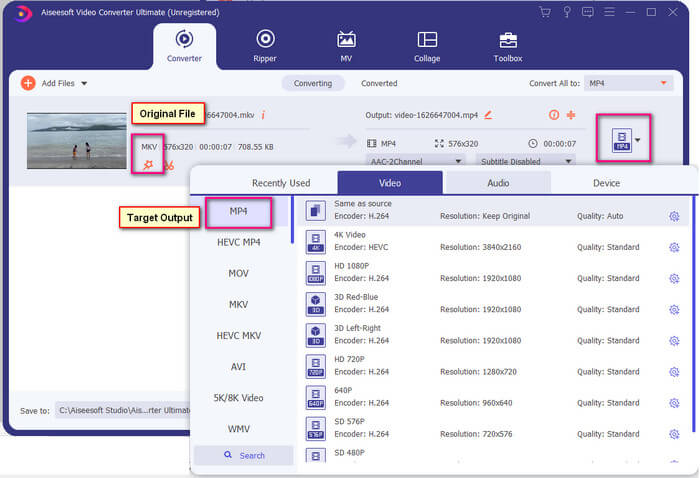
3. lépés. Most módosítsd a fájl formátumát: kattints a jobb felső sarokban található MP4 jelzésre, majd válaszd ki a kívánt kimeneti formátumot.
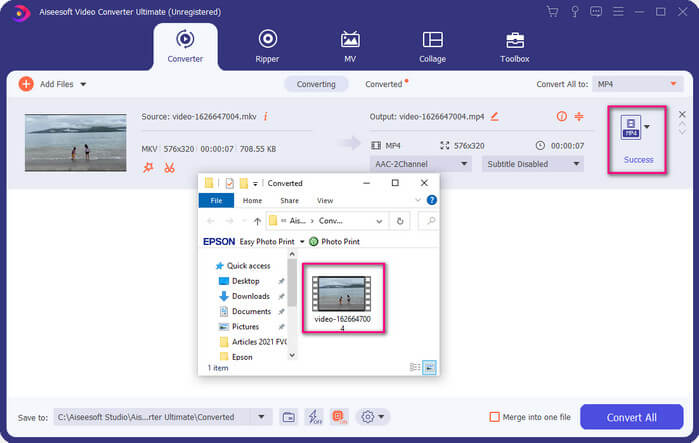
4. lépés. Végül kattints a Convert gombra a fájl rendereléséhez. Amint a fájl elkészült, automatikusan megnyílik az a mappa, ahová mentve lett.
2. rész. MKV-fájlok streamelése és lejátszása Xbox One-on
Technikailag nem tudja lejátszani az MKV videókat Xbox One-on, mert maga a beépített lejátszó nem támogatja azt. Tehát mielőtt lejátszaná, először konvertálnia kell a videót. Tekintse meg a fenti megoldásokat a fájl lejátszás előtti konvertálásához. Mindeközben itt van néhány módja a videók Xbox One-on való lejátszásának.
Hogyan játszhat le MKV fájlokat Xbox One-on USB flash meghajtón keresztül
Az Xbox One S három USB-portot támogat. Az Xbox One S rendszeren azonban USB-meghajtóra van szükség. A meghajtónak FAT16, FAT32, NTFS vagy exFAT formátumúnak kell lennie. Ha szeretné tudni, hogy az USB-meghajtó működik-e, próbálja meg megnyitni Mac vagy Windows PC-jén. Ha működik, akkor nagy az esélye annak, hogy az Xbox elolvassa. Az ellenőrzést követően átmásolhatja a fájlt a számítógépére, és mentheti a meghajtóra. Vegye ki, és csatlakoztassa a konzol elejéről vagy hátuljáról lévő portok egyikére. Kettő van hátul és egy elöl. Miután csatlakoztatta, látni fogja, hogy a meghajtó megjelenik az egyik lehetőségként. Innentől nyissa meg a médialejátszót, és kezdje el játszani.
MKV-fájlok lejátszása Xbox One-on Casting segítségével
A Windows 10 egy beépített funkciója lehetővé teszi, hogy az eszközödet kompatibilis vevőkre – például Xbox One S-re – tükörképként kiküldd (cast). Ez az Xboxon a Play To funkciónak felel meg. A folyamat DLNA-alapú, vagyis Wi-Fi kapcsolatra van szükség a működéséhez. Nincs más dolgod, mint az Xbox Settings menüjébe lépni, a Preferences résznél a Game DVR-t választani, majd engedélyezni az Allow Play to Streaming opciót. Ezután a Windows PC-n kattints a Cast to Device lehetőségre. Jobb gombbal kattints a lejátszani kívánt fájlra, és válaszd ki az XboxOne-t. A videó ezután az Xboxon fog lejátszódni.
Kapcsolódó témák
3. rész. Gyakran ismételt kérdések az MKV-fájlok Xbox One-on való lejátszásával kapcsolatban
Hiba az Xbox One S-ben, hogyan lehet kijavítani?
Először indítsd újra a konzolt. A kontrolleren tartsd lenyomva az Xbox gombot, majd válaszd a Turn console off vagy a Restart Console lehetőséget. Ha ez nem működik, kapcsold ki közvetlenül magát a konzolt. Végül, ha egyik megoldás sem válik be, elvégezhetsz rajta egy gyári visszaállítást (master reset).
Játszhatok Xbox One S-sel internet nélkül?
Az első beállításhoz internetkapcsolatra van szüksége. A beállítás után offline módba léphet, és használhatja. Csak győződjön meg róla, hogy először beállította, mielőtt offline használná. Offline módban itt van néhány dolog, amit megtehetsz, tévét nézhetsz, játszhatsz, klipeket vagy képernyőfelvételeket menthetsz, és eredményeket szerezhetsz, de korlátozásokkal.
Mi az Xbox One S sorozat hátránya?
A játékkonzol által kínált nagyszerű funkciók ellenére van egy dolog, amit biztosan talál egy ilyen többfeladatos eszközön. Valószínűleg keress egy lemezmeghajtót. Sajnos ez nem támogatott. Ez azt jelenti, hogy a régi konzollal használt többi játék itt nem működik.
Következtetés
Bár nincs közvetlen mód az MKV-fájlok Xbox One-on történő közvetlen lejátszására, a videót mindig konvertálhatja a konverterek fenti listájának maximalizálásával. Mindegyik támogatja az összes formátumot, amelyet az Xbox One S médialejátszója használhat. Ha tudni szeretné, hogyan javíthat ki néhány problémát az Xbox One S-sel kapcsolatban, olvassa el a leggyakrabban ismételt kérdéseket.
-
 Az MKV-fájlok zökkenőmentes konvertálása PS3-on való lejátszásra [Megoldva]
 Szeretnél MKV-videókat lejátszani PS3-on? A PS3 azonban nem tudja közvetlenül lejátszani az MKV fájlokat. Ez a cikk bemutatja, hogyan konvertálhatja az MKV-videókat PS3-támogatott videoformátumokká, hogy gond nélkül lejátszhassa PS3-on.
-
 A legjobb 5 legjobb Windows Media Player alternatíva Android mobilokhoz
 Mivel nem tudja letölteni a Windows Media Player for Android alkalmazást, olvassa el ezt a cikket, és ismerje meg a Windows Media Player 5 legjobb alternatíváját.
-
 Az 5 legjobb iPhone videolejátszó, amelyet nem szabad kihagyni 2025-ben
 Ha bármilyen formátumban szeretne videókat lejátszani, és jobb megtekintési élményt szeretne elérni iPhone-ján, olvassa el ezt a cikket, és ismerje meg az iPhone 12/11/X/8/7/6 legjobb 5 videolejátszóját.
