


 Video Converter Ultimate
 Screen Recorder
 Videó javítás
 Biztonságos letöltés
A 224003-as hibakód javítása: Minden, amit tudnod kell
A legkevesebbet, amit az ember meg szeretne tapasztalni, az az, hogy a 224003-as hibakódot látja a képernyőjén. A 224003-as hibakód gyakori okainak, például a hálózati problémáknak, a böngészőkompatibilitásnak és az elavult szoftvereknek a megértése elengedhetetlen a hatékony hibaelhárításhoz. A megfelelő eszközök ismerete szükséges egy ilyen ügy kezeléséhez, amely döntéshozatalt igényel annak biztosítása érdekében, hogy ne tegye tönkre teljesen a videofájlt.
Ez a cikk lépésről lépésre végigveszi a megoldásokat, kitérve az egyes lehetséges okokra, és gyakorlati tippeket ad a hiba elhárításához. Az útmutató végére felvérteződik a szükséges tudással, hogy eligazodjon a 224003-as hibakód összetettségeiben, és zökkenőmentes digitális élményt biztosítson magának. Akár először találkozik ezzel a hibával, akár már többször is szembesült vele, útmutatónk célja, hogy ellássa az eszközökkel a 224003-as hibakód elhárításához, javításához és jövőbeni megelőzéséhez. Mindenképpen olvassa el végig a cikket még ma, hogy a jövőben is tudja, hogyan kezelje, ha újra felbukkan.

1. rész: A 224003 videó hibakód értelmezése
A 224003-as hibakód különféle formákban nyilvánulhat meg, gyakran a rendszeren belüli hibára vagy problémára utal. A felhasználók bizonyos alkalmazások, streaming szolgáltatások vagy böngészők használata közben találkozhatnak ezzel a hibával, ami jelentős kényelmetlenséget okoz. A hiba hatékony kezeléséhez és megoldásához elengedhetetlen, hogy megértsük a lehetséges okait, amelyeket az alábbiakban felsorolunk.
A 224003-as hibakód gyakori okai
◆ Hálózati problémák: A gyenge vagy instabil internetkapcsolat kiválthatja a 224003-as hibakódot, különösen online tartalmak streamelésekor. Ez a 232404-es hibakód egyik oka is.
◆ Böngészőkompatibilitás: Előfordulhat, hogy egyes böngészők nem teljesen kompatibilisek az adott alkalmazással vagy szolgáltatással, ami a hiba megjelenéséhez vezethet.
◆ Elavult szoftver: Az elavult szoftverek – beleértve a böngészőket és az alkalmazásokat – hozzájárulhatnak a hiba jelentkezéséhez.
◆ Sérült gyorsítótár vagy sütik: A felhalmozódott gyorsítótár vagy a sérült sütik a böngészőben megzavarhatják az alkalmazás megfelelő működését, ami 224003-as hibakódhoz vezethet.
Milyen helyzetekben fordul elő a hibakód
◆ Problémák a streamingplatformmal: A streamingplatform szerveroldali gondjai – például karbantartás, technikai hibák vagy túlterheltség – szintén okozhatják a 224003-as hibakódot. Ilyen esetekben a felhasználónak korlátozottak a lehetőségei a hiba elhárítására, és meg kell várnia, amíg a platform megoldja a problémát.
◆ Hardveres gyorsítás: A böngésző beállításaiban engedélyezett hardveres gyorsítás időnként kompatibilitási gondokat okozhat bizonyos videótartalmakkal, ami 224003-as hibakódhoz vezet. Ilyenkor a hardveres gyorsítás kikapcsolása jelenthet megoldást, ugyanúgy, mint más lejátszási hibák – például a zöld képernyős videó, videófagyás stb. – esetén.
◆ Eszközkompatibilitási problémák: Előfordulhat, hogy egyes eszközök vagy operációs rendszerek nem teljesen kompatibilisek a videótartalommal, ami lejátszási hibákat okozhat.
◆ Hálózati tűzfal vagy biztonsági szoftver: Bizonyos biztonsági szoftverek vagy tűzfalak blokkolhatják egyes videótartalmak streamelését, ami a 224003-as hibakód megjelenéséhez vezethet.
◆ Böngészőbővítmények zavaró hatása: Egyes böngészőbővítmények vagy kiegészítők megzavarhatják az online videolejátszók megfelelő működését, ami 224003-as hibakódot eredményezhet.
Nagyon fontos megérteni, hogy a 224003-as hibakódot eredményező konkrét feltételek eltérőek lehetnek; ezért a hibaelhárítási intézkedések is eltérőek lehetnek. A mögöttes ok azonosítása attól függ, hogy a hiba milyen kontextusban fordul elő a probléma megfelelő orvoslásához.
2. rész. Útmutató a 224003 számú hiba elhárításához lépésről lépésre
Aiseesoft Video Repair
A 224003-as hiba bármikor, bárkinél és bármilyen videófájlnál előfordulhat, és ilyenkor egy ilyen üzenet jelenhet meg: 224003-as hiba: A videófájl nem játszható le. Az Aiseesoft Video Repair megbízható eszköz a sérült vagy hibás videófájlok – így a 224003-as hibához kapcsolódó fájlok – javítására. Különféle formátumú videókat képes helyrehozni, többek között MP4, MOV, AVI, WMV, MKV és FLV fájlokat. Támogatja továbbá a vírusok, rosszindulatú programok és egyéb tényezők által megrongált videók javítását is. Kövesse ezt a lépésről lépésre haladó útmutatót az Aiseesoft Video Repair használatához, és állítsa helyre videóit kifogástalan minőségben.
Lépések a 224003-as hiba megoldásához az Aiseesoft Video Repair használatával:
1. lépés. Látogasson el az Aiseesoft weboldalára, töltse le a Video Repair programot, és kövesse a telepítési utasításokat.
Ingyenes letöltésWindows 7 vagy újabb rendszerreBiztonságos letöltés
Ingyenes letöltésMacOS 10.7 vagy újabb rendszerreBiztonságos letöltés
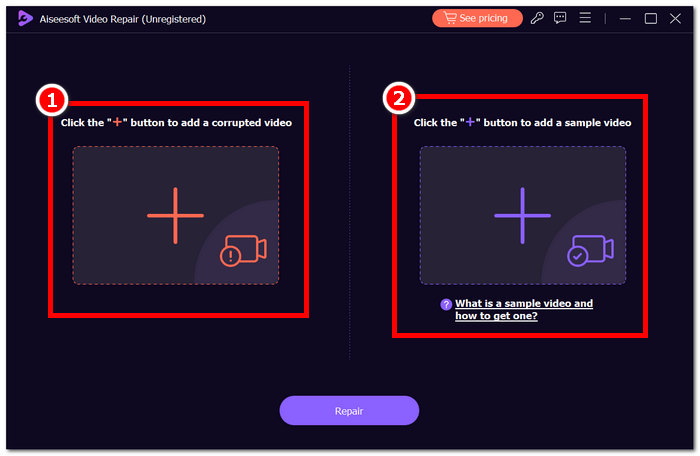
2. lépés. Nyissa meg az Aiseesoft Video Repair szoftvert, és a piros + szimbólumra kattintva adja hozzá a 224003-as hibakódot mutató videót. Ezután kattintson a jobb oldalon lévő lila + szimbólumra a mintavideó hozzáadásához.
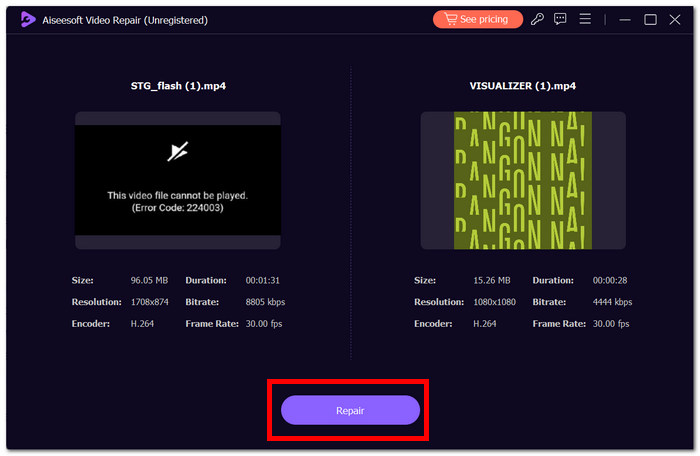
3. lépés. Kattintson a Repair gombra, ekkor a szoftver elemzi és kijavítja a videót.
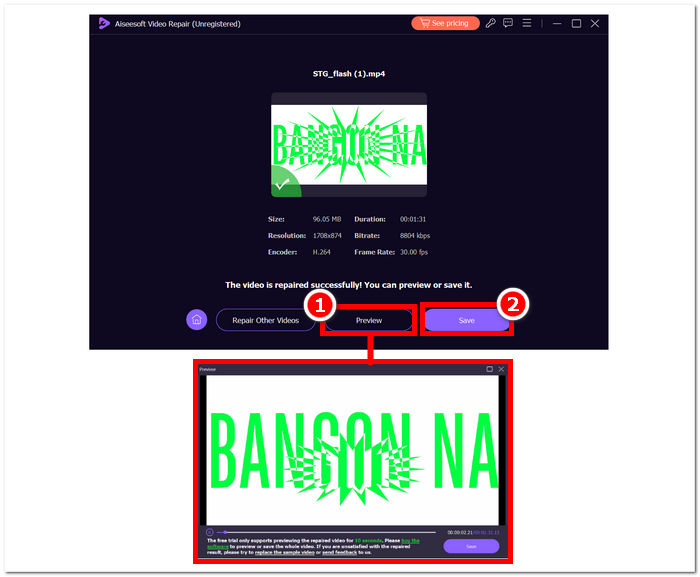
4. lépés. A javítás után kattintson a Preview gombra az ellenőrzéshez. Kattintson a Save gombra a javított videó letöltéséhez, majd nyissa meg a médialejátszójával, hogy meggyőződjön róla, a 224003-as hiba megszűnt-e.
További tippek:
◆ A javítás megkezdése előtt készítsen biztonsági másolatot az eredeti videofájlról.
◆ Az optimális teljesítmény érdekében az Aiseesoft Video Repair legújabb verzióját használja.
Ha szorgalmasan követi ezeket a lépésenkénti utasításokat, hatékonyan használhatja az Aiseesoft Video Repair-t a 224003-as hiba leküzdésére és kiküszöbölésére, visszaállítva a videofájlokat működőképes és élvezetes állapotba. Ne felejtse el menteni a javított videót a kívánt helyre, és élvezze a megszakítás nélküli megtekintést a 224003-as hiba okozta frusztráció nélkül. Ha a folyamat során bármilyen nehézségbe ütközik, olvassa el az Aiseesoft Video Repair dokumentációját, vagy kérjen segítséget a támogatási erőforrásaitól további útmutatásért.
3. rész: GYIK a 224003-as hibakóddal kapcsolatban
Miért mondja a Firefox folyton a 224003-as videó hibakódot?
A 224003-as Firefox videohiba a hálózati csatlakozási problémák, a böngészőbeállítások eltérései vagy a videótartalommal való összeférhetetlenség miatt fordulhat elő. A hiba elhárításához először ellenőrizze internetkapcsolata stabilitását, győződjön meg arról, hogy böngészője naprakész, és törölje a böngésző gyorsítótárát és a cookie-kat. Ezen túlmenően, ha ideiglenesen eltávolítja a bővítményeket a böngészőből, az segíthet a kompatibilitási ütközések azonosításában és feloldásában, így potenciálisan kiküszöbölheti a 224003-as hiba előfordulását a videó lejátszása közben.
A videofájl javítása rontja a videó minőségét?
A videofájl javítása a minőség romlása nélkül elvégezhető, ha megfelelően hajtják végre. Ez a folyamat elsősorban az olyan problémákkal foglalkozik, mint a fájlon belüli sérülés vagy formázási hibák. Alapvető fontosságú, hogy megbízható videojavító eszközökre támaszkodjon, és elővigyázatossági intézkedésként készítsen biztonsági másolatot az eredeti videofájlról, mielőtt bármilyen javítási eljárást elkezdene.
Meg tudod javítani az online videó hibakódját?
Egy online videó hibakód, például a 224003 megoldásához frissítse az oldalt, ellenőrizze internetkapcsolatát, és frissítse böngészőjét. Ha a probléma továbbra is fennáll, fontolja meg egy másik böngésző kipróbálását a kompatibilitás érdekében. Ha minden más nem segít, forduljon a platform támogatásához vagy a közösségi fórumokhoz, hogy segítsen a hiba megoldásában és a zökkenőmentes videólejátszás visszaállításában.
Következtetés
A 224003-as hibakód bosszantó lehet, de megfelelő információkkal és hibaelhárítási lépésekkel könnyedén felülkerekedhet rajta. A hálózati problémák, a böngészőkompatibilitás és az elavult szoftverekhez kapcsolódó lehetséges okok azonosításával és kijavításával egyszerűen orvosolhatja a hibát, és visszaállíthatja a zavartalan digitális élményt. Ha ismét találkozik a 224003-as hibakóddal, tekintse át oktatóanyagunkat a lépésről lépésre haladó megoldásért. Ezekkel az ismeretekkel a technikai jellegű bosszúságok a múlté lesznek, és gond nélkül élvezheti megszakítás nélküli digitális tevékenységeit.
-
 Mi a 0xc10100bf hiba a videóban és hogyan javítható?
 Nem játszható le a videó a 0xc10100bf hiba miatt, és keresi a megoldást? Ebből a cikkből megtudhatja, mi ez, és hogyan javíthatja ki.
-
 Gyors megoldások a 150. videó lejátszása képtelen hiba javítására
 Találkoztál már azzal, hogy a videónézés során elkeserítő képtelenség lejátszani a 150-es hibaüzenetet? Ne aggódjon, mert tájékoztattuk a javítás módjáról.
-
 [Részletes útmutató] A számítógépen nem lejátszott Google Drive-videó javítása
 A Google Drive-on található videók nem játszhatók le „Hiba történt a videó lejátszása során” hibával. Ennek oka lehet maga a Google Drive vagy a króm problémák. Ez a cikk 6 megoldást mutat be részletesen.
