


 Video Converter Ultimate
 Screen Recorder
 Videó javítás
4 legegyszerűbb módszer az F4V fájl AVI médiafájl formátummá konvertálására
A Macromedia bemutatta az F4V-t, majd később az Adobe fejlesztette ki, hogy versenyezzen a modern, jó minőségű videótárolóval. Ezenkívül az FLV helyettesítő formátumaként jön létre, mivel az FLV-nek vannak korlátozásai. További magyarázat, hogy az F4V fájl ISO alap médiafájl formátumot használ H.264 kodekkel a fájl méretének csökkentésére. Bár a formátum jó minőségű kimenetet tartalmaz, az F4V kompatibilitása gyengébb, mint a másik formátum. És nem csak ez, hanem ez a formátum is fokozatosan megszűnt, mert az Adobe Flash Player már megszűnt.
Tehát ha másokhoz hasonlóan neked sem játssza le a médialejátszód az .f4v fájlokat, olvass tovább. Összegyűjtöttünk különféle eszközöket, amelyek segítenek a lejátszhatatlan .f4v fájlokat AVI formátummá alakítani. Most pedig nézzük meg, hogyan lehet az elérhető online és offline eszközökkel az F4V-t AVI formátumba konvertálni.

1. rész: Tanulja meg, hogyan lehet F4V-t AVI-vé konvertálni a fenomenális F4V-ből AVI-vé konvertálóval
Ha a problémád megoldásához a legjobb konvertálót keresed, akkor a FVC Video Converter Ultimate lehet a megoldás. Mi magunk is teszteltük az eszközt, és átolvastunk néhány hozzászólást is; az „ultimate” nemcsak a neve, hanem a szoftver teljesítménye és funkciói is valóban kimagaslóak. Az egyik leglenyűgözőbb funkciója a villámgyors konvertálás és a hardveres gyorsítás, így a felhasználóknak, akik ezt a szoftvert használják, nem kell sokat várniuk.
Ha GIF-eket szeretnél készíteni, felgyorsítani vagy lelassítani a videókat, visszafelé lejátszani őket, felerősíteni a hangot stb., ezt is megteheted ezzel az eszközzel, mert fejlett funkciókat kínál. Ugyanakkor fizetned kell érte, mielőtt használhatnád – viszont nem kell száz dollárnál többet költened rá. Ha még mindig a vásárláson gondolkodsz, olvasd el az alábbi lépéseket, és alakítsd át az F4V fájlt AVI-ba az alábbi utasításokat követve.
1. lépés. Mielőtt használhatnád ezt a hatékony eszközt, töltsd le az asztali gépedre. Ezután telepítsd, végezd el gyorsan a beállítást, majd kattints a Start Now gombra az eszköz megnyitásához.
Ingyenes letöltés Windows 7 vagy újabb rendszerre Biztonságos letöltés
Ingyenes letöltés macOS 10.7 vagy újabb rendszerre Biztonságos letöltés
2. lépés. Ha az eszköz már meg van nyitva, menj az Add Files opcióra, vagy kattints a + gombra, ekkor megjelenik egy mappa. Keresd meg az .f4v fájlkiterjesztést, és kattints az Open gombra.
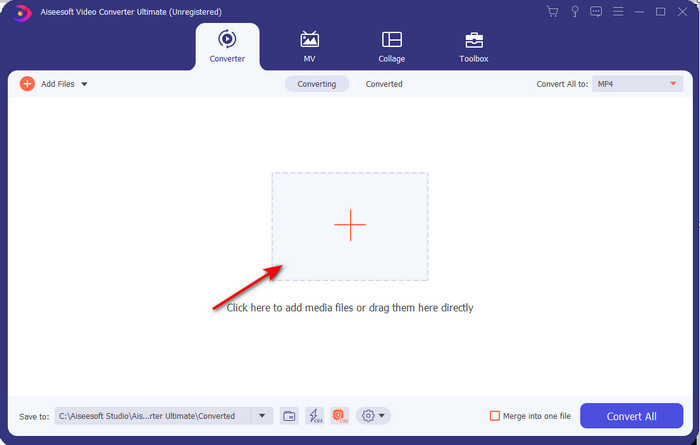
3. lépés. A fájl betöltése után kattints a felület jobb felső részén található Convert All to menüpontra, és válaszd az AVI formátumot.
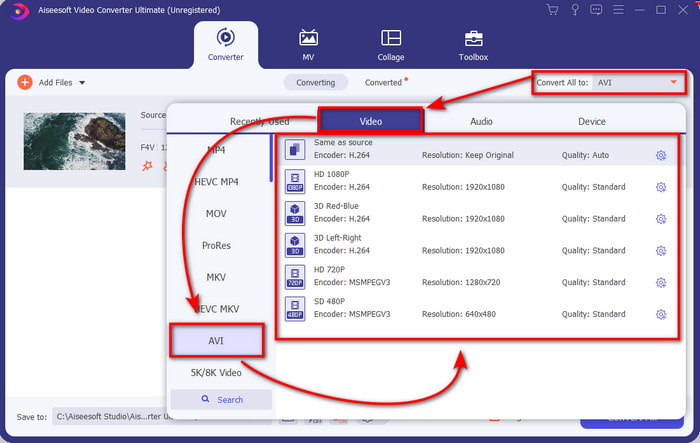
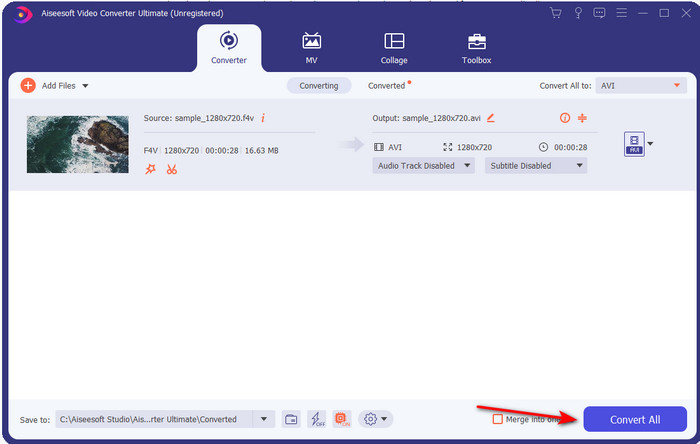
4. lépés. A konvertálási folyamat elindításához kattints a Convert All gombra. Várj néhány percet, amíg a program F4V-ból AVI-t készít.
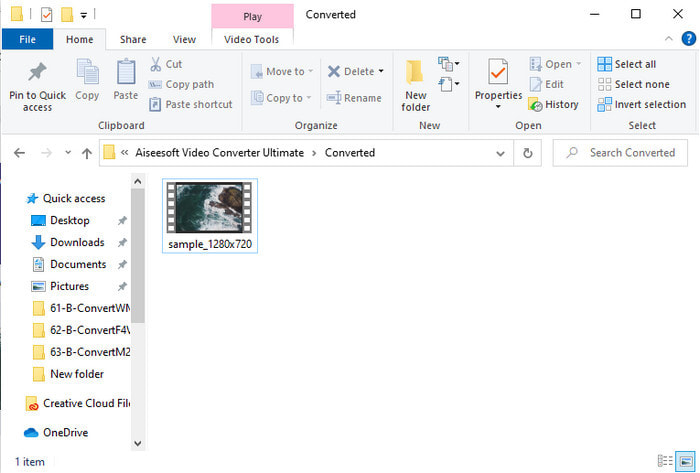
5. lépés. A konvertálás után egy mappa automatikusan megnyílik az asztalodon a most átalakított .f4v fájllal. Kattints a videófájlra, hogy megnézd a korábban lejátszhatatlan felvételt az asztali gépeden, vagy ha szeretnéd, másold át a telefonodra.
2. rész: Tanulja meg, hogyan lehet F4V-t AVI Online konvertálni a 3 elérhető webkonverterrel
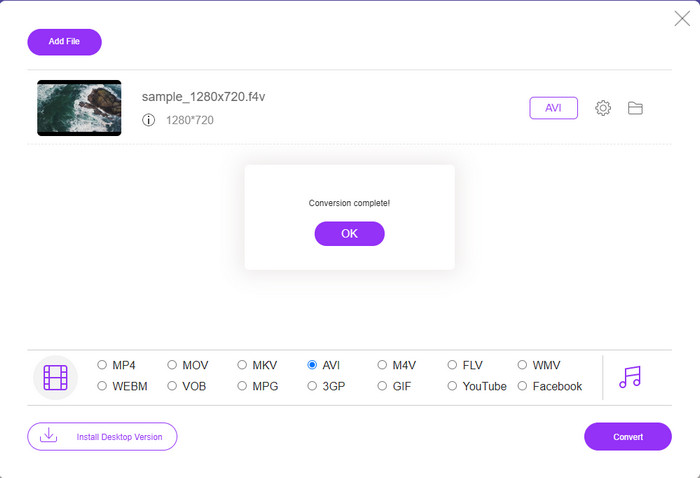
1. FVC Free Video Converter Online
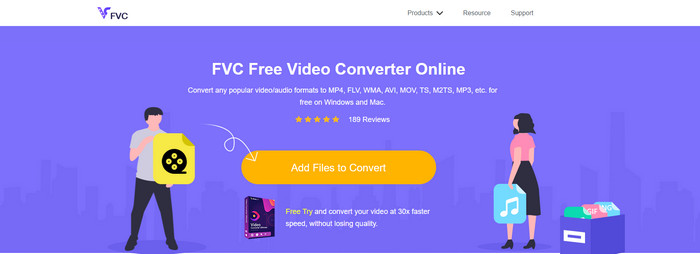
Ha tudni szeretnéd, melyik webes konvertáló a legjobb, akkor a FVC Free Video Converter Online lehet a befutó. Minden hasznos funkció megtalálható benne: például módosíthatod a videó bitrátáját és képkockasebességét (fps), hogy a konvertálás előtt jobb minőséget érj el. Internetezők milliói dicsérték már ennek a webes eszköznek az összteljesítményét. Emellett közepes mennyiségű formátumot támogat, amelyek közül választhatsz és feltölthetsz. Ugyanakkor nem tudsz vele annyira látványos videókat létrehozni, mint az Ultimate eszközzel. Ennek ellenére, ha szeretnéd kipróbálni és F4V-t AVI formátumba konvertálni, kövesd az alábbi lépéseket.
1. lépés. Kattints erre a linkre, hogy megnyisd a FVC Free Video Converter Online oldalt.
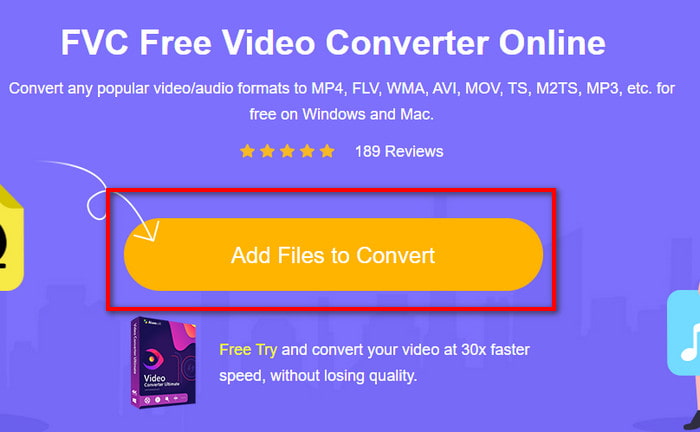
2. lépés. Kattints az Add Files to Convert gombra az eszköz elindításához, majd a megnyíló mappában válaszd ki azt a fájlt, amelyet új formátumba szeretnél konvertálni, és kattints az Open gombra.
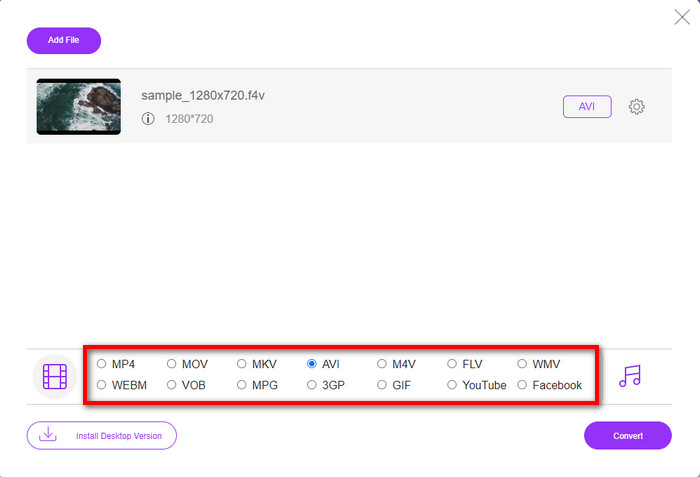
3. lépés. Miután a fájl betöltődött, válaszd ki az alsó részen az AVI formátumot azok közül, amelyekbe konvertálni szeretnél.
4. lépés. Miután kiválasztottad az AVI formátumot, itt az idő a konvertálásra: kattints a Convert gombra.
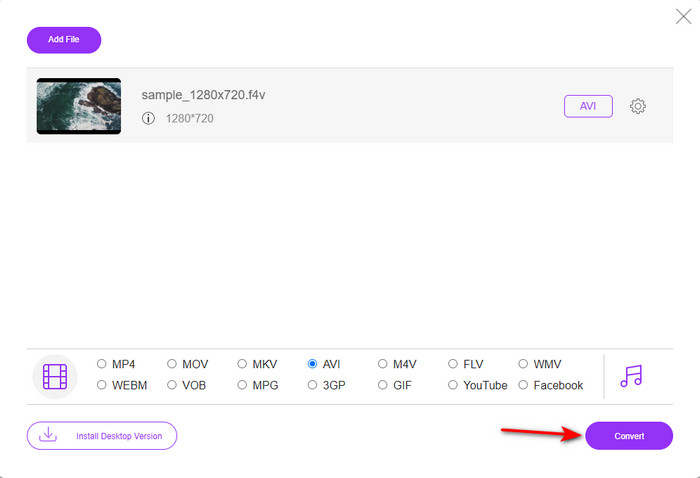
5. lépés. Várj néhány percet, amíg a fájl letöltődik, majd megjelenik egy mappa a konvertált fájllal.
2. Zamzar
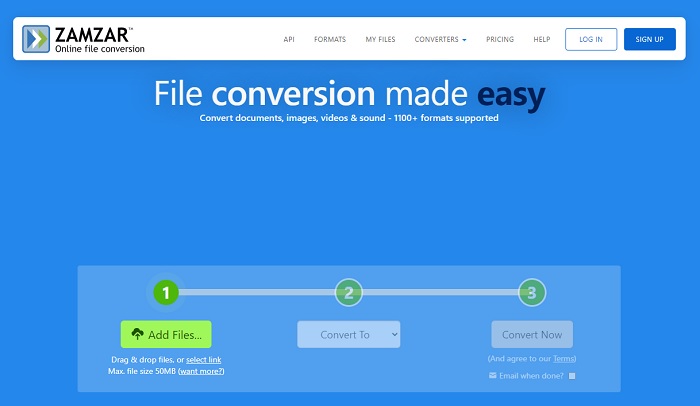
Egy másik online konvertáló alternatíva a Zamzar. Akárcsak bármelyik online konvertáló, ez az eszköz is internetkapcsolatot igényel a használathoz. Az itt bemutatott összes webes eszköz internetet igényel, hogy működjön a konvertálás. Mivel sok felhasználó alkalmazza, a Zamzar népszerűvé vált, mert rengeteg formátumot támogat, amelyek közül választhatsz. Ráadásul ingyenesen használható, azonban korlátozás vonatkozik a konvertálható fájl méretére. Ha az .f4v fájlod nagyobb, mint 50 MB, nem tudod itt konvertálni, ahogy azt lentebb is jelzi. Ha a fájlod ennél kisebb, akkor viszont kipróbálhatod, és az alábbi lépéseket követve online konvertálhatod az F4V-t AVI-vá.
1. lépés. Nyisd meg a böngésződet, és keresd meg a Zamzar weboldalt.
2. lépés. Kattints az Add Files gombra, és keresd meg a konvertálni kívánt fájlt. Ezután válaszd az AVI formátumot a „Convert to” opció alatt, majd kattints a Convert gombra.
3. lépés. Várd meg a folyamat végét, majd amikor megjelenik az új felület, kattints a Download gombra a fájl mentéséhez.
3. Fájlok konvertálása
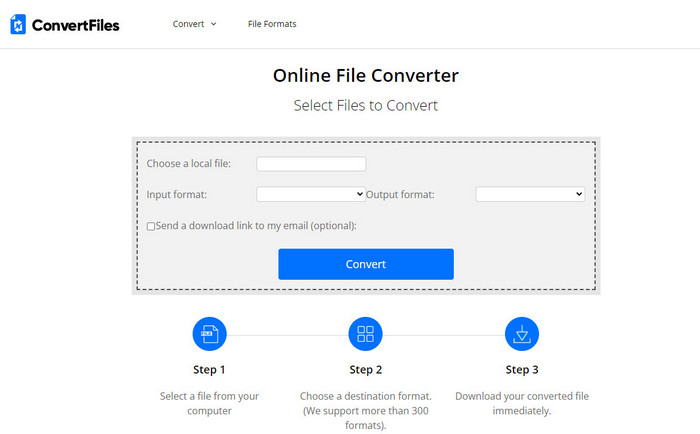
Ha egyszerűbb, néhány perces konvertálási folyamatot szeretnél, próbáld ki a ConvertFiles oldalt. Az eszköz a konvertálás közben és után is jól teljesít. Viszont a rengeteg reklám rontja a felhasználói élményt, mivel túl sok hirdetés jelenik meg a webes felületen. Emellett a folyamat több időt vesz igénybe, mint a többi online és offline konvertálónál. A fájlméret, amelyet itt feltölthetsz, jóval nagyobb lehet, mint a Zamzar esetében. Ha ezt az eszközt szeretnéd használni az F4V fájl AVI-vá konvertálásához, kövesd az alábbi lépéseket.
1. lépés. Nyisd meg a böngésződet, keresd meg a Convert Files oldalt, majd nyisd meg.
2. lépés. Kattints a Choose a Local File gombra a mappa megnyitásához, és keresd meg a fájlt; az Output Format résznél válaszd az AVI-t. Ezután kattints a Convert gombra a konvertálás elindításához.
3. lépés. A konvertálás után kattints a kékkel kiemelt URL-re, amely egy új weboldalra irányít. Itt kattints a linkre a konvertált formátum letöltéséhez.
3. rész. Melyik formátum jobb; F4V vs. AVI
Nos, az F4V és az AVI legjobb esetben is konténerként teszik a dolgukat. Ezeknek a formátumoknak azonban sok a közös, és céljuk nem ugyanaz. Például, ha jó minőségű videót szeretne tárolni kis fájlméreten belül, és tárolni és védeni kívánja a DRM MPEG-4 videoadatokat, az F4V a legjobb választás. De tegyük fel, hogy jó minőségű videót szeretne tárolni, amely támogatja a szinkronizált médialejátszást. Ebben az esetben az AVI formátumot kell választania, mert annak eltérő tárolója van mind a hang, mind a videó számára. Ennek ellenére az AVI fájl mérete túl nagy ahhoz, hogy sok eszköz, sőt asztali számítógép is kezelje, mivel tömörítetlen.
4. rész. GYIK az F4V AVI konvertálásról
Az F4V konvertálása csökkenti a felbontást konvertálás után?
A videó felbontásának meg kell őriznie eredeti minőségét még az új formátumba konvertálás után is. Egyes esetekben sok felhasználó azt tapasztalja, hogy az F4V minősége romlott. Ennek egyik oka az lehet, hogy alacsony a beállított minőség, vagy a használt eszköz nem támogatja az 1080 vagy 4k felbontású videókat.
Miért nem lehet lejátszani az F4V-t a médialejátszómon?
Ezt a formátumot több médialejátszó is képes lejátszani, de nem mindegyik támogatja. Ha ilyen formátumú videót szeretnél nézni, a legjobb megoldás, ha egy másik formátumba konvertálod, vagy egy új, harmadik féltől származó médialejátszót keresel az F4V videók megtekintéséhez.
Tömöríteni kell az F4V-t, hogy kisebb legyen?
Az F4V fájlmérete nem olyan nagy, mint az AVI formátumé. Ha azonban megpróbálod tovább tömöríteni ezt a fájltípust, előfordulhat, hogy a videó minősége romlik. Itt megtanulhatod, hogyan tudod tömöríteni az F4V videóidat.
Következtetés
A cikk végén betekintést nyerhetünk abba, hogy mi az F4V, és miért kell átalakítania. A cikkben említett összes online és offline szoftver jól működik. Bár az összes eszköz nagyszerű, az FVC Video Converter Ultimate továbbra is kiemelkedik a többi közül. Mivel ez a szoftver még akkor is jól működik, ha nincs internetkapcsolata, és ez az eszköz egy szempillantás alatt képes befejezni az átalakítási folyamatot. Tehát most, ha szeretné megtapasztalni azt a fenomenális átalakítást, amelyről beszélünk, töltse le most.
-
 Hogyan lehet konvertálni a TS-t AVI / MKV / MOV / WMV online és ingyenes formátumba Win / Mac rendszeren
 Szeretné gyorsan átalakítani a TS fájlokat AVI / MKV / MOV / WMV fájlokká? Ez a cikk online és offline videokonvertereket mutat be teljes útmutatóval. Talán itt kaphatja meg a legjobb ingyenes TS átalakítót.
-
 [Ingyenes és online] 7 módszer az MTS konvertálására AVI-vé Mac/Windows számítógépen
 Hogyan lehet könnyen konvertálni az MTS-t AVI-ba? Ebben az útmutatóban 7 ingyenes és egyszerű módot talál az MTS fájlok AVI formátumba konvertálására Windows vagy Mac rendszeren minőségromlás nélkül.
-
 Bemutató az MP4 konvertálásához AVI fájlokká 7 ingyenes videokonverterrel
 Szeretne minden ingyenes módot az AVI-ból MP4-videóvá konvertálni? Ezt a cikket nem szabad kihagyni. Íme 7 módja annak, hogy AVI fájlokat MP4 formátumba konvertáljon ingyenesen Windowson, Macen, iPhone-on, Androidon és online.
