


 Video Converter Ultimate
 Screen Recorder
 Videó javítás
Tudja meg, hogyan lehet MPG-t WMV-vé konvertálni a 2 legjobb konverterrel
Ha az MPG fájlokat összehasonlítjuk más formátumokkal, elmondható, hogy elavultak. Ráadásul sok felhasználó kérdezi, hogyan lehet ingyen MPG-t WMV-vé konvertálni anélkül, hogy romlana a videó minősége. Ne is várjunk tovább, nézzük meg, milyen eszközökkel alakíthatja át .mpg fájljait, és ismerjük meg részletesebben a két formátumot. Tartsuk lendületben a folyamatot, és haladjunk tovább azokhoz az átalakítókhoz, amelyeket használhat.

1. rész. MPG konvertálása WMV-vé ingyen online
Ha online szeretné az MPG-t WMV-vé konvertálni, figyelembe kell vennie a korlátokat, különösen a fájlméretet. Mivel az MPG fájlok a bitrátától függően nagyok lehetnek, olyan online konverterre lesz szüksége, amely nem korlátozza a fájlméretet. A FVC Free Video Converter Online nem korlátozza sem a feltölthető fájlok méretét, sem az átalakítások számát. Bár az eszköznek nincsenek ilyen jellegű megkötései, a támogatott formátumok köre mégis szűkebb. Ha azonban egy fillért sem szeretne költeni az átalakításra, akkor ezt a konvertert érdemes választania, mert ez az egyetlen online átalakító, amely kiváló minőséget nyújt az átkonvertálás során. Szeretné tudni, hogyan kell használni ezt az online MPG konvertert? Ha igen, olvassa tovább az alábbi részleteket, és tanulja meg, hogyan használhatja ezt az online eszközt.
1. lépés. Először kattintson erre a linkre, és egy új lap automatikusan meg fog nyílni.
2. lépés. Kattintson az Add Files to Convert gombra, hogy engedélyezze az eszköz futtatását a rendszerén. Ezután a felugró számítógépes mappában válassza ki azt az .mpg fájlt, amelyet konvertálni szeretne. Miután kiválasztotta a fájlt, kattintson az Open gombra a feltöltéshez.
Töltse le az asztali verziót a fájlok kötegelt konvertálásához.
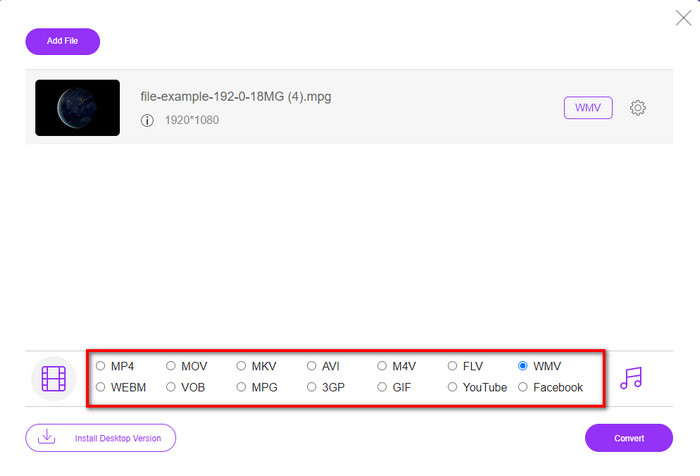
3. lépés. Alul egy formátumlista látható, amelyből választhat; kattintson az MKV formátumra, hogy továbblépjen az utolsó lépésre.
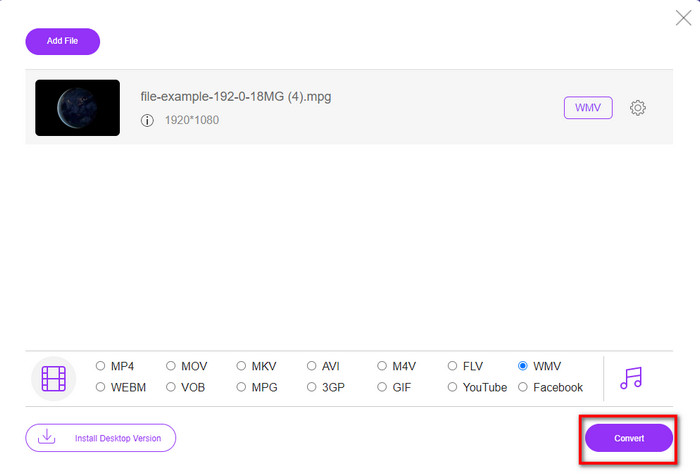
4. lépés. Indítsa el a fájl konvertálását az alul található Convert gombra kattintva.
2. rész. MPG konvertálása WMV-vé Windows 11/10 rendszeren minőségromlás nélkül [ajánlott]
Még mindig nem elégedett az online konverterrel? Mit szólna ahhoz, ha azt mondanánk, hogy használhat egy ingyenesen letölthető MPG–WMV konvertert, amely sokkal gyorsabb, és több funkcióval rendelkezik. Az FVC Video Converter Ultimate rengeteg videóval kapcsolatos problémában segít, különösen a formátumok átalakításában. Bár az eszköz képes konvertálni, még számos területet kell felfedeznünk benne. Szeretne ezekről többet tudni? Akkor olvassa el az alábbi fő funkciókat.

FVC Video Converter Ultimate
4 255 366+ letöltés- Támogatja az MPG, WMV, AVI, MP4, MOV, MKV, FLV, M4V stb. konvertálását több mint 200 formátumba.
- Használata egyszerű, és nagyon intuitív felülettel rendelkezik, amelyet sok felhasználó szeret.
- Kiválóan alkalmas a videó szerkesztésére, például kivágásra, egyesítésre, körbevágásra, GIF-ek létrehozására és még sok másra.
- Ultragyors konverzió és hardveres gyorsítás áll rendelkezésre a villámgyors konvertálási folyamathoz.
- Minden platformon elérhető, például Windows és macOS.
- Konvertálhat több MPG vagy WMV fájlt egy menetben a támogatott kötegelt konvertálással.
Ingyenes letöltés Windows 7 vagy újabb rendszerre Biztonságos letöltés
Ingyenes letöltés macOS 10.7 vagy újabb rendszerre Biztonságos letöltés
Mindezekkel a funkciókkal rendelkezhet, ha rendelkezik ezzel a tökéletes eszközzel. De előtte olvassuk el a teljes részletes hatókört és az MPG WMV-vé konvertálásához szükséges lépéseket.
1. lépés. Kattintson az alábbi letöltés gombra, és válassza ki, melyik platformot használja. A letöltés után telepítse a konvertert, majd indítsa el az eszközt.
Ingyenes letöltés Windows 7 vagy újabb rendszerre Biztonságos letöltés
Ingyenes letöltés macOS 10.7 vagy újabb rendszerre Biztonságos letöltés
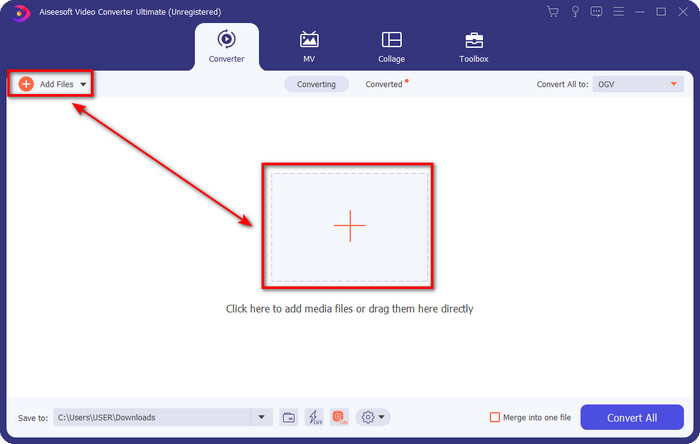
2. lépés. Az MPG fájl feltöltéséhez kattintson az Add Files gombra vagy a középen található + jelre. Azonnal megjelenik egy mappa, válassza ki a fájlt, majd nyomja meg az Open gombot a folytatáshoz.
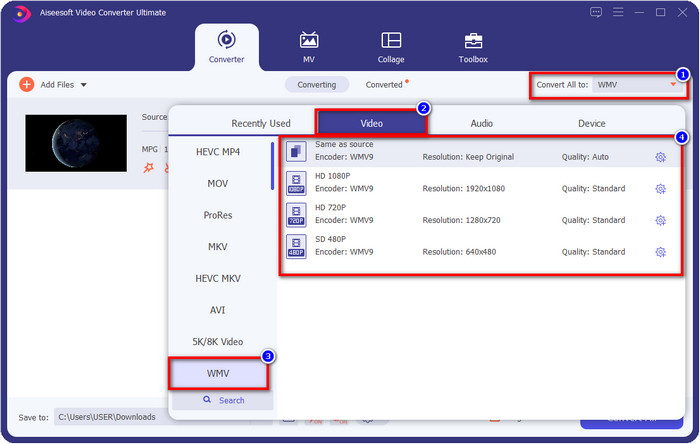
3. lépés. A fájl konvertálása előtt ki kell választania a kívánt formátumot a listából a Convert All to gombra kattintva. Válassza a WMV formátumot, majd jelölje ki a használni kívánt kódolót.
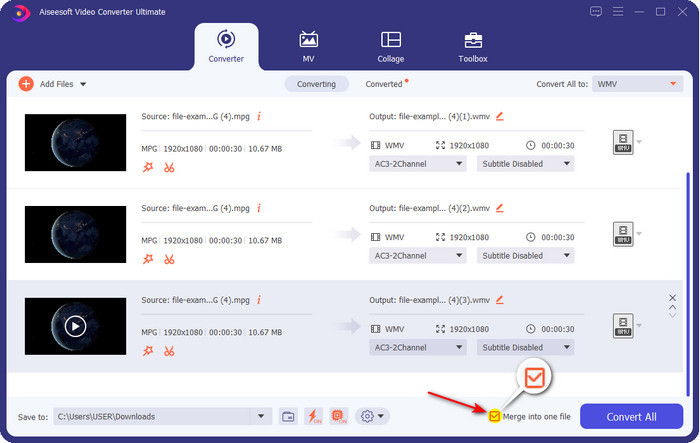
Opcionális. Különböző MPG fájlokat szeretne egyesíteni? Ebben az esetben pipálja be a négyzetet, hogy egyesítse a végső kimenetet.
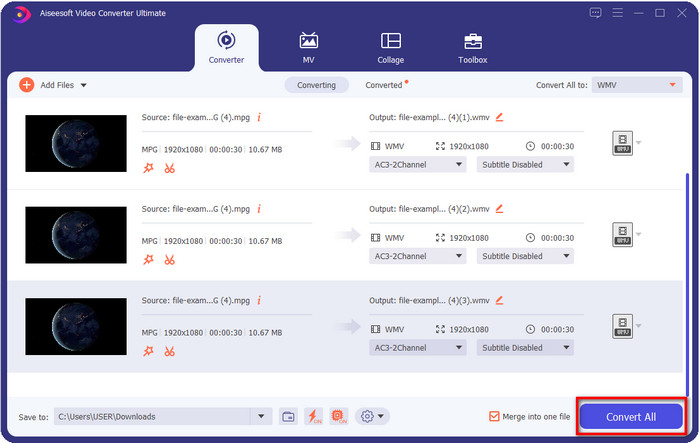
4. lépés. Kattintson a Convert All gombra, hogy elindítsa az átalakítási folyamatot. Miután befejeződött az MPG–WMV konvertálás, egy számítógépes mappa jelenik meg a képernyőn.
3. rész: Mi a különbség az MPG és a WMV között?
Az MPG és a WMV egyaránt olyan médiakonténer, amely hangot és videót tárol. Noha mindkét formátum képes erre, mégis rengeteg különbség van köztük. Szeretne többet megtudni? Az alábbiakban részletesen bemutatjuk az MPG-t és a WMV-t, valamint azt, hogy mire érdemes odafigyelnie, mielőtt egy ingyenes online vagy offline MPG–WMV konverter mellett dönt.
Az MPG-t az egyik legelsőként kifejlesztett formátumként tartják számon. Ez a formátum kétféle, MPEG alá tartozó kódolót használ: az MPEG-1-et és az MPEG-2-t. Két tömörítőt alkalmaz, hogy kielégítse azokat az igényeket, amelyekre az MPEG-1 önmagában nem képes, ami azt jelenti, hogy az MPEG-2 mintegy tartalék megoldás az MPG számára. Korábban az egyik legjobb minőségű videós formátumnak számított, de azóta sok más formátum felülmúlta – jó példa erre a WMV. Ha le szeretné játszani MPG fájljait, elolvashatja a legjobb MPG/MPEG lejátszókról szóló cikket.
A WMV két Windows-os tömörítőt is használhat, és sok egy fájlba. Minden Windows-felhasználó számára ismert, mert ez a Windows rendszeren elérhető elsőrangú formátum. Bár két vagy több tömörítőt használ, a kodek használata után sem rombolja le a minőséget. Ezenkívül ez a formátum jobban kompatibilis az összes Windows asztali számítógéppel, és kiváló videó streaminghez.
MPG vs. WMV
A Moving Picture Experts Group (MPEG) által készített MPG egy elterjedt digitális videóformátum a video-, hang- és metaadatok tárolására. Nagyon hasznos filmek készítésekor az interneten való megosztáshoz. Az MPG-ben lévő fájlok általában MPEG-1 vagy MPEG-2 videó/audió tömörítést tartalmaznak.
A Microsoft által gyártott WMV a 2000-es években az egyik leggyakoribb videóformátum volt. Megtekinthető az interneten, és lejátszható különféle Windows médialejátszókkal. És ez a Windows Media Player alapértelmezett videofájl-formátuma is. De a közelmúltban más formátumok is átvették.
4. rész. GYIK az MPG-ből WMV-vé konvertálással kapcsolatban
Hogyan lehet MPG-t WMV-vé konvertálni a Windows Media Player segítségével?
Először is, a Windows Media Playerben nem tud formátumot konvertálni, de be tudja rippelni a CD-t és meg tudja változtatni a formátumot, ha az asztalára szeretné menteni. Először nyissa meg a Windows Media Playert a PC-jén, kattintson az Organize, majd az Options menüpontra. Alatta válassza a Rip Music fület, a legördülő menüben állítsa be a kívánt formátumot, majd nyomja meg az OK gombot. Ezután helyezze be a CD-t, és a program automatikusan be fogja rippelni a róla származó fájlokat.
Hol tudom megnézni az MPG videó fájlomat?
A Windows beépített médialejátszóját, a Windows Media Playert is használhatja az .mpg fájlok lejátszására. Ha azonban egy sokkal jobb megoldást keres, kattintson és olvassa el ezt a cikket, hogy megismerje a különböző platformokon elérhető MPG/MPEG lejátszókat.
Hogyan lehet MPG-t WMV-vé konvertálni a Windows Movie Makerben?
Bár a Windows Movie Maker elsősorban szerkesztésre szolgál, a formátumváltás itt is lehetséges. Mégsem a tipikus konvertálási folyamatról van szó, mint más online vagy offline konvertereknél. Ráadásul ez a szerkesztő csak Windows 10-en vagy annál régebbi verziókon érhető el, így ha a Windows legújabb kiadását használja, nem tudja letölteni. Ha MPG videóját WMV formátummá szeretné alakítani, kövesse az alábbi lépéseket. Nyissa meg a szerkesztőt, és húzza a fájlt az üres felületre. Kattintson a File, majd a Save Movie menüpontra, válassza ki a kívánt eszközbeállítást, és várja meg, amíg a folyamat befejeződik. Így minden renderelt fájl .wmv formátumban fog elmentődni.
Következtetés
A fent bemutatott összes eszköz garantáltan segít MPG-t WMV-vé alakítani, mivel magunk is kipróbáltuk őket, hogy ebben a cikkben csak valós tapasztalatokon alapuló információkat közöljünk. Ha nem szeretne konvertert letölteni az eszközére, hogy helyet takarítson meg, akkor a FVC Free Video Converter Online használatát javasoljuk. Ha viszont olyan professzionális megoldásra van szüksége, amelyre egy online konverter nem képes, akkor az FVC Video Converter Ultimate a tökéletes eszköz a feladatra. Még mindig nem győzte meg az Ultimate verzió? Ebben az esetben le kell töltenie a szoftvert az asztali gépére, hogy használhassa, és megtapasztalja az átalakítás maximális élményét.
-
 [2022] Az MPG-ből AVI-ba konvertáló legkedveltebb választéka segít az MPG-ből AVI-vé konvertálni
 Gondolkozott már azon, hogy MPG-jét AVI-videófájllá konvertálja, hogy lejátssza a videolejátszóján? Itt található a legjobb cikk, amely a fenti problémáról szól.
-
 3 egyszerű módszer az MPG konvertálására MOV-má Mac/Windows/Online számítógépen
 Konvertálni szeretné MPG fájljait, és később át szeretné vinni őket iOS, iPod, iPad vagy Mac készülékére? Ez a cikk segít kitalálni, hogyan lehet az MPG-t MOV-vá konvertálni lépésekkel.
-
 MPG konvertálása FLV-vé a minőség elvesztése nélkül [Bizonyított]
 Meg kell néznie kedvenc filmjét ezen a médialejátszón, de az nem támogatja az MPG-t. Próbálja meg MPG-fájlját FLV-vé konvertálni a cikkben bemutatott konverterekkel.

