


 Video Converter Ultimate
 Screen Recorder
 Videó javítás
Ismerje meg, melyik a 2 legjobb konverter az RMVB ingyenes AVI formátumba konvertálásához
Ha hatékonyabb tömörítést keres, használja az RMVB formátumot, mert ez a formátum változó bitrátát alkalmaz a hang és a videó kódolásához. Ez a formátum a legjobb konténer a konstans bitrátával kódolt streaming média tárolására. Bár a formátum a legjobb választás az online streameléshez, továbbra is szüksége lesz egy médialejátszóra vagy kodekre, hogy le tudja játszani a .rmvb kiterjesztésű videókat. Ha ez a helyzet, könnyítsük meg a dolgát, és derítsük ki, melyik RMVB–AVI fájlkonvertert használhatja az RMVB fájlok átalakításához.
1. rész. A legjobb offline RMVB–AVI konvertáló Windows és Mac rendszerhez [Leggyorsabb és leghatékonyabb módszer]
Elsőként a listán a lenyűgöző konverter, amit biztosan meg fog kedvelni: az FVC Video Converter Ultimate a leggyorsabb és legbiztonságosabb módot kínálja az RMVB AVI-vá alakítására. Ennek az eszköznek minden funkciója alapvető azok számára, akik gyakran konvertálnak különböző formátumok között. Ha videót szeretne szerkeszteni, felerősíteni a hangot, egyedi GIF-et készíteni és még sok mást csinálni, ez az eszköz mindenkinek remek választás. Bár magát a konvertálást itt ingyen is elvégezheti, maga az eszköz nem ingyenes. Ugyanakkor nem kell több száz dollárt költenie a letöltésre, a hozzáférésre és a konverter teljes képességeinek kihasználására. Ha megvásárolta és letöltötte a programot, itt az ideje, hogy a fantáziáját használva, ennek a segédeszköznek a segítségével a lehető legjobb kimenetet érje el. Az alábbiakban pedig lépésről lépésre bemutatjuk, hogyan alakíthatja át RMVB fájljait új formátumba.
Lépések az RMVB AVI-vá alakításához az FVC Video Converter Ultimate segítségével:
1. lépés. Töltse le ezt az RMVB–AVI konvertert a PC-jére vagy Mac gépére, telepítse, végezze el az alapbeállításokat, majd kattintson a Start Now gombra.
Ingyenes letöltés Windows 7 vagy újabb rendszerre Biztonságos letöltés
Ingyenes letöltés macOS 10.7 vagy újabb rendszerre Biztonságos letöltés
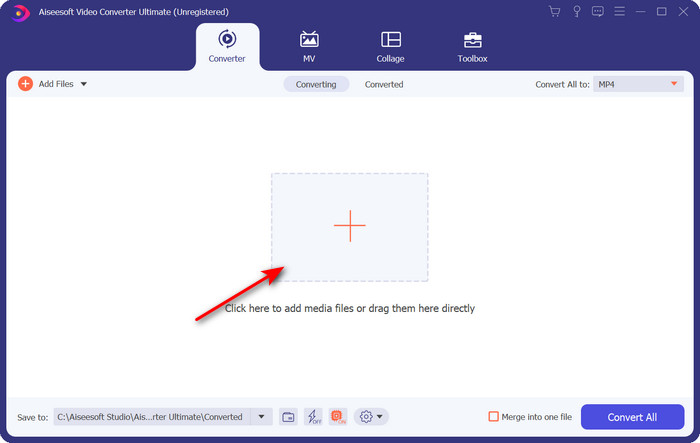
2. lépés. Indítsa el a programot, és töltse fel a .rmvb fájlt a felületre a középen található + gomb megnyomásával. Keresse meg a fájlt a mappában, majd kattintson az Open gombra.
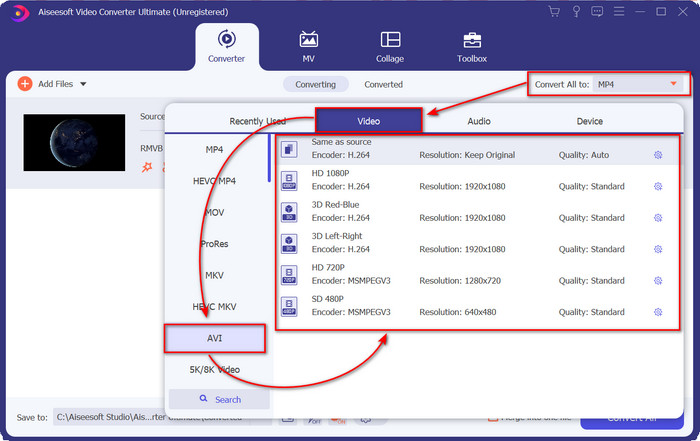
3. lépés. Lépjen a Convert All to: részhez, keresse meg az AVI formátumot, majd kattintson rá.
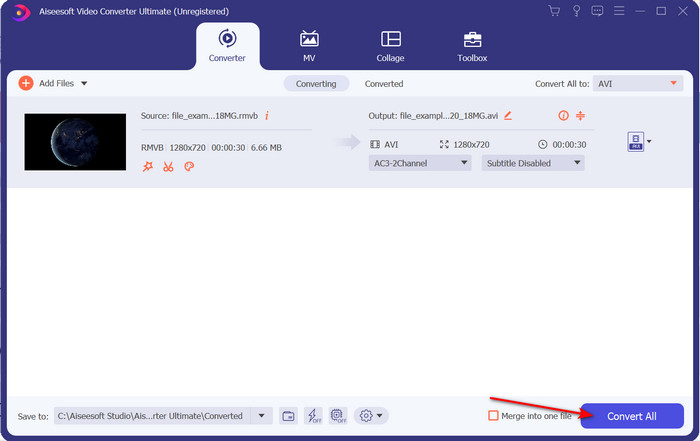
4. lépés. Miután kiválasztotta a formátumot, indítsa el az átalakítást a Convert All gombra kattintva.
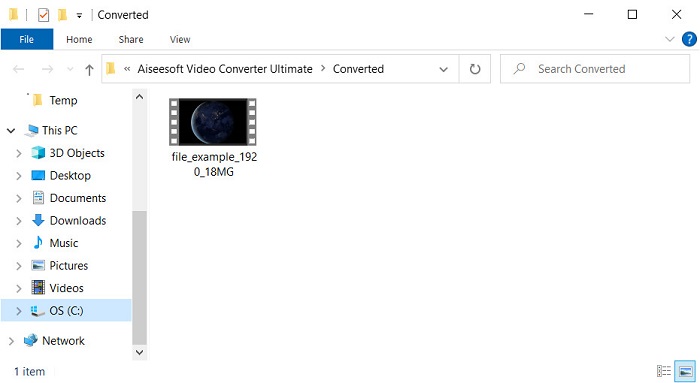
5. lépés. Egy mappa az új .rmvb fájl(ok)kal megjelenik a képernyőn; kattintson a fájlra, hogy lejátszhassa a videót, és élvezze.
Előnyök
- Az eszköztár számos népszerű segédprogramot kínál, amelyek segítenek a felmerülő problémák megoldásában.
- A többi online és offline konverterhez képest 30-szor gyorsabban konvertálja a fájlokat.
- Bolondbiztos, hogy bárki, akinek van tapasztalata a konvertálásban, vagy nem, könnyen konvertálhat.
- A kötegelt átalakítás gyorsan megtörténik különböző formátumokkal.
Hátrányok
- Az eszköz eléréséhez fizetnie kell érte, de az nem több száz dollárnál.
- Letöltés szükséges PC-n vagy Mac-en.
2. rész. A legjobb online RMVB-AVI konvertáló webböngészőhöz [ingyenes]
RMVB–AVI konvertert keres online? Akkor a FVC Free Video Converter Online az egyik választható megoldás. Ez a webes eszköz lehetővé teszi, hogy szoftver letöltése nélkül konvertáljon. Bárki számára elérhető, aki rendelkezik internetkapcsolattal. Emellett ingyenes, biztonságos, és a weboldalon nincsenek hirdetések a konvertálás közben. További előnye, hogy korlátlanul konvertálhat fájlokat. Többféle, elérhető formátum közül választhat. Ugyanakkor ez a webes eszköz nem rendelkezik olyan fejlett funkciókkal, mint amelyeket az FVC Video Converter Ultimate kínál. Ráadásul internetkapcsolat nélkül – más online eszközökhöz hasonlóan – nem tudja használni. Ha tehát szeretné kipróbálni a konvertálást költség nélkül, kövesse az alább megadott lépéseket.
Lépések az RMVB AVI-vá alakításához online az FVC Free Video Converter Online segítségével:
1. lépés. Az online RMVB–AVI konverter eléréséhez kattintson erre a linkre.
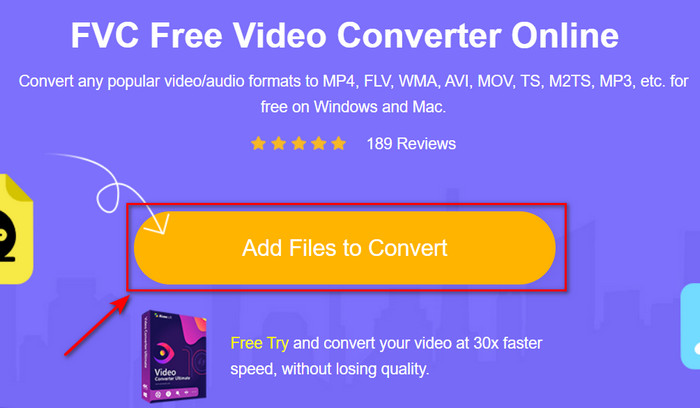
2. lépés. Nyomja meg az Add Files to Convert gombot; ha első alkalommal használja ezt az eszközt, egy indítóprogram automatikusan letöltődik, ezután kattintson ismét az Add Files to Convert gombra, és megjelenik egy mappa. Keresse meg a .rmvb fájlt, majd kattintson az Open gombra.
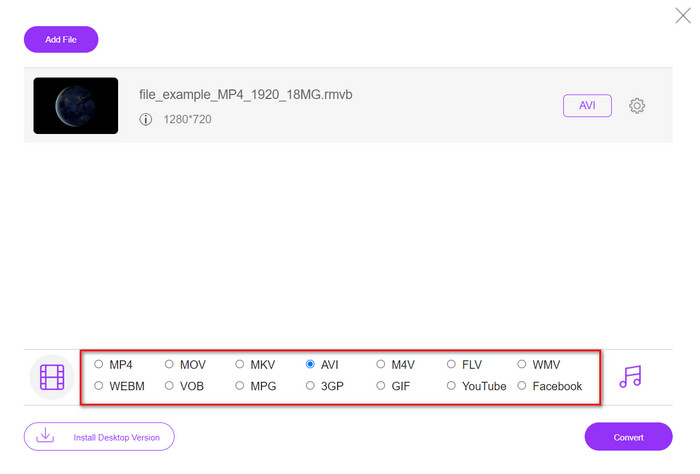
3. lépés. Miután a fájl megjelent a webes felületen, kattintson az AVI lehetőségre a lent látható választékból.
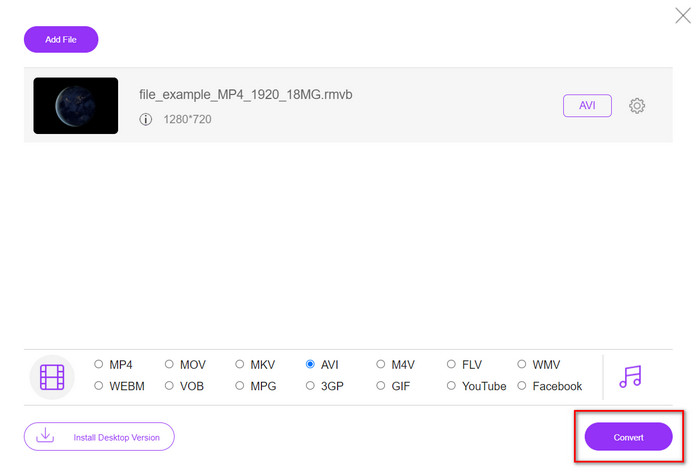
4. lépés. Miután kiválasztotta az AVI-t, indítsa el a konvertálást a Convert gombra kattintva.
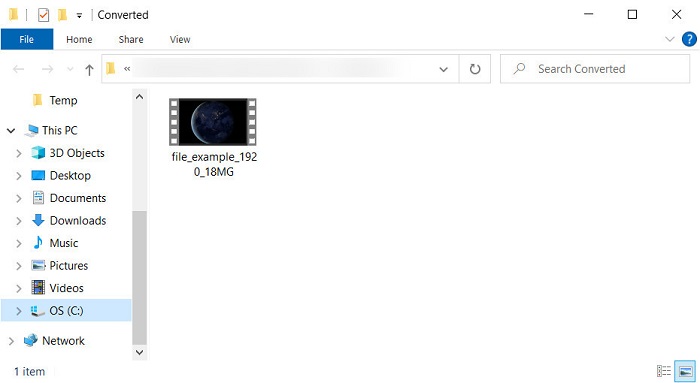
5. lépés. Ha a konvertálás befejeződött, egy mappa jelenik meg a képernyőn az átalakított fájllal; ha meg szeretné nézni, kattintson a fájlra.
Előnyök
- A telepítőn kívül nincs szükség letöltésre az eléréséhez.
- Ingyenes, és a webes felületen nincsenek hirdetések.
- Nyissa meg a webeszközt egy másik böngészőben, mert az mindenben elérhető.
Hátrányok
- Internet-függő, ami azt jelenti, hogy ha nincs interneted, nem tudod használni.
- Nincsenek olyan szerkesztési funkciók, mint az FVC Video Converter Ultimate.
3. rész. GYIK az RMVB-ről és az AVI-ról
Lejátszhatom az RMVB fájlt a Quicktime-on?
A QuickTime számos formátumot képes lejátszani, és ez a médialejátszó különböző videó- vagy hangsávokba kódolt kodekeket támogat. A .rmvb azonban nem tartozik a támogatott formátumok közé, ezért ha QuickTime-ban szeretne .rmvb fájlt lejátszani, előbb át kell alakítania valamelyik támogatott formátumra, például MOV-ra, MPEG-4-re, AVI-ra vagy egyéb kompatibilis formátumra. Alternatív megoldásként RMVB lejátszókat is használhat, hogy zökkenőmentesen élvezhesse RMVB videóit.
Miért nem tudom megnyitni az .rmvb fájlokat a Windows Media Player alkalmazásban?
Mivel ez a médialejátszó nem támogatja az .rmvb fájljainak kodekjét, tegyük fel, hogy .rmvb kiterjesztésű videót szeretne nézni. Ebben az esetben a lejátszás előtt feltétlenül telepítsen egy videokodeket a számítógépére. De a probléma elkerülése érdekében próbálja meg átalakítani a formátumot egy elfogadható formátumra, amelyet ez a médialejátszó támogat.
Menthetek videót RMVB formátumban a telefonomra?
Igen, elmentheti, de nem tudja lejátszani az alapértelmezett videolejátszóján, és a fájl lejátszásához le kell töltenie egy harmadik féltől származó videolejátszót, amely támogatja ezt a formátumot.
Következtetés
Összefoglalva: mostanra megismertük, mi az RMVB formátum, és milyen típusú kódolást támogat. Noha ez a formátum kiváló az online továbbításhoz, egyes médialejátszók mégsem támogatják, mivel a felépítése meglehetősen összetett. Ezért mutattunk be két megoldást, amelyekkel megtanulhatja, hogyan alakítsa át az RMVB fájlokat AVI formátumba: az egyik eszköz online, díjmentesen érhető el, a másik pedig az a rendkívül hatékony konverter, amely szinte egy szempillantás alatt elvégzi az összes feladatot. Ha az FVC Free Video Converter Online mellett dönt, számíthat a kiváló online átalakításra. Ha viszont letölt egy sokkal fejlettebb verziót, akkor a lehető legjobb, „ultimate” teljesítményt várhatja el.
-
 Útmutató az RMVB átalakításához MP4-be Windows / Mac rendszeren (3 ingyenes út)
 Szeretne RMVB-t MP4-re konvertálni a számítógépen vagy mobiltelefonon való egyszerű lejátszáshoz? Ebben az útmutatóban egyszerű módszereket talál az RMVB-fájlok MP4-re konvertálására.
-
 A legnépszerűbb 4 ingyenes RMVB-FLV átalakító alkalmazás asztali vagy online
 Ez a cikk elmondja a legjobb RMVB – FLV átalakító szoftvert és webalkalmazásokat, amelyek képesek RMVB (RealMedia Variable Bitrate) fájlokat FLV videofájlokká konvertálni.
-
 A legjobb módszer az AMV AVI-vé konvertálására [Jóváhagyva]
 Nehéz dolga van az AMV formátumú videofájl AVI formátumba konvertálásával? Íme néhány tipp, amelyeket csak ebben a cikkben találhat meg.
