


 Video Converter Ultimate
 Screen Recorder
 Videó javítás
[Gyors és egyszerű mód] Konvertálja az RMVB fájlokat WMV-vé a 2 legjobb RMVB konverterrel
Manapság az ázsiaiak egyre több televíziós epizódot, animációs filmet és mozifilmet készítenek, majd világszerte terjesztik őket, hasonlóan az észak‑amerikaiakhoz. A legtöbb ilyen film .rmvb formátumban van kódolva, mert az RMVB kisebb méretű, alacsonyabb a bitrátája, mégis kiváló minőséget nyújt. Amikor azonban letöltöd a fájlt Windowsra, az alapértelmezett médialejátszó nem játssza le ezt a formátumot, mert nem támogatott. Elég kellemetlen, ugye? Ma viszont már átalakíthatjuk az RMVB fájlodat lejátszható WMV formátumba. Ennek érdekében vágjunk bele, és nézzük meg, hogyan lehet az RMVB‑t WMV‑vé konvertálni a két használható eszközzel.

1. rész. Egyéb okok, amelyek miatt az RMVB-fájlt WMV-re kell konvertálnia
Mielőtt elkezdené a konverziós expedíciót, először értsük meg az RMVB fájl konvertálásának lehetséges okát. Az alábbi lista azokat a lehetséges okokat tartalmazza, amelyek miatt online vagy offline RMVB-WMV konverterre van szüksége.
Ahogy fentebb említettük, az RMVB fájl szinte egyetlen médialejátszóval sem kompatibilis, különösen a Windows Media Playerrel nem. Ez a probléma nem újdonság, mert sok olyan formátum van, amelyet a Windows Media Player nem támogat; sajnos az RMVB is ezek közé tartozik. Bár az RMVB‑t átkonvertálhatod egy új, kompatibilis formátumba, létezik egy másik megoldás is: egy külső médialejátszó letöltése, például a Blu-ray Player. Ez a lejátszó sokkal szélesebb formátumtámogatással rendelkezik, mint a Windows Media Player, így többféle videót tud lejátszani. Ha szeretnéd letölteni ezt a médialejátszót, kattints az alábbi letöltés gombra. Ha pedig részletesebb információt szeretnél olvasni az RMVB lejátszókról, kattints erre a linkre.
Ingyenes letöltésWindows 7 vagy újabb verzióhozBiztonságos letöltés
Ingyenes letöltésMacOS 10.7 vagy újabb verzióhozBiztonságos letöltés
Az RMVB fájlok nyílt forráskódú fájltárolók, amelyekhez ez a formátum nem használ konkrét kodeket. Annak ellenére, hogy nagy előnyt jelent a kodek kezelése, nem minden alkalmazás támogat nyíltan mindenféle kodeket. Ezért, ha az RMVB fájlt szerkesztésre vagy lejátszásra szeretné használni, ne lepődjön meg, ha nem fog működni a nem támogatott kodekkel.
Tehát most, hogy kitaláljuk, hogyan lehet az RMVB-t WMV-vé konvertálni, folytassuk az alábbi részletekkel, és figyelmesen olvassuk el. Csak öt percet fog tölteni ennek a cikknek a elolvasásával, és elegendő ismeretet szerez az RMVB-fájlok konvertálásához a rendelkezésre álló konverterekkel.
2. rész. A legkiválóbb konverter az RMVB-ből WMV-vé konvertálásához a Video Converter Ultimate segítségével
A FVC Video Converter Ultimate kifejezetten arra szakosodott, hogy az RMVB fájlokat WMV, AVI, MKV, MOV, MP4 és más formátumokká alakítsa, akár egy percen belül. Beépített szupergyors konverzióval és hardveres gyorsítással rendelkezik, így az átalakítás villámgyorsan elkészül. Valójában ez az átalakító számos, rendkívül fejlett szerkesztési funkciót is támogat, amelyeket imádni fogsz. Sietve szeretnéd befejezni az RMVB fájl konvertálását? Akkor mire várunk még? Lépjünk egyenesen a folyamatra, és másold le az alábbi lépéseket.
Lépések az RMVB fájlok WMV formátummá alakításához az FVC Video Converter Ultimate segítségével:
1. lépés. Töltsd le az FVC Video Converter Ultimate programot Windowsra az alábbi letöltés gombra kattintva. Ha Macet használsz, kattints a másik gombra az eszköz Mac‑verziójának letöltéséhez. Kövesd a telepítési lépéseket, majd indítsd el az átalakítót.
Ingyenes letöltés Windows 7 vagy újabb rendszerre Biztonságos letöltés
Ingyenes letöltés macOS 10.7 vagy újabb rendszerre Biztonságos letöltés
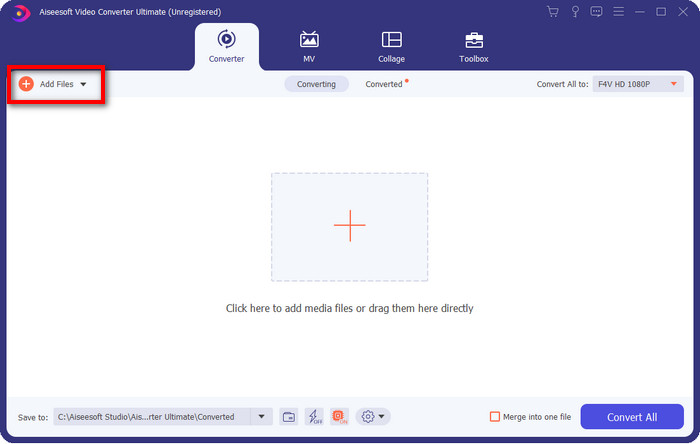
2. lépés. Add hozzá az RMVB fájlokat a konverterhez az Add Files gomb megnyomásával, majd keresd meg a fájlt a megjelenő mappában, és kattints az Open gombra.
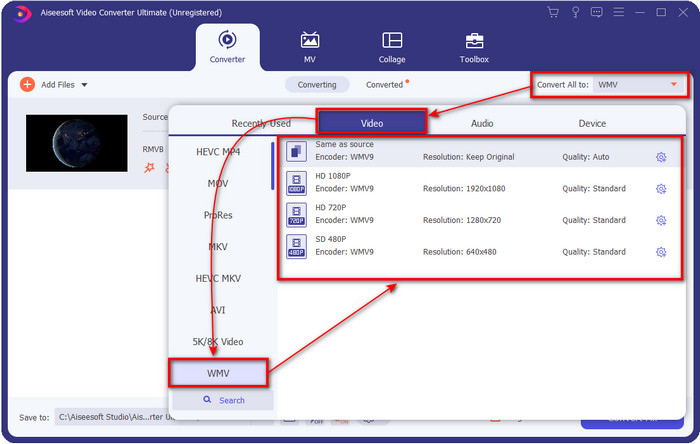
3. lépés. Kattints a Convert All to gombra, ekkor megjelenik a formátumok listája; válaszd ki a kívánt formátumot, például a WMV‑t, majd kattints rá.
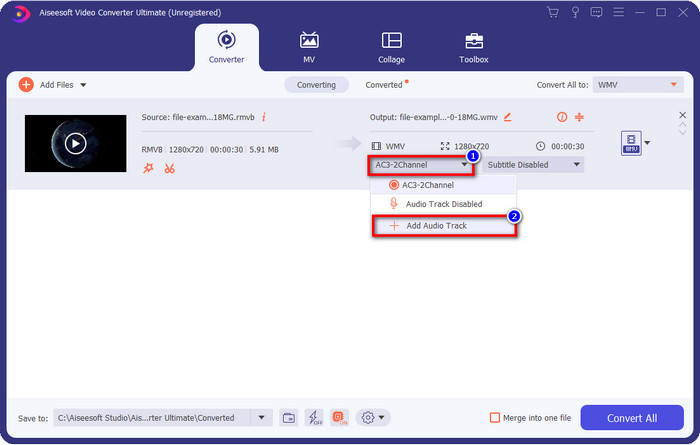
Opcionális: Szeretnél hangot hozzáadni a videóhoz a konvertálás előtt? Ha igen, kattints a lenyíló gombra, válaszd az Add Audio Track lehetőséget, keresd meg az asztalon elmentett hangsávot, majd nyomd meg az Open gombot.
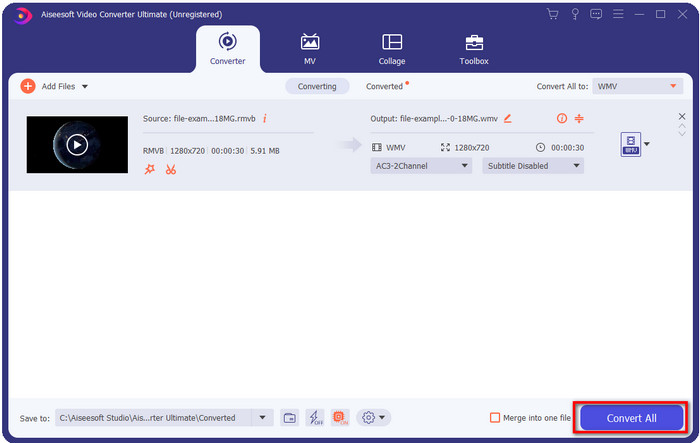
4. lépés. A Convert All gombra kattintva elindul a konvertálási folyamat. A művelet befejezése után egy mappa nyílik meg a képernyőn a konvertált fájllal.
3. rész. A legjobb webkonverter az RMVB WMV Online konvertálásához
Ha egy nagy teljesítményű, online RMVB–WMV konvertert keresel, akkor mindenképpen használd az FVC Free Video Converter Online eszközt. Ez a webes konverter kétségkívül nagyszerű megoldás a konvertálási problémáidra. Igaz, csak korlátozott számú formátumot támogat feltöltésre és választásra – ez problémát jelenthet, igaz? Ha azonban kifejezetten RMVB fájlt szeretnél online megoldással átalakítani, azt ez az eszköz támogatja. Az alábbi listában bemutatjuk, hogyan kell használni ezt a webes eszközt.
Lépések az RMVB fájlok WMV formátummá alakításához az FVC Free Video Converter Online segítségével:
1. lépés. Kattints erre a linkre, és a böngésződben egy új lap nyílik meg.
Töltse le az asztali verziót a fájlok kötegelt konvertálásához.
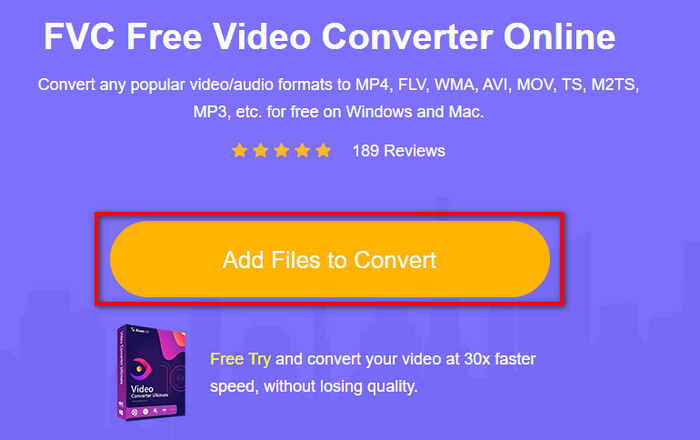
2. lépés. Kattints az oldalon az Add Files to Convert gombra, ekkor megjelenik egy mappa az asztalról. Válaszd ki az átalakítani kívánt RMVB fájlt, majd kattints az Open gombra.
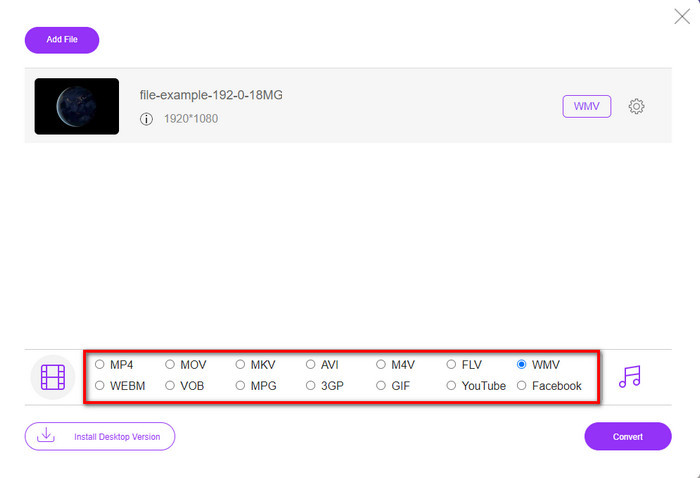
3. lépés. Miután a fájl feltöltődött, válaszd ki alul a WMV formátumot, vagy bármely más, a listában elérhető formátumot.
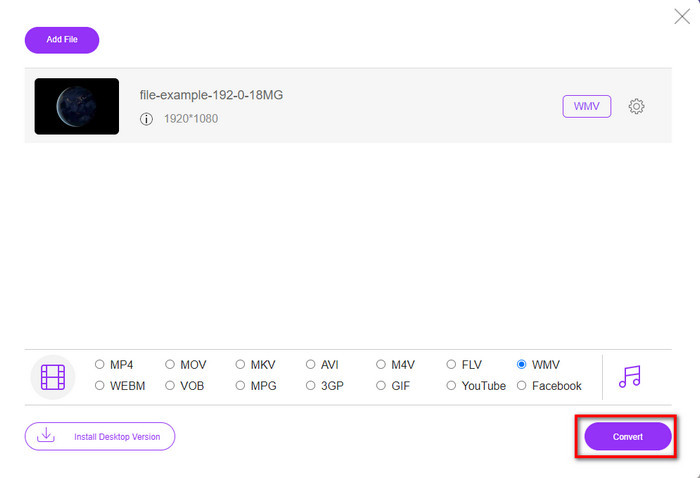
4. lépés. Kattints a Convert gombra a konvertálási folyamat elindításához.
RMVB vs. WMV
Az RMVB, a szabványos Real Media (.RM) formátum újabb változata, egy változó bitrátával tömörített Real Media videofájl formátum. Ez egy népszerű formátum az ázsiai filmekhez és animékhez. Az RMVB fájlok kisebb méretűek, és kisebb a bitsebessége, de jobb a minőségük.
A Microsoft által gyártott WMV a 2000-es években az egyik leggyakoribb videóformátum volt. Megtekinthető az interneten, és lejátszható különféle Windows médialejátszókkal. És ez a Windows Media Player alapértelmezett videofájl-formátuma is. De a közelmúltban más formátumok is átvették.
4. rész. GYIK az RMVB-ből WMV-vé konvertálással kapcsolatban
Az RMVB és az RM ugyanaz?
A két konténer között nincs lényeges különbség. A névváltoztatások azért vannak, mert a CBR régebbi valódi kodek volt, csak streamelési célokra. A név megváltozott, de a formátum célja nem.
Mit kell tennem az RMVB fájlok Mac számítógépen való lejátszásához?
Macen letölthetsz egy külső RMVB lejátszót, hogy le tudd játszani a videót. Ha azonban nem szeretnél harmadik féltől származó lejátszót telepíteni, érdemes megfontolni az RMVB fájl MOV formátummá alakítását. Szeretnéd tudni, hogyan kell ezt megtenni? Akkor kattints erre a linkre, és ismerd meg, hogyan konvertálhatod az RMVB‑t MOV‑vá.
Az RMVB fájl konvertálása elveszti a minőségét?
Az RMVB konvertálása nem ronthatja magának a videónak a minőségét. De a konverter nagy része megváltoztatja a minőséget, mert az 1080 vagy még jobb minőségű pixelek nem támogatottak. Tehát most, ha a fájlokat minőségromlás nélkül szeretné konvertálni, akkor az FVC Video Converter Ultimate programot kell használnia. Ez az eszköz támogatja az 1080-as és még magasabb fájlok konvertálását a minőség romlása nélkül.
Következtetés
Akár egy asztali konvertert szeretnél letölteni és megtartani, akár egy online eszközt használnál, az FVC mindenben segít. A fent említett két konverter sok szempontból kiemelkedő, ha az online és offline átalakítókkal hasonlítjuk össze őket. Ahelyett, hogy ezeket más eszközökhöz mérnénk, hasonlítsuk inkább össze őket egymással. Az FVC Free Video Converter Online segít megoldani a konvertálási gondjaidat, és nagy előnye, hogy bármikor azonnal használható, ha van internetkapcsolatod. Ezzel szemben az FVC Video Converter Ultimate lenyűgöző minőségű kimenetet biztosít, ami téged és másokat is meg fog lepni. Ha még izgalmasabbá szeretnéd tenni a konvertálási folyamatot, használd ezt az Ultimate konvertert, és hozd ki belőle a legtöbbet.
-
 A legnépszerűbb 4 ingyenes RMVB-FLV átalakító alkalmazás asztali vagy online
 Ez a cikk elmondja a legjobb RMVB – FLV átalakító szoftvert és webalkalmazásokat, amelyek képesek RMVB (RealMedia Variable Bitrate) fájlokat FLV videofájlokká konvertálni.
-
 Az RMVB fájlból AVI-ba konvertáló 2 legjobb választása [Online és offline]
 Nem tudja, hogyan lehet az RMVB-t AVI-vé konvertálni? Ez a cikk azokra az átalakítókra összpontosít, amelyek segítségével az RMVB-t AVI-vé alakíthatja, akár online, akár offline.
-
 Útmutató az RMVB átalakításához MP4-be Windows / Mac rendszeren (3 ingyenes út)
 Szeretne RMVB-t MP4-re konvertálni a számítógépen vagy mobiltelefonon való egyszerű lejátszáshoz? Ebben az útmutatóban egyszerű módszereket talál az RMVB-fájlok MP4-re konvertálására.

