


 Video Converter Ultimate
 Screen Recorder
 Videó javítás
Ismerje meg a WebM AVI formátumú konvertálásának technikáit 3 elérhető konverterrel
Ha olyan formátumot keres, amely bármely HTML5-tel kompatibilis, akkor a WebM-nek kell lennie a választásnak. Ezt a formátumot az egyik legjobb webes videóformátumnak tartják. Általánosságban elmondható, hogy a WebM‑formátumokat kifejezetten webes használatra hozták létre, mert jobb minőséget biztosítanak, és EBML‑struktúrát használnak. Az EBML bináris kódokat használ, amelyeket mi, emberek nem tudunk elolvasni, de speciális funkciójuk van. Emiatt előfordulhat, hogy ha letölt egy WebM‑fájlt a meghajtójára, egy idő után a formátum lejátszhatatlanná válik. Van azonban mód arra, hogy működőképessé tegye: át kell alakítani egy új formátumba, például AVI‑ba. Most tehát beszéljünk arról, miért érdemes WebM‑fájlokat AVI formátumba konvertálni, és milyen eszközök állnak ehhez rendelkezésre.
1. rész Miért kell a WebM-et AVI-vé alakítanunk?
Amint azt korábban említettük, ez a két formátum videót és hangot is tartalmazhat egy fájlban. Bár vannak hasonlóságok, mégis sok különbség van bennük. Mint például a szerkezet, a kodek, a specialitás, a teljesítmény, a támogatott platformok és egyebek. Tehát, hogy elképzelésünk legyen róla, akkor határozzuk meg.
A WebM elérhető frissített böngészőkben, például a Mozilla Firefoxban vagy a Google Chrome-ban; néhány böngésző azonban nem támogatja ezt a formátumot. Webböngészőkön való használatra specializálódott, hogy tökéletes minőséget biztosítson a fájl gyorsabb és jobb betöltésével. Ezenkívül ugyanolyan formája van, mint az MKV-nak, ugyanazzal a kodekkel. A WebM formátumtól eltérően az AVI formátumot minden médialejátszó, web és videómegosztó platform ismeri, mivel egyre népszerűbb és támogatott. Mivel az AVI első osztályú videó- és hangminőséget tárol, amelyet imádni fog. Szinte minden szempontból jobb, mint a WebM; ennek ellenére a fájlméret a formátum legnagyobb hátránya. Tehát most, ha szerkeszteni, menteni és lejátszani szeretne, használja a WebM-et, akkor feltétlenül konvertálja a WebM formátumot AVI-ba, hogy ezt megtegye a listában található három eszközzel.
2. rész: WebM konvertálása AVI-vé a rendelkezésre álló asztali eszközzel
1. FVC Video Converter Ultimate
Fogalma sincs, hogyan alakítsa át a WebM‑et AVI‑vá, mert még nincs tapasztalata a konvertálásban? Mégis lenyűgöző végeredményt szeretne elérni? Akkor a FVC Video Converter Ultimate az a kiváló konvertáló, amelyet imádni fog, ugyanis ez az átalakító több mint 200 különböző audio‑ és videoformátumot támogat. Emellett fejlett funkciókat is kínál, amelyeket akkor is könnyen használhat, ha nem profi. Továbbá a konvertálási folyamat pillanatok alatt végbemegy, mivel támogatja a hardveres gyorsítást és a gyors átalakítást. A szoftvert azonban csak megvásárlás után használhatja, de nem kell aggódnia, mert nem drága. Ha tehát szeretné megtapasztalni azt a „varázslatot”, amelyet ez az eszköz nyújt az átalakítás során, kövesse az alábbi lépéseket.
1. lépés. Ha még nem rendelkezik a szoftverrel, akkor először töltse le az asztali meghajtóra. Amint a letöltés befejeződik, telepítse, majd végezze el a gyors beállítást a folytatáshoz.
Ingyenes letöltés Windows 7 vagy újabb rendszerre Biztonságos letöltés
Ingyenes letöltés macOS 10.7 vagy újabb rendszerre Biztonságos letöltés
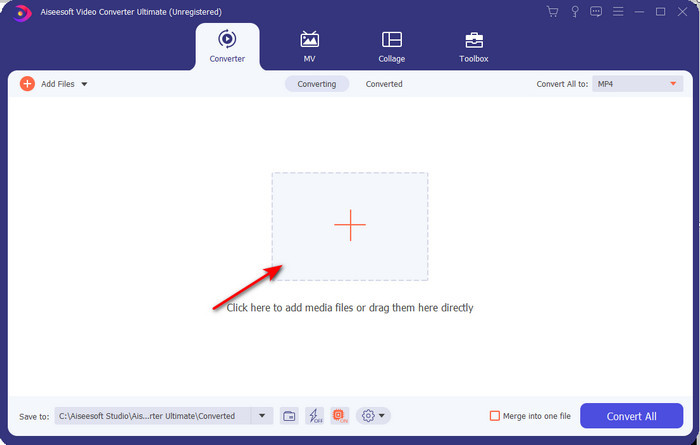
2. lépés. Ezután kattintson a + gombra a felület közepén. Keresse meg a videót a képernyőn megjelenő mappában, majd a beszúráshoz kattintson a Megnyitás gombra.
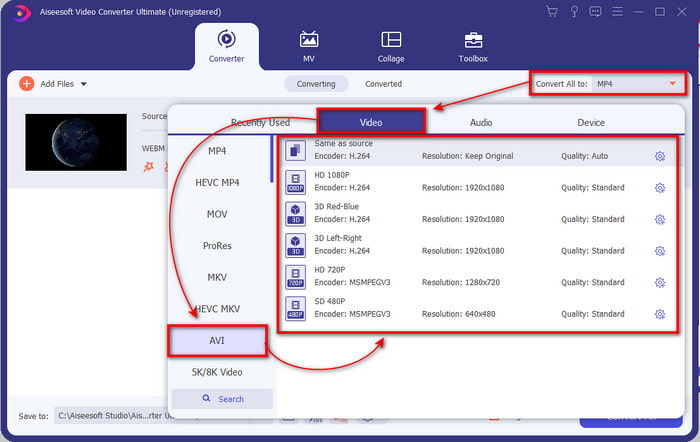
3. lépés. Nyomja meg a Convert All to: opciót, hogy a WebM‑videót AVI‑formátumba alakítsa, majd válassza ki a kívánt felbontást a rendelkezésre álló lehetőségek közül.
4. lépés. Miután kiválasztotta a formátumot, itt az ideje elindítani a konvertálást a Convert All gombra kattintva.
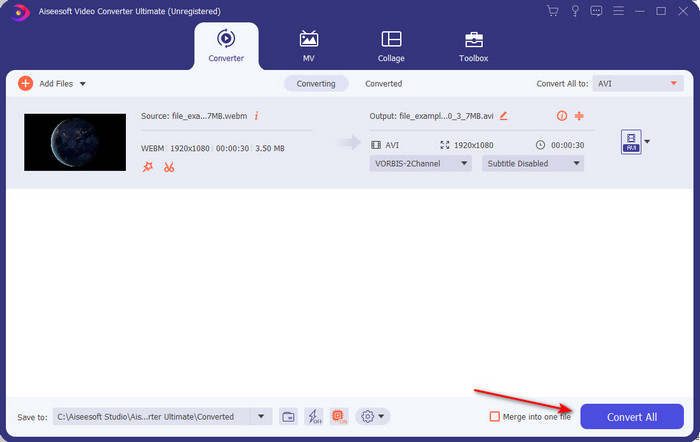
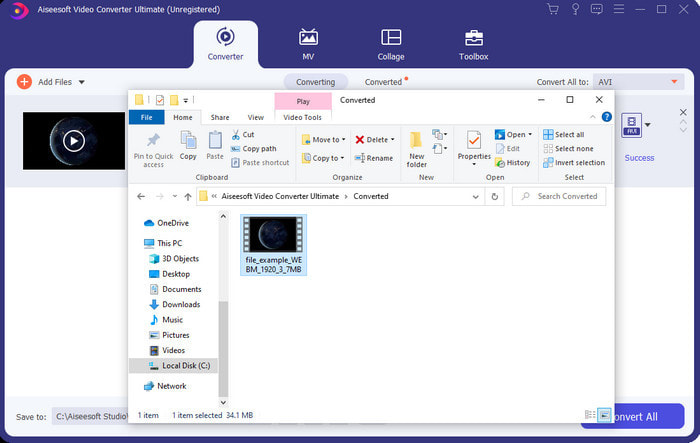
5. lépés. Itt az átalakítás folyamata sokkal gyorsabb, így nem kell túl sokat várnia. A képernyőn megjelenik egy mappa az AVI‑formátumba konvertált fájllal. A konvertált fájl megtekintéséhez kattintson rá, és élvezze az újonnan átalakított WebM‑videót.
2. FFmpeg
A WebM‑formátum módosítása FFmpeg használatával gyorsan elvégezhető, ha tudja, hogyan kell kezelni az eszközt. Ha részletesebb beállításokat szeretne végezni a fájlon, ezt a programot érdemes használnia. Ez a szoftver azonban nem a legjobb választás kezdők számára, mivel kódokkal kell dolgozni a megfelelő konvertáláshoz. Ráadásul CLI‑felületen működik. Ahogy korábban említettük, parancsokkal kell „kommunikálni” vele. Ha tehát az FFmpeg segítségével szeretné a WebM‑et AVI‑vá alakítani, kövesse az alábbi lépéseket.
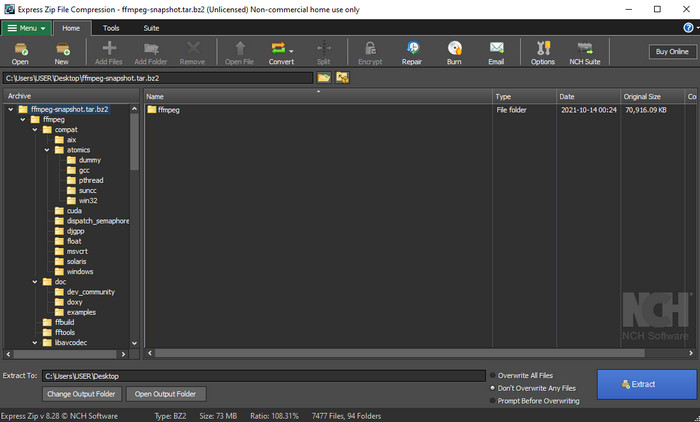
1. lépés. Töltse le az FFmpeg‑et az asztali gépére; a letöltött szoftvert ki kell csomagolni. Hozzon létre egy új mappát, és ebbe csomagolja ki. Ezután másolja ki a mappa elérési útját, mert később szüksége lesz rá.
2. lépés. Nyomja meg a Windows gombot az asztalon, és írja be a CMD parancsot, hogy kommunikálni tudjon a szoftverrel.
3. lépés. Keresse meg a WebM‑fájlt a parancssor segítségével, majd másolja be ezt a kódot: ffmpeg -i input.webm -vn -ar 44100 -ac 2 -b:a 192k output.avi, és nyomja meg az Enter billentyűt a billentyűzeten.
3. rész: A WebM konvertálása AVI-vé az elérhető legjobb webeszköz használatával
FVC ingyenes online videokonverter
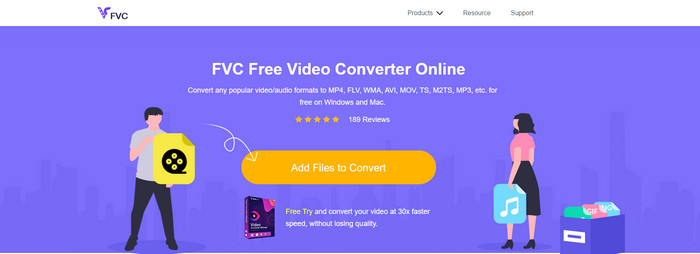
Ha nem szeretne szoftvert letölteni a meghajtóra, keressen egy WebM‑fájlt AVI‑vá alakító online konvertert. Ez a FVC Free Video Converter Online bármikor és bárhonnan használható, de ne feledje, hogy internetkapcsolat szükséges, mivel ez az eszköz az internetre támaszkodik. Bár a webes eszköz ingyenesen elérhető, mégsem támogat annyi különböző formátumot, mint az FVC Video Converter Ultimate. Ha tehát költség nélkül szeretné elvégezni az átalakítást, kövesse az alábbi lépéseket, és tapasztalja meg, hogyan működik az online konvertálás.
1. lépés. Az FVC Free Video Converter Online weboldalának megnyitásához kattintson erre a linkre.
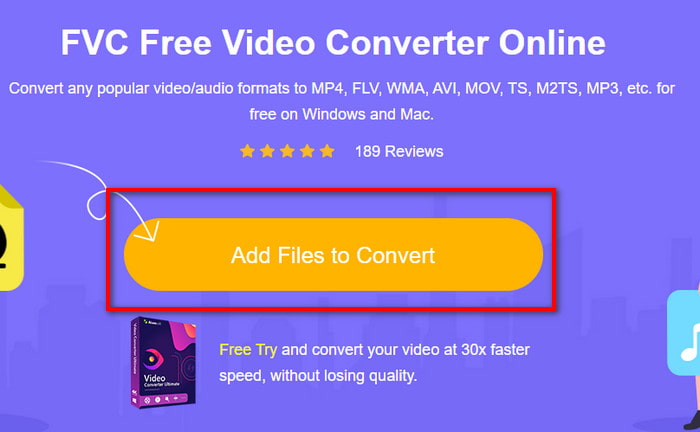
2. lépés. Az eszköz elindításához kattintson az Add Files to Convert gombra, majd egy mappa jelenik meg a képernyőn. Keresse meg a fájlt a mappában, majd kattintson a Megnyitás gombra.
3. lépés. Miután a fájl megjelent a felületen, válassza az AVI‑formátumot, vagy az alsó részen azt a másik formátumot, amelyre át szeretné alakítani.
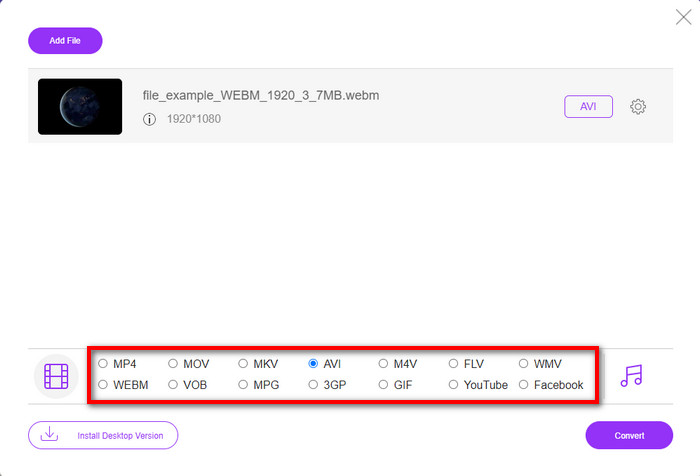
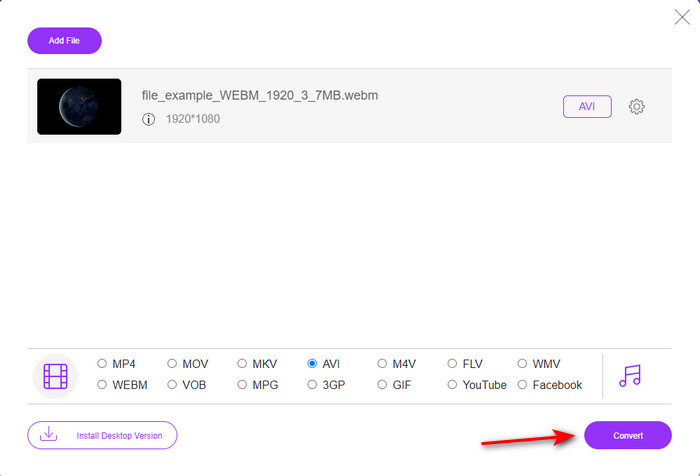
4. lépés. Most pedig kezdjük el az átalakítási folyamatot a Convert gombra kattintva. Ezzel az ingyenes WebM–AVI konverterrel sok fájlt is átalakíthat, azonban kötegelt konvertálásra nincs lehetőség.
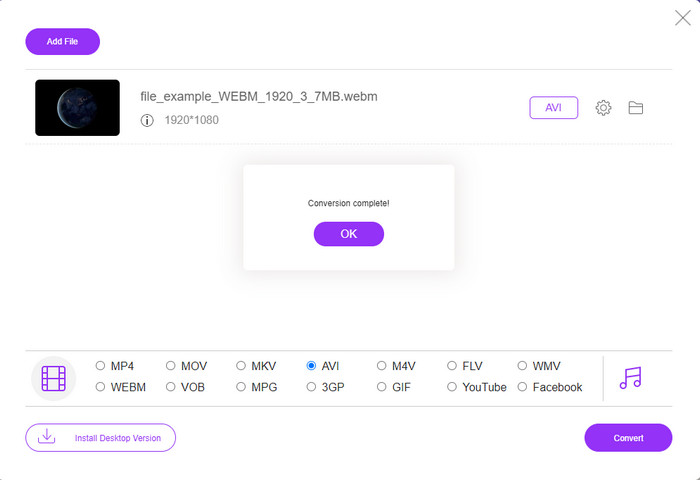
5. lépés. Végül, amikor az átalakítás befejeződött, a fájlt a mappában ellenőrizheti.
4. rész. GYIK a WebM-ről és az AVI-ról
Miért támogatja a WebM formátumot a modern böngészők?
A WebM‑formátumú videók HTML5‑ben bővítmény nélkül is lejátszhatók. A WebM‑videók azonban nem játszhatók le régebbi böngészőverziókban. Ezért győződjön meg róla, hogy a böngészője naprakész, ha WebM‑fájlt szeretne lejátszani. Itt megismerheti a legjobb WebM‑lejátszókat, amelyekkel zökkenőmentesen játszhatja le WebM‑fájljait.
Milyen kodeket használ a WebM?
A WebM két különböző videokodeket használ, ez a VP8 és a VP9. De a VP9 a leggyakrabban használt videokodek a WebM számára, mert jól tudja tömöríteni a fájlt a Google-on és más böngészőkön. Ezenkívül a VP9 a VP8 utódja, és az MPEG kodekekkel versenyzett.
A WebM konvertálása veszít minőségéből?
Ha a WebM‑et új formátumba konvertálja, ne számítson minőségromlásra. Hiszen csak a formátumot változtatja meg, de ha a WebM‑et GIF‑re alakítja, akkor számítson némi minőségvesztésre. Ennek oka, hogy a GIF a többi formátumhoz képest csak szűkebb színpalettát támogat.
Következtetés
Összefoglalásként megállapíthatjuk, hogy a fenti megoldások mind működnek. Ugyanakkor különböznek egymástól a konvertálási folyamat, a sebesség és egyéb szempontok tekintetében. Ha tehát olyan kiváló konvertert keres, amely minden formátumot támogat, akkor az FVC Video Converter Ultimate a tökéletes eszköz erre a feladatra. Ha szeretné megtapasztalni, milyen „varázslatot” nyújt ez a végső eszköz, mindenképpen töltse le.
-
 WebM - MP4 | A WebM ingyenes konvertálása MP4-be (online és asztali)
 Hogyan lehet WebM fájlokat nézni böngésző nélkül? Meg kell konvertálni a WebM-et MP4-re. Íme a legjobb 10 ingyenes WebM-MP4 átalakító, amellyel a WebM-et MP4-re változtathatja online, valamint Mac és Windows számítógépeken.
-
 4 hatékony módszer a MOV AVI-vé konvertálására PC-n és Mac-en [2021]
 Szeretné tudni, melyik a legjobb MOV-AVI konverter a weben? És miért lehet az FVC Ultimate Video Converter a megfelelő az Ön számára.
-
 3 egyszerű módszer az FLV konvertálására AVI formátumra asztali és online módon
 Íme három módszer, amelyek segítségével hatékonyan konvertálhatja FLV-videófájljait AVI formátumba Windows és Mac rendszeren, hogy kiváló minőségben nézhesse meg őket.
