


 Video Converter Ultimate
 Screen Recorder
 Videó javítás
Ismerje meg a WebM konvertálásának módjait MKV-vé a legjobb konverterekkel
Numerous video formats come in WebM file format, and many browsers like Google, Mozilla Firefox, Opera, and Microsoft Edge, support this type of file. However, WebM files are containers that can only store video streams compressed with VP8 or VP9 video codecs. So if you want to convert your WebM file into a file container that can hold an unlimited number of audio, video, and subtitle tracks, you must change your WebM file to MKV file format. Moreover, this article will discuss the best WebM to MKV Converters.

1. rész Miért kell a WebM-et MKV-vé konvertálni?
WebM files are video file formats widely supported by almost all web browsers. It is a file format that HTML5 often uses for video streaming purposes. In addition, it is a royalty-free file format that is mainly made for the web. This file type is also used as a container for audio and video formats. On the other hand, MKV or Matroska files contain unlimited audio, video, and subtitle tracks. So why do we need to convert WebM to MKV? Simply because the WebM files can only hold videos compressed with VP8 and VP9 codecs. While MKV files can handle multiple subtitles streams and audio tracks in various languages, that is useful for movie enthusiasts.
2. rész WebM átalakítása MKV fájlokká egy villámgyors konverter segítségével
Everyone wants a converter that can convert files quickly. Luckily, we found a tool that can convert files in a blink of an eye. FVC Video Converter Ultimate is an offline converter that allows you to convert WebM to MKV quickly. It also supports almost all standard formats like WebM, MKV, AVI, MP4, MOV, M4V, FLV, and many more. And if you want to merge multiple files into one, this converter has a feature to do batch conversion.

FVC Video Converter Ultimate
Több mint 5 689 200 letöltés- Lehetővé teszi a kötegelt átalakítást.
- Javíthatja, szerkesztheti, tömörítheti a fájlt.
- Olyan funkcióval rendelkezik, amely néhány másodperc alatt képes konvertálni a fájlt.
- Könnyen használható felülettel rendelkezik.
Ingyenes letöltés Windows 7 vagy újabb rendszerre Biztonságos letöltés
Ingyenes letöltés macOS 10.7 vagy újabb rendszerre Biztonságos letöltés
Step 1. To download the app, click the Download button below. Then follow the installation procedure and then open the application.
Ingyenes letöltés Windows 7 vagy újabb rendszerre Biztonságos letöltés
Ingyenes letöltés macOS 10.7 vagy újabb rendszerre Biztonságos letöltés
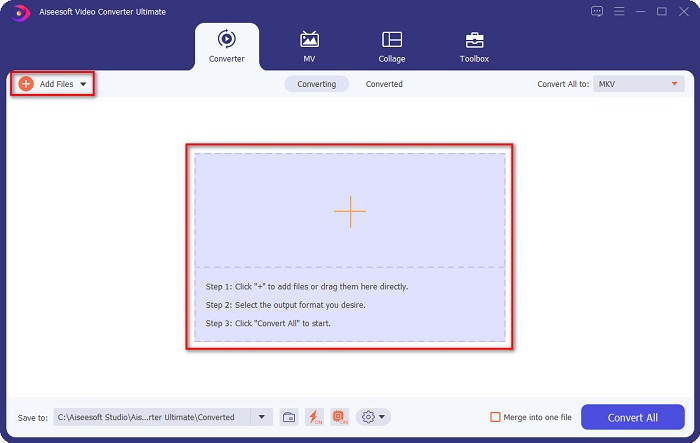
Step 2. After opening the application, click the Add Files button or the + sign button to upload your WebM file on the first interface of the software.
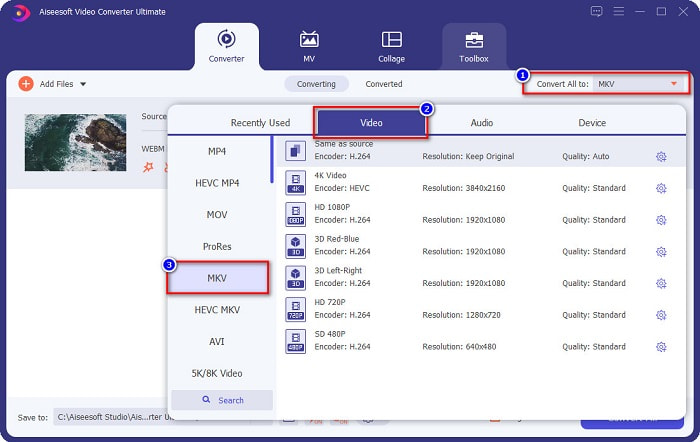
Step 3. To choose your desired file output format, click the Convert All to button at the upper right corner of the software's interface. Select MKV, then proceed to the next step.
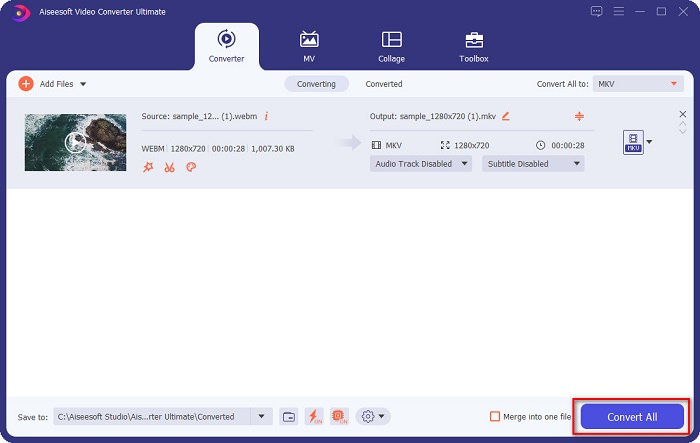
Step 4. And for the last step, click the Convert All button to start converting your WebM to MKV file. Just wait for a few seconds, and voila! Your MKV file is now ready.
By following these simple steps and using this WebM to MKV converter, you can convert files effortlessly. Also, you can use it to convert WebM to MP3 or other audio files.
3. rész WebM konvertálása MKV-fájlokká FFMPEG használatával
Az FFMPEG egy parancssori segédprogram, amelyet általában formátumok átkódolására, videószerkesztésre, méretezésre és videó-utómunka-effektusokra használnak. Ezenkívül ez a szoftver lehetővé teszi a fájlformátumok konvertálását is. Mivel ez egy szöveges konverter, sok ember, aki használni akarja, nehezen tudja használni ezt a konvertert. Mindazonáltal ez egy hatékony és hatékony módja a WebM konvertálásának MKV-vé az FFmpeg-en.
Step 1. To use this converter, download the FFMPEG on your computer. Follow the installation process, then run ffmpeg.exe to your computer system.
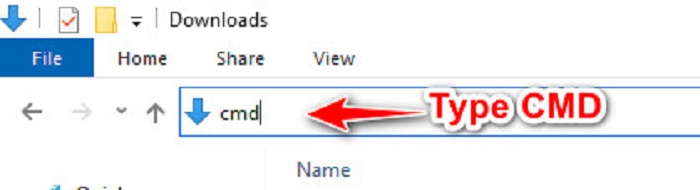
Step 2. Locate your WebM file in your computer files, then on your folder, where your file is located, type CMD to open the command prompt for your file conversion.
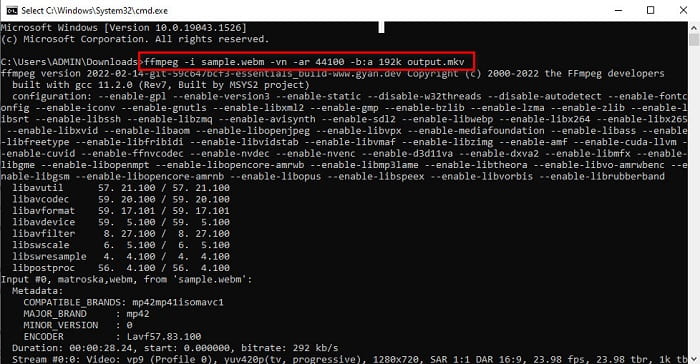
Step 3. Lastly, type the following command ffmpeg -i sample.webm -vn -ar 44100 -b:a 192k output.mkv. Then press enter key on your keyboard, and a list of codes will appear, which signifies that your conversion is complete.
4. rész. WebM konvertálása MKV-fájlokká online a Best Online Converter segítségével
One of the best online converters available on the web today is FVC Free Online Video Converter. This Converter allows you to convert numerous files, including WebM MKV, MP4, AVI, MOV, WMA, MP3, etc. This online converter is very easy to use because of its simple interface. However, since it is a web-based tool, you may experience having a slow conversion of files due to internet issues. Nonetheless, many still use this to convert WebM to MKV online, and people are satisfied with its performance.
Step 1. In your browser, search FVC Free Online Video Converter or click this link to go to their webpage.
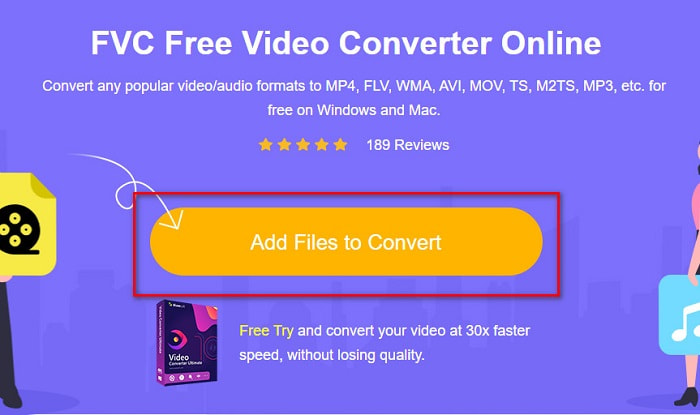
Step 2. Then click the Add Files to Convert and launch the application. After launching the app, your computer files will appear to choose your WebM file.
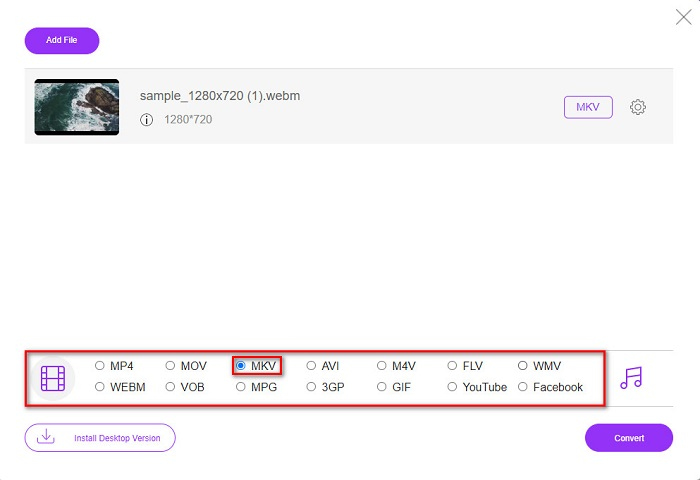
Step 3. Next, choose the MKV file as your desired file format. The list of file formats is located below the software’s second interface.
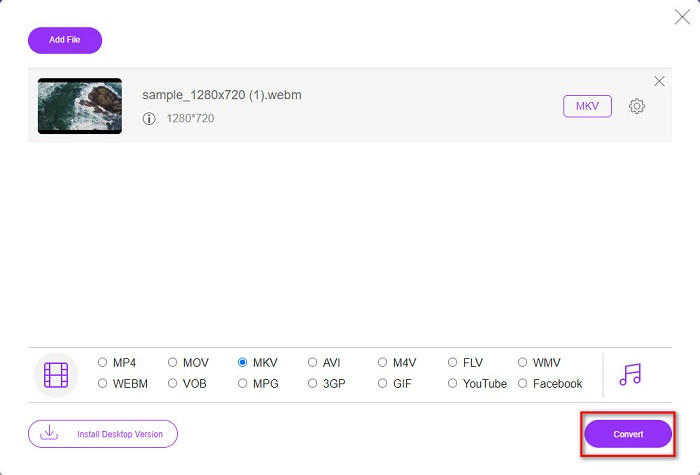
Step 4. Lastly, click the Convert button, then your file will start to convert.
5. rész. Összehasonlító táblázat
| Jellemzők | FVC Video Converter Ultimate | FFMPEG | FVC Free Online Video Converter |
| Ultragyors konverzió |  | – | – |
| Kötegelt konverzió | | – | – |
| Támogatott fájlformátumok | A WebM konvertálható MKV, MP4, MOV, AVI, M4V, FLV, +1000 további formátumba. | Támogatja a különféle fájlformátumokat, mint például az AIFF, AVI, FLV, GIF és néhány fájlformátumot. | Lehetővé teszi szinte az összes ismert formátum konvertálását, mint például az FLV, AVI, MP4, MOV, MP3 stb. |
| Könnyen használható interfész | | – | |
| Internet kapcsolat | – | – | |
6. rész. GYIK a WebM MKV-vé konvertálásával kapcsolatban
Veszteségmentesen konvertálhatom a WebM-et MKV-vé?
Yes. By using FVC Converter Ultimate as your converter, you can change WebM to MKV without losing the quality of your file.
Miért van hatalmas fájlméret az MKV-nak?
Az MKV fájlok hatalmas fájlmérettel rendelkeznek, mivel támogatja a különféle audio- és videosávok extra funkcióit.
Átalakíthatom a WebM-et MP4-re?
Indeed, a tool can decode WebM to MP4 by using various file converters available in the market. You can also read this article to know more about the topic about the conversion from WebM to MP4.
Következtetés
Bár a WebM és az MKV egyaránt fájltároló, nyugodtan kijelenthetjük, hogy a WebM-fájl MKV-vé konvertálása jó döntés. És a fent bemutatott összes ingyenes online és offline konverter különböző tulajdonságokkal rendelkezik. De ha sok egyedi funkcióval rendelkező konvertert szeretne, amely ultragyorsan konvertálja a WebM-et MKV-fájllá, úgy gondoljuk, hogy az FVC Video Converter Ultimate a legjobb eszköz az Ön számára!
-
 3 Lenyűgöző szoftver a WebM fájlok AVI formátumba konvertálására
 Nincs ötleted, hogyan lehet a WebM-et AVI-vé konvertálni? Akkor kezdjük el olvasni ezt a cikket. Ahogy mi minden részletet megadunk a WebM-en és a konvertáláshoz használható három konverteren.
-
 Könnyen követhető módszerek a WEBM MOV-vé konvertálására
 Nehéznek találja, hogy WebM-videóit nem tudja lejátszani a Safari segítségével, és nem szeretne olyan böngészőre váltani, amely támogatja ezt a formátumot? Olvassa el ezt a cikket, hogy megtudja, hogyan módosíthatja könnyedén a WebM-et MOV-ra.
-
 A legnépszerűbb WebM-FLV konverter ingyenes az interneten és az asztalon
 Ugyanez a probléma a WebM-fájlok lejátszásakor az okostelefonokon? Ezután töltsön 5 percet ennek a cikknek a elolvasásával, hogy megtudja, hogyan lehet a WebM-et FLV-vé konvertálni.
