


 Video Converter Ultimate
 Screen Recorder
 Videó javítás
2 módszer a videók tömörítésére az Instagram Online és az Asztalon
Hogyan lehet tömöríteni a videókat az Instagram számára? Kétségbeesett voltál, amikor megtudtad, hogy az órákig dolgozott videót nem lehet feltölteni az Instagramra nagy mérete miatt? Ne ess pánikba. Most jöttél jó helyre. Ez a cikk a videók 2 tömörítésének legegyszerűbb módját nyújtja az Instagram feltöltéséhez.

1. rész: Miért kell tömörítenem a videókat az Instagram számára
Csakúgy, mint fent említettük, nagy videofájlokat nem lehet feltölteni az Instagramra. Tömörítenie kell az Instagram-videókat 20 MB alatti MP4 fájlokba. A videó képkockasebességének 30 képkocka / másodpercnek kell lennie, 3500 KB / s bitráta. A videó mérete általában 1080 pixel széles. 4: 5 felbontás ajánlott. Ezenkívül a videóinak 3 másodpercnél hosszabbnak és 60 másodpercnél rövidebbnek kell lenniük.
2. rész: Videofájlok tömörítése az Instagram Online számára
A FVC Free Video Compressor egy intelligens online eszköz, amellyel különböző formátumú videókat tömöríthet. Nem kell letöltenie a programot. A teljes tömörítési folyamat egy weboldalon zajlik. Ezzel az eszközzel a videóit tetszőleges méretűre zsugoríthatja.
Főbb jellemzők:
- 1. Tömörítsen különféle nagy videókat, például MKV, FLV, WMV, AVI, TS, MOV stb.
- 2. Könnyen használható felület kezdőknek a beállítások testreszabásához
- 3. 30x gyorsabban dolgozzon, és ne hagyjon vízjelet a kimenetekben
- 4. Kezelje a 4K Ultra HD videókat minőségromlás nélkül
Az alábbi lépésekkel tömörítheti az Instagram videófájljait online ezzel az eszközzel:
1. lépés: Nyissa meg a böngészőjében a FVC Free Video Compressor eszközt.
Kattintson a középen található Add Files to Compress gombra. Ha először használja ezt az eszközt, le kell töltenie a fvc-launcher nevű fájlt, és futtatnia kell a folytatás előtt. Ezután kattintson ismét az Add Files to Compress gombra. Ekkor kiválaszthatja azokat a videofájlokat, amelyeket Instagramra szeretne tömöríteni.

2. lépés: Testre szabhatja az Instagramra szánt, tömörítendő videó beállításait.
Méret: A csúszkát húzva állíthatja a százalékos értéket. Ha videót tömörít Instagramra, ügyeljen rá, hogy a kimeneti fájlméret 20 MB alatt legyen. A kimeneti méret módosítása egyben a kimeneti bitrátára is hatással lesz.
Formátum: Jelenleg 12 formátumba konvertálhatja a videót, többek között MP4, MKV, AVI, FLV stb. Ha videót szeretne tömöríteni Instagramra, válassza az MP4 formátumot.
Felbontás: Lejjebb csökkentheti a felbontást, például 320×240, 480×360 és más értékekre. Vagy megtarthatja az eredeti felbontást is, és az Instagramra szánt videót pusztán a bitráta csökkentésével tömörítheti.

3. lépés: Indítsa el a tömörítést, és várja meg, amíg az eszköz befejezi a feladatot.
Kattintson a lila színű Compress gombra, és válassza ki a célmappát, ahová a kimeneti videót menteni szeretné. Ne zárja be a böngészőt vagy a weboldalt, amíg a videó feldolgozás alatt áll. Ellenkező esetben elölről kell kezdenie az Instagramra szánt videó tömörítését. A folyamat sebessége nagymértékben függ a hardverétől.
3. rész: Hogyan lehet tömöríteni az Instagram videofájljait az asztali számítógépen
A méret mellett a videó hossza is 3 és 60 másodperc között kell legyen. Mivel azonban az online eszköz weboldalon fut, a funkciói viszonylag egyszerűek. Az online eszközzel nem tudja megvágni a videót. Milyen eszközt használhat, ha nemcsak tömöríteni, hanem szerkeszteni is szeretné a videót? A Aiseesoft Video Converter Ultimate valószínűleg a legjobb választás.
Főbb jellemzők:
- 1. Kompatibilis több mint 1000 formátummal, beleértve a WMA, MP4, AVI, MOV, WMV, MP3, FLAC stb.
- 2. A fejlett hardvergyorsító technológia soha nem látott sebességet biztosít
- 3. Vágja le és egyesítse a videoklipeket szivárványos szűrőkkel és alapvető effektusokkal.
- 4. A 3D Maker eszköz lehetővé teszi, hogy hihetetlen 3D videókat élvezhessen a 3D szemüvegében
- 5. Készítsen szinte professzionális osztott képernyős videókat
- 6. Beépített négy végső módja a videó fejlesztésének
Ingyenes letöltés Windows 7 vagy újabb rendszerre Biztonságos letöltés
Ingyenes letöltés macOS 10.7 vagy újabb rendszerre Biztonságos letöltés
Lépések az Instagram videók tömörítésére a Video Converter Ultimate segítségével:
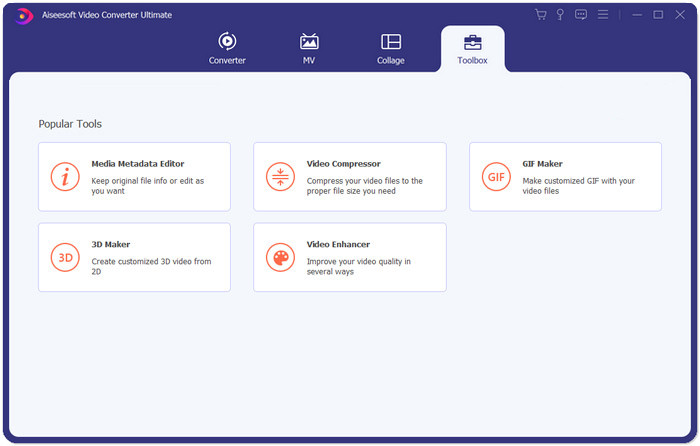
1. lépés: Töltse le, telepítse és indítsa el a Aiseesoft Video Converter Ultimate programot. Váltson a Toolbox fülre, és kattintson a “+” gombra az Instagramra szánt, tömörítendő videó hozzáadásához.
2. lépés: A videó hozzáadása után a Video Compressor felületre kerül. Húzza a méretcsúszkát a kimeneti fájl méretének beállításához, és válassza ki a kívánt felbontást és kimeneti formátumot.
Megjegyzés: A bitrátát csak közvetve tudja változtatni a felbontás és a kimeneti méret különböző kombinációinak kipróbálásával.
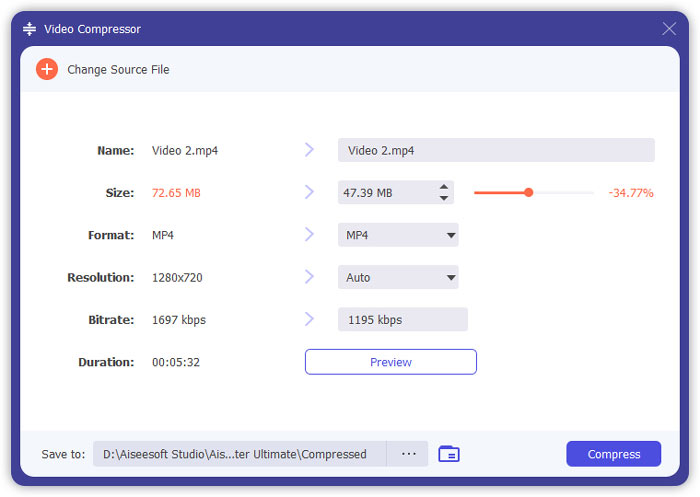
3. lépés: Kattintson a jobb alsó sarokban található Compress gombra az Instagramra szánt videó tömörítésének elindításához.
További olvasnivaló:
Hogyan tömörítsünk videókat online WhatsApphoz (100 MB/500 MB/1 GB…)
Hogyan tömörítsünk videót e-mailhez, és csökkentsük 25 MB alá
4. rész: Gyakran feltett kérdések a videók Instagram-ra történő feltöltéséről
Milyen követelményeket támaszt az Instagram videó feltöltése?
Formátum: MP4
Kodek: H.264
Bitráta: 3500 kbps alatt
Képkockasebesség: kevesebb mint 30 képkocka másodpercenként.
Mi a legjobb képarány az Instagram videóknál?
A legjobb képarány 9:16, amely a legtöbb okostelefon szokásos aránya is.
Milyen hangformátumot használjon a videóm az Instagram feltöltéséhez?
AAC hang.
Következtetés
Ebből a cikkből két praktikus eszközt kapsz, amellyel tömörítheted videódat az Instagram számára. Ezek az FVC Free Video Compressor és a Video Converter Ultimate. Amikor tömöríti a videót az Instagram számára, ne felejtse el megbizonyosodni arról, hogy videójának hossza 3-60 másodperc és 20 MB alatt van-e.
-
 A legjobb mód a Vimeo videó méretének csökkentésére a feltöltéshez
 Ebben a bejegyzésben megmutatjuk, hogyan kell tömöríteni a videofájlt a fájl Vimeo-ra való feltöltéséhez, valamint a videó- és hangtömörítéshez szükséges útmutatásokat.
-
 Hogyan lehet levonni a videofájl méretét a YouTube-on 2 módon
 A YouTube-videók nagyok és lassan tölthetők fel? Csak tömörítse a videofájl méretét kisebbre a YouTube számára online módon és számítógépen.
-
 Videó tömörítése a Facebook ingyenes és online
 Ha tilos egy nagy videót feltölteni a Facebookra, ne aggódjon. Csak tömörítse a nagy méretű videót GB-ról MB-ra az ingyenes videokompresszor segítségével.
