


 Video Converter Ultimate
 Screen Recorder
 Videó javítás
4 Módszerek az MP3 metaadatok szerkesztésére vagy javítására Windows és Mac rendszeren
Mindenki musicphile, ami azt jelenti, hogy szeretjük a zenét, mert segít átérezni az énekesek és az írók érzelmeit, még akkor is, ha nem látjuk őket vizuálisan. A zenén keresztül mindenki kapcsolatban maradhat, és segíthet a stressz oldásában, javíthatja az IQ-nkat, és minden nap produktív lehet. A legtöbb zene MP3 formátumban van, mert ez a szabványos hangtároló hozzá. Bár lejátszhatja az MP3 fájlt az eszközén, nem tudja megfelelően lejátszani a megfelelő elrendezést, ha a metaadatok hibásak. Nem tudja beállítani a megfelelő hangulatot, ha a zenei könyvtára káoszban van, akkor mit tegyen? Miért nem próbálja meg kijavítani a címkéket, hogy helyesen rendezze őket? Ha szeretné tudni, hogyan szerkesztheti az MP3 metaadatokat Windows és Mac rendszeren, ez a megfelelő cikk az Ön számára, mivel négy különböző módszert mutatunk be, amelyeket használhat.

1. rész. Az MP3 metaadatok javításának vagy szerkesztésének legjobb módja Windows és macOS rendszeren [ajánlott]
A(z) FVC Video Converter Ultimate már tett egy lépést afelé, hogy az egyik legjobb MP3‑címkejavító program legyen Windows és Mac rendszeren. Ez az eszköz támogatja MP3, WAV, WMA, AAC és számos egyéb hangformátum feltöltését, hogy ugyanazt a metaadattal kapcsolatos problémát meg tudja oldani. Arra is lehetőséget ad, hogy eltávolítsa azokat a rejtett metaadatokat, amelyekhez más címkeszerkesztőkkel nem fér hozzá.
Nem csak, ha akarja, konvertálhatja az MP3-at egy másik hangformátumba, és számos olyan funkciót és szolgáltatást kínál, amelyek az Eszköztárban találhatók; megnézheted őket, ha letöltöd. Ez a program néhány percen belül megoldja a problémát a lehető leggyorsabban. Nem biztos benne, hogy igaz? Szerencsére az alábbi írott oktatóanyag megtanítja az MP3 metaadatok szerkesztését, hogy bebizonyítsa, hogy gyorsan meg tudod csinálni, ahogy mondjuk.
1. lépés. Kattintson az alábbi letöltés gombra, és válassza ki a két operációs rendszer közül azt, amelyiket jelenleg használja. A letöltés után gyorsan telepítse, nyissa meg az eszközt, és lépjen a következő lépésre.
Ingyenes letöltés Windows 7 vagy újabb rendszerre Biztonságos letöltés
Ingyenes letöltés macOS 10.7 vagy újabb rendszerre Biztonságos letöltés
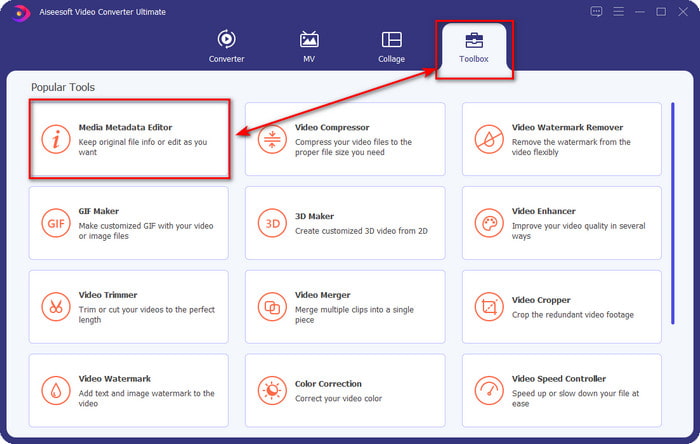
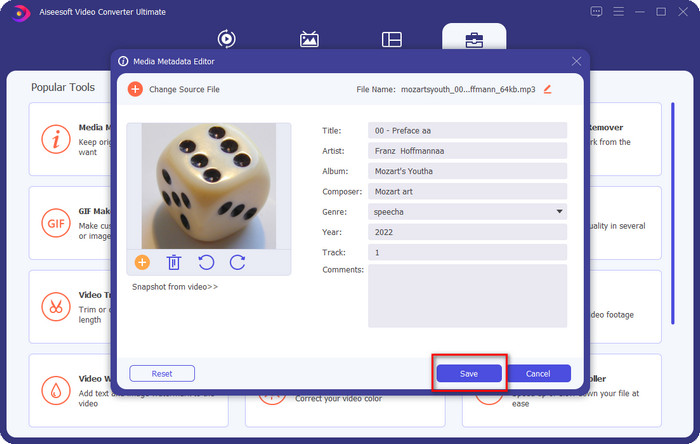
2. lépés. Válassza a Eszköztár menüpontot, majd alatta kattintson a Média metaadat‑szerkesztő lehetőségre. Ahogy a bevezetőben is említettük, az Eszköztárban több funkciót is használhat, amelyeket a többi szerkesztő nem kínál.
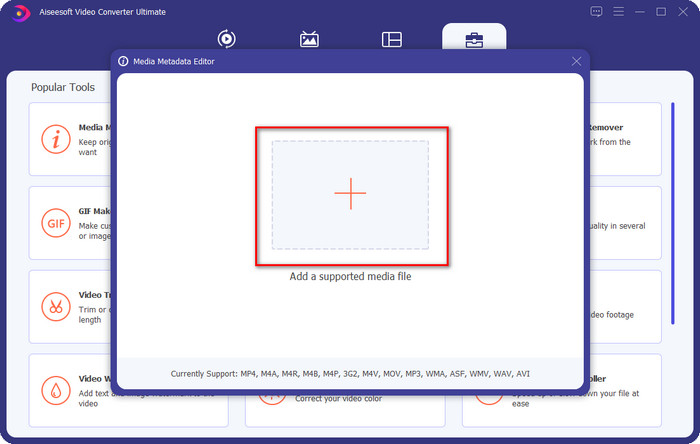
3. lépés. Egy kis ablak jelenik meg a képernyőn; kattintson a + ikonra. Keresse meg a mappában azt a hang‑ vagy MP3‑fájlt, amely megjelenik a kijelzőn, kattintson a fájlra, majd a Megnyitás gombra a feltöltéshez.
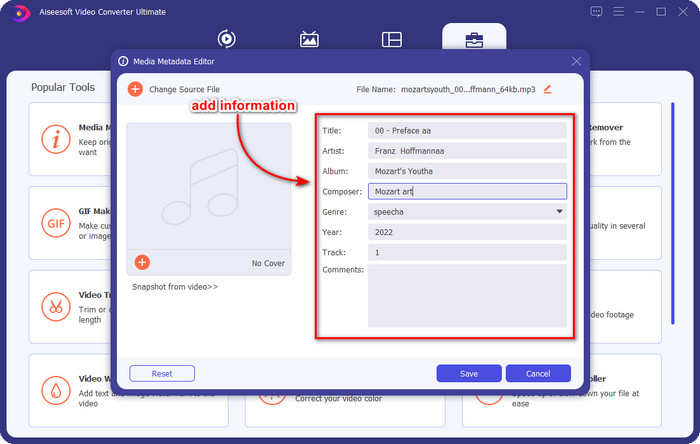
4. lépés. Szerkessze és javítsa a metaadatokat igényei szerint; kattintson az egyes szövegmezőkre az információ hozzáadásához.
Opcionális. Ezzel az eszközzel MP3‑album borító metaadatot is hozzáadhat vagy javíthat MP3‑fájlján: kattintson a + ikonra, válassza ki a mappából a borítóként használni kívánt képet, majd kattintson a Megnyitás gombra a folytatáshoz.
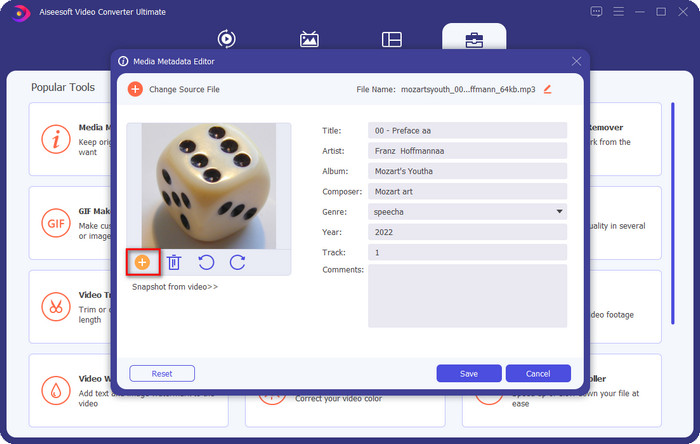
5. lépés. Ha befejezte az MP3‑fájl metaadatainak hozzáadását és javítását, kattintson a Mentés gombra, hogy elmentse a hangfájlon végrehajtott módosításokat. Voilá, ezzel máris erőfeszítés nélkül kijavította a hangcímkéket a végső eszköz segítségével.
2. rész. 3 ingyenes módszer az MP3 címkék megváltoztatására asztalon
iTunes
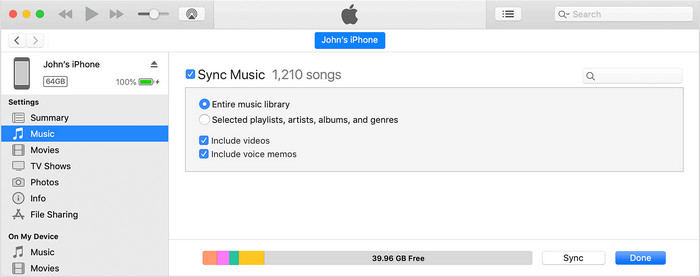
Az iTunes egy beépített program, amely segíthet MP3‑címkék szerkesztésében macOS X rendszeren. Ugyanazt végzi, mint a Groove Music, amikor a hangfájlok metaadatainak szerkesztéséről van szó. Ezzel az eszközzel azonban zenét is vásárolhat, és villámgyorsan le is játszhatja. Ráadásul az innen származó zenék már eleve rendelkeznek címkékkel, és ha a letöltött zenéjénél ezek hiányoznak, ezzel az alkalmazással hozzáadhatja őket. Kövesse az alábbi lépéseket, hogy megtudja, hogyan kell ezt csinálni.
1. lépés. Nyissa meg az iTunest a Mac számítógépén.
2. lépés. Kattintson a hangfájlra, majd válassza a Get Info (Infó) lehetőséget.
3. lépés. Javítsa a címkéket, majd kattintson az OK gombra a módosítások mentéséhez.
MP3Tag
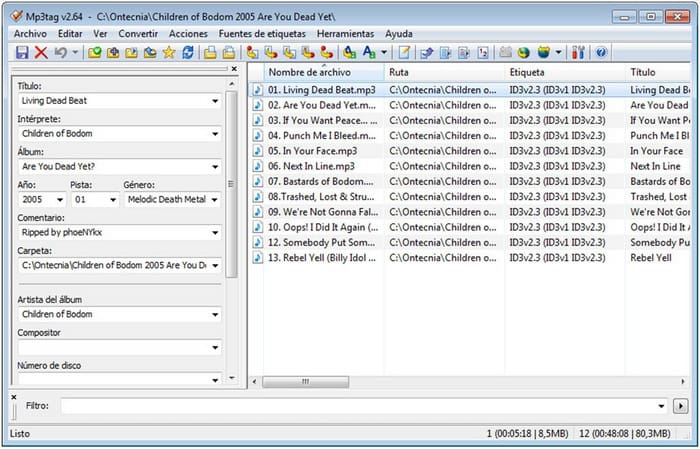
Az MP3 Tag egy dedikált és kiváló MP3‑címkejavító, amelyet letölthet Windowsra. Ezzel az eszközzel automatikusan elérheti a zenei adatbázist, hogy a megfelelő metaadatokat kapja meg. Bár az eszköz nem hasonlít a többi beépített szoftverre, mégis jól látható, hogy ezzel is lehetséges a metaadatok módosítása az átlagos formátumtámogatás mellett. Ha le szeretné tölteni és használni ezt az eszközt, kövesse az alábbi lépéseket.
1. lépés. Töltse le a szoftvert a számítógépére, és nyissa meg.
2. lépés. Húzza és ejtse az MP3‑fájlt a középső területre, kattintson a hangfájlra, és a bal oldalon már szerkesztheti a címkéket.
3. lépés. Az elvégzett szerkesztések mentéséhez kattintson a mentés ikonra.
Groove zene
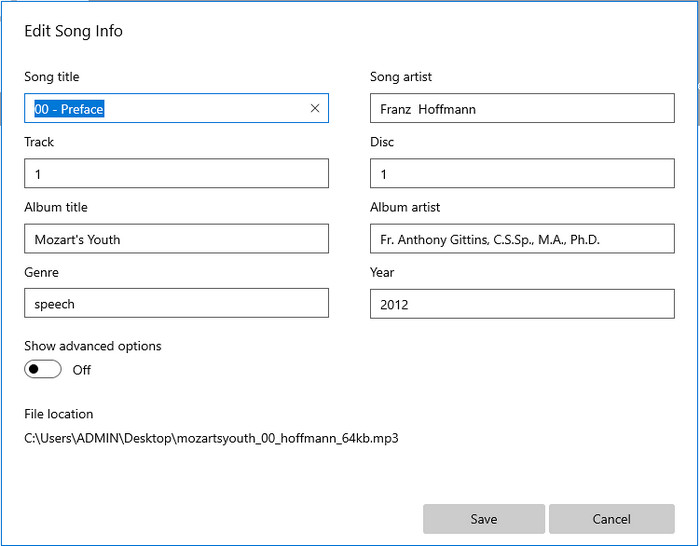
Tegyük fel, hogy nincs elég szabad hely a meghajtóján. Lehetséges így is megtanulni, hogyan szerkesszük az MP3‑címkéket Windows 10‑en? A Groove Music ekkor lehet a segítségére, hogy a Windows‑felhasználók módosítani tudják a hangfájljaik címkéit. Ezzel az eszközzel szinte bármelyik, a meghajtón tárolt hangfájlt kényelmesen lejátszhatja. Ha szeretné tudni, hogyan kell használni ezt a beépített alkalmazást, kövesse az alábbi lépéseket.
1. lépés. Kattintson a windows ikonra a képernyőn, és írja be a Groove Music nevet az alkalmazás megnyitásához. Miután rákattintott, az eszköz automatikusan elkezdi a beállítást.
2. lépés. Kattintson a jobb egérgombbal a hangfájlra, és válassza az Edit Info (Információ szerkesztése) lehetőséget.
3. lépés. Módosítsa az Edit Song Info (Dalinfók szerkesztése) metaadatokat, és kattintson a Mentés gombra, ha mindennel végzett.
3. rész. GYIK a metaadatok szerkesztésével kapcsolatban MP3-on
Biztonságos az MP3 metaadatok online szerkesztése?
Nos, igen, szerkesztheti az MP3 metaadatait online, ha akarja. De ne feledje, hogy vannak olyan webhelyek, amelyek nem biztonságos hálózattal rendelkeznek, így a bejelentkezés rossz döntés, amelyet meg kell hoznia. Tehát ennek elkerülése érdekében használja a fent bemutatott eszközöket az mp3 metaadatainak biztonságos javításához.
Fontosak a metaadatok?
Valóban így van. A metaadat minden egyes médiafájlunknál jelentős szerepet játszik. Ennek segítségével könnyen megállapíthatjuk, mi található egy fájlban, például hely, idő, dátum, információk és egyebek. Ráadásul az itt megadott információk csak egyszerű alapötletek a metaadatról, és ha többet szeretne megtudni a metaadatokról, kattintson erre a linkre, és olvassa el, mi az a metaadat.
Megtekinthetem a metaadatokat az MP3-amon?
Természetesen igen, megteheti, és ha nem tudja, hogyan lehet megtekinteni a metaadatokat, elolvashatja ezt a cikket, és követheti a leírt lépéseket, hogy megfelelően meg tudja őket nézni.
Következtetés
Valóban, a négy legjobb .mp3 címkejavító eszköz már elérhető az Ön számára, ami azt jelenti, hogy most már igényei szerint választhat közülük. A cikkben megadott tényszerű információknak köszönhetően könnyedén szerkeszthetjük vagy javíthatjuk MP3‑fájljaink címkéit. Bár az általunk bemutatott módszerek kiválóak, mi mégis a FVC Video Converter Ultimate programot választjuk a többi beépített vagy harmadik fél által készített alkalmazással szemben. Ennek oka, hogy ez az eszköz a legfejlettebb és legerősebb címkeszerkesztést nyújtja, amelyre szüksége lehet, anélkül hogy túl sok erőfeszítést kellene tennie. Ha tehát szeretné megszerezni ezt az eszközt, kattintson a letöltés gombra, és kövesse a fent leírt lépéseket.
-
 5 legnépszerűbb MP4 metaadat-szerkesztő [Frissítve 2022]
 Hogyan módosíthatom az MP4 metaadataimat? Az MP4 metaadatainak megváltoztatásának legjobb módja egy olyan címkeszerkesztő használata, amely támogatja az MP4 formátumot, például az alábbiakban felsorolt mintát.
-
 Az 5 legnépszerűbb felhasználó által választott AVI videocímkeszerkesztő 2022-ben
 Melyik a legjobb AVI címkeszerkesztő, amit használhatok? Az AVI-fájlok címkeszerkesztőinek piaca túl széles. Tehát ma bemutatjuk a 2022-es év öt legtöbbet választott szerkesztőjét.
-
 4 hatékony MKV metaadatszerkesztő Windows és macOS rendszerhez
 Nem találok MKV metaadat-szerkesztőt a piacon. Mit használjak? Ugyanaz a probléma? Ha igen, olvassa tovább ezt a blogot, hogy megismerje a használható eszközöket.
