


 Video Converter Ultimate
 Screen Recorder
 Videó javítás
 Biztonságos letöltés
Az MXF videofájlok egyesítése a Sony videokameráról az eredeti 4K minőséggel
K: „A Sony X70-et most megrendeltem a Canon XF100 fényképezőgép cseréjére. A Canon XF100 segítségével a Canon XF Utility segítségével gyorsan összeolvashatom az összes MXF fájlt. Van-e hasonló szoftver a Sony X70 által létrehozott MXF fájlok egyesítésére? ”
Ha a 4K módban professzionális fényképezőgépekkel (például Sony XDCAM (beleértve a Sony X70), a Canon XF305 és a Panasonic AG-HPX500M) videofelvételeket készít, a videofájlok kiváló minőségű MXF formátumban kerülnek mentésre. De a legtöbb videótárs nem támogatja az MXF fájlokat. Itt vannak a leggyakrabban használt MXF kombájnok, amelyeket ismernie kell.

1. rész: Az MXF fájlok ingyenes online egyesítése
Ha egyszerűen szeretnél néhány nagy MXF fájlt egyesíteni méretkorlátozás nélkül, a FVC Free Online Merger sokoldalú megoldás, amelyet érdemes megfontolni. Lehetővé teszi többféle formátumú videó feltöltését. Emellett lenyűgöző videót készíthetsz anélkül, hogy vízjel kerülne rá.
- 1. Helyezze az MXF videofájlokat egymás mellé online, méretkorlátozás nélkül.
- 2. Egyesítsen több MXF videofájlt MP4 formátumba 1080p felbontásban.
- 3. Konfigurálja és állítsa be a felbontás beállításait különféle előre beállított beállításokkal.
- 4. Védje az adatvédelmet, hogy 24 órán belül eltávolítsa a feltöltött MXF-et.
1. lépés: Lépj az FVC Free Online Merger oldalára, és kattints az Upload Videos to Merge gombra a böngészőbővítmény telepítéséhez, majd válaszd ki az egyesíteni kívánt MXF fájlokat.

2. lépés: Kattints a Plus ikonra, hogy a kívánt sorrendben adj hozzá további MXF fájlokat. Ezután válaszd az MP4 formátumot, hogy a videókat zökkenőmentesen feltölthesd és lejátszhasd a YouTube-on. A videók jó minőségének megőrzéséhez válaszd az 1920*1080P felbontást.

3. lépés: Ezután állítsd be az útvonalat, ahová a kombinált videókat a számítógépre menteni szeretnéd, és kattints a jobb alsó sarokban lévő Merge Now gombra az MXF fájlok automatikus egyesítésének elindításához.

2. rész: Az MXF fájlokhoz való csatlakozás eredeti minőség nélkül
Amikor az eredeti 4K-minőséget szeretnéd megőrizni MXF videóknál filmek vagy televíziós műsorok készítéséhez, a FVC Video Converter Ultimate sokoldalú megoldást kínál a videófájlok – többek között MXF, MKV, MP4 és más formátumok – egyesítésére. Lehetővé teszi a kívánt rész kivágását, a fájl tömörítését, illetve más videóformátumba konvertálását. Emellett 1080P vagy 4K felbontással is egyesítheted az MXF fájlokat.
- 1. Kombinálja a különböző videoformátumokat, beleértve az MXF, MKV, MP4 és egyebeket.
- 2. Adjon meg 4 módszert a felbontás növelésére, a videó zajának eltávolítására stb.
- 3. Állítsa be a videó felbontását, bitrátáját, képkockasebességét és egyéb paramétereit.
- 4. Konvertálja a kombinált videót egy másik videoformátumba a közösségi oldalak számára.
Ingyenes letöltés Windows 7 vagy újabb rendszerre Biztonságos letöltés
Ingyenes letöltés macOS 10.7 vagy újabb rendszerre Biztonságos letöltés
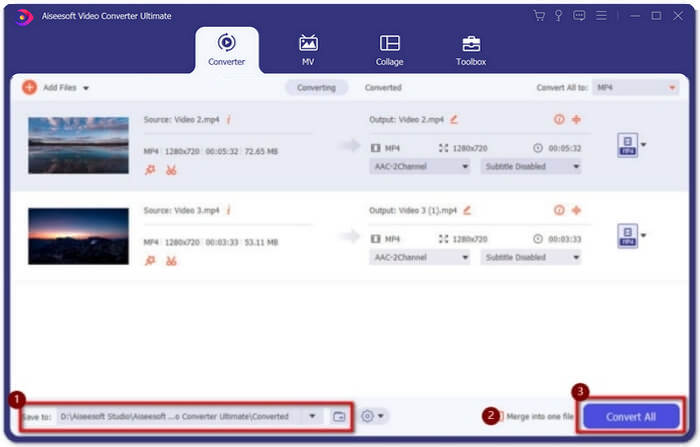
1. lépés: Töltsd le és indítsd el a Video Converter Ultimate programot. Kattints az Add Files gombra az összes egyesíteni kívánt MXF fájl kiválasztásához. A fájlokat egyszerűen be is húzhatod a szoftverbe. Ha módosítani szeretnéd a sorrendet, csak húzd a videókat a megfelelő helyre, majd engedd el őket.

2. lépés: Ezt követően kattints a Convert All to gombra, és keresd meg az MXF format opciót a videósorban. Válaszd a 4K vagy a Same as Source lehetőséget az eredeti, magas minőség megőrzéséhez. Emellett igény szerint fel is skálázhatod a videó felbontását.

3. lépés: A kívánt mentési útvonal kiválasztása után pipáld be a Merge into one file jelölőnégyzetet, majd kattints a Convert All gombra az MXF fájlok egyesítéséhez. Miután egyesítetted a videókat, elmentheted a fájlokat a számítógépedre, vagy megoszthatod őket közösségi média oldalakon.
3. rész: GYIK az MXF videofájlok egyesítéséhez
1. Mi az MXF?
Az MXF az Anyagcsere Formátum rövidítése, amely professzionális audio és video média formátum. A professzionális kamerák által 4K módban készített videók mindig MXF formátumban vannak, ezért gyakran használják a filmek és a televízióipar videók gyártására és szerkesztésére.
2. Ha egyesíteni szeretném az MXF videókat a YouTube-hoz, melyik formátumot válasszam?
Az MXF túl nagy a YouTube számára, inkább válassza az MXF fájlok MP4-be való egyesítését, hogy kis méret mellett viszonylag jó minőségű maradjon. Sőt, a legtöbb eszköz és lejátszó támogatja az MP4 videók lejátszását.
3. Lejátszhatok MXF videofájlokat a QuickTime lejátszóval?
Igen, lehetséges. Bár ez egy kevésbé elterjedt formátum, néhány médialejátszó támogatja az MXF videók lejátszását, például a QuickTime Macen és a Zoom Player Windowson. Ha nem tudod lejátszani az MXF videókat, megpróbálhatod konvertálni az MXF fájlokat valamilyen általános formátumba, például MP4 vagy AVI formátumba.
Következtetés
A professzionális kamerák által készített MXF videofájlok egyesítéséhez megtalálja a cikkben a leggyakrabban használt MXF asztalosokat. Ha csak ezeket az egyesített videókat szeretné feltölteni a YouTube-ra, akkor az ingyenes online asztalos használata a legjobb választás, mert ez segíthet az MXF fájlok MP4-be történő egyesítésében, kisebb méretben. Ha azonban professzionális filmet vagy televíziót szeretne készíteni, akkor az eredeti 4K minőség megőrzése érdekében válassza a Video Converter ultimate lehetőséget.
-
 6 legjobb AVI-fúzió: Hogyan lehet csatlakozni az AVI videofájlokhoz Windows és Mac rendszeren
 Ha DVD-hez szeretne csatlakozni az AVI videókhoz, akkor a cikkből megismerheti a legjobb 6 AVI-csatlakozó jellemzőit, beleértve az ingyenes online eszközöket, valamint az asztali programokat.
-
 Hogyan tömörítsük az MXF-et a Premiere Pro és az ingyenes online szolgáltatásokkal
 Hogyan tömörítsük az MXF-et kisebb fájlmérettel? Hogyan tömörítsük az MXF fájlokat az Adobe Premiere Pro programban? Ez a bejegyzés kétféle módon osztja meg az MXF fájlokat.
-
 Hogyan lehet ingyenesen csatlakozni az M2TS fájlokhoz
 Szabadon akarja egyesíteni a kamerákkal rögzített M2TS / MTS fájlokat? Ez a bejegyzés megosztja hatékony módon, hogyan lehet 2 M2TS fájlt újrakódolás nélkül egyesíteni.
