


 Video Converter Ultimate
 Screen Recorder
 Videó javítás
A legmegbízhatóbb MP4-metaadat-szerkesztő az MP4-metaadatok egyszerű hozzáadásához, szerkesztéséhez és eltávolításához
Az MP4-címkék segítségével a fájlokat a metaadatok szerinti rendezéssel könnyebben rendszerezheti és kezelheti. Emiatt sok felhasználó keres egy tökéletes metaadat‑szerkesztőt, amellyel ezt a feladatot egyszerűen elvégezheti. Szerencsére ma összegyűjtöttük a piacon elérhető legjobb címkeszerkesztőket, amelyeket MP4‑fájljaihoz használhat. Az alapos kutatásunknak köszönhetően nézzük meg, melyik MP4 metaadat‑szerkesztőt érdemes használnia a fájlok megfelelő rendszerezéséhez.

1. rész. 4 legjobb ingyenes MP4 címkeszerkesztő az interneten és offline
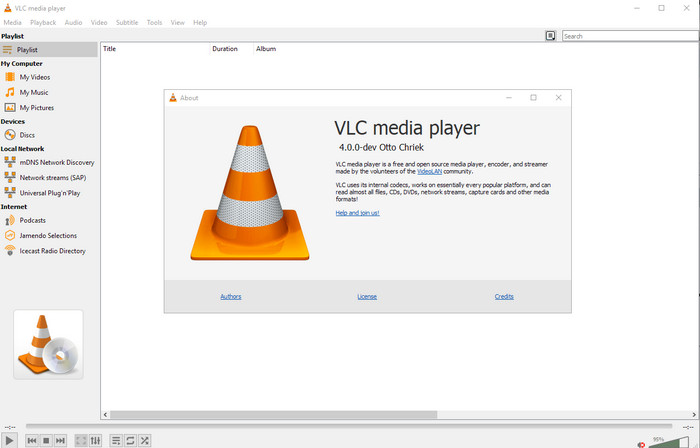
VLC Media Player
Elérhető: Windows, Mac és Linux rendszeren
Elsőként a listánkon a legjobb médialejátszó szerepel, de ha ingyenes mp4 metaadat‑szerkesztőt szeretne, erre szüksége lehet. A VLC Media Player ingyenes lehetőséget kínál az MP4‑fájlokhoz tartozó címkék szerkesztésére vagy eltávolítására. Ezzel az eszközzel könnyedén módosíthatja a fájl metaadatait, például a címet, a szerzői jogi információkat, a műfajt, az előadót, a dátumot, az időt stb. Bár sok felhasználó szerint itt egyszerű a metaadatok szerkesztése, néhányan ezzel ellentétes véleményt fogalmaztak meg. Ők zavarónak és kevésbé hatékonynak találják más címkeszerkesztőkhöz képest. Ennek ellenére, ha egy biztonságos, sokak által bizonyított eszközt szeretne letölteni, érdemes kipróbálnia ezt a programot.
Amvidia Címkeszerkesztő
Elérhető: Mac rendszeren
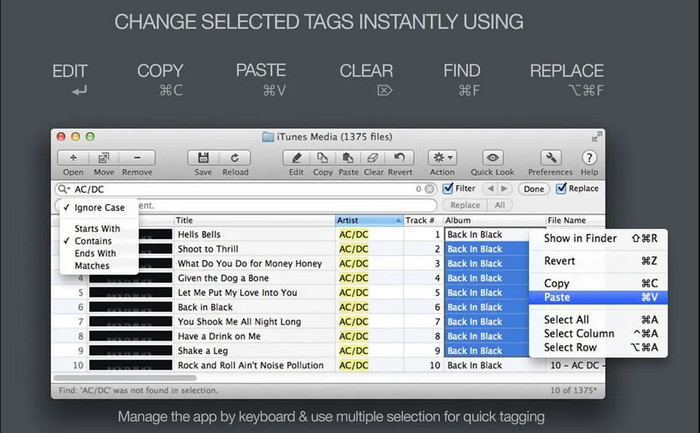
Egy másik MP4 metaadat‑szerkesztő Macre az Amvidia Tag Editor. Ha metaadatokat, borítóképet, iTunes‑címkéket szeretne hozzáadni, vagy meg akarja változtatni a fájl nevét, mindezt elvégezheti vele; ha kötegelt címkézésre van szüksége, ez az eszköz ebben is segít. Emellett ez az ingyenesen letölthető szoftver jelentős számú médiaformátumot támogat feltöltésre, de előbb le kell töltenie a programot. A részletes funkciók miatt a kezdőknek időbe telhet a használat elsajátítása, mert sok lépést kell megtenni a metaadatok hozzáadása előtt. A felülete is elavult, akárcsak a VLC‑é.
TigoTago
Elérhető: Windows rendszeren
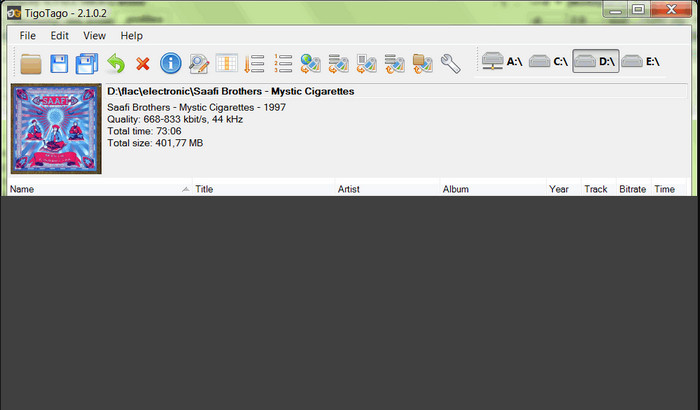
A TigoTago egy másik MP4 metaadat‑címkéző, amelyet Windows alatt ingyen használhat. Ha az MP4‑fájl egyes adatait vagy címkéit szeretné szerkeszteni, töltse le az eszközt, és módosítsa az MP4‑címkéket könnyedén, egyesével. Ezzel az eszközzel kitöltheti a fájl alapvető címkéit, például a címet, albumot, sávokat és előadót, de hozzáadhat fejlettebb címkéket is, mint például dalszöveg, megjegyzések stb. Ha összehasonlítjuk ezt az eszközt a VLC‑vel, azt mondhatjuk, hogy ez jobb, mert a címkeszerkesztést helyezi előtérbe. Bár a médialejátszónál többet nyújt, még mindig ráfér a fejlesztés, beleértve a grafikus felületét és egyéb funkcióit.
InstantD3 – Ingyenes online ID3 címkeszerkesztő
Elérhető: Weben
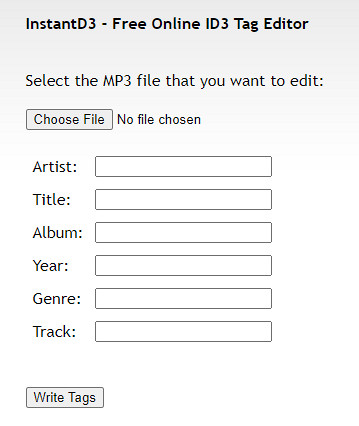
Ha nem szeretne szoftvert letölteni, elérheti ezt az online MP4 videó címkeszerkesztőt, az InstantD3 - Ingyenes online ID3 címkeszerkesztőt. Bár az eszköz elérhető az interneten, nem tud online keresni a metaadatok között, hogy automatikusan alkalmazza a szükséges címkéket az MP4-re. Az eszköz intuitív kezelőfelületet kínál, amely lehetővé teszi a felhasználók számára, hogy egyszerűen címkéket adhassanak hozzá hangfájljaikhoz. Mivel az eszköz ingyenes, hirdetések jelennek meg a webhelyen, de figyelmeztetnünk kell, hogy a webhelyen található hirdetések nem megfelelőek 18 éven aluliak számára. Ezenkívül saját felelősségére érheti el az eszközt; miután elérte az eszköz webhelyét, internetkapcsolata nincs biztonságosan.
2. rész. A legjobb választás videoszerkesztő metaadatok hozzáadásához, szerkesztéséhez és eltávolításához Windows és Mac rendszeren
Elérhető: Windows, Mac és Linux rendszeren
A fent említett MP4 metaadat‑szerkesztők kiválóak, de a FVC Video Converter Ultimate az a nagy teljesítményű metaadat‑szerkesztő, amelyre valóban szüksége lehet a metaadatok szerkesztéséhez vagy eltávolításához. Ez az eszköz a legjobb, mégis könnyen használható szerkesztőfunkciókat kínálja, miközben professzionális eredményt ad. Ellentétben a fentiekben említett eszközökkel, amelyek csak korlátozott számú médiaformátumot támogatnak, ezzel a programmal MP4, MOV, MKV, FLV, AVI és további több mint 1000 formátumot tölthet fel, és gyorsan módosíthatja mindezek metaadatait. Nem lenyűgöző, mire képes ez az eszköz? Ha érdekli ez a remek program, könnyen követheti a lépésről lépésre szóló útmutatónkat, hogy szerkessze, hozzáadja vagy eltávolítsa az MP4‑fájlok címkéit.
1. lépés. Először nyomja meg a letöltés gombot, hogy letöltse az MP4 címkeszerkesztőt Macre vagy Windowsra. A fájlra kattintás után kövesse a telepítési folyamatot, majd nyissa meg a programot.
Ingyenes letöltés Windows 7 vagy újabb rendszerre Biztonságos letöltés
Ingyenes letöltés macOS 10.7 vagy újabb rendszerre Biztonságos letöltés
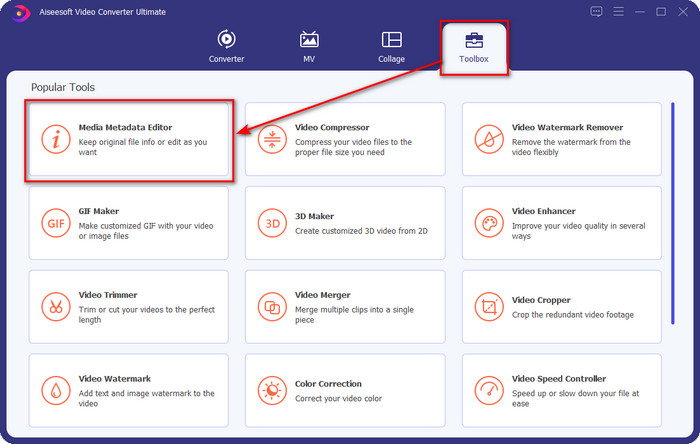
2. lépés. Miután megnyitotta a szerkesztőt, válassza a három szekció közül a Toolbox (Eszköztár) menüpontot, majd alatta kattintson a Media Metadata Editor (Média metaadat‑szerkesztő) lehetőségre.
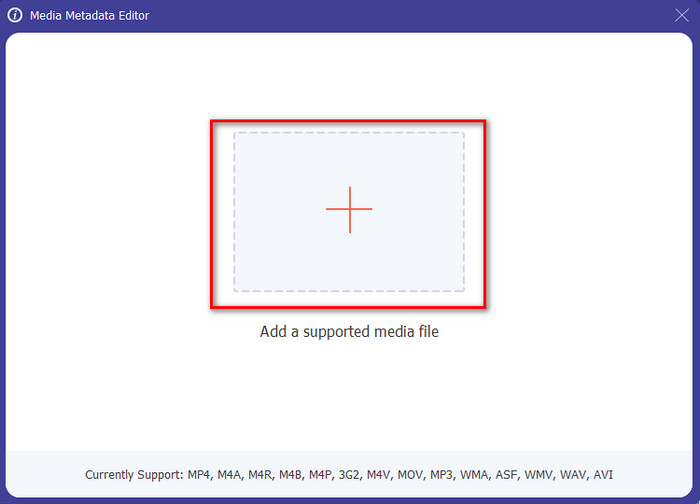
3. lépés. Az MP4‑fájl feltöltéséhez kattintson a + gombra, keresse meg a megjelenő mappában az .mp4 fájlt, majd a sikeres beillesztéshez nyomja meg az Open (Megnyitás) gombot.
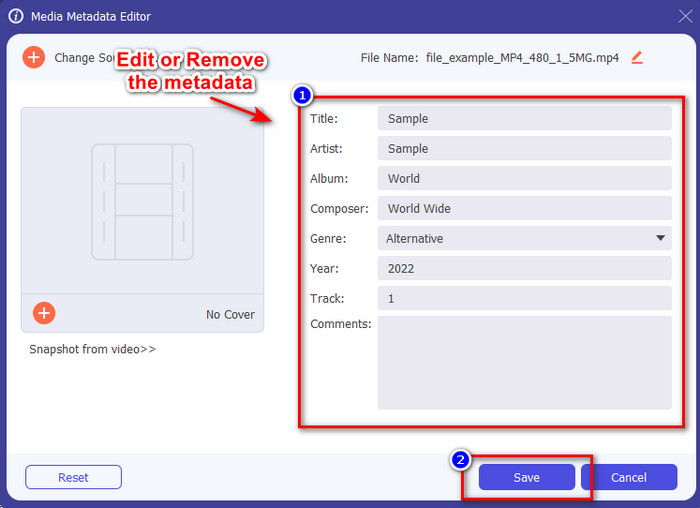
4. lépés. Adja hozzá, távolítsa el vagy szerkessze az információkat a képernyőn megjelenő szövegmezőben, és töltse ki azokat igényei szerint. Az MP4‑címkén végzett módosítások mentéséhez kattintson a Save (Mentés) gombra. Ha a végső szerkesztőt választja, könnyen beláthatja, hogy ez gyerekjáték.
Összefüggő:
Legjobb hangoskönyv címkeszerkesztő
3. rész. GYIK az MP4 Tag Editorről
Hogyan lehet ellenőrizni az MP4 metaadatokat Windows rendszeren?
Ha ellenőrizni szeretné MP4-fájlja metaadatait, kövesse az alábbi lépéseket. Először keresse meg az .mp4 fájlt, koppintson az egér jobb gombjával, lépjen a Tulajdonságok elemre, végül kattintson a Részletek elemre. Ebben a listában minden információ, amire szüksége lesz a metaadataival kapcsolatban. Ha tehát kívánsága szerint szeretné szerkeszteni őket, válassza ki a fenti eszközt.
Hol tudok MP4 fájlokat nézni?
A legtöbb médialejátszó támogatja az MP4‑fájlokat, mivel ez a szabványos videoformátum. De a kérdés az, hol nézhet nagy felbontású MP4 videókat? Ebben az esetben kattintson erre a linkre. Minden szükséges információt megtalál ebben a cikkben.
Hogyan válasszuk ki a legjobb MP4 címkeszerkesztőt?
Néhány dolgot emlékeznie kell, mielőtt kiválasztja a használni kívánt MP4 metaadat-szerkesztőt; ha nem tudja, hogy mik ezek, számíthat ezekre a szabványokra. Először is győződjön meg arról, hogy a metaadat-szerkesztő támogatja az Ön által használt formátumot; nem minden szerkesztő támogatja a széles formátumtartományt. Hiábavaló lenne olyan metaadat-szerkesztő használata, amely nem támogatja az Ön formátumát. Másodszor, győződjön meg arról, hogy az eszköz könnyen használható; ha még nem szerkeszti a metaadatokat, győződjön meg arról, hogy a választott eszköz nem túl merev ahhoz, hogy megtanulja. Végül győződjön meg arról, hogy biztonságos-e a használata; ha letölthető vagy online, akkor tudnia kell, hogy biztonságos-e a használata. Győződjön meg arról, hogy a szerkesztő használata előtt be kell tartania ezeket az egyszerű szabványokat, hogy csak a legjobbat használja.
Következtetés
Az ebben a cikkben bemutatott MP4 metaadat‑szerkesztők segítségével gyorsan szerkesztheti, hozzáadhatja vagy eltávolíthatja az MP4‑fájlok metaadatait. Az eszközökről írt részletes értékelések alapján most már összehasonlíthatjuk őket, és láthatjuk, melyik felel meg leginkább az MP4‑címkék szerkesztésével kapcsolatos igényeinknek. Ha még mindig nem döntötte el, melyiket használja, felkínáljuk önnek a lista legjobbját: a FVC Video Converter Ultimate programot. Ez a fantasztikus eszköz biztosan megfelel az igényeinek; megszerezni azonban csak úgy tudja, ha letölti. Tehát kattintson a letöltés gombra, kövesse az általunk megadott lépéseket, és élvezze a címkék szerkesztését megerőltetés nélkül.
-
 5 legegyszerűbb módja a metaadatok eltávolításának bármely médiafájlból
 Hogyan lehet eltávolítani a metaadatokat? Nehéz megcsinálni? Kell vásárolnom vagy használnom kell egy ingyenes eszközt a címkék eltávolításához? Mindezekre a kérdésekre választ kapunk ebben a cikkben.
-
 Az 5 legjobb online és offline metaadat-kivonó [2025]
 A piacon többféle metaadat-kivonó található, de ma már csak az öt legtöbbet választott címkekivonót választjuk ki a közönség szerint.
-
 Az 5 legjobb videó metaadat-szerkesztő 2025-ben [Elfogulatlan felülvizsgálat]
 Meg szeretné tekinteni a videó metaadatait? Ha igen, olvassa el az alábbi részleteket, hogy teljes mértékben megértse a témát, és megtudja, melyik eszköz illik a legjobban az Ön számára.
