


 Video Converter Ultimate
 Screen Recorder
 Videó javítás
 Biztonságos letöltés
A 4 legjobb módszer a hangulatjelek eltávolítására egy videóból
Szórakoztató dolog emojikat használni, amikor üzenetet küldünk valakinek. De ha a kedvenc filmjeinkről vagy videóinkról van szó, akkor elmondhatjuk, hogy kifejezetten zavaró nézni őket, amikor emoji jelenik meg rajtuk. Ebben az esetben megmutatjuk az egyik leghatékonyabb módszert arra, hogyan tüntetheti el ezeket az idegesítő elemeket a videóiból. Mire vár még? Olvassuk el együtt ezt a cikket, és ismerjük meg a legegyszerűbb és leggyorsabb módszereket arra, hogy hogyan távolítsunk el emojikat egy videóról.

1. rész: Hangulatjelek eltávolítása egy videóból a legjobb eszköz segítségével
A legjobb módja annak, hogy emojikat távolítson el egy videóból, a Video Converter Ultimate használata. Ez a nagyszerű szoftver képes eltávolítani a videóiból a fölösleges elemeket, például emojikat vagy hangulatjeleket, szöveget, vízjeleket, logókat és még sok mást. Emellett jól érthető felülettel és egyszerű lépésekkel rendelkezik, így bárki számára kényelmes a használata. Ez az eszköz kétféle módot kínál az emojik eltávolítására a videóból: a Video Watermark Remover funkciót és a Video Cropper Tool eszközt. Továbbá különféle videoformátumokat támogat, például MP4, M4V, MOV, SWF, FLV, 3GP, MTS és egyebek. Akár Windows-, akár Mac-felhasználó, igénybe veheti ezt az eszközt, mivel a Video Converter Ultimate mindkét rendszeren elérhető.
Ezenkívül ezzel az eszközzel GIF-et hozhat létre képéből és videójából, mivel GIF-készítő funkciót kínál. Ezenkívül, ha hangot szeretne szinkronizálni a videóból, ez lehetséges ezzel az eszközzel. Audio Sync funkcióval rendelkezik, amely lehetővé teszi a hang beállítását és szinkronizálását a videóval.
Mutatjuk a legjobb módszereket a zavaró hangulatjelek eltávolítására a videóidról a Video Watermark Remover Tool segítségével.
1. lépés: Töltse le a Video Converter Ultimate programot Windowsra vagy Macre. Az alábbi Download gombra kattintva teheti meg. A telepítés befejezése után nyissa meg az alkalmazást.
Ingyenes letöltés Windows 7 vagy újabb rendszerre Biztonságos letöltés
Ingyenes letöltés macOS 10.7 vagy újabb rendszerre Biztonságos letöltés
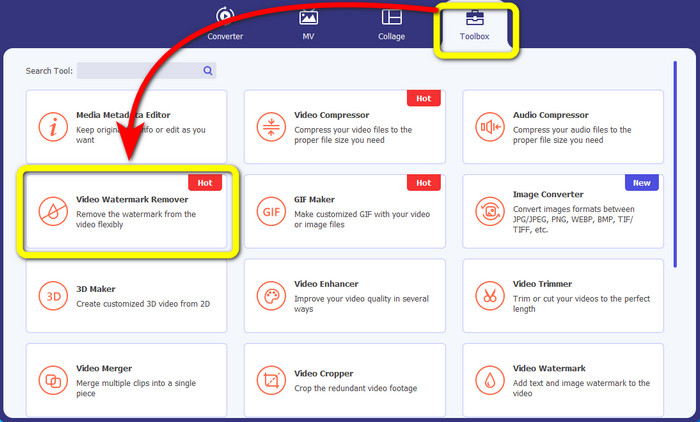
2. lépés: Amikor már megjelenik a felület, a felső részen négy lehetőséget lát. Válassza a Toolbox panelt, majd kattintson a Video Watermark Remover opcióra.
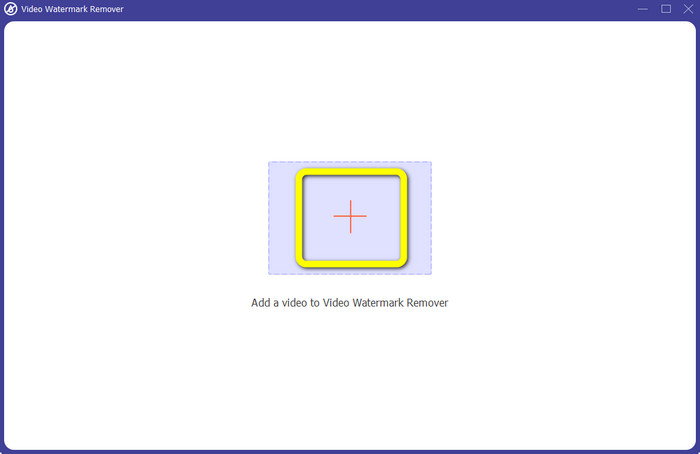
3. lépés: Ezután kattintson a + ikonra, és adja hozzá azt a videót, amelyről el szeretné távolítani az emojikat.
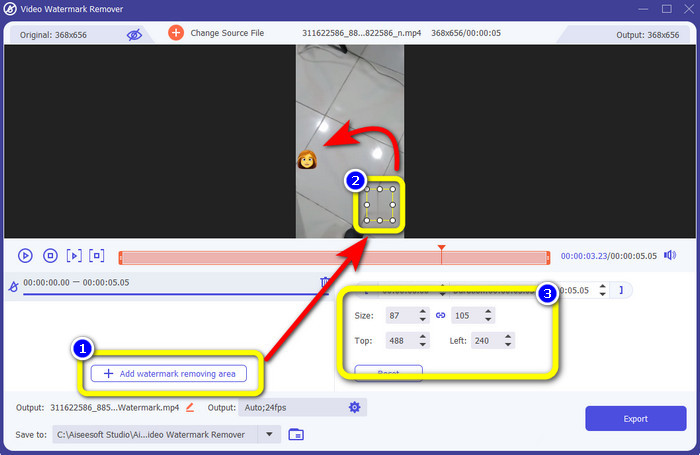
4. lépés: Miután hozzáadta a videót, kattintson az Add Watermark Removing Area gombra. Egy kis doboz jelenik meg a videón; ezzel fedje le az emojit. A harmadik mezőben a Size, Top és Left opciókkal mozgathatja a dobozt a képernyőn.
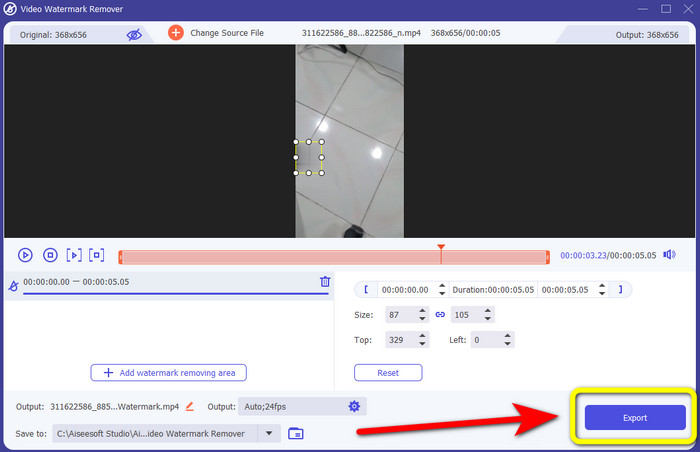
5. lépés: Ha már lefedte az emojit, nyomja meg az Export gombot. Várja meg az eltávolítási folyamatot, majd mentse el a kész videót.
2. rész: Online módszerek a hangulatjelek eltávolítására egy videóból
A Media.io használatával
Ha online emojieltávolító érdekli, kipróbálhatja a Media.io oldalt. Ez az online eszköz képes eltávolítani a zavaró elemeket a videókból, például emojikat, vízjeleket, logókat és egyebeket. Nem szükséges előzetes tapasztalat, mivel csak néhány lépésből áll az emojik eltüntetése a videóról. Ezenfelül ez az alkalmazás több platformon is használható, vagyis elérhető iPhone-on, Androidon, iPaden, Windowson és Macen is. Képes a legelterjedtebb videofájl-formátumok kezelésére, többek között WMV, MOV, MP4, FLV, 3GP, AVI és más formátumokra. A magánszférát is garantálja, mivel a feltöltött videókhoz csak ön fér hozzá.
A Media.io azonban csak korlátozott funkciókat kínál az ingyenes verzió használatakor. Csak legfeljebb 100 Mb méretű fájlt tölthet fel, és az eltávolítási folyamat normális. Az online alkalmazás további funkcióinak használatához meg kell vásárolnia az alap vagy a pro verziót. Kövesse az alábbi lépéseket a hangulatjelek eltávolításához a videóiból.
1. lépés: Látogasson el a Media.io weboldalára. Kattintson a Choose Files gombra, és adja hozzá az emojit tartalmazó videót.
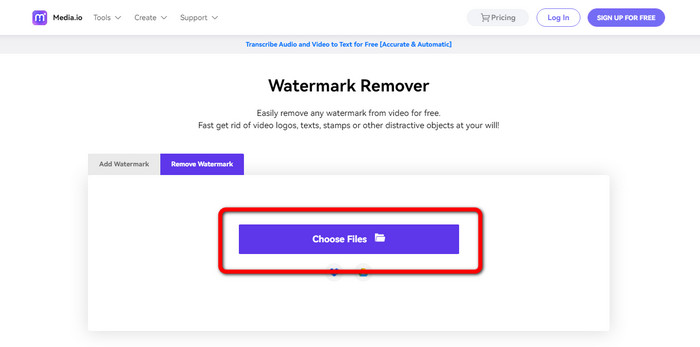
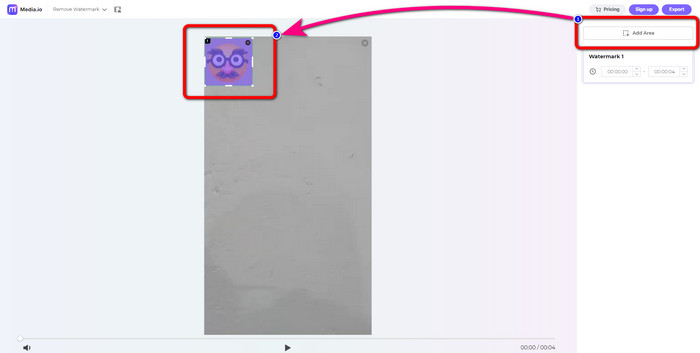
2. lépés: A videó feltöltése után kattintson az Add Area gombra. Megjelenik egy kék doboz. Húzza az emojira, hogy lefedje azt.
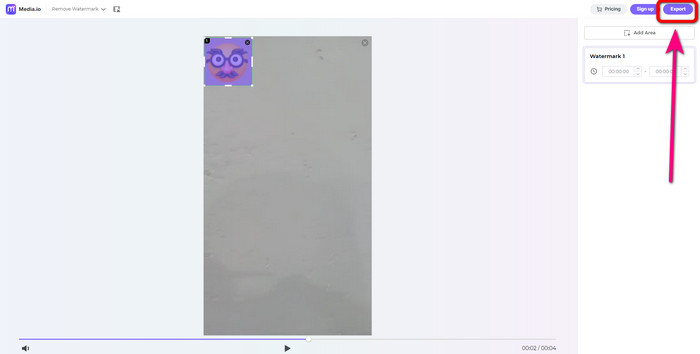
3. lépés: Az utolsó lépésként kattintson az Export gombra, és mentse el a videót emojik nélkül.
123Apps használata
Egy másik online hangulatjel-eltávolító, amelyet használhat, a 123Apps. Ennek az eszköznek az irányításával könnyedén eltávolíthatod a videóidról a zavaró elemeket, például hangulatjeleket, matricákat, logókat, vízjeleket, dátumbélyegzőket és egyebeket. Ezenkívül könnyen használható, mert intuitív kezelőfelülete van, amely kezdők számára is megfelelő. Ezen kívül számos videofájl formátumot támogat, mint például MOV, AVI, MP4, WMV stb. A hangulatjelek és objektumok videóból való eltávolítása mellett a 123Apps videószerkesztésre is használható. Különféle eszközöket használhat, például videóvágót, forgót, trimmert, hurkolót, egyesítőt és egyebeket.
Ennek azonban vannak korlátai. Csak legfeljebb 500 Mb fájlmérettel tölthet fel. Ha nagyobb fájllal szeretne dolgozni, előfizetést kell vásárolnia. Végül, vannak esetek, amikor ez az eszköz nem működik megfelelően az internetkapcsolat miatt. Ha el szeretné távolítani a hangulatjeleket a videóból, kövesse az alábbi egyszerű lépéseket.
1. lépés: Lépjen a 123APPS weboldalára, és kattintson az Open File gombra, hogy feltöltse az emojit tartalmazó videót.
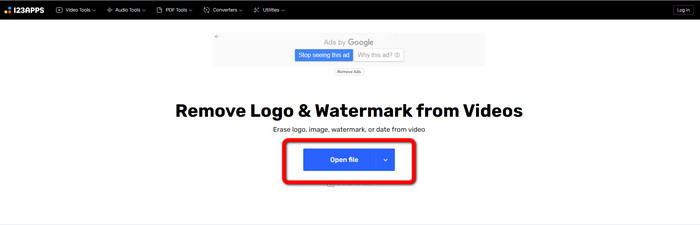
2. lépés: Egérrel jelölje ki azt a területet, amelyet el szeretne távolítani.
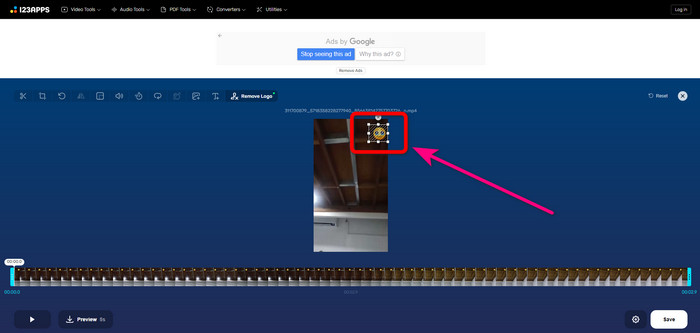
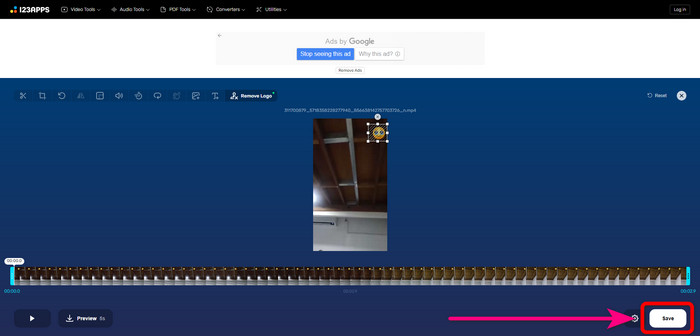
3. lépés: Végül nyomja meg a Save gombot. Várja meg az eltávolítási folyamatot, majd mentse el a videót az eszközére.
HitPaw Watermark Remover Online
Az egyik hasznos eszköz az emojik videókból való eltávolítására a HitPaw Watermark Remover Online. Ez letölthető és online verzióban is létezik, így eldöntheti, hogy böngészőben vagy asztali gépen szeretné-e használni. Segítségével másodpercek alatt eltávolíthat bármit, például vízjeleket a videóról. Korlátozás nélkül használhatja. Ezenkívül nem igényel szakértelmet, mivel mindössze három alapvető lépésből áll az idegesítő objektumok eltávolítása a videókból.
Ezenkívül magas szintű biztonsággal rendelkezik, ami azt jelenti, hogy fájlja biztonságban van, és csak Ön szerkesztheti videóit. Ennek az online eszköznek a használatakor azonban figyelembe kell vennie az internetkapcsolatot. Nem fog jól működni, ha lassú az internet. Ezenkívül néha nem kompatibilis más eszközökkel, például Androidokkal. Kövesse az alábbi lépéseket a hangulatjelek eltávolításához a videókból.
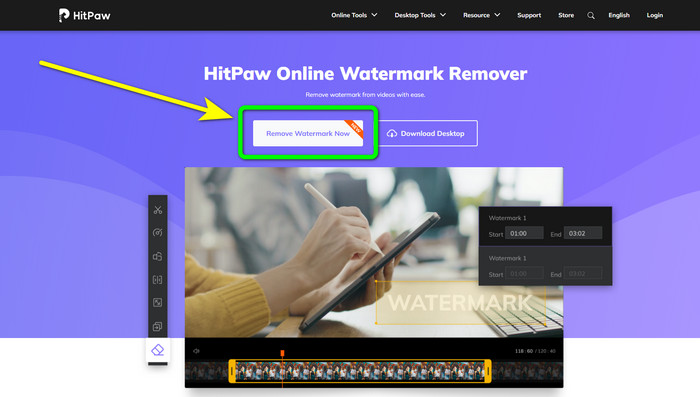
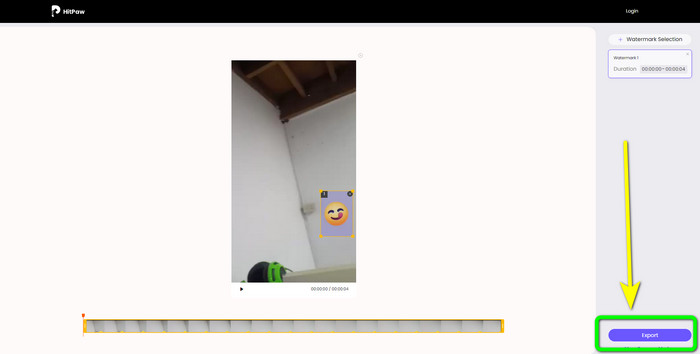
1. lépés: Lépjen a HitPaw Online Watermark Remover weboldalára. Kattintson a Remove Watermark Now > Choose File gombra a videó beszúrásához.
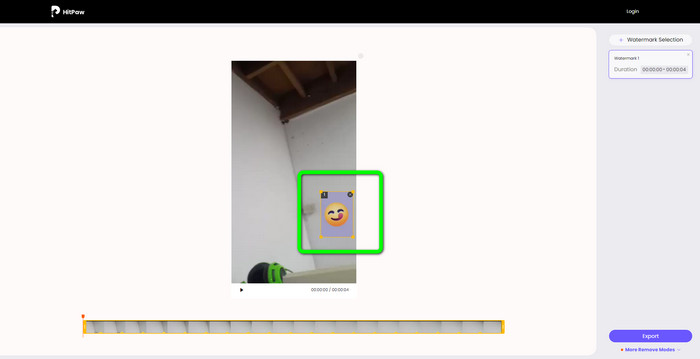
2. lépés: Miután beillesztette a videót, már használhatja a kék dobozt a videón. Húzza ezt a dobozt az emojira, hogy lefedje.
3. lépés: Végül kattintson az Export gombra, és mentse el a videót.
3. rész: GYIK a hangulatjelek videóból való eltávolításával kapcsolatban
1. Eltávolíthatom a hangulatjeleket a videóimból Android és iPhone használatával?
Igen tudsz. Használhatja a Watermark Remover, Logo Eraser, PicLab, Photo Eraser és egyebeket. Ezek jó alkalmazások, amelyek segítségével eltávolíthatod a felesleges elemeket a videóidból.
2. Hogyan távolíthatok el egy objektumot a videómból?
Használhatja a Video Converter Ultimate alkalmazást. Ez egy hasznos eszköz az objektumok eltávolítására a videóidról.
3. Miért távolítsam el a hangulatjeleket a videóimból?
Az egyszerű ok az, hogy élvezze kedvenc filmjeit vagy videóit. Nem túl kellemes látni ezeket a felesleges elemeket, például a hangulatjeleket. Ezért jobb, ha eltávolítod őket a videóidból.
Következtetés
Ez a négy legjobb módszer az emojik eltávolítására videókból. Ha pedig gondtalan megoldást keres, próbálja ki a Video Converter Ultimate programot. Ez az alkalmazás egyszerűen segít megszabadulni a zavaró elemekről a videókon.
-
 A logó eltávolításának leggyorsabb módja a videóról az Adobe Premiere Pro programban
 Próbálja ki ezeket az egyszerű és leggyorsabb módszereket a logók eltávolítására a videókról az Adobe Premiere Pro programban. Ez a cikk bemutatja a legjobb módszereket, amelyekkel kipróbálhatja eszköze használatát
-
 Hogyan távolítsuk el a logót a videóról a Windows Movie Maker segítségével
 Ha többet szeretne megtudni arról, hogyan távolíthatja el a logókat a videókról a Windows Movie Maker használatával és más alternatív módszerekkel, olvassa el ezt a cikket. Egyszerű módszereink vannak az Ön számára.
-
 Kiváló módszerek a matrica eltávolítására a fényképekről és videókról
 Szeretné könnyedén eltávolítani a matricákat a videókról és fényképekről? Íme a hatékony módszerek, beleértve a legmegbízhatóbb és legegyszerűbb módszereket, amelyeket kipróbálhat.
