


 Video Converter Ultimate
 Screen Recorder
 Videó javítás
 Biztonságos letöltés
Kifogástalan módszerek az iSkysoft logó eltávolítására a videóról
Az iSkysoft egy kiváló alkalmazás számos remek funkcióval, amelyek kiemelik a többi pályázó közül. Egyszerű alkalmazás, amellyel a videóformátumot más formátumba konvertálhatja, és néhány alapvető videószerkesztést is végezhet. A szoftver legszomorúbb része azonban az, hogy a program használata után egy nagy iSkysoft vízjel kerül a videóira. Egy nagy vízjel/logó a videón egyáltalán nem esztétikus. Szerencsére léteznek megbízható alkalmazások, amelyekkel eltávolíthatja az olyan zavaró elemeket, mint az iSkysoft logó/vízjel. El kell olvasnia ezt a bejegyzést, ha szeretné megismerni a legjobb módszereket az iSkysoft logó eltávolítására a videójáról.

1. rész: Távolítsa el az iSkysoft logót az asztali videóból
Az iSkysoft logó a képernyőn valóban idegesítő, különösen, ha a kedvenc videóit nézi. De többé nem kell aggódnia. Megszabadulhat ettől a logótól a Video Converter Ultimate segítségével. Ez a megbízható szoftver két egyszerű módon is segíthet eltávolítani az iSkysoft logót a videóiból: a Video Watermark Remover eszközzel és a Video Cropper eszközzel. Ezekkel az eszközökkel könnyedén eltávolíthatja az iSkysoft logót a videójáról. Ha az iSkysoft logó a videó sarkában van, ajánlott a Video Cropper eszközt használni. Ha viszont a logó a videó közepén helyezkedik el, akkor a Video Watermark Remover eszközt használhatja. Így a kedvenc filmjeit vagy videóit anélkül nézheti, hogy a logó bosszantaná.
Ezen túlmenően a Video Converter Ultimate a vízjelek eltávolítása mellett több funkcióval is rendelkezik. Van benne videójavító, videó egyesítő, vágó, trimmer, forgató, konverter stb. Ezenkívül ennek az alkalmazásnak az egyik fő funkciója a különféle videofájlformátumok konvertálása. A nem professzionális felhasználók is használhatják ezt az alkalmazást, mert egyszerű felülettel rendelkezik. Ha szeretné megtanulni, hogyan távolíthatja el az iSkysoft logót a videójáról, bemutatjuk az alkalmazás két egyszerű módját.
A Video Watermark Remover használata
1. lépés: Először le kell töltenie a Video Converter Ultimate programot az asztali számítógépére, hogy használni tudja ezt a remek szoftvert. Letöltés után kövesse a telepítési folyamatot, majd indítsa el az alkalmazást.
Ingyenes letöltés Windows 7 vagy újabb rendszerre Biztonságos letöltés
Ingyenes letöltés macOS 10.7 vagy újabb rendszerre Biztonságos letöltés
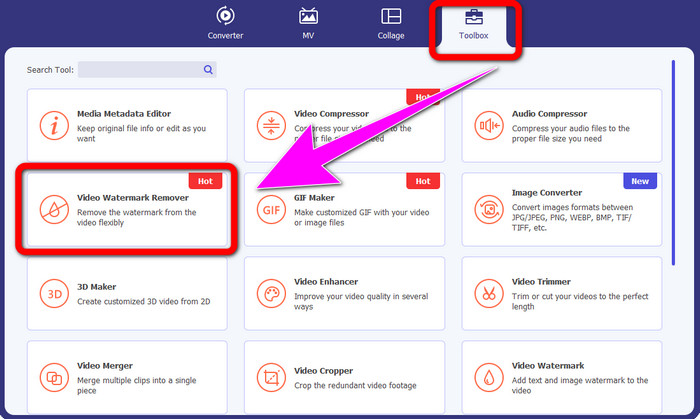
2. lépés: Amint elindította a szoftvert, lépjen a Toolbox panelre, és válassza a Video Watermark Remover eszközt. Számítson rá, hogy egy újabb felület jelenik meg a képernyőn.
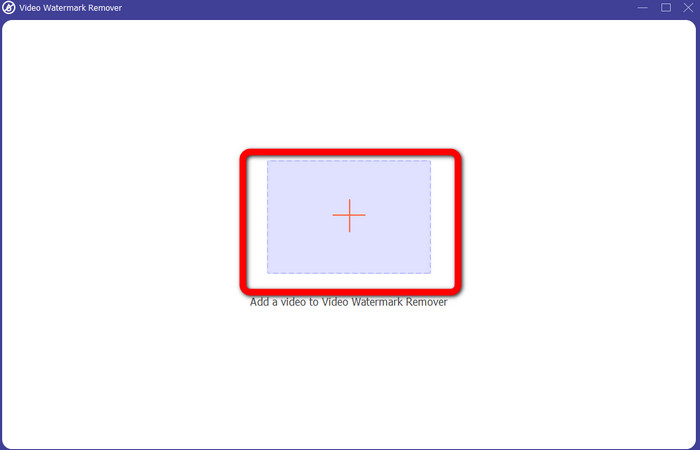
3. lépés: Amikor már látja az új felületet, kattintson a plusz ikonra, és csatolja azt a videót, amelyről el szeretné távolítani az iSkysoft logót.
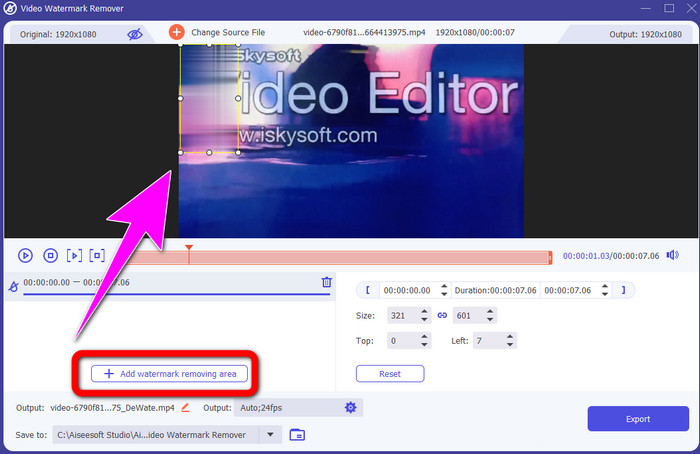
4. lépés: Ezután kattintson az Add Watermark Removing Area gombra. Mozgassa a dobozt a videón, és fedje le vele az iSkysoft logót.
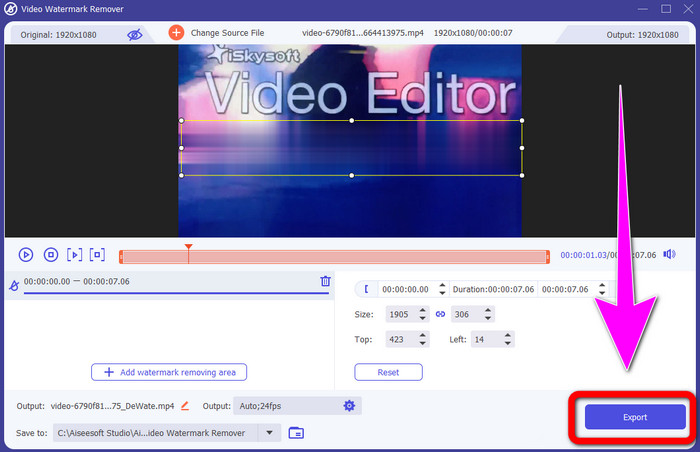
5. lépés: Végül kattintson az Export gombra, hogy elmentse a végleges videót.
A Video Cropper használata
Ebben a részben megmutatjuk, hogyan távolíthatja el az iSkysoft logót a videójáról a Video Cropper eszközzel.
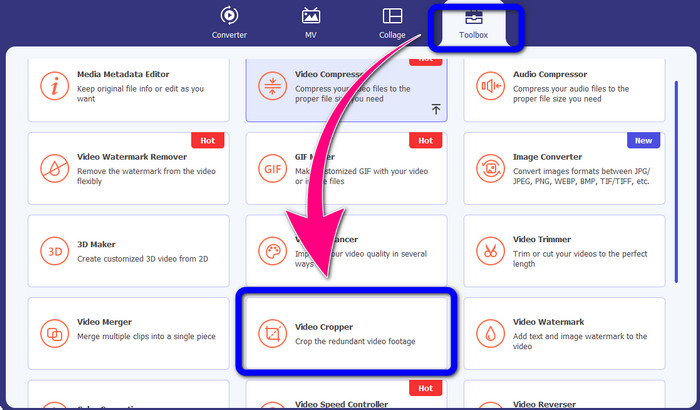
1. lépés: Futtassa az alkalmazást az asztali számítógépén. A Toolbox panel alatt kattintson a Video Cropper eszközre. Akárcsak a fenti eszköznél, számítson rá, hogy egy másik felület fog megjelenni a képernyőn.
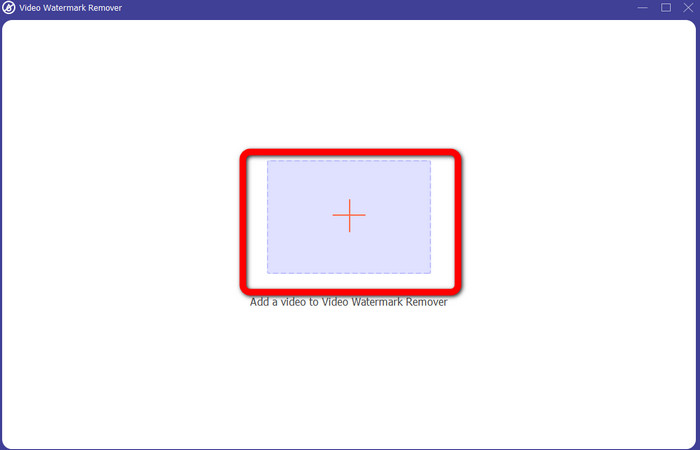
2. lépés: Kattintson a Plus jel gombra, hogy importálja az iSkysoft logót tartalmazó videót.
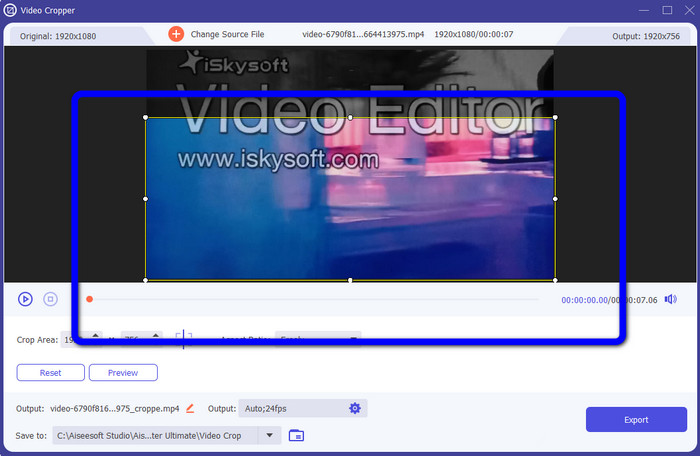
3. lépés: Ebben a részben már levághatja a videót, hogy eltávolítsa róla az iSkysoft logót. Az egérrel mozgassa a videó széleit.
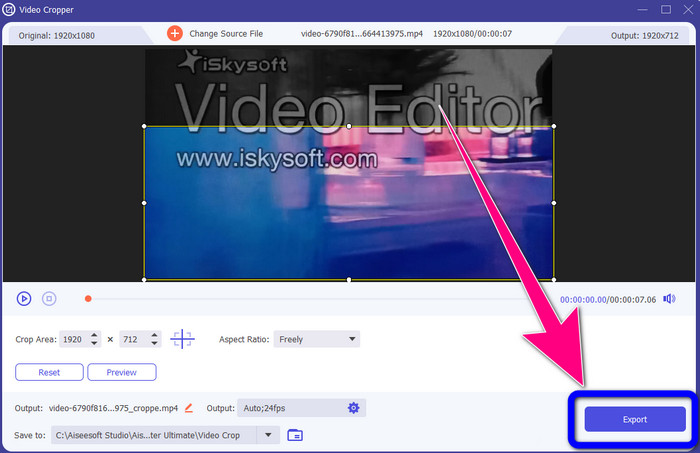
4. lépés: Az utolsó lépésként kattintson az Export gombra, és mentse el az elkészült fájlt az asztalára.
2. rész: Az iSkysoft logó eltávolítása a Video Online-ból
A HitPaw használata
Az iSkysoft logót online is eltávolíthatja. Az egyik legjobb eszköz, amelyet használhat, a HitPaw. Ez az online alkalmazás könnyedén el tudja távolítani a logót a videójáról. Asztali gépen és online is használhatja, ami mindenkinek kényelmes. A HitPaw használata ráadásul biztonságos. Biztosítja, hogy a videókat csak ön szerkeszti és tekinti meg. Emellett nem kell aggódnia a szoftver korlátozásai miatt sem. Nincs korlátja a videóiról eltávolítható logók számának. Nem kell megvásárolnia az alkalmazást, mivel ingyenes. Azonban ha a logót vagy bármilyen
szükségtelen elemeket a videódból, várnod kell még egy kicsit. Ez az alkalmazás lassú eltávolítási eljárással rendelkezik, ami időigényes a felhasználók számára. Ezenkívül az internetkapcsolattól is függ. Jól fog működni, ha gyors kapcsolattal rendelkezik. De ha lassú a kapcsolat, akkor számítson némi késésre. Kövesse az alábbi egyszerű lépéseket az iSkysoft logó eltávolításához a videóiról.
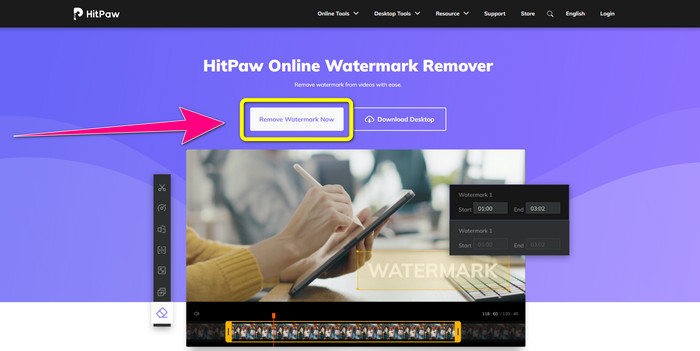
1. lépés: Látogasson el a HitPaw weboldalára. Kattintson a Remove Watermark Now - Choose File gombra, hogy beillessze az iSkysoft logót tartalmazó videót, amelytől meg szeretne szabadulni.
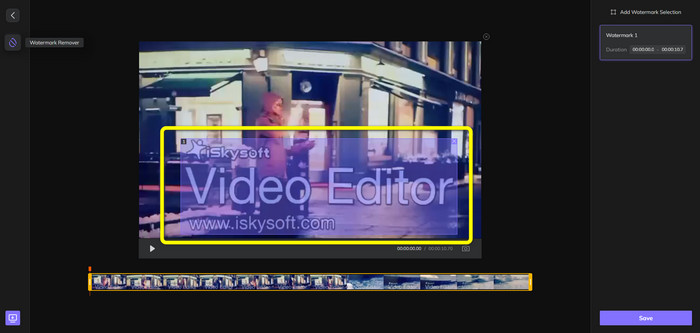
2. lépés: Miután már csatolta a videófájlt, egy kék színű doboz jelenik meg a képernyőn. Használja ezt a dobozt az iSkysoft logó lefedésére. A doboz méretét tetszés szerint módosíthatja.
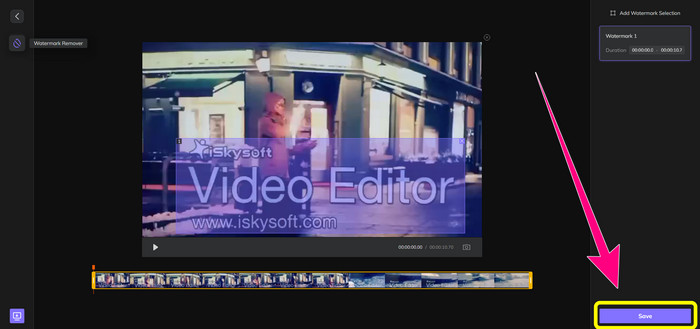
3. lépés: Ha végzett az iSkysoft logó lefedésével a videón, kattintson a Save gombra. Várja meg az eltávolítási folyamatot, majd mentse el a videót.
A Video Watermark Remover Online használata
Egy másik online eszköz, amelyet használhat, a Video Watermark Remover Online. Ezzel az alkalmazással eltávolíthatja az iSkysoft logót a videóiból. Szintén könnyen használható szoftver, amely alkalmas nem profi felhasználók számára is. Ezenkívül minden zavaró elemet eltávolíthat a videóiból anélkül, hogy romlana a minőségük. A díjmentes verzió használatakor azonban korlátozás vonatkozik a logók eltávolítására. Csak 5 videóról távolíthat el logókat vagy vízjeleket. Elő kell fizetnie, ha több videót szeretne feldolgozni a Video Watermark Remover Online segítségével. Emellett nem mentheti a kimenetet más formátumba; csak az eredeti formátumban mentheti el, ami nem túl előnyös. Végül a fájlok feldolgozása lassú. Kövesse az alábbi egyszerű útmutatót az iSkysoft logó eltávolításához a videóiból.
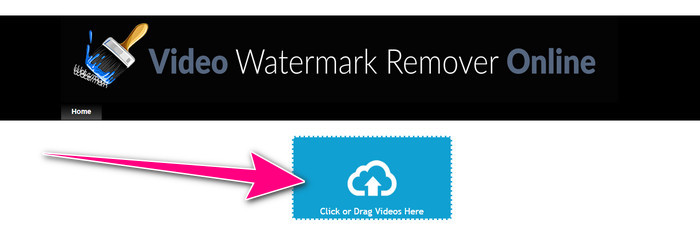
1. lépés: Lépjen a Video Watermark Remover Online weboldalára. Válassza a Click or Drag Videos Here gombot, hogy importálja azt a videófájlt, amelyről el szeretné távolítani az iSkysoft logót.
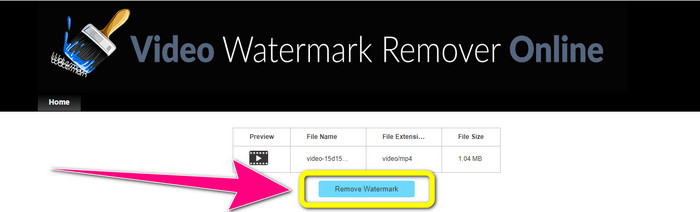
2. lépés: Ezután kattintson a Remove Watermark gombra, és várja meg az eltávolítási folyamatot.
Kapcsolódik:
A leggyorsabb módja a logó eltávolításának videóról Adobe Premiere Pro-ban
Hogyan távolítson el logót egy videóról a Windows Movie Maker használatával
3. rész: GYIK az iSkysoft logó eltávolításával kapcsolatban
El lehet távolítani a logót a képről?
Igen, használhatja az FVC Free Watermark Remover eszközt, hogy egyszerűen és gyorsan eltávolítsa a logót a képéről.
A vízjel eltávolítása illegális?
Az Egyesült Államok Szerzői Jogi Törvényének 1202. szakasza szerint a vízjelek tulajdonos engedélye nélküli eltávolítása illegális.
Hogyan távolíthatom el ingyenesen a logót?
A Video Converter Ultimate ingyenes próbaverziójával ingyenesen eltávolíthatod a logót a videódról.
Következtetés
Ez a cikk kiváló módszereket mutatott be arra, hogyan lehet eltávolítani az iSkysoft logót a videójáról asztali és online eszközök segítségével. Ha azonban egy igazán nagyszerű logóeltávolítót keres, akkor töltse le a Video Converter Ultimate programot. Ez az alkalmazás gyors eltávolítási folyamatot kínál, és minden felhasználó számára könnyen elérhető.
-
 8 kiváló vízjel-eltávolító videó online és offline
 Ha a legjobb ingyenes videó vízjel-eltávolító szoftvert keresi, amelyet Windows, Mac, iPhone és Android telefonokon használhat, ez a cikk neked szól
-
 A legjobb módszerek a harapható vízjel eltávolítására a videóról
 Ez a cikk bemutatja a legmegbízhatóbb és legfantasztikusabb harapható vízjeleltávolítót. Ezek a csodálatos alkalmazások segítenek megoldani ezt a fajta problémát
-
 Könnyen megtanulható eljárások a logó videóról való eltávolítására
 A legjobb és egyszerű videologó-eltávolítót keresi? Akkor ez a cikk jó neked. Használja ki a lehetőséget, és tanulja meg, hogyan távolíthat el logót egy videóból.
