


 Video Converter Ultimate
 Screen Recorder
 Videó javítás
 Biztonságos letöltés
Hogyan távolítsuk el hatékonyan az iStock vízjelet videókon és képeken lépésekkel
Amikor kéznél szeretnél egy jogtiszta vizuális médiafájlt, az iStock weboldalról töltheted le ezeket a fájlokat. A weboldal nem használható ingyen mindenki számára, ami azt jelenti, hogy a képet valódi pénzért kell megvásárolnod. Bár innen ingyen is letöltheted a fájlt, a letöltött képen vízjel lesz. Az alapértelmezett vízjel ráhelyezésével a weboldal azt jelzi, hogy ez a fájl az iStock tulajdona. Nem idegesít a vízjel? Ha egyetértesz ezzel, olvasd végig ezt a blogot, hogy megmutassuk az interneten talált megoldást. Bemutatjuk az elérhető előfizetési csomagokat is, valamint azt is, hogy hogyan lehet eltávolítani az iStock vízjelet az egyes esetekben.

1. rész: Az iStock Watermarkon videók és képek eltávolítása a 3 hasznos módszer segítségével
1. út. Hitel vásárlása az iStock-on
Kezdjük az iStock hitelvásárlásával. Az iStock hitel egy valuta; ez a weboldal elismeri az Ön pénzével megegyező jóváírást. A hitel segítségével bármilyen fájlt vásárolhat bizonyos összeggel. Az iStock képeket vízjel nélkül mentheti, ha hitelt vásárol. Ahhoz, hogy megtudja, hogyan kell ezt megtenni, teljesen elolvashatja az alábbi lépéseket, amelyek segítik a végrehajtást.
1. lépés. Nyisd meg a hivatalos weboldalt, és jelentkezz be a fiókodba. Ha még nincs fiókod, hozz létre egyet, mielőtt megvásárolod a szükséges krediteket.
2. lépés. A weboldalon kattints a Pricing (Árazás) menüpontra, hogy lásd, milyen csomagokat kínál ez az eszköz.
3. lépés. Megjelenik a megvásárolható kreditek listája, válaszd ki, hány kreditet szeretnél, majd kattints a Purchase Credits (Kreditek vásárlása) gombra.
4. lépés. Töltsd ki az itt használt vásárlási és számlázási adatokat a kredit megvásárlásához.
2. út. Távolítsa el az iStock vízjelet a videókról az FVC Video Converter Ultimate használatával
Az iStock vízjel eltávolításához videóról az ultimate vízjel-eltávolítót, a FVC Video Converter Ultimate programot kell használnod. Ez a leggyakrabban választott vízjel-eltávolító, amely erőfeszítés nélkül távolítja el a vízjeleket a videóidról. Ez az eszköz képkockáról képkockára szedi le a vízjelet a videóról, és exportálás után nem hagy hátra nyomot. Tehát ha ezt a szoftvert a számítógépeden szeretnéd használni, biztosak lehetünk abban, hogy pillanatok alatt vízjel nélküli videót kapsz. Szeretnéd használni ezt a szoftvert? Ha igen, akkor folytasd az olvasást, és kövesd az alább leírt lépéseket, hogy eltávolíthasd a vízjelet az iStockról letöltött videóról.
1. lépés. Kattints az alább elhelyezett letöltés gombra, hogy a programot a számítógépedre töltsd. Válaszd ki a megfelelő operációs rendszert, hogy a megfelelő verziót kapd meg. A letöltés után telepítsd és állítsd be az eszközt, majd kattints a Start Now (Indítás most) gombra a szoftver megnyitásához és használatának megkezdéséhez.
Ingyenes letöltés Windows 7 vagy újabb rendszerre Biztonságos letöltés
Ingyenes letöltés macOS 10.7 vagy újabb rendszerre Biztonságos letöltés
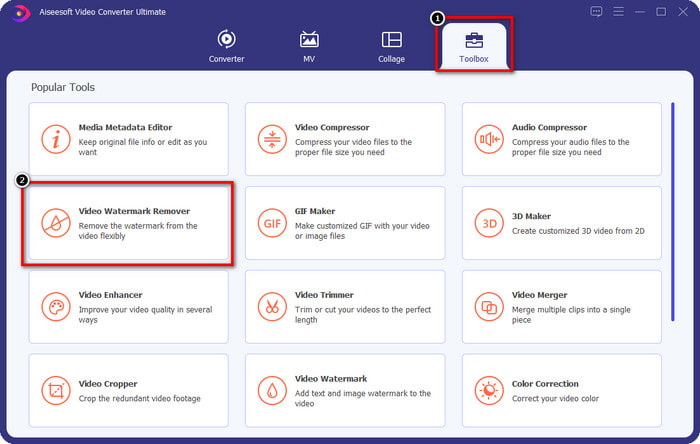
2. lépés. Most, hogy megvan ez az iStock vízjel-eltávolító, lépj a Toolbox (Eszköztár) menüpontra. Keresd meg a Video Watermark Remover (Videó vízjel-eltávolító) opciót, hogy ezt a funkciót használd.
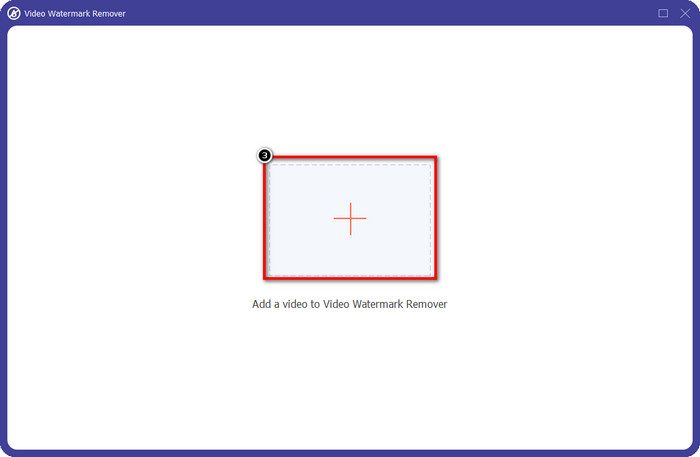
3. lépés. Nyomd meg a + gombot, hogy feltöltsd az iStockról letöltött, vízjeles videófájlt. Keresd meg a videófájlt a képernyőn megjelenő fájlkezelőben, majd kattints az Open (Megnyitás) gombra a feltöltéshez.
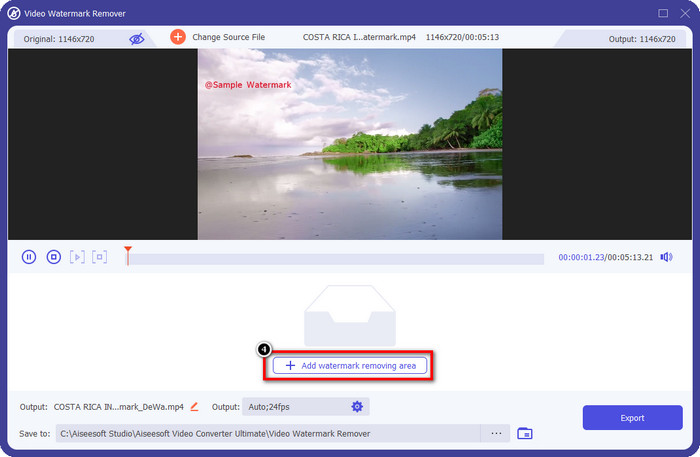
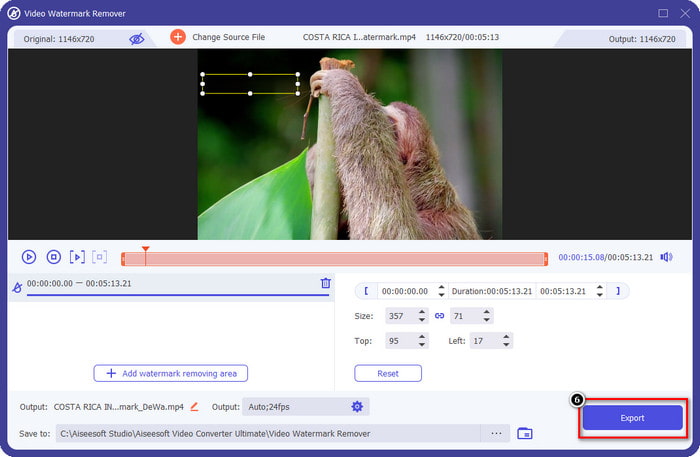
4. lépés. Az új ablakban válaszd az Add Watermark Removing Area (Vízjel-eltávolítási terület hozzáadása) lehetőséget, hogy kijelöld a vízjel helyét a feltöltött videón.
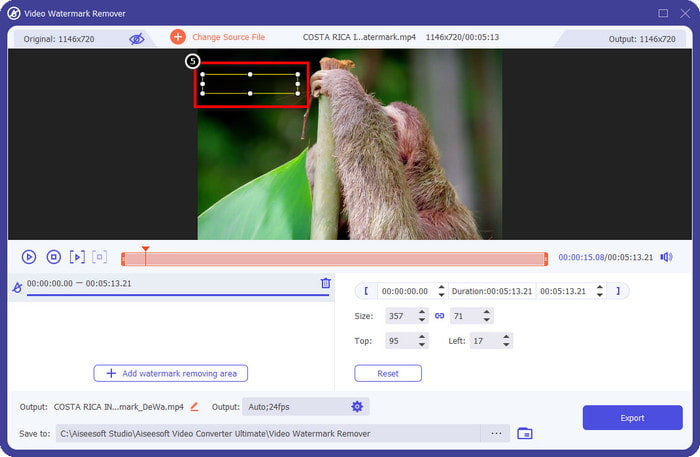
5. lépés. A felső-középső részen állítsd be a téglalap alakú kijelölést, és helyezd a vízjel fölé, hogy ez a terület legyen feldolgozva.
6. lépés. Ha mindent elvégeztél az itt leírtak szerint, kezdd meg a fájl exportálását az Export (Exportálás) gomb megnyomásával. Ezzel be is fejezted a vízjel eltávolítását a videódról az ultimate eszköz segítségével.
3. út. Távolítsa el az iStock vízjelet a képekről az FVC Free Watermark Remover segítségével
A képeken lévő vízjel kezeléséhez a FVC Free Watermark Remover eszközt kell használnod. Ez egy hasznos, online iStock vízjel-eltávolító, amellyel hatékonyan el tudod távolítani a vízjeleket a képekről anélkül, hogy bármit is le kellene töltened az eszközödre. Ráadásul nem kell semmit megvásárolnod vagy igénybe venned, mert a használata ingyenes. Annak ellenére, hogy online eszközről van szó, a vízjelek eltávolításában nyújtott teljesítménye vitathatatlanul jobb, mint számos más képvízjel-eltávolítóé. Nem hiszed el, amit mondunk? Csak egy módon bizonyíthatjuk a kiváló teljesítményét: ha követed az itt leírt lépéseket.
1. lépés. Kattints erre a linkre, hogy azonnal használhasd az online képvízjel-eltávolítót.
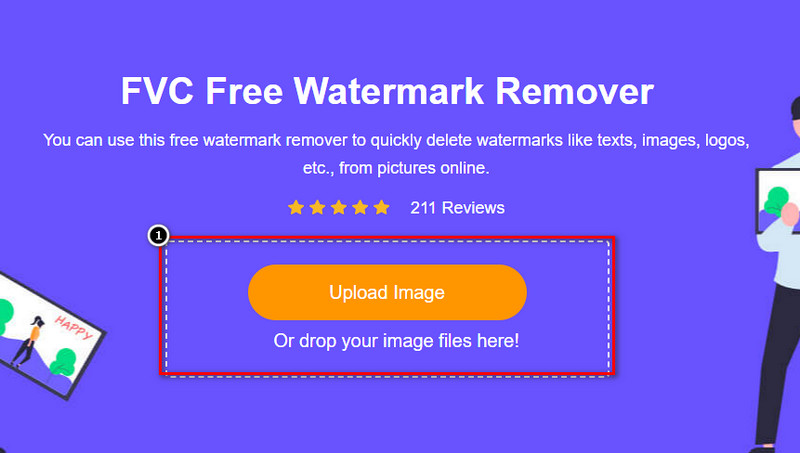
2. lépés. Nyomd meg az Upload Image (Kép feltöltése) gombot, válaszd ki a vízjeles képet, és várd meg, amíg a feltöltési folyamat befejeződik.
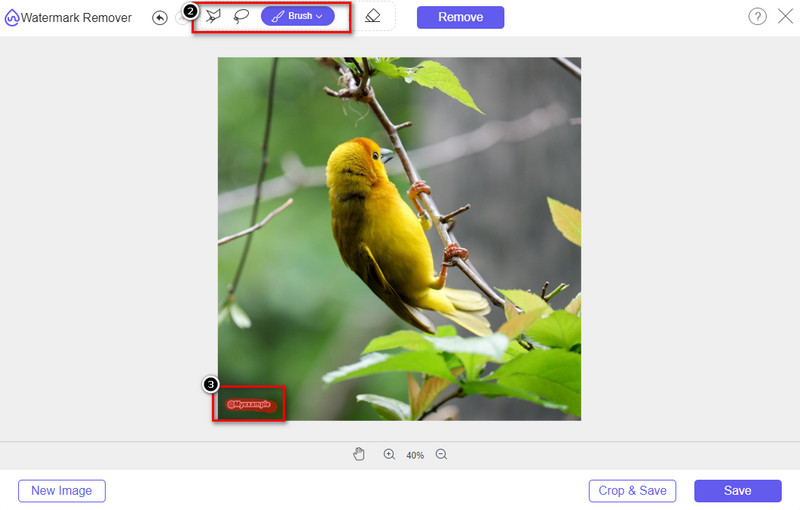
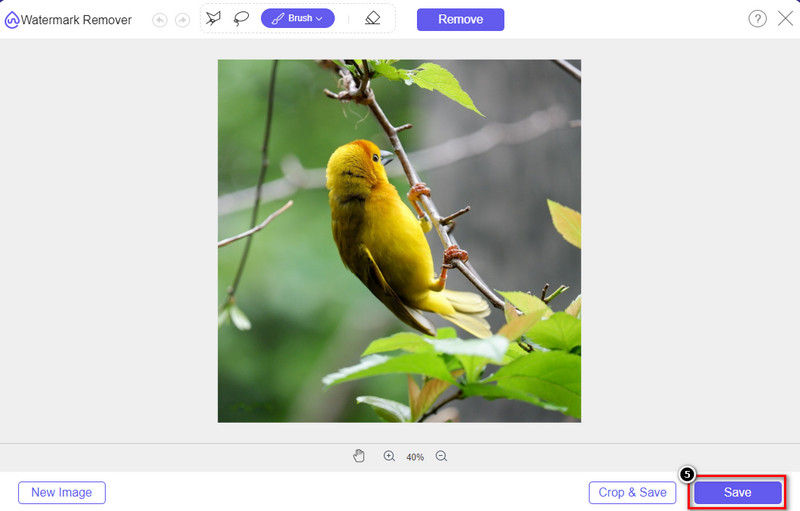
3. lépés. A Draw (Rajzolás) eszközzel rajzolj rá a vízjelre, hogy kiemeld azt.
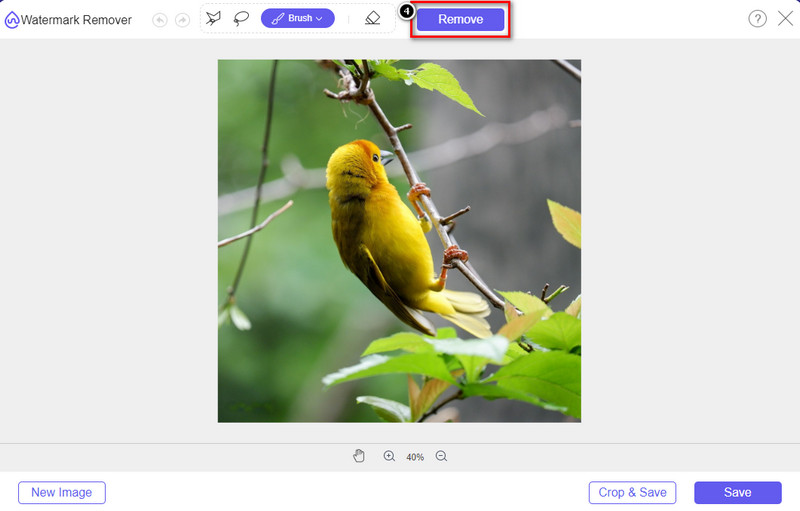
4. lépés. Kattints a Remove (Eltávolítás) gombra, hogy lásd, hogyan néz ki a kép a vízjel eltávolítása után.
5. lépés. Végül a kép mentéséhez kattints a Save (Mentés) gombra, hogy exportáld a képet az iStock vízjele nélkül.
Összefüggő:
Hogyan távolítsd el a vízjelet a Renderforesttel exportált videókról
Hogyan távolítsd el a Viva Video vízjelét a videókról
2. rész. GYIK az iStock vízjel eltávolításával kapcsolatban
Hogyan tölthetek le ingyen iStock képeket vízjel nélkül?
Ha azonnal le kíván tölteni egy képet az iStock-ról, akkor a webhely vízjelet helyez a képre. Ez a webhely minden fájlt véd a szerzői jogi problémák és egy bizonyos kép túlzott felhasználásának elkerülése érdekében. Ha vízjel nélküli képet szeretne letölteni, vásárolnia kell egy kis hitelt; Kövesse a fent hozzáadott lépéseket.
Mennyibe kerül egyetlen kredit az iStock-on?
Egyetlen kredit ára az iStock-on $12. A jóváírás felhasználásával itt vásárolhat médiafájlt, és vízjel nélkül töltheti le a kívánt vizuális adathordozón. Minél több kreditet vásárol, kreditenként kedvezmény jár; megtekintheti a rendelkezésre álló krediteket, amelyek tetszenek.
Nem drága fájlt vásárolni az iStock-on?
A többi, ugyanazt a szolgáltatást nyújtó webhelyhez képest ez az egyik legolcsóbb webhely, amellyel licencelt fájlokat vásárolhat. Miután megvásárolt egy fájlt itt, korlátlanul használhatja, ellentétben a másikkal, ahol a vásárlást követően továbbra is korlátozások vonatkoznak a fájl használatára.
Következtetés
Most, hogy tudja, hogyan lehet hatékonyan eltávolítani az iStock vízjelet a videókról és képekről, elmondhatjuk, hogy a munka kész. Szóval, melyik utat részesíti előnyben? Szeretne kreditet vásárolni, hogy a fájl vízjel nélkül készen álljon? Vagy szeretné használni az itt hozzáadott eszközöket, amelyek képesek kezelni a vízjelet a képeken és a videókon? Bármit is választ, a fájl továbbra is tökéletes lesz, és használatra kész a vízjel zavarása nélkül.
-
 Hogyan távolítsuk el a vízjelet a Pixlr segítségével részletes lépésekben [Hatásos]
 Szeretné tudni, hogyan távolíthat el vízjelet a Pixlr segítségével? Ha igen, folytassa az alábbi olvasást, hogy megtudja, hogyan kell ezt megtenni és milyen alternatívákat használhat.
-
 Távolítsa el az Animotica vízjelet az exportált videókról 3 bevált módszerrel
 Gondolkozott már azon, hogy lehetséges-e eltávolítani az Animotica vízjelet az exportált videókról? Ez a cikk bemutatja a teendőket.
-
 Ingyenes módszerek a VideoShop vízjel eltávolítására a videókon [könnyen]
 A VideoShop vízjel eltávolításához az eszköznek vízjeleltávolítóra lesz szüksége. Ha tudni szeretné, mik ezek, olvassa el ezt a cikket.
