


 Video Converter Ultimate
 Screen Recorder
 Videó javítás
 Biztonságos letöltés
A legjobb módszerek a VideoScribe logó eltávolítására a videóból
Szeretnél megtanulni, hogyan lehet eltávolítani a VideoScribe logót a videóidról? Előfordul, hogy logó jelenik meg a videóidon. Ezt nem mindig tudod elkerülni, különösen, ha a videó tulajdonosa védeni szeretné a videóit, és közben a márkáját is szeretné népszerűsíteni. Logóval akkor is találkozhatsz, ha egy adott alkalmazás ingyenes verzióját használod. Erre a legjobb példa a VideoScribe alkalmazás. Ha ennek az alkalmazásnak az ingyenes verzióját használod, a videódon VideoScribe logó lesz, hacsak nem vásárolod meg a programot. Mielőtt azonban erre költenél, más ingyenes alkalmazásokkal is eltávolíthatod a logót a videóidról. Olvasd el ezt a cikket, hogy megtudd, hogyan tudsz logót eltávolítani anélkül, hogy bármit is megvásárolnál.

1. rész: Hogyan távolítsuk el a VideScribe logót az offline videóból
Ha offline szeretnéd eltávolítani a VideoScribe logót a videóidról, használhatod a Video Converter Ultimate programot. Ez az alkalmazás segít a VideoScribe logó egyszerű és gyors eltávolításában. A szoftverrel emellett videókat is szerkeszthetsz minőségromlás nélkül. Egyszerű grafikus felülete mellett kiváló minőségű kimenetet kínál. A Video Converter Ultimate elérhető Macen és Windowson is. Bár rengeteg funkcióval rendelkezik, kezdők számára is jól használható. Számos fájlformátumot támogat, például FLV, MOV, MP4, MTS, DivX, XviD és sok más. Emellett számos szerkesztőeszközt tartalmaz, amelyekkel javíthatod a videóidat, például javítás, vágás, körbevágás, színkorrekció, videók forgatása és még sok más. A Video Converter Ultimate kétféle módszert is kínál a VideoScribe logó eltávolítására a videóidról.
A Video Watermark Remover használata
1. lépés: Kattints az alábbi letöltés gombra, hogy letöltsd a Video Converter Ultimate programot Windowsra vagy Macre. Ezután telepítsd a szoftvert az eszközödre, és indítsd el az alkalmazást.
Ingyenes letöltés Windows 7 vagy újabb rendszerre Biztonságos letöltés
Ingyenes letöltés macOS 10.7 vagy újabb rendszerre Biztonságos letöltés
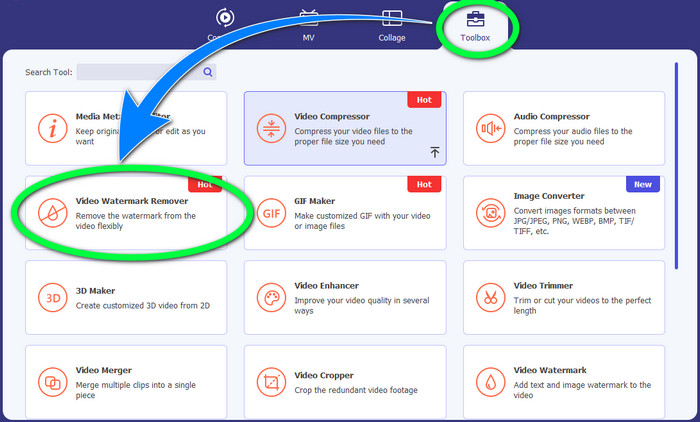
2. lépés: Ezután lépj a Toolbox panelre, és kattints a Video Watermark Remover gombra. Egy új felület fog megjelenni a képernyődön.
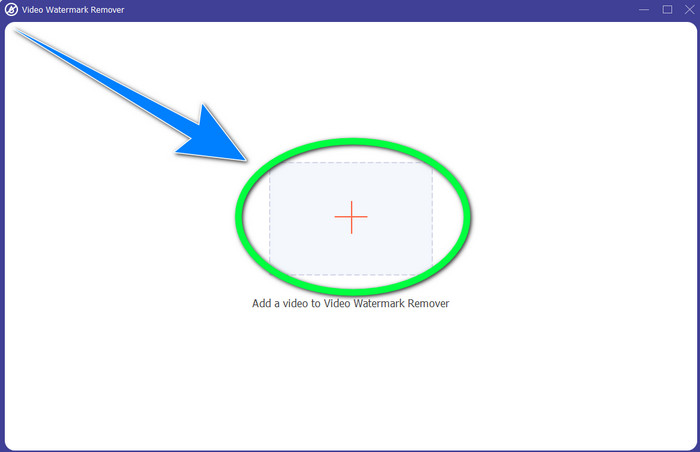
3. lépés: Kattints a + gombra, és importáld azt a videófájlt, amelyről el szeretnéd távolítani a VideoScribe logót.
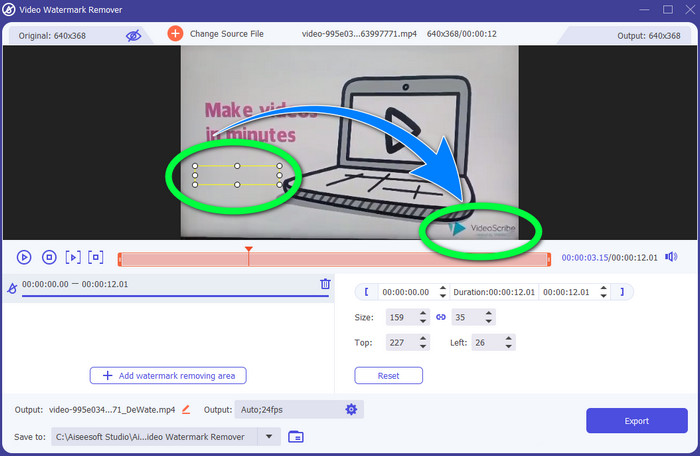
4. lépés: Miután beimportáltad a videót, kattints az Add Watermark Removing Area lehetőségre, és helyezd a kis kijelölő dobozt a logóra. A doboz méretét tetszés szerint módosíthatod.
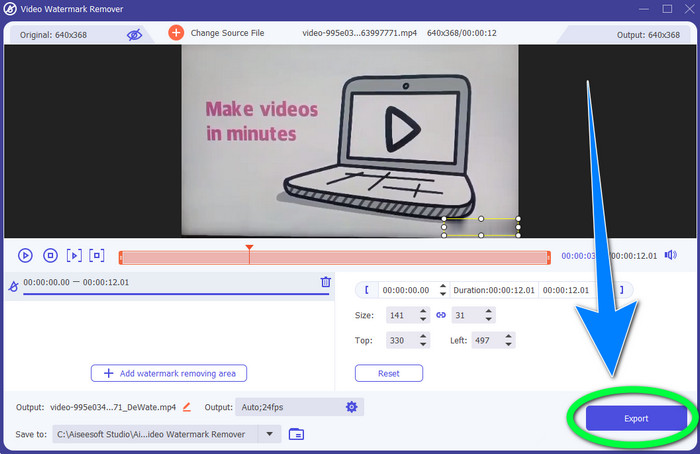
5. lépés: Végül kattints az Export gombra, hogy elmentsd a videót a logó nélkül.
A Video Cropper funkció használata
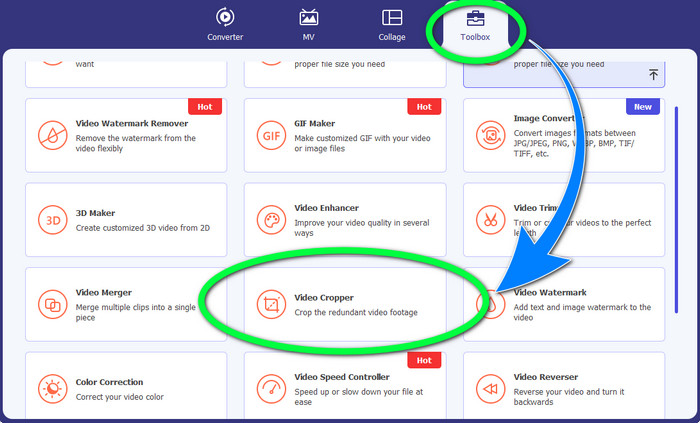
1. lépés: A vágóeszköz egy másik módja a VideoScribe logó eltávolításának. A Toolbox alatt kattints a Video Cropper gombra.
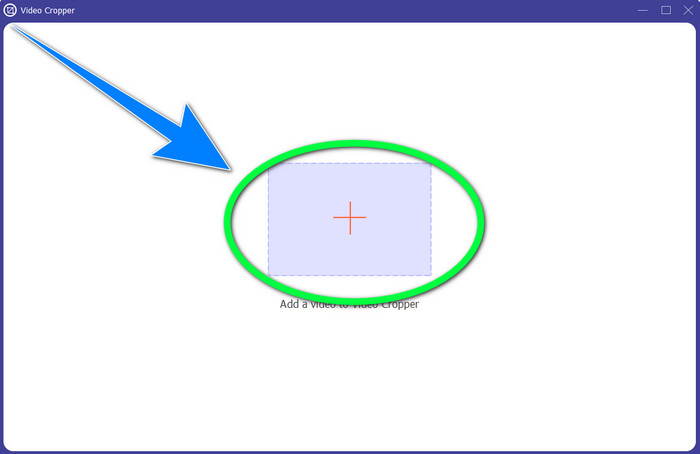
2. lépés: Új felület fog megjelenni a képernyődön. Válaszd a + jelet, és illeszd be a VideoScribe logót tartalmazó videódat.
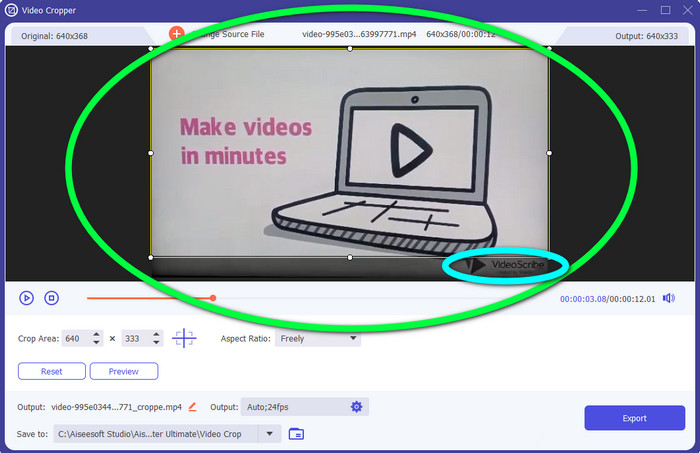
3. lépés: A vágóeszközzel körbevághatod a videód szélét. Ha a logó a videó szélén helyezkedik el, levághatod azt, így eltávolítva a logót.
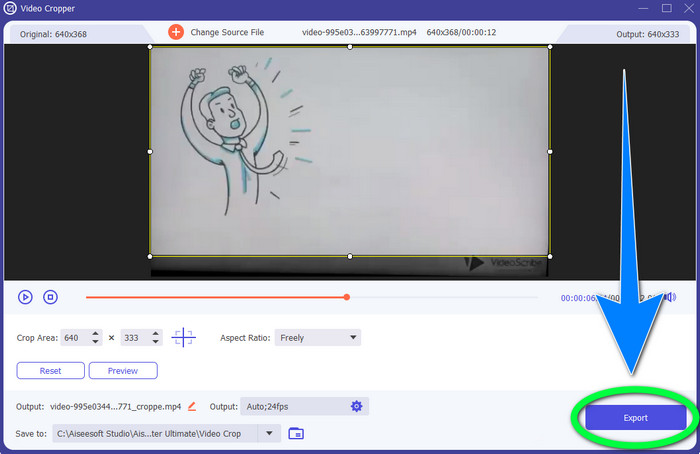
4. lépés: Ezután, ha úgy gondolod, hogy már eltávolítottad a VideoScribe logót, kattints az Export gombra, és mentsd el a végleges videót az eszközödre.
2. rész: Hogyan távolítsuk el a VideoScribe logót a Video Online-ból
A BeeCut-Online vízjeleltávolító használata
Szeretnéd online eltávolítani a VideoScribe logót a videóidról? A BeeCut-Online Watermark Remover az egyik remek és hasznos online eszköz, amelyet használhatsz. Ez az online eszköz segít eltávolítani a zavaró elemeket a videóidról, például logókat, vízjeleket, szövegeket, dátumbélyegzőket és még sok mást. Ennek köszönhetően a VideoScribe logót is könnyedén eltávolíthatod a videóidról az egyszerű felületnek köszönhetően. A BeeCut-Online Watermark Remover számos fájlformátumot támogat, például FLV, MOV, MP4, WebM, ASF, AVI, 3GP, MPG és továbbiakat. Emellett ezzel az eszközzel a képeidről is eltávolíthatsz zavaró elemeket. Sajnos ez az alkalmazás internetfüggő, vagyis nem tudod használni, ha nincs internet-hozzáférésed vagy internetkapcsolatod. Ami az eltávolítási folyamatot illeti, néha időigényes lehet, attól függően, hogy gyors vagy lassú az internetkapcsolatod. Az alábbiakban lépésről lépésre bemutatjuk a folyamatot.
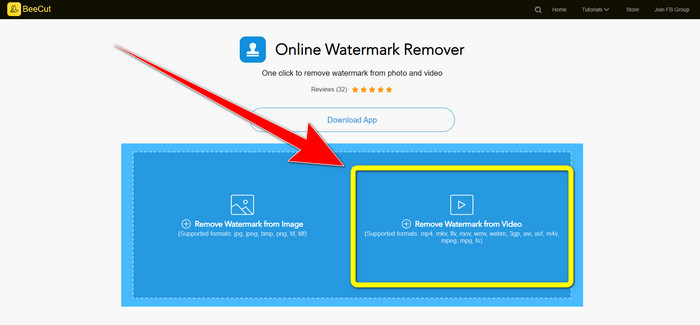
1. lépés: Látogasd meg a BeeCut-Online Watermark Remover weboldalát. Kattints a Remove Watermark from Video gombra, és csatold a VideoScribe logót tartalmazó videódat.
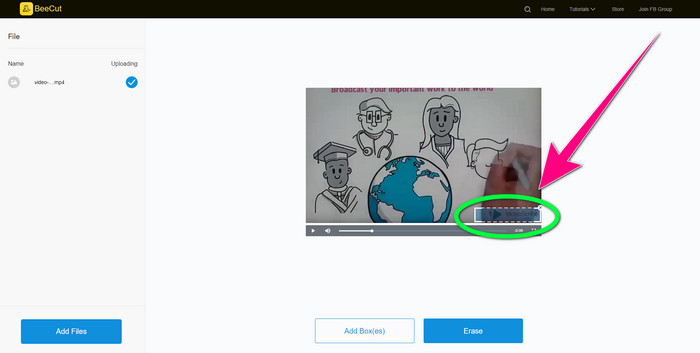
2. lépés: Miután hozzáadtad a videót, használd a videón megjelenő kis dobozt, és húzd a logó fölé, hogy lefedd azt.
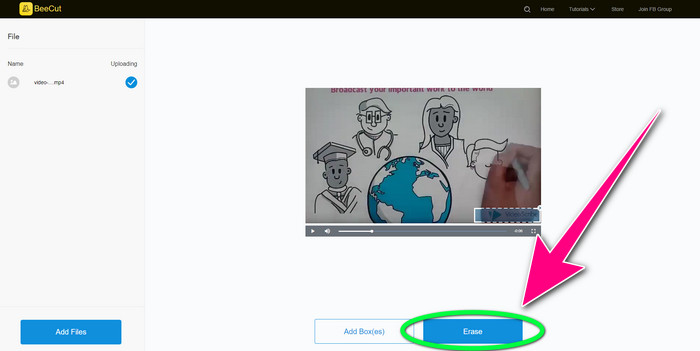
3. lépés: Ha végeztél a logó lefedésével a kis doboz segítségével, kattints az Erase gombra, hogy elmentsd és letöltsd a videódat VideoScribe logó nélkül.
A Video Watermark Remover Online használata
A Video Watermark Remover Online egy másik online eszköz, amellyel eltávolíthatod a VideoScribe logót a videóidról. Egyszerű felülettel rendelkezik, és kezdők számára is megfelelő. Emellett eltávolíthatod a logókat a videóidról minőségromlás nélkül, ami nagyszerű. Azonban az online eszköz ingyenes verziója korlátozott funkciókat kínál. Csak 5 videóról távolíthatsz el logót, és nem exportálhatod azokat más fájlformátumokba. És mivel ez egy online alkalmazás, internetkapcsolat nélkül nem tudod használni. Előfordulhat az is, hogy az eszköz időnként nem működik megfelelően. Ha szeretnél logókat eltávolítani a videóidról, kövesd az alábbi egyszerű lépéseket.
1. lépés: Lépj a Video Watermark Remover Online weboldalára. Kattints a Click or Drag Videos Here gombra, hogy beilleszd a VideoScribe logót tartalmazó videódat.

2. lépés: Kattints a Remove Watermark gombra, és várd meg az eltávolítási folyamatot. Ezután elmentheted a videódat.
3. rész: GYIK a VideoScribe logó videóról való eltávolításával kapcsolatban
Megbízhatom az online eszközöket, amelyek eltávolítják a logókat a videóimról?
Igen tudsz. Az online eszközök biztonságosak, és védhetik a videofájlt. Egyes eszközök a folyamat után automatikusan törölhetik a fájlokat, így nem kell aggódnia. Azonban nem minden online eszköz egyforma, ezért továbbra is meg kell keresnie a véleményeket, hogy megtudja, megbízhat-e egy adott eszközben.
Hogyan lehet megszabadulni a logóktól a videókon?
Ha meg akar szabadulni a logótól, töltse le a Video Converter Ultimate programot számítógépére vagy Mac-re. Használhatja a videó vízjel-eltávolítót vagy a videóvágó eszközt. Ez a két módszer segíthet megszabadulni a logótól a videódban.
Eltávolíthatom a VideoScribe logót előfizetés nélkül?
Természetesen! A VideoScribe logót a Video Converter Ultimate segítségével távolíthatja el. A logó eltávolításához nem kell megvásárolnia ezt az alkalmazást, mert ingyenes.
Következtetés
Ez a cikk információt adott arról, hogyan történik a VideoScribe logó eltávolítása a videóról letölthető és online eszközök segítségével. Ha azonban gyorsan és erőfeszítés nélkül szeretnél logót eltávolítani a videóidról, használhatod a Video Converter Ultimate programot.
-
 A 3 legújabb Shutterstock vízjeleltávolító, amire valaha is szüksége lesz
 Nem tetszik az exportált videóhoz csatolt Shutterstock vízjel? Használhat Shutterstock vízjeleltávolítót a hatékony törléshez.
-
 A Powtoon vízjel eltávolítása 4 hatékony módszerrel
 Olvassa el ezt a cikket, hogy megtudja, hogyan távolítsa el a Powtoon vízjelet az itt található legjobb eszközök és egy oktatóanyag segítségével.
-
 Apowersoft vízjel-eltávolító áttekintése – Jellemzők, előnyök és hátrányok, valamint árak
 Az Apowersoft Watermark Remover az egyik legjobb vízjeleltávolító, amely támogatja az online és offline módot is, kattintson erre, ha többet szeretne tudni!
