


 Video Converter Ultimate
 Screen Recorder
 Videó javítás
 Biztonságos letöltés
Hogyan lehet egyszerűen és hatékonyan eltávolítani a Viva videó vízjelet a videókról
A Viva Video egy videószerkesztő és videókészítő alkalmazás, amelyet letölthet mobileszközeire, és olyan kiemelkedő videót készíthet, amelyet a másik videószerkesztővel nem tud elérni. Ezzel az ingyenes verzióját vagy a prémium videószerkesztést előnyére használhatja. Így a felhasználók problémákba ütköznek az ingyenes verzió használatakor, mert vízjelet hagy maga után, és más szerkesztési funkciók nem egyeznek meg a profi verzióval. A videóba beágyazott vízjel akadályozhatja a látványt, és jobb eltávolítani.
Azonban néhány eszközt használhatsz – amelyeket megtalálsz a Play Áruházban és az App Store-ban – a vízjel eltávolítására. De melyik a legjobb? Olvasd tovább ezt a cikket, mert bemutatjuk azt az eszközt, amellyel eltávolíthatod a vízjelet, és lépésről lépésre elmagyarázzuk, hogyan távolíthatod el a Viva Video vízjelet a videódból.

1. rész: A Viva videó vízjel eltávolítása a legjobb vízjeleltávolító alkalmazások segítségével
Videó radír – Vízjel/logó eltávolítása a videóról [Android]
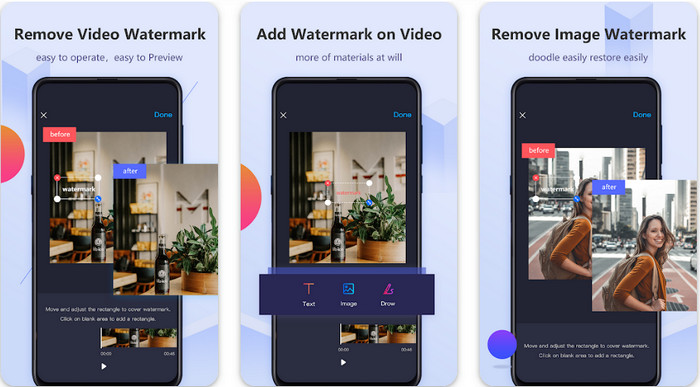
A Video Eraser - Remove Watermark/Logo from Video egy hatékony vízjel-eltávolító, amelyet letölthetsz az Android készülékedre, hogy eltávolítsd a videódba ágyazott vízjelet. Ez az alkalmazás bármilyen típusú vízjel eltávolításában segíthet a videódból, például logó, szöveg, bélyegző stb. Ezenfelül akkor is hasznát veheted, ha saját vízjelet szeretnél hozzáadni, illetve ha vágni, trimmelni, visszafordítani, tömöríteni vagy a videó sebességét módosítani szeretnéd. Annak ellenére, hogy funkciókban gazdag, az eszköz ingyenesen letölthető. Tehát ha Androidon szeretnéd eltávolítani a Viva Video vízjelet, kövesd az alábbi lépéseket.
1. lépés. Először töltsd le az alkalmazást az Android készülékedre a Play Áruházból, majd kattints a Letöltés gombra.
2. lépés. Nyisd meg a vízjel-eltávolítót, kattints a Remove Watermark from Video lehetőségre, engedélyezd, hogy az eszköz hozzáférjen a videóidhoz, majd töltsd fel a vízjeles videót.
3. lépés. Helyezd a téglalapot a vízjelre, hogy letakard azt.
4. lépés. Nyomd meg a Done gombot, hogy elmentsd a videót a vízjel nélkül.
Összefüggő:
Videoradír – Retusálás eltávolítása [iOS]
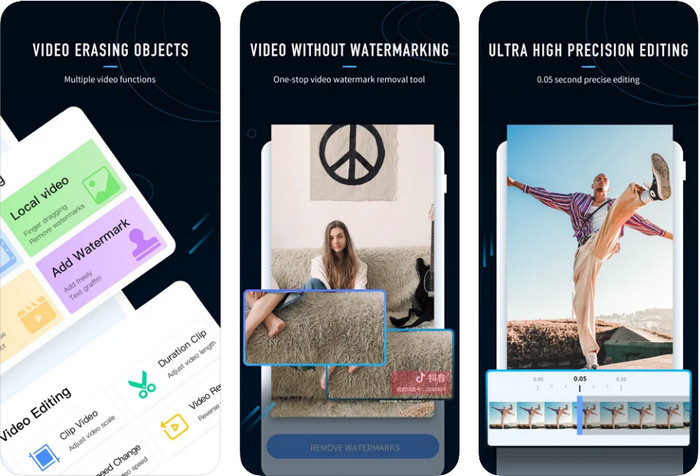
iOS-en az App Store-ból letöltheted a Video Eraser- Retouch Removal alkalmazást. Ez az egyik olyan Viva Video vízjel-eltávolító, amelyet ingyen letölthetsz, és hatékonyan segít megszabadulni a videón lévő jelöléstől. Akárcsak az itt bemutatott Androidos vízjel-eltávolító, ez is támogat más szerkesztőfunkciókat, például videófelbontás-növelés, vízjel hozzáadása, vágás, trimmelés, tömörítés és tükrözés. Mindez megtalálható benne. Bár hasonló funkciókat kínál, mint az Androidos alkalmazás, a működésük mégis eltérő, és mielőtt ezzel az eszközzel eltávolíthatnád a vízjelet, vásárlásra lesz szükség. Az alábbi lépések követésével megtanulhatod, hogyan távolítsd el a vízjelet az általad exportált Viva Video felvételről; kövesd az alább jelzett lépéseket.
1. lépés. Töltsd le az alkalmazást az App Store-ból, majd a letöltés után nyisd meg.
2. lépés. Az alkalmazás megnyitása után kattints a Local Video/GIF lehetőségre, hogy feltöltsd a vízjeles videót. Ügyelj rá, hogy engedélyezd az app számára a Fotókhoz való hozzáférést.
3. lépés. Érintsd meg a videód vízjeles részét; ekkor egy téglalap alak jelenik meg a képernyőn.
4. lépés. Koppints az Eliminate Watermark gombra, hogy exportáld a videót, és elmentsd azt a vízjel zavaró jelenléte nélkül.
2. rész: A Viva Video vízjel eltávolítása Windows és Mac rendszeren [Ultimate Software]
Windows és Mac felhasználóként olyan hatékony szoftverre lesz szükséged, amellyel csíkok hátrahagyása nélkül távolíthatod el a videóról a vízjelet. Az FVC Video Converter Ultimate megmutatja, hogyan távolíthatod el ingyen a Viva Video vízjelet, miközben a végeredmény professzionális minőségű lesz. Akárcsak az Androidra és iOS-re letölthető vízjel-eltávolító appok, ez az eszköz is több további funkciót és lehetőséget kínál, amelyeket kihasználhatsz. Ez a program többet nyújt, mint a két említett vízjel-eltávolító alkalmazás.
Mi teszi lenyűgözővé ezt az eszközt? Az eszköz által támogatott eltávolító funkciók jobbak, mint a videóin használható vízjeleltávolítók. Tehát, ha ezt használja, élvezheti a videó megtekintését vízjel nélkül, miután eltávolította itt. Szüksége van egy oktatóanyagra a használatához? A következő részletek lehetővé teszik, hogy megtudja, hogyan kell használni ezt az eszközt olyan egyszerűen, mint az 1-2-3.
1. lépés. Az ultimate szoftver letöltéséhez kattints az alábbi letöltés gombra, majd telepítsd a programot az eszközödre. Kövesd a WinRAR telepítési lépéseit, majd kattints a Start Now gombra.
Ingyenes letöltés Windows 7 vagy újabb rendszerre Biztonságos letöltés
Ingyenes letöltés macOS 10.7 vagy újabb rendszerre Biztonságos letöltés
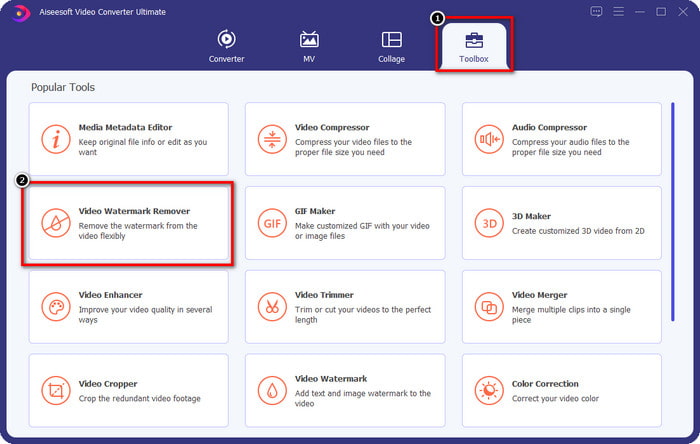
2. lépés. Lépj a Toolbox menübe, majd kattints a Video Watermark Remover lehetőségre, hogy elkezdd használni ennek az eszköznek a hatékony vízjel-eltávolítóját.
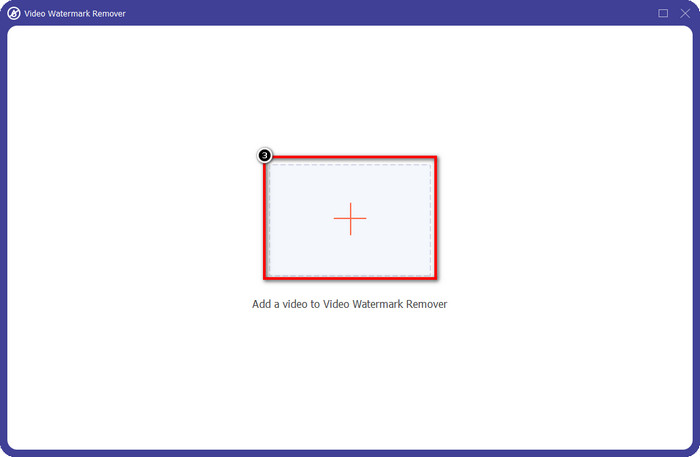
3. lépés. A plusz ikonra kattintva töltheted fel az asztalodra mentett, vízjeles Viva Video felvételt. Keresd meg a videófájlt a megjelenő mappában, majd kattints az Open gombra a sikeres feltöltéshez.
4. lépés. Kattints az Add Watermark Removing Area lehetőségre, hogy elkezdd használni a vízjel-eltávolító funkciót.
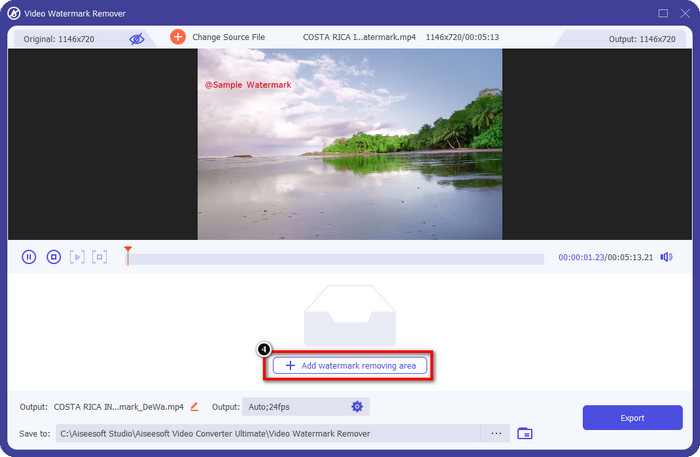
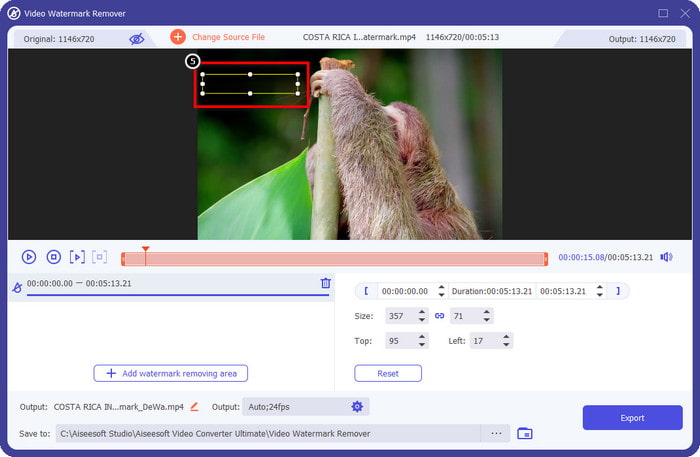
5. lépés. Húzd és helyezd át a téglalap alakú formát a videón lévő vízjelre, és takard le teljesen. Fontos, hogy teljesen lefedd, mert ha nem, a vízjel nyoma megmarad. A forma méretét igényeid szerint átméretezheted.
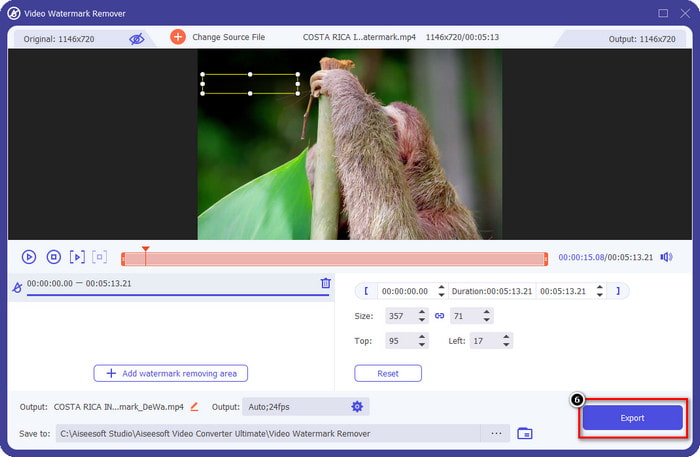
6. lépés. Ezt követően kattints az Export gombra, hogy elmentsd a videót vízjel nélkül. Egyszerű, igaz? Pont erre készült ez az ultimate eszköz: legyen egyszerű, mégis mindenben hatékony.
3. rész. GYIK a Viva videó vízjel eltávolításával kapcsolatban
Letölthetem a Viva Video-t vízjel nélkül?
Igen, megvásárolhatja az eszköz professzionális verzióját, hogy az itt szerkesztett videó exportálásakor ne maradjon vízjel a videón. Ezenkívül, miután megvásárolta az eszköz pro verzióját, használja az eszköz másik prémium funkcióját, amely nem érhető el ingyenesen.
A Viva Videonak van asztali verziója?
A Viva Video verziót csak Android és iOS rendszeren töltheti le. Tehát, ha az asztali verziót szeretné letölteni, akkor nem fog ilyet találni, de megkeresheti a legjobb alternatívákat a videószerkesztéshez, mint amit a Viva Video kínál.
A Viva Video rendelkezik kémprogramokkal?
2017-ben az alkalmazásról szóló jelentések később megerősítették, hogy rosszindulatú programokat tartalmaz. Tehát azok, akik letöltötték ezt a szoftvert, erőszakkal törölték ezt az alkalmazást eszközeikről, hogy elkerüljék a további következményeket.
Következtetés
A cikkben található Viva Video vízjel-eltávolító segítségével eltávolíthatja a Viva Video által az exportált videóba ágyazott vízjelet. Kipróbálhatja a fent említett alkalmazásokat, és kövesse a vízjel eltávolítására vonatkozó utasításokat. A Viva Video vízjellel rendelkező Windows és Mac felhasználók számára azonban jobb, ha a végső szoftvert használják a vízjel gyors és hatékony eltávolításához, és professzionális eredményhez. Mire vársz? Kattintson a letöltés gombra a végső vízjel azonnali eltávolításához az eszközről, és használja a fenti lépéseket követve.
-
 A Lomotif vízjel eltávolítása ezekkel a fantasztikus eszközökkel
 Szeretnéd megtanulni, hogyan távolíthatod el a Lomotif vízjelet a videódról? Olvassa el ezt a cikket, hogy megismerje a legkiemelkedőbb online és offline eltávolítási módszereket.
-
 Hogyan távolítsuk el a turistákat a fényképekről vízjel-eltávolítóval
 Hogyan lehet eltávolítani a turistákat a fényképekről? Ha szeretné megtanulni, hogyan távolíthatja el a nem kívánt dolgokat a fényképről, ezek az eszközök segítenek. Olvassa el ezt a cikket, ha többet szeretne megtudni.
-
 123rf vízjeleltávolítók – Az Ultimate Tools alapos áttekintése
 Ha tudni szeretné, melyek a legkiemelkedőbb 123rf vízjeleltávolítók, olvassa el alaposan ezt a cikket. Ez a cikk részletes áttekintést nyújt az eszközökről.
