


 Video Converter Ultimate
 Screen Recorder
 Videó javítás
 Biztonságos letöltés
Útmutató a VSDC vízjel egyszerű és hatékony eltávolításához a videókon
Nem tévedhetsz, ha a VSDC Video Editor-t választod alapvető videószerkesztésre Windows rendszeren. Ez a nemlineáris szerkesztő képes kielégíteni azokat az igényeket, amelyeket egy videószerkesztőtől vársz. Olyan szerkesztési funkciók készletét nyújtja, amelyekkel a végén kiváló minőségű videót állíthatsz elő. A program egyre növekvő népszerűségével sok felhasználóban merül fel kérdés az eszközzel kapcsolatban, és az egyik leggyakoribb mostanában ez: van‑e vízjel a VSDC ingyenes videószerkesztőjében? Neked is ugyanez a kérdésed, mint a neten böngésző többi felhasználónak? Hogy megválaszoljuk a sokakat foglalkoztató kérdést, elmondjuk a szükséges információt – olvass tovább, hogy jobban megismerd.

1. rész: Van-e vízjele a VSDC Free Video Editor-nek?
Annak ellenére, hogy a VSDC ingyenes verzióját használja a videók vagy filmek szerkesztéséhez, a VSDC vízjelek nem kerülnek bele az exportálás után. Így ingyenesen élvezheti az itt szerkesztett videót vízjel nélkül. A többi videószerkesztő funkció használatához jobb, ha megvásárolja az eszközt a zárolás feloldásához. Bár ez egy ingyenes szerkesztő, az eszköz nem tudja eltávolítani a videóhoz hozzáadott vízjelet. Egyesek számára gondot okoz, mások pedig a hasítási és vágási funkcióját használják a vízjel eltávolítására, bár jó, ha az oldalakon van. De ha a vízjel középen van, szeretne videóvágót használni? Természetesen nem! Az alábbi eszközök segíthetnek a videóban található VSDC vízjel egyszerű eltávolításában.
2. rész: Hogyan távolítsuk el a vízjelet a VSDC-n lévő videóról a 2 elérhető módszerrel
FVC Video Converter Ultimate – Ultimate Watermark Remover Windows és Mac rendszeren
A FVC Video Converter Ultimate a legfejlettebb, mesterséges intelligenciával működő szoftver, amellyel eltávolíthatod a VSDC-vízjelet. Ez az eszköz lehetővé teszi, hogy manuálisan felülbíráld a vízjel‑eltávolító funkciókat, amit sok más szoftver nem enged. Pontosan távolítja el a vízjelet a videókról anélkül, hogy nyomot hagyna azon a területen, ahonnan a vízjel származott.
Sőt, ez az eszköz olyan robusztus funkciókkal és funkciókkal is rendelkezik, amelyek nem találhatók meg a többi szoftveren. Annak ellenére, hogy ez az eszköz támogatja a mesterséges intelligencia technológiát, nem kell aggódnia a számítógép specifikációi miatt, mert az eszköz alacsony kategóriás Windows és macOS rendszeren működik. Teljesítményét tekintve kiváló, alacsony specifikációkat használ számítógépeken, Windows és Mac rendszeren is működik, valamint fokozott teljesítményt nyújt az importálás és az exportálás terén. Nem kell mást keresni, mint a lépésről lépésre bemutatott oktatóanyagot arról, hogyan távolíthatja el a vízjelet a videóról a VSDC-ben az alábbi segítséggel.
1. lépés. Töltsd le most a szoftvert az asztali gépedre az alábbi letöltés gombra kattintva. Ezt követően kövesd a telepítés és beállítás lépéseit, majd kattints a Start Now gombra, hogy megnyisd az eszközt a számítógépeden.
Ingyenes letöltés Windows 7 vagy újabb rendszerre Biztonságos letöltés
Ingyenes letöltés macOS 10.7 vagy újabb rendszerre Biztonságos letöltés
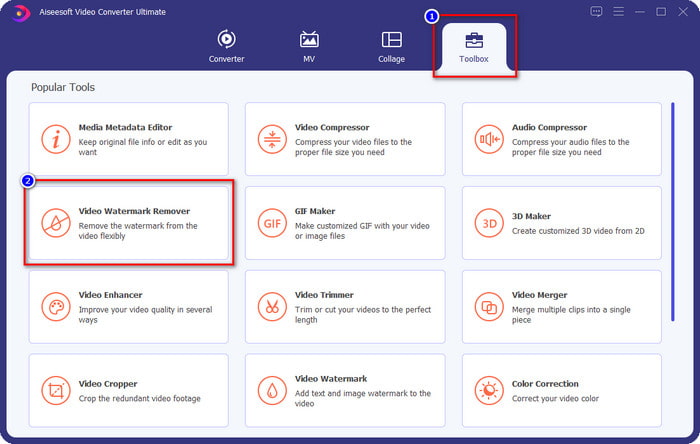
2. lépés. A szoftver elindítása után lépj a Toolbox szakaszra, és válaszd a Video Watermark Remover opciót, hogy a program végső vízjel‑eltávolítóját használd.
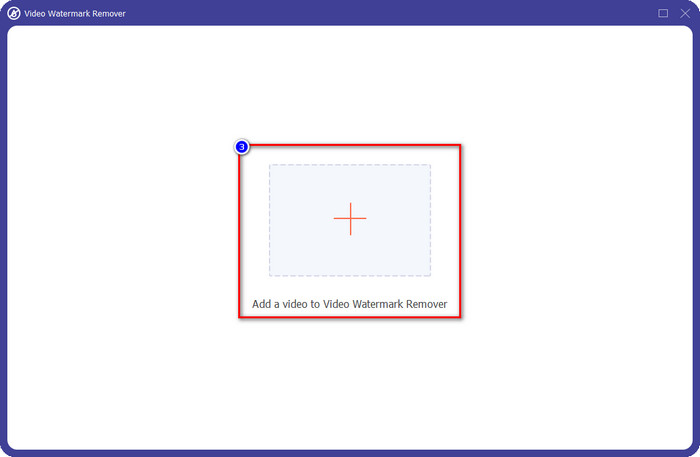
3. lépés. A képernyőn megjelenő ablakban kattints a + ikonra, hogy feltöltsd a vízjellel ellátott videót.
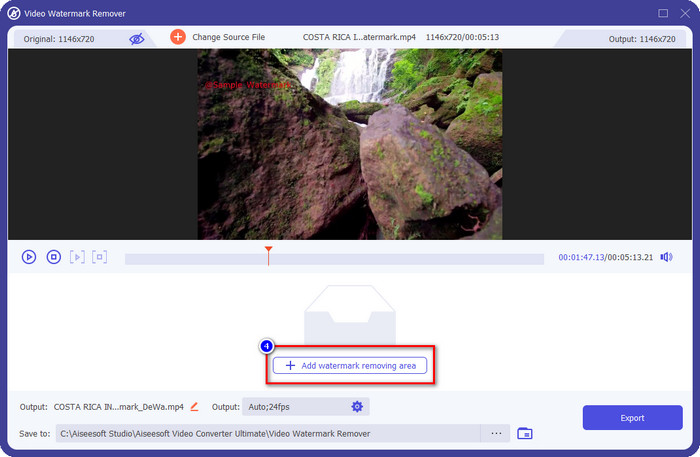
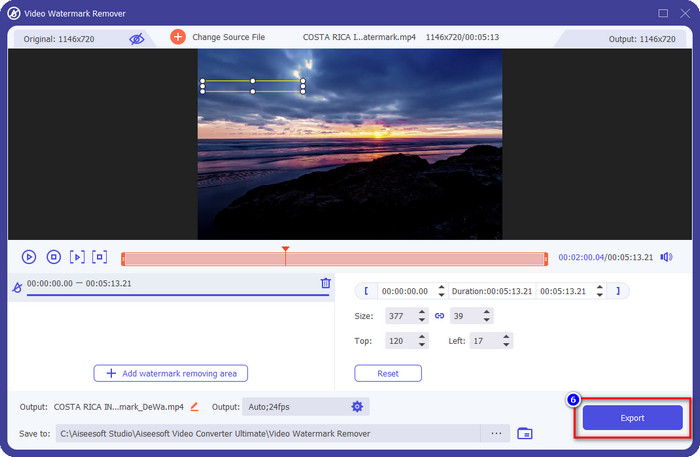
4. lépés. A vízjel‑eltávolító használatához kattints az Add Watermark Removing Area (Vízjel‑eltávolítási terület hozzáadása) lehetőségre.
5. lépés. Helyezd el a kijelölő dobozt azon a területen, ahol a vízjel található, és ügyelj arra, hogy teljesen lefedd, hogy amikor exportálod a videót, már ne lásd rajta a vízjelet, és zavartalanul élvezhesd a lejátszást.
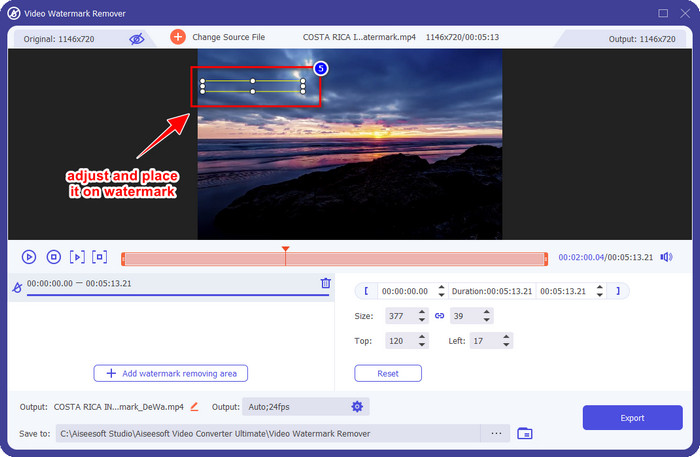
6. lépés. Miután a vízjelet lefedted, kattints az Export gombra, hogy elmentsd a videót vízjel nélkül.
Kapwing
Az egyik legjobb módja a VSDC ingyenes videószerkesztő vízjelének eltávolítására a Kapwing.com használata. Ez a vízjelszerkesztő lehetővé teszi, hogy gyorsan megszabadulj a videón lévő, már meglévő vízjeltől, így a felvétel sokkal jobban néz ki. Még ha nem is vagy profi az ilyen feladatokban, akkor sem kell aggódnod, ha ezt választod, mert a felülete intuitív és jól felszerelt. A használatának elsajátítása így jóval gyorsabb. Az eszköz remek választás, de vannak hátrányai is: például az ingyenes verzióval nem exportálhatsz 60 percnél hosszabb videót, bizonyos korlátok vannak, és be kell jelentkezned, hogy a Kapwing‑vízjelet eltávolíthasd az exportáláskor.
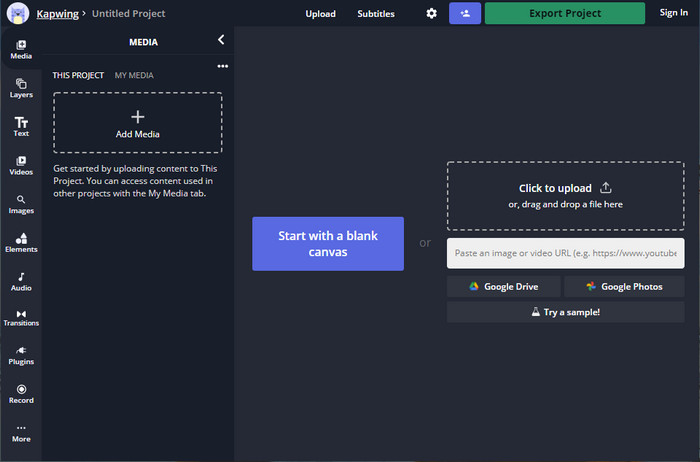
1. lépés. Nyisd meg a webes eszközt, és töltsd fel a fájlt úgy, hogy ide behúzod és ejted.
2. lépés. A fájl feltöltése után menj az elemekhez (Elements), és kattints a kívánt alakzatra a rendelkezésre állók közül.
3. lépés. Fogd meg és helyezd az alakzatot a vízjelre. Ne feledd, ez a módszer nem működik jól, ha a videó több színárnyalatot tartalmaz; akkor működik megfelelően, ha az adott terület egyszínű vagy egységes színpalettát használ.
4. lépés. Kattints az Export Video, majd az Export MP4 gombra a végső videó mentéséhez.
Összefüggő:
Hogyan távolítsuk el a Photobucket vízjeleket
Hogyan távolítsuk el a vízjelet GIF-ről
3. rész. GYIK: Van-e vízjel a VSDC Free Video Editor-nek?
Exportálhatok 4K videót a VSDC‑vel?
Igen, ez az eszköz 4k felbontású videókat exportál, ha akarja. A folyamat azonban több időt vesz igénybe, mint a többi videófelbontásnál, például az 1080-as és a 720-asnál. Bár a renderelés ugyanannyi időt vesz igénybe, az eszköz még mindig képes ultra-nagy felbontású videóminőséget készíteni, mint például a 4k, ha szükséges.
Hogyan lehet eltávolítani a vízjelet a VSDC-ben?
Töltse le az eszközt, majd indítsa el a folytatáshoz, kattintson az Objektum hozzáadása elemre, majd alatta kattintson a Videó gombra. Nyissa meg a Videoszűrőt; akkor a lehetőségek megjelennek; kattintson a Szűrők elemre; kattintson a DeLogo gombra. A DeLogo segítségével most elfedheti a videó vízjelét a VSDC-n. Csak az eszköz újonnan frissített verziójával működik; ha nem találja, frissítenie kell a használt verziót a későbbi verzió letöltésével.
A VSDC a legjobb használható videószerkesztő?
Nem a legjobb, de kihagyhatatlan eszköznek tekinthetjük, mert alapvető szerkesztési funkciókat biztosít, amelyekre egy lenyűgöző videó készítéséhez szüksége lehet. Bár a használatának elsajátítása meredek, más felhasználók hajlamosak időt tölteni a szoftver megtanulásával, nem pedig a szerkesztéssel. Még ha nem is szerepel a 10 legjobb videószerkesztő között, akkor is nagyszerű eszköznek tekintik a szerkesztési célra.
Következtetés
A VSDC vízjelének eltávolításához szükséged lesz egy megbízható vízjel‑eltávolítóra, mint amilyen a cikkben említett két szoftver. Az egyes programokhoz megadott lépések segítségével kiválaszthatod azt, amelyik szerinted a legjobban megfelel az igényeidnek, és hasznos lesz a videódon lévő vízjel eltávolítására. Ha azonban egy többfunkciós szoftvert szeretnél, amellyel vízjelet eltávolíthatsz és hozzáadhatsz, videót szerkeszthetsz, konvertálhatsz és sok mást is elvégezhetsz, akkor válaszd a FVC Video Converter Ultimate programot. Miért? Mert ez egyszerűen a legjobb, mindent tudó szoftver, amelyre az asztali gépeden szükséged lehet. Hasznosnak találtad ezt a cikket? Ha igen, és elégedett vagy vele, adhatsz nekünk öt csillagot lentebb.
-
 Útmutató arról, hogy mi a vízjel a fényképen [Frissítve 2022]
 Mi az a vízjel a fényképen? Hozzá kell adnunk egyet? Hogyan távolíthatjuk el? Itt minden szükséges dolog megtalálható, ezért olvassa tovább ezt a blogot.
-
 Hogyan távolítsuk el könnyedén a vízjelet a Wondershare DVD Creator alkalmazásból
 Ez a cikk információkat tartalmaz a vízjel eltávolításáról a Wondershare DVD Creator alkalmazásból. Ahhoz, hogy minden szükséges információt megkapjon, ezt feltétlenül el kell olvasnia.
-
 Könnyen távolítsa el a vízjelet PDF-ből egyszerű lépésekkel
 Távolítsa el a vízjelet a PDF-ből az alábbi egyszerű lépések végrehajtásával. Tanulja meg, hogyan távolíthat el egyszerűen vízjeleket PDF-fájljaiból ezekkel a csodálatos eszközökkel.
