


 Video Converter Ultimate
 Screen Recorder
 Videó javítás
[Teljes áttekintés] Melyek a legjobb videó metaadat-szerkesztők az asztalon
A videó metaadatai sokféleképpen segíthetnek; kiváló példa, hogy a fájljaidat időpont, dátum, szerzők, fájlméret és még sok más szempont szerint tudod rendezni – lényegében: rendszerezni. Bár metaadat minden médiafájlon van, bizonyos okokból időnként szerkesztenünk kell ezeket. Azonban nehéz feladat lehet kiválasztani, melyik eszközt használd, mert rengeteg metaadatszerkesztő érhető el a piacon. Hogy csökkentsük a terhedet, segítünk áttekinteni különböző, a piacon elérhető, valóban profi szerkesztőket az adataidhoz. Minden részletet és funkciót alaposan ellenőriztünk, hogy őszinte értékelést adhassunk az egyes szoftverekről. Nézzük meg közelebbről azt az öt legjobb videó-metaadatszerkesztőt, amelyekre bátran támaszkodhatsz.

1. rész. 5. Asztali offline módban elérhető legjobb videó-metaadat-szerkesztők
Video Converter Ultimate [Erősen ajánlott]
Ingyenes letöltés Windows 7 vagy újabb rendszerre Biztonságos letöltés
Ingyenes letöltés macOS 10.7 vagy újabb rendszerre Biztonságos letöltés
Kompatibilis operációs rendszer: Windows, Mac és Linux
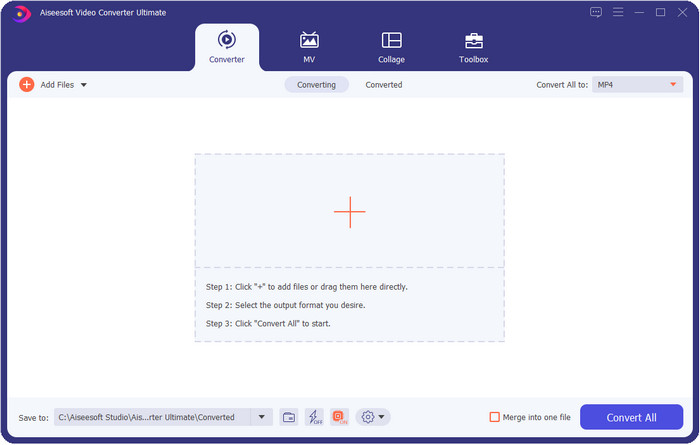
A Video Converter Ultimate a legjobb videó-metaadatszerkesztő a fájljaid metaadatainak megtekintésére, eltávolítására és szerkesztésére. Ez a metaadatszerkesztő nem egy szokványos eszköz, mert rengeteg funkciót kínál, amelyeket rövid idő alatt könnyen elsajátíthatsz. Ezzel az eszközzel számos hasznos információt adhatsz a metaadatokhoz, például megjegyzéseket, borítóképet, évet, műfajt (ha zenéről van szó) és még sok mást, mindezt másodpercek alatt. Szeretnéd tudni, mi lepett meg minket ebben az eszközben? Más szoftverekkel ellentétben, amelyek másolatot hoznak létre a szerkesztett fájlról – ami nem helytakarékos –, ez az eszköz nem készít másolatot: az Ultimate-be feltöltött fájlra közvetlenül alkalmazza az általad megadott metaadatokat, tehát kíméli a tárhelyet. Ráadásul, ha egy mindent tudó eszközre van szükséged, ez a tökéletes választás minden olyan felhasználónak, aki metaadat-megjelenítőt keres Macen vagy Windowson.
Előnyök
- Több formátumot támogat, amelyekre feltölthet, például MP4, MKV, AVI, FLV, MP3 és több mint 1000 médiaformátum a metaadatok egyszerű módosításához vagy eltávolításához.
- Lehetővé teszi bármely felhasználó számára, hogy könnyen szerkeszthesse a metaadatokat.
- Windows és Mac felhasználók számára a legjobb választás, ha letöltik ezt a metaadat-szerkesztőt a meghajtójukra.
- Könnyen eltávolíthatja a több fájlból álló metaadatokat néhány kattintással.
Hátrányok
- Az eszköz megvásárlása és letöltése elengedhetetlen, de minden fillért és számítógép-meghajtót megér.
ExifTool
Kompatibilis operációs rendszer: Windows, Mac és Unix
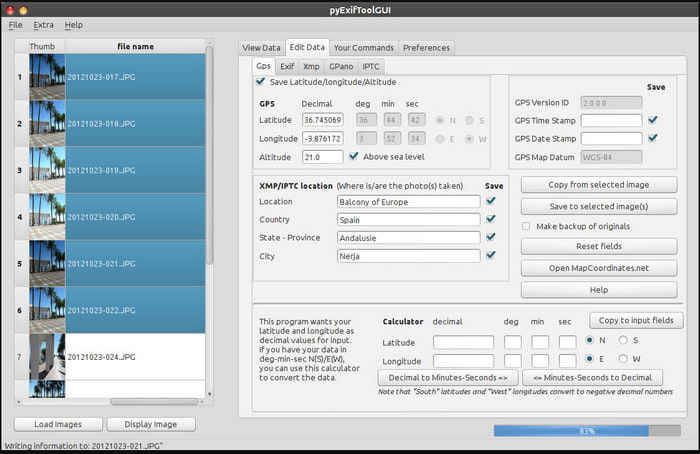
Az ExifTool egy jól ismert videó-metaadatszerkesztő Windowson, Macen és Unix rendszereken, amelyhez ingyenesen hozzáférhetsz. Számos videó- és képformátumot támogat a metaadatok módosításához vagy eltávolításához. Emellett ez az eszköz lehetővé teszi, hogy egyszerre több fájl több metaadatát is szerkeszd. A lista többi szerkesztőjével ellentétben ennél az eszköznél rengeteg minden történik a felületen; ha még új vagy a metaadat-szerkesztésben, időre lesz szükséged, hogy megszokd és megértsd a használatát.
Előnyök
- Ingyenesen letölthető.
- Könnyen szerkesztheti és megtekintheti a metaadatokat.
Hátrányok
- Az interfész és az opciók használata zavaros.
Metaadatok++
Kompatibilis operációs rendszer: Windows
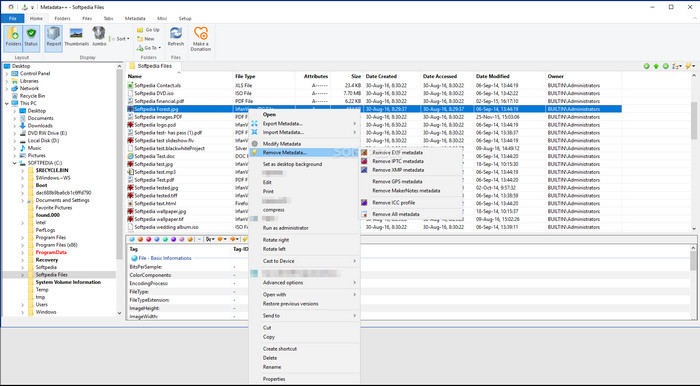
Ha Windows alatt nyílt forráskódú videó-metaadatszerkesztőt szeretnél használni, jó választás lehet a Metadata++. Ez az eszköz lehetővé teszi, hogy gyorsan hozzáadd vagy eltávolítsd a metaadatokat a fájlról gyorsbillentyűk segítségével, így ritkábban kell az egeret használnod. A szerkesztő ugyan nem olyan hatékony, mint a lista többi tagja, de ha szeretnéd, mégis megbízhatsz benne a feladathoz.
Előnyök
- Gyorsbillentyűk állnak rendelkezésre a metaadatok gyors szerkesztéséhez.
- Könnyen hozzáadhat metaadatokat azokhoz a fájlokhoz, amelyek még nincsenek meg.
- Ingyenesen letölthető Windows alatt.
Hátrányok
- A GUI elavult.
- Túl sok funkciót kell megérteni, mielőtt használni kezdené őket.
MyMeta
Kompatibilis operációs rendszer: Windows
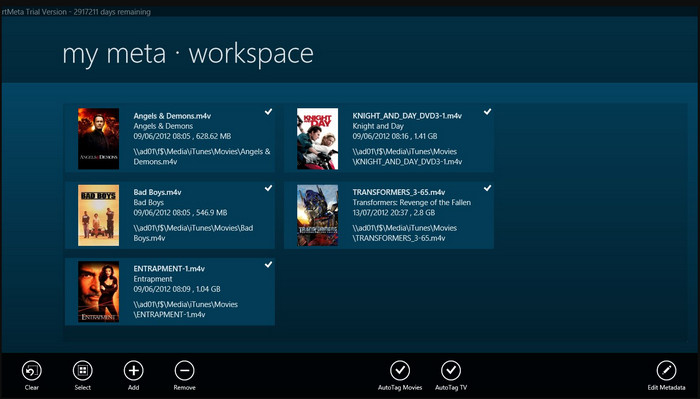
A MyMeta egy videó-metaadatszerkesztő, amellyel az MP4, M4V és MOV fájlok metaadatait azonnal módosíthatod. Ez az eszköz képes automatikusan metaadatokat és borítóképet létrehozni az internetes találatok alapján. Emellett a fájlok címkézésére is használhatod az elérhető információk szerint. Bár az eszköz remekül működik, a támogatott formátumok köre kizárólag az MP4, M4V és MOV.
Előnyök
- Könnyen kezelhető.
- Az automatikus címke segítségével néhány kattintással átmásolhatja egy adott fájl metaadatait.
- Rendes GUI.
Hátrányok
- Csak az MP4, M4V és MOV fájlokat támogatja. Tehát ha más formátumot próbál feltölteni ide, az nem támogatott.
- Egyes funkciók nem felelnek meg a felhasználó igényeinek.
VLC Media Player
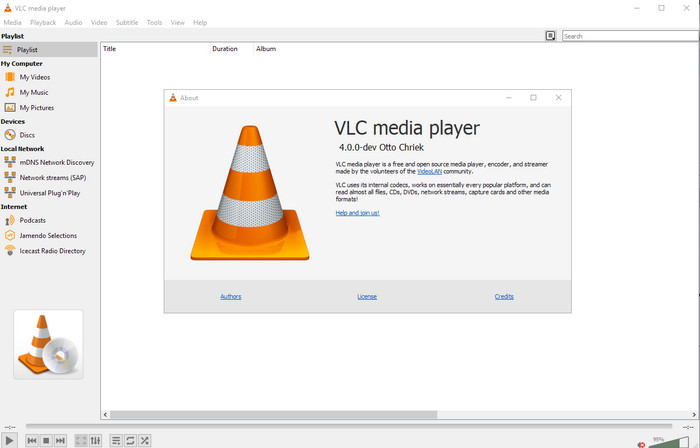
Kompatibilis operációs rendszer: Windows, Mac, Linux
A VLC Media Player elsősorban médiafájlok lejátszására készült, de ezt a nyílt forráskódú videó-metaadatszerkesztőt a fájl metaadatainak szerkesztésére is használhatod. Ahogy említettük, számos különböző formátumot képes könnyedén lejátszani, különféle kodekekkel, szinte bármelyik platformon, hiszen egy csúcsszintű médialejátszó. Bár sokféle fájlformátumot le tud játszani, a metaadat-szerkesztésre támogatott fájlformátumok köre korlátozott, és nem olyan széles, mint a fentebb említett egyéb eszközöknél.
Előnyök
- Letölthető nyílt forráskódú metaadatszerkesztő.
- Felhasználóbarát.
- Minden operációs rendszerben elérhető.
Hátrányok
- Támogatja az átlagos formátumot a feltöltéshez.
- Az eszköz grafikus felhasználói felülete elavult.
2. rész. Összehasonlító táblázat a Video metaadat-szerkesztőről
| Jellemzők | Video Converter Ultimate [Erősen ajánlott] | ExifTool | Metaadatok++ | MyMeta | VLC Media Player |
| Metaadatok hozzáadása és eltávolítása |  | | | | |
| Felhasználóbarát | | | | | |
| Támogatja a széles körű formátumokat | |  | | | |
| A legjobb választás kezdőknek | | | | | |
| Kötegelt metaadatok szerkesztése | | | | | |
3. rész: Metaadatok hozzáadása, eltávolítása és szerkesztése az erősen javasolt metaadat-szerkesztővel
Ha úgy döntöttél, hogy a Video Converter Ultimate-et használod videó-metaadatszerkesztőként, javasoljuk, hogy kövesd az alábbi lépéseket. Minden további szó nélkül tartsuk a tempót, és kezdjük el használni ezt az ultimate eszközt ehhez az ultimate feladathoz.
1. lépés. Töltsd le az eszközt az alább látható letöltés gomb megnyomásával; válaszd ki, hogy Windowst vagy Macet használsz. A letöltés befejeztével kattints a fájlra, hogy azonnal telepítsd, majd a telepítés után indítsd el a programot.
Ingyenes letöltés Windows 7 vagy újabb rendszerre Biztonságos letöltés
Ingyenes letöltés macOS 10.7 vagy újabb rendszerre Biztonságos letöltés
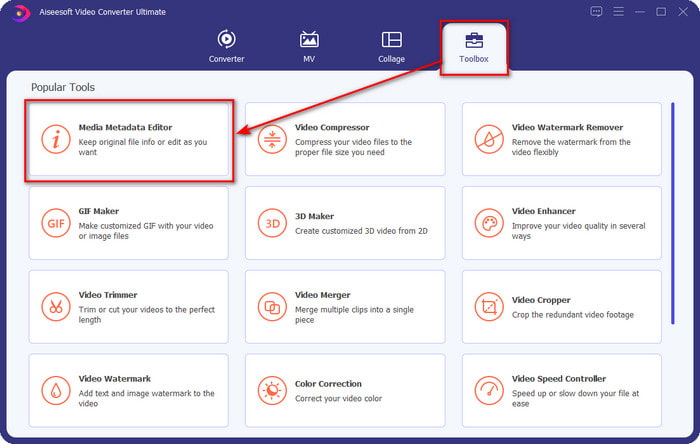
2. lépés. Miután elindítottad az eszközt, kattints a Toolbox (Eszköztár) részre, azon belül keresd meg a Media Metadata Editor (Média-metaadat szerkesztő) lehetőséget; kattints rá, mielőtt a következő lépésre lépnél.
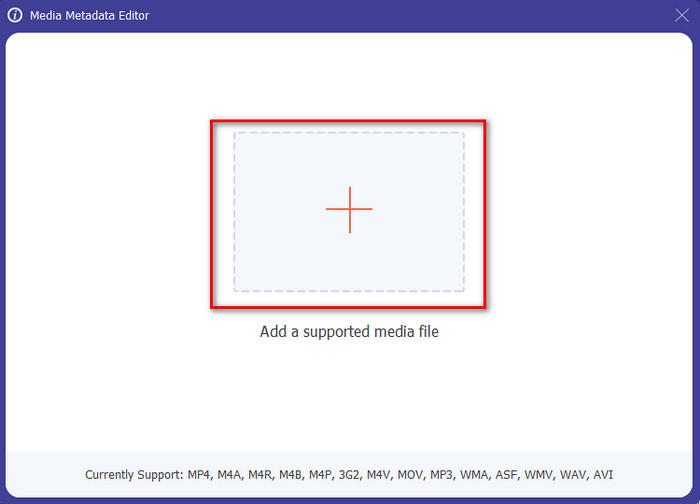
3. lépés. Illeszd be a fájlt a + ikonra kattintva; ekkor egy mappaablak jelenik meg a képernyőn, válaszd ki azt a médiafájlt, amelynek a metaadatait szerkeszteni szeretnéd, majd a folytatáshoz nyomd meg az Open (Megnyitás) gombot.
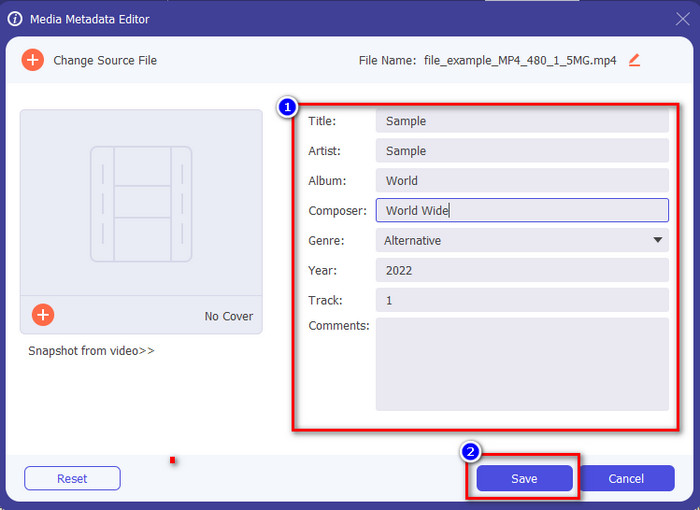
4. lépés. Az új ablakban, amely megjelenik a kijelzőn, már szerkesztheted, eltávolíthatod és hozzáadhatod a metaadatokat a megjelenő szövegmezőkben. Ha elégedett vagy a metaadatokkal, kattints a Save (Mentés) gombra, hogy alkalmazd a módosításokat a fájlra. Egyszerű, nem igaz? Nos, pontosan erre képes ez az ultimate eszköz.
4. rész. GYIK a Video Metaadat Editorről
Megnézhetem a metaadatokat online?
Igen, használhatod az FVC Free Video Converter Online-t arra is, hogy online megtekintsd egy videó metaadatait; kövesd az alábbi lépéseket, hogy megtudd, hogyan nézheted meg ezeket. Először kattints a linkre, hogy új lap nyíljon a böngésződben; ez a link automatikusan az FVC online konverter hivatalos weboldalára visz. Ezután kattints az Add Files to Convert (Fájlok hozzáadása a konvertáláshoz) gombra; ha először használod a szolgáltatást, le kell töltened az indítót, majd a fájlra kattintva telepítened kell. Kattints rá ismét, ekkor ezúttal egy számítógépes mappaablak jelenik meg, válaszd ki azt a fájlt, amelynek a metaadatait meg akarod nézni, majd a folytatáshoz nyomd meg az Open gombot. Egy új ablak jelenik meg a képernyőn; kattints az i ikonra, ekkor már láthatod a videó metaadatait.
Melyek a metaadatok részei?
A metaadat számos különféle információt tartalmazhat a médiafájlról: a szerző nevét, a mű címét, a helyszínt, beállításokat, a használt eszközt, dátumot, időpontot, műfajt (ha zenéről van szó), képet és még sok minden mást. A metaadat azonban legtöbbször attól függ, hogy miről szól a fájl; ha a fájl hangoskönyv, a metaadatok eltérnek egy videófájlétól.
Az ID3 a metaadatok mintája?
Az ID3 egy metaadattároló, amely az MP3 médiafájlokon látható; alapvetően hangfájlokon.
Következtetés
A cikkben bemutatott szoftverek segítségével megtekintheted, szerkesztheted, hozzáadhatod vagy akár eltávolíthatod a videó metaadatait, még akkor is, ha kevés ismereted van a metaadatokról. Most, hogy megismerted az öt legjobb szerkesztőt a piacon, eljött az idő, hogy kiválaszd, melyik eszközre támaszkodsz ennél a feladatnál. Ha úgy érzed, még nem döntöttél, számos okból a Video Converter Ultimate használatát ajánljuk. A többi eszközzel ellentétben ez a szoftver másodpercek alatt képes elvégezni ezt a feladatot. Ha még mindig kételkedsz abban, amit mondunk, töltsd le az eszközt, próbáld ki, és fedezd fel, mi mindent kínál még számodra.
-
 A 4. legjobb online és offline metaadat-megtekintő [Frissítve 2025]
 Ellenőrizhetem a fájlom metaadatait? Igen, megteheti, ennek a bejegyzésnek a segítségével bemutatjuk a különböző metaadatmegjelenítőket, amelyeket használhat.
-
 Az 5 legjobb online és offline metaadat-kivonó [2025]
 A piacon többféle metaadat-kivonó található, de ma már csak az öt legtöbbet választott címkekivonót választjuk ki a közönség szerint.
-
 7 népszerű zenei címkeszerkesztő Windows, Mac és mobileszközökön
 A zenei címkék népszerűek a könyvtárában lévő zenék elrendezésére a benne lévő adatok alapján. Mi van, ha változtatni akarsz? Olvassa el az alábbi részleteket, ha többet szeretne megtudni.
