


 Video Converter Ultimate
 Screen Recorder
 Videó javítás
Tudjon meg többet az 5 legjobb számítógépes videoszerkesztőről, és hasonlítsa össze
Manapság rengetegen szeretnek videókat készíteni, hogy megőrizzék az emlékezetes pillanatokat, és legtöbben pénzkeresetre is használják őket. A vloggerek és influenszerek például mindig felveszik magukat, amit aztán megmutatnak a rajongóiknak. Emellett így igyekeznek népszerűbbé válni a többi influenszernél és vloggörnél. Szóval ha te is kezdő vlogger vagy influenszer vagy, aki szeret saját magáról videókat készíteni, akkor mindenképpen érdemes a legjobb Windows 10 videószerkesztőt választanod, hogy tovább javítsd és lenyűgözővé tedd a videóidat, több lájkot, megtekintést, feliratkozót és hosszú távon akár bevételt szerezz. Mielőtt belevágunk, szeretnénk gratulálni, mert már megtetted az első lépést afelé, hogy sikeres vlogger vagy influenszer legyél. Ugyanakkor a megfelelő eszköz kiválasztása, amellyel dolgozni fogsz, az egyik legkritikusabb pont, amivel találkozol majd. Ezért most összegyűjtöttünk többféle videószerkesztőt, amelyek bizonyítottan hatékonyak, hogy ezek közül választhass az alábbiakban.

1. rész. Az 5 legjobb Windows-videószerkesztő online és offline
Top 1. Video Converter Ultimate
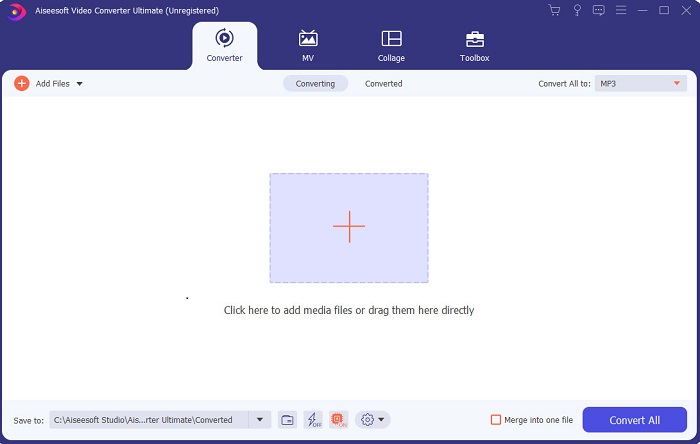
Ha előnyt akarsz szerezni, és olyan színvonalú videókat szeretnél, mint a példaképeid, akkor használd az FVC Video Converter Ultimate programot. Ez az átalakító és Windows videószerkesztő már rengeteg felhasználónak segített világszerte ismertté válni – lehet, hogy te leszel a következő. A legtöbb ismert influenszer, vlogger és videószerkesztő ezt használja szerkesztésre, javításra, felturbózásra és még sok minden másra. Ha tehát profi, a példaképeidéhez hasonló végeredményt szeretnél, és valódi pénzt akarsz keresni a videóiddal, akkor mielőbb töltsd le ezt a szoftvert, hogy új internetes szenzációvá válj, és önmagad legjobb verziója lehess. Emellett előnyeit és hátrányait is összegyűjtöttük, hogy jobban megismerhesd ezt az eszközt.
Ingyenes letöltés Windows 7 vagy újabb rendszerre Biztonságos letöltés
Ingyenes letöltés macOS 10.7 vagy újabb rendszerre Biztonságos letöltés
Előnyök
- Kezdők számára ez az eszköz a megfelelő választás. Mivel egyszerű, követhető és könnyebben érthető utasításokat tartalmaz. Alapvetően helyén van.
- Profiknak, minden mástól eltérően videó szerkesztő PC-re ennek az eszköznek sok futurisztikus funkciója van. Például, ha javítani szeretné a hangminőséget és javítani szeretné a videót, akkor használhatja ezt az eszközt. Továbbá, ha a hang nincs szinkronizálva a videóval, akkor van egy hangszinkronizálási funkciója a javításhoz.
- Összességében ez az a fenomenális konverter és szerkesztő, amelyre számíthat. Főleg, ha meglepően szeretnél belépni a vloggerek és influencerek világába.
- A szerkesztő szoftver letölthető, és nincsenek olyan szerkesztőeszközök, amelyek hasonló tulajdonságokkal rendelkeznek.
Hátrányok
- Ez az eszköz nem ingyenes, de alacsony az ára. Más szóval, olcsó és kiváló minőségű kimenetet produkál.
Top 2. Windows Movie Maker
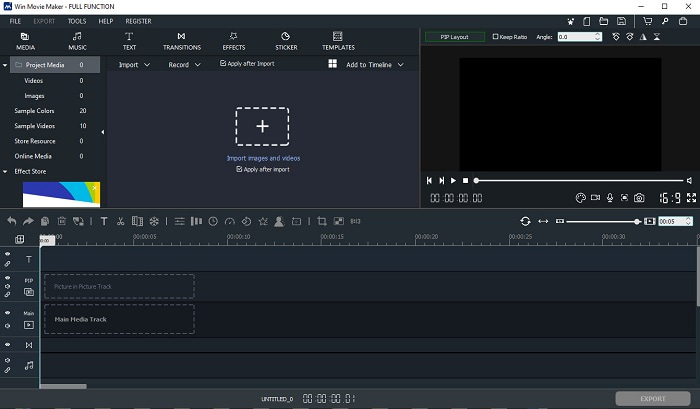
Ez a videószerkesztő Windows 7, 8, 10 és XP rendszerhez az egyik legjobb a videók készítésére és szerkesztésére. A Windows Movie Maker programot már rengetegen letöltötték, hogy saját videóikat szerkesszék vele, mivel összetett szerkesztési funkciókat kínál. Ugyanakkor a program túl megterhelő lehet azoknak, akik újak a videókészítésben és -szerkesztésben. Ha azonban profi vagy, vagyis rendelkezel már szerkesztési tapasztalattal, akkor mindenképp érdemes kipróbálnod ezt az eszközt. A programnak van egy prémium verziója is, amely nagyon hasonlít az ingyenes változatra, de a kimentett videókon nem lesz vízjel.
Előnyök
- Kezdők számára ez az eszköz nem ideális, de nagyszerű a bonyolult szerkesztéshez.
- Szakemberek számára az itt bemutatott funkciók megvalósíthatók, ha van tapasztalatuk.
- Átmenetet, effektusokat, matricákat stb.
Hátrányok
- Az eszköz kissé zavaró az itt elvégezhető eszközfunkciók miatt. Ezenkívül elsöprő, és nincs utasítás a kezeléséhez.
- Ha ennek az eszköznek az ingyenes verzióját használja, számítson rá, hogy az exportálás után magán a videón lesz vízjel.
Top 3. OpenShot
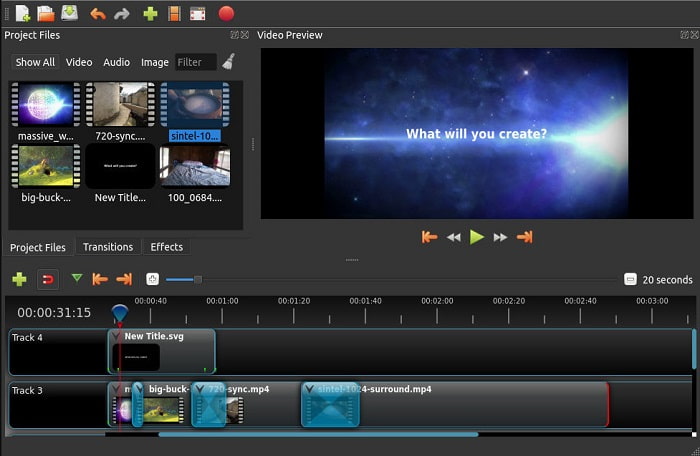
Egy másik ingyenes videószerkesztő vízjel nélkül az Openshot. Egyszerűbb, könnyebben érthető funkciókat kínál, mint a Windows Movie Maker. Ráadásul a telepítés után egy rövid bemutató vezeti végig a felhasználót a program alapvető funkcióin. Bár magyarázatot kapsz, csak az alapfunkciók kerülnek részletes ismertetésre. Ez az eszköz kizárólag alapvető szerkesztési lehetőségeket biztosít, ami azt jelenti, hogy kevésbé tudsz kreatív lenni. Emellett a program felülete a monokróm színvilága miatt kissé unalmas benyomást kelthet.
Előnyök
- Kezdők számára ez a Windows Movie Maker egyszerűbb verziója. Hozzáadhat effektusokat, átmeneteket és egyebeket.
- A szakemberek számára rendben van, hogy használják, de nem a legjobb.
- A szoftver rendben van, ha egyszerű szerkesztéssel érkezik.
Hátrányok
- Nem lehet megváltoztatni az unalmas felületet, és kevésbé interaktív.
- Néhány kisebb és nagyobb hiba még a frissítés után is jelen van itt.
Top 4. Lightworks
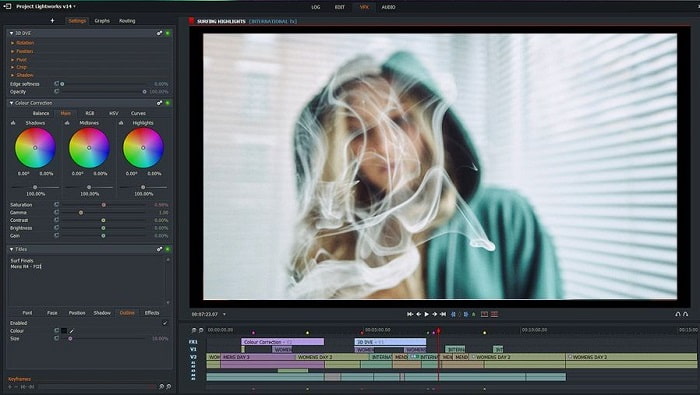
A Lightworks egy ingyenes videószerkesztő Windowsra, de létezik belőle prémium verzió is. Amikor azonban kipróbáltuk és letöltöttük volna a programot, a rendszer jelezte, hogy az .exe fájl károsíthatja a számítógépünket. Ezért végül nem töltöttük le, hanem alaposabb kutatást végeztünk a programról. Ha telepíted a szoftvert a gépedre, először regisztrálnod kell, mielőtt használhatnád. A szerkesztési funkciók kezdők számára nagyon összetettnek tűnhetnek, de még a profik számára is kissé nehezek lehetnek. Nem kell azonban megijedni, gyakorlással meg lehet tanulni a használatát.
Előnyök
- Kezdők számára az eszköz túl bonyolult, és túl sok lehet a kezelése. Főleg, ha csak egyszerű szerkesztést szeretne végezni.
- A szakemberek számára az eszköz valós idejű szerkesztési funkcióit használhatja. Bár néhány funkció új, és legtöbbjük fizetős.
- Az eszköz általános teljesítménye A osztályba sorolható a szerkesztés és a videók készítése terén.
Hátrányok
- Ha 1080 képpontos kimenetet szeretne, meg kell vásárolnia az eszközt. És még mielőtt használni tudná, regisztrálnia kell.
- A szoftver káros .exe fájlt tartalmaz, ezért töltse le saját felelősségére.
Top 5. ClipChamp
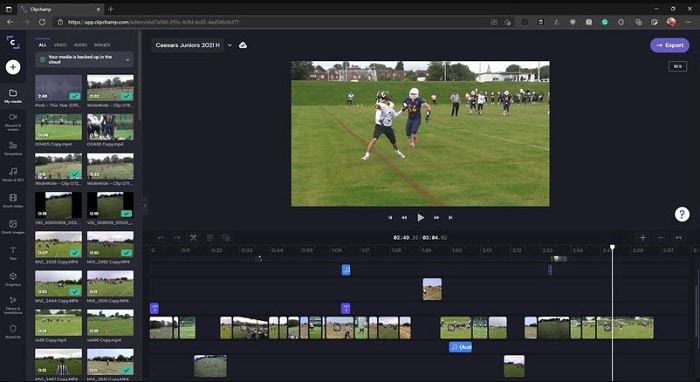
Ez az online eszköz további funkciókat biztosít, ha frissíted az előfizetési csomagot. Az egyik legkönnyebben elérhető megoldás, amellyel videókat szerkeszthetsz anélkül, hogy külön szoftvert kellene letöltened. A Clipchamp remek eszköz, de regisztráció szükséges a használatához. Ez az online Windows 10 videószerkesztő hasonló funkciókat kínál, mint a Lightworks, csak épp böngészőben fut. Ugyanakkor, ha ide importálsz videófájlokat szerkesztésre, számítanod kell a lassú importálási folyamatra. Az előnye viszont az, hogy magát az eszközt nem kell letöltened a működéséhez.
Előnyök
- Kezdők számára ezt az eszközt kötelező kipróbálni, de a videó szerkesztése és beillesztése egy kicsit lassabb.
- Szakemberek számára nem árt egyszerű videókat korlátozott erőforrásokkal használni és szerkeszteni.
- Összességében az eszköz könnyebben érthető, mint a Windows Movie Maker.
Hátrányok
- Internetfüggő, ami azt jelenti, hogy ha lassú az interneted, akkor instabil folyamatra számíts.
- A webes eszköz használatához regisztrációs űrlapra van szüksége.
2. rész. Összehasonlító táblázat az 5 videószerkesztőhöz Windowshoz
| Jellemzők | Video Converter Ultimate | Windows film készítő | OpenShot | Fényművek | ClipChamp |
| Videószerkesztés, például vágás, vágás, összevonás és így tovább. |  | | | | |
| Video Enhancer | |  | | | |
| Vízjel | | | | | |
| Támogatott program | Asztali alapú eszköz | Asztali alapú eszköz | Asztali alapú eszköz | Web alapú eszköz | Web alapú eszköz |
| Árkategória | 1 hónapra: $25.00 Egy évre: $31.20 | $39.95 Egyszeri fizetés | Ingyenes, de lehet adományozni | QScan Pro QScan Pro – Havi előfizetés aktiválása $59.99 | Alkotó – $9/hó Üzleti- $19/ havi |
| Élettartamú licenc esetén: $55.20 | QScan Max QScan Max – Havi előfizetés aktiválása $119.99 | Business Platinum – $39/ havi |
3. rész. GYIK a Windows Video Editorről
Melyik a legjobb Mac Video Editor, amit használhatok?
Bár a bemutatott eszközök mind Windowsra készült szerkesztők – az FVC Video Converter Ultimate kivételével –, ha kíváncsi vagy más, Macre készült videószerkesztőkre is, akkor kattints erre a linkre, és válassz a felsorolt lehetőségek közül.
Miért nem lehet lejátszani a videóimat Androidon?
Számos oka lehet annak, hogy a videók miért nem játszhatók le az Android készülékeden. Hogy megismerd ezeket az okokat, és azonnal orvosolni tudd a problémát, olvasd el a Hogyan javítható a videók lejátszásának hibája Android telefonokon című útmutatót.
Hogyan tömöríthetem a hosszú videóimat és oszthatom meg őket a YouTube-on?
Jelenleg legfeljebb 256 fájlméretű (256 MB-os) videót tölthetsz fel, ezért a legjobb megoldás a tömörítés. Ha szeretnéd megosztani a videóidat YouTube-on, akkor nézzük meg együtt, hogyan csökkentheted a fájlméretet és töltheted fel a YouTube-ra.
Következtetés
Mielőtt olyan vlogger vagy influenszer lehetsz, akire most felnézel, meg kell tanulnod önállóan szerkeszteni a videóidat. Most eljött a pillanat, hogy kipróbáld azt a rendkívüli szerkesztőt, amely Hollywood-szintű funkciókat és minőséget kínál. Így nemcsak a nézőidet és követőidet, hanem saját magadat is lenyűgözheted. Ragadj meg minden lehetőséget, tündökölj, és engedd, hogy a siker útját a FVC Video Converter Ultimate fénye világítsa meg számodra.
-
 A legjobb MP4 szerkesztő Windows és Mac rendszerre 2025-ben
 Akár MP4-videók szerkesztésére használja a számítógépét, akár csak a telefonján dolgozik, remek lehetőségeket találhat itt, köztük a legjobb MP4-szerkesztőt Windowsra és Macre.
-
 Hogyan adhatunk audiót és zenét ingyenesen a videóhoz a számítógépen / telefonon
 Ez a cikk négy egyszerű módszert mutat be arra, hogyan lehet ingyenesen hozzáadni a hangot a videókhoz. Nem számít, melyik hangsávot szeretné hozzáadni a videójához, itt kielégítő eredményeket érhet el.
-
 Hogyan válasszuk ki és egyesítsük a dalokat online - 4 legjobb módszer, amelyet tudnunk kell
 Ha online vágni és egyesíteni akarja a dalokat, hogy egy darab zenét hozzon létre, akkor többet megtudhat a 4 legjobb online eszközről a dalok klipelésére és a cikk fájljainak egyesítésére.
