


 Video Converter Ultimate
 Perekam Layar
 Perbaikan Video
Panduan Panduan yang Harus Anda Pertimbangkan dalam Mengonversi M2TS ke FLV [Offline & Online]
File media seperti VOB, WMV, dan MOV adalah contoh lain dari M2TS. Sebenarnya, apa itu M2TS? M2TS adalah singkatan dari MPEG-2 Transparent Stream. Video berdefinisi tinggi pada cakram Blu-ray, AVCHD, dan sebagainya dapat disimpan dalam format kontainer ini. Sementara itu, FLV adalah berkas dengan ekstensi .flv yang merupakan singkatan dari Flash Video. Ekstensi berkas FLV mengacu pada berkas video atau audio yang ditransmisikan melalui internet menggunakan Adobe Flash Player atau Adobe Air. Dua jenis berkas video ini mungkin terdengar asing bagi Anda, tetapi untuk mengonversi M2TS ke FLV, pertama-tama Anda perlu mengetahui fungsi kedua format video ini dan semua pilihan yang harus Anda pertimbangkan dalam proses konversi. Siapkan pikiran Anda dan pahami setiap informasi yang akan Anda baca.

Bagian 1. Bagaimana Mengkonversi M2TS ke FLV di Windows dan Mac
Dengan Video Converter Ultimate, mengonversi M2TS ke FLV di Windows dan Mac sangatlah mudah. MP4/MOV/M4V/FLV/M4K/MTS/M2TS/ASF/MP3/VOB/AAC hanyalah beberapa dari banyak format video dan format audio populer yang didukung oleh program hebat ini. Video definisi tinggi Anda dapat dikonversi ke format populer seperti FLV dalam hitungan detik sambil mempertahankan kualitas aslinya. Ini memiliki fitur konversi batch yang memungkinkan Anda mengonversi banyak file tanpa kehilangan kualitas. Dengan asumsi Anda telah membiasakan diri dengan perangkat lunak, Anda sekarang dapat mempelajari semua langkah yang diperlukan untuk mengonversi dengan sukses:
Langkah 1: Pertama, klik tombol Free Download di bawah ini untuk mengunduh perangkat lunak ke komputer Anda. Setelah selesai mengunduh perangkat lunak, instal di komputer Anda, lalu akan muncul jendela di layar yang memberi tahu bahwa perangkat lunak siap digunakan. Klik Start Now untuk menjalankan perangkat lunak.
Unduh GratisUntuk Windows 7 atau yang lebih baruUnduhan Aman
Unduh GratisUntuk MacOS 10.7 atau yang lebih baruUnduhan Aman
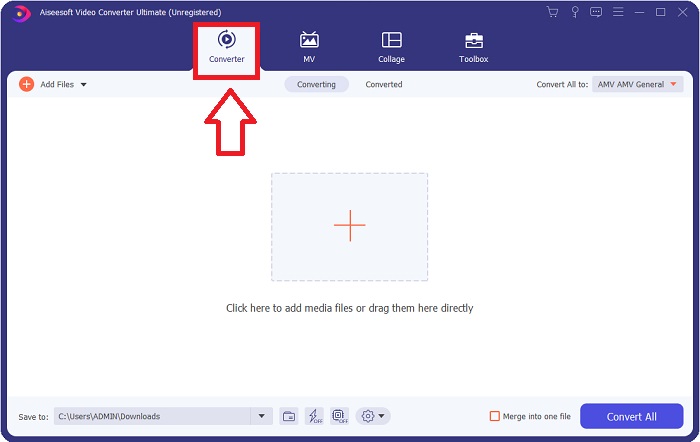
Langkah 2: Kedua, setelah Anda menjalankan perangkat lunak, Anda akan diarahkan ke antarmuka utama perangkat lunak, yaitu menu Converter.
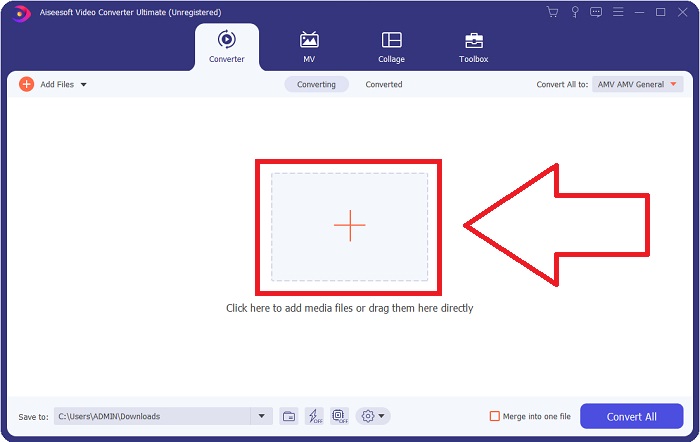
Langkah 3: Untuk mengunggah berkas, klik ikon + di tengah antarmuka, atau Anda juga dapat langsung menyeret video dari komputer Anda.
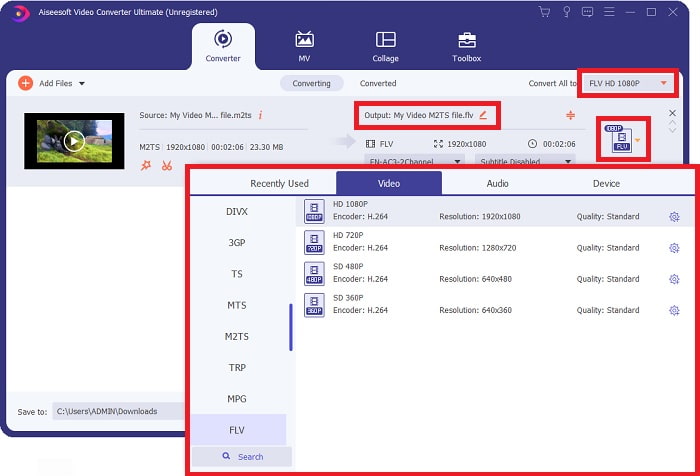
Langkah 4: Setelah mengunggah berkas M2TS ke konverter, buka menu Convert All di pojok kanan atas jendela dan klik. Jendela baru akan muncul yang menampilkan semua jenis format yang didukung perangkat lunak, lalu pilih format video FLV dari daftar kategori Video.
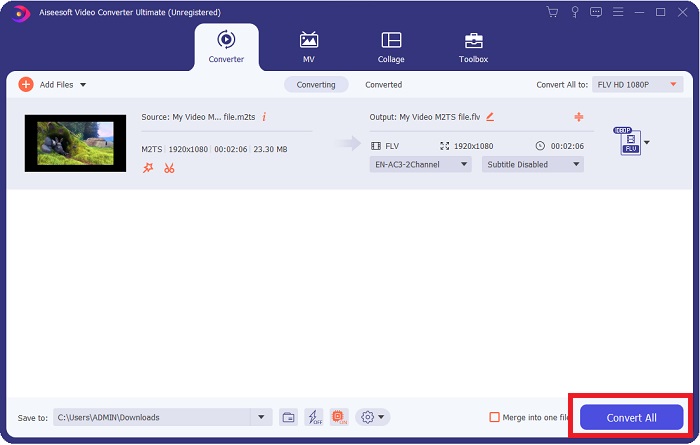
Langkah 5: Jika Anda masih belum bisa memutuskan kualitas apa yang akan digunakan karena kualitas yang Anda cari tidak tersedia dalam pilihan, Anda dapat mengklik ikon roda gigi dan mengubah semua pengaturan bitrate, resolusi, frame rate, dan sebagainya. Jika Anda sudah puas dengan semua perubahan, kini Anda bisa mengklik Convert All untuk mulai mengonversi berkas video Anda.
Bagian 2. Cara Gratis dan Efektif Lainnya untuk Mengonversi M2TS ke FLV Online
Free Video Converter Online adalah alat daring yang cocok untuk mengonversi format video seperti FLV, MP4, MOV, MKV, MTS, ASF, VOB, dan lain-lain, dengan kecepatan yang lebih tinggi dibandingkan platform konversi lainnya. Meskipun proses konversinya singkat, alat daring ini mengekspor berkas video tanpa masalah pada kualitasnya. Tanpa penjelasan lebih jauh, mari langsung masuk ke semua langkah yang perlu Anda ikuti:
Langkah 1: Klik tautan ini untuk masuk ke situs utama Free Video Converter Online.
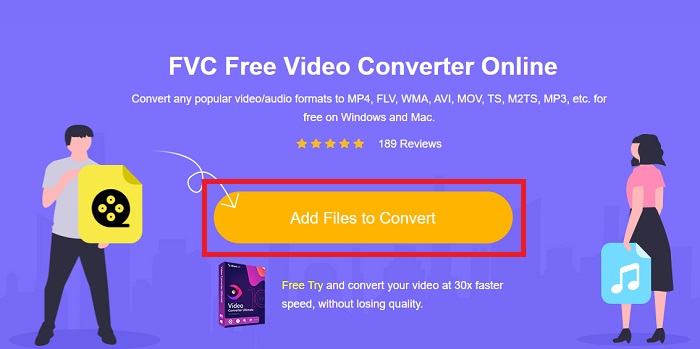
Langkah 2: Lalu klik tombol Add Files to Convert untuk mengunggah berkas video M2TS yang ingin Anda konversi ke format video FLV.
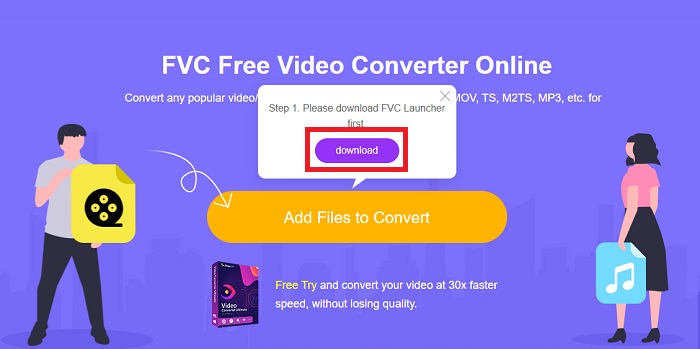
Langkah 3: Setelah Anda mengunggah berkas, Anda akan melihat jendela pop-up di bagian atas layar yang meminta izin untuk mengunduh launcher agar Anda dapat menggunakan alat daring ini. Klik launcher yang sudah diunduh untuk menginstalnya di komputer Anda dan mulai mengonversi.
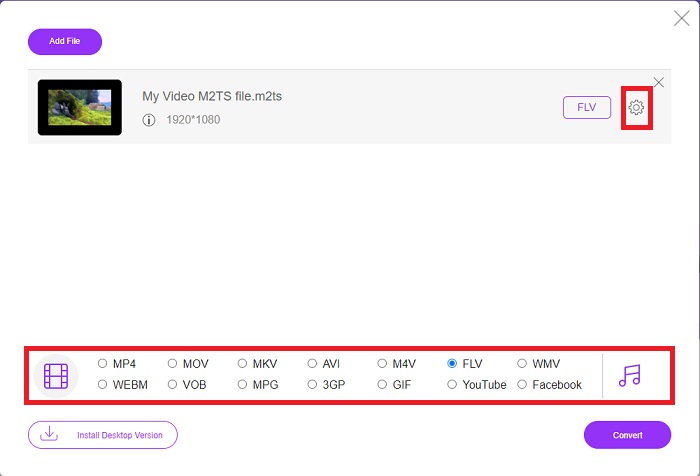
Langkah 4: Pilih format video FLV dari pilihan format di bagian bawah antarmuka. Anda juga dapat mengedit kualitas video keluaran dengan mengklik ikon roda gigi di sebelah format video yang Anda pilih. Jendela lain akan muncul yang memuat pengaturan bitrate, resolusi, dan frame rate. Mulailah menyesuaikan, dan setelah selesai mengatur, klik OK dan lanjutkan proses konversi.
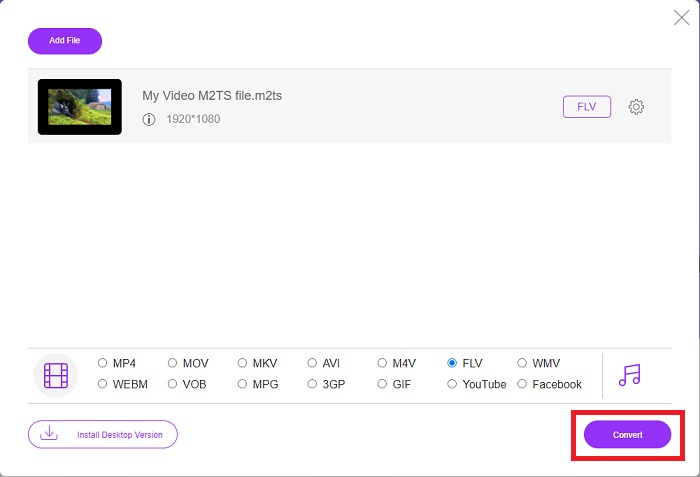
Langkah 5: Sekarang Anda dapat mengonversi berkas dengan mengklik tombol Convert di pojok kanan bawah jendela.
Bagian 3. Perbandingan Antara M2TS dan FLV
Format wadah video M2TS digunakan untuk menyimpan video definisi tinggi pada Disk Blu-ray, AVCHD, hard drive, dan perangkat lain yang mendukung aliran transportasi MPEG-2. Blu-ray Disc Audio-Video (BDAV) adalah nama yang diberikan untuk format ini karena digunakan secara luas dalam cakram Blu-ray. Demi memperkecil ukuran data. Alih-alih menggunakan aliran transportasi CBR, aliran transportasi VBR digunakan (kecepatan konstan) karena konten audio dan video berkualitas tinggi yang terkandung dalam file M2TS; VideoStudio Pro adalah aplikasi luar biasa untuk mengedit file M2TS.
| Ekstensi File | M2TS | FLV |
| Jenis File | Aliran Transportasi Audio-Video Disk Blu-ray MPEG-2 | File Video Flash |
| Dikembangkan oleh | Asosiasi Disk Blu-ray | Sistem Adobe |
| Pro | File video Blu-ray BDAV definisi tinggi berbasis streaming MPEG-2; digunakan untuk menyimpan data video pada cakram Blu-ray; mendukung resolusi 720p/1080i. | Format video yang lazim, FLV digunakan oleh puluhan ribu situs web, menawarkan berbagai fitur tambahan, dan menghasilkan ukuran file yang lebih kecil daripada kebanyakan format video lainnya. File FLV sangat baik untuk menghasilkan video berkualitas tinggi dengan kecepatan tinggi. |
| Kontra | File m2ts tidak boleh berisi bab. Mereka disimpan di tempat lain dalam struktur folder Bluray. | Perlu menginstal plug-in flash untuk memutar file file flash secara online. |
| Program membuka Format Video | Semua Pemain MPplayer Pemutar Media VLC Pemain Pot | Pemutar Media VLC Adobe Flash Player |
Bagian 4. FAQ tentang Mengonversi M2TS ke FLV
Bagaimana cara memutar file M2TS?
Windows Media Player, SMPlayer, 5KPlayer, Splash, dan File Viewer Plus dapat memutar file M2TS. Beberapa pemutar M2TS kompatibel dengan berbagai sistem operasi. Pemutar media VLC VideoLAN, misalnya, dapat memutar file M2TS di Windows, Mac, dan Linux.
Apakah FLV merupakan format perekaman yang sesuai?
Adobe Flash Player menggunakan format berkas FLV. Salah satu format video yang paling populer dan serbaguna ini mendukung semua platform dan peramban video. Platform streaming video daring seperti YouTube mendapatkan manfaat dari penggunaan format FLV. Format ini mudah diunduh berkat ukuran berkasnya yang kecil. Klik di sini untuk mempelajari lebih lanjut perekam FLV yang tersedia.
Apakah FLV masih digunakan?
Video, iklan spanduk, animasi, dan streaming langsung semuanya merupakan opsi. Sudah lama sejak film flash, dan mereka menggunakan klip di internet. Namun, meskipun format FLV sedang dalam perjalanan keluar, itu terus menjadi standar video untuk pengguna internet di seluruh dunia.
Kesimpulan
Untuk mengakhiri diskusi, kita semua berpikir tidak ada jenis konverter yang tersedia untuk mengubah M2TS ke FLV. Namun, artikel ini akan mengoreksi Anda bagaimanapun juga dengan memperkenalkan dua konverter terbaik yang perlu Anda pertimbangkan untuk digunakan, Free Video Converter Online atau Video Converter Ultimate. Kedua konverter ini bukanlah apa-apa yang dapat Anda minta karena ia menawarkan semua alat dan fitur profesional yang mungkin dapat membantu Anda dari mengonversi file hingga mengubah file menjadi tampilan yang lebih baik.
-
 2 Cara termudah untuk Mengonversi File WMV ke FLV di PC/Mac
 Bagaimana Anda bisa mengubah WMV ke FLV? Pertama, Anda perlu membaca rekomendasi kami dan menemukan metode favorit Anda, lalu ikuti panduan kami untuk melakukan pekerjaan dengan cepat.
-
 3 Solusi Cara Mengkonversi FLV ke PSP Tanpa Rugi
 Bagaimana cara mengubah FLV ke PSP? Di sini Anda akan mendapatkan panduan langkah demi langkah untuk mengonversi video Flash ke format yang didukung PSP (WMV, MP4, AVI, FLV, dll.) di Windows dan Mac.
-
 2 Metode untuk Mengonversi Audio FLV ke WMA [Gratis & Daring]
 Ingin mengekstrak audio WMA dari video FLV? Berikut adalah 2 ekstraktor audio WMA gratis untuk mengonversi FLV (Flash Video) ke WMA (Windows Media Audio) dengan kecepatan konversi cepat di Mac OS X dan Windows 10/8/7.
