


 Video Converter Ultimate
 Perekam Layar
 Perbaikan Video
Tips & Trik Cara Mengonversi File WebM ke FLV untuk Windows/Mac/Online
Apakah Anda mengalami kesulitan memutar video dengan ekstensi file WebM? Mungkin Anda sedang mencari solusi terbaik dengan cara mengonversi file tersebut ke format yang dapat diputar di perangkat Anda. Jika demikian, Anda beruntung karena artikel ini akan membahas dua konverter WebM terbaik yang dapat Anda gunakan secara online maupun offline. Mari beralih ke konverter WebM ke FLV gratis yang bisa Anda gunakan di desktop dan pelajari cara mengonversi WebM secara langsung.

Bagian 1. Konverter WebM ke FLV Terbaik di Windows & Mac
Yang pertama dalam daftar adalah konverter WebM ke FLV luar biasa yang bisa Anda unduh ke desktop untuk membantu mengatasi masalah Anda. FVC Video Converter Ultimate adalah pilihan konverter terbaik untuk meraih tingkat keberhasilan konversi 100%. Alat ini secara khusus digunakan untuk mengonversi format video dan audio Anda ke format yang kompatibel dari lebih dari 200 format pilihan Anda. Alat ini bahkan lebih unggul karena menawarkan proses konversi yang sederhana dengan kecepatan konversi sangat tinggi tanpa mengurangi kualitas. Konverter ini membawa proses konversi ke level berikutnya, ingin mencobanya? Jika demikian, mari pelajari cara menggunakan alat ini dengan mengikuti langkah-langkah terperinci di bawah ini.
Langkah-langkah Mengonversi File WebM ke Format FLV dengan FVC Video Converter Ultimate:
Langkah 1. Klik tombol unduh yang disajikan di bawah dan ikuti petunjuk instalasi.
Unduh GratisUntuk Windows 7 atau yang lebih baruUnduhan Aman
Unduh GratisUntuk MacOS 10.7 atau yang lebih baruUnduhan Aman
Langkah 2. Untuk menambahkan file WebM Anda, klik Add Files di pojok kiri atas antarmuka. Lalu pilih file .webm di folder Anda dan klik Open.
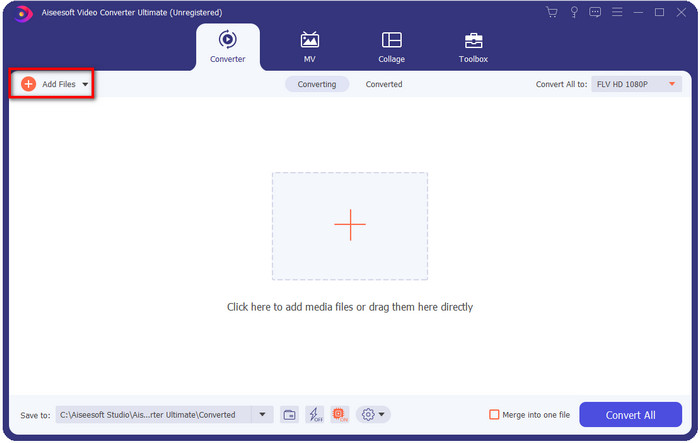
Anda dapat drag-and-drop file pada antarmuka jika Anda ingin menambahkan beberapa file WebM atau file lain untuk melakukan konversi batch.
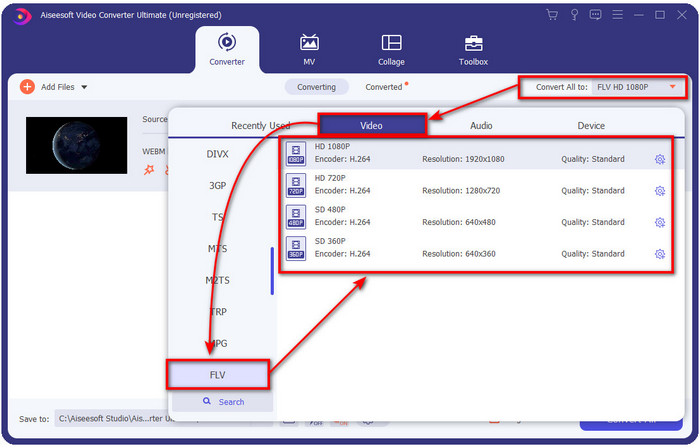
Langkah 3. Klik opsi Convert All to di pojok kanan atas antarmuka dan pilih format FLV.
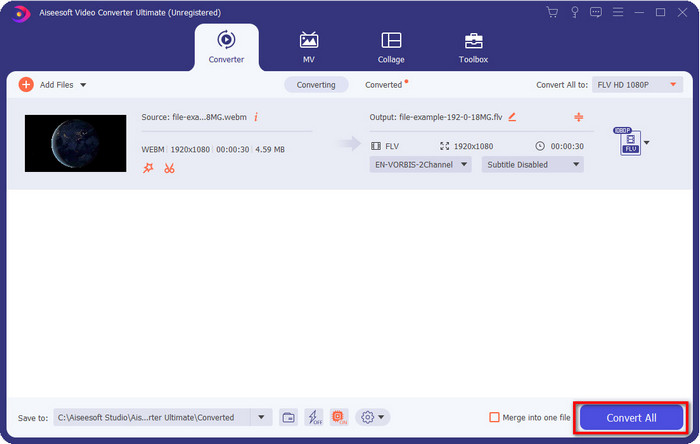
Langkah 4. Klik Convert All untuk mulai dan mengonversi WebM ke FLV. Setelah proses selesai, sebuah folder akan muncul di layar Anda berisi file FLV yang baru dikonversi.
Pro
- Ini mendukung profil format yang tak terhitung jumlahnya yang dapat Anda pilih.
- Mendukung Akselerasi Perangkat Keras & Konversi Cepat untuk prosedur konversi yang lebih cepat.
- Ini menawarkan beberapa fitur pengeditan lanjutan seperti memotong, menggabungkan, memotong, menambahkan efek, dan banyak lagi.
- Konversikan file WebM Anda sekaligus.
- Tersedia di semua sistem operasi seperti Windows & Mac.
Kontra
- Unduh di desktop Anda.
- Konverter berbayar.
Bagian 2. Konversi WebM ke FLV Gratis Online
FVC Free Video Converter Online menawarkan konverter WebM ke FLV online yang kuat untuk Anda. Konverter ini tersedia di semua mesin pencari pilihan Anda. Alih-alih mengunduh konverter ke desktop, mengapa tidak menggunakan alat web ini sebagai alternatif? Selain gratis, alat ini juga bebas iklan dan malware. Namun, banyak fungsi yang tidak tersedia di sini jika dibandingkan dengan FVC Video Converter Ultimate, terutama dalam cakupan format yang didukung. Ingin tahu cara menggunakan konverter web ini? Maka ikuti langkah-langkah yang disediakan di bawah ini.
Langkah-langkah Mengonversi File WebM ke Format FLV Secara Online dengan FVC Free Video Converter Online:
Langkah 1. Klik FVC Free Video Converter Online ini untuk membuka situs web konverter.
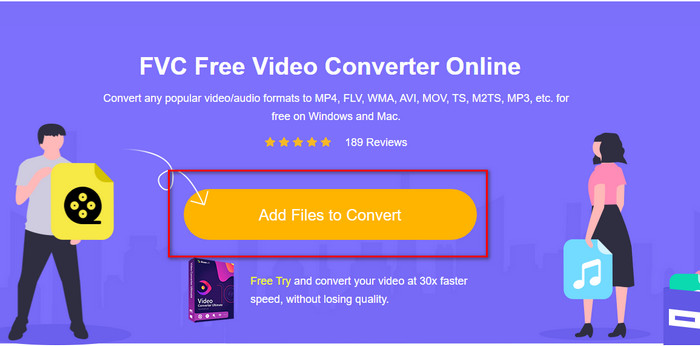
Langkah 2. Di situs web konverter, klik Add Files to Convert untuk memasang peluncur (launcher) alat web. Ketuk lagi, lalu sebuah folder akan terbuka, cari file .webm dan klik Open.
Langkah 3. Atur format menjadi FLV dengan memilihnya di bawah daftar format.
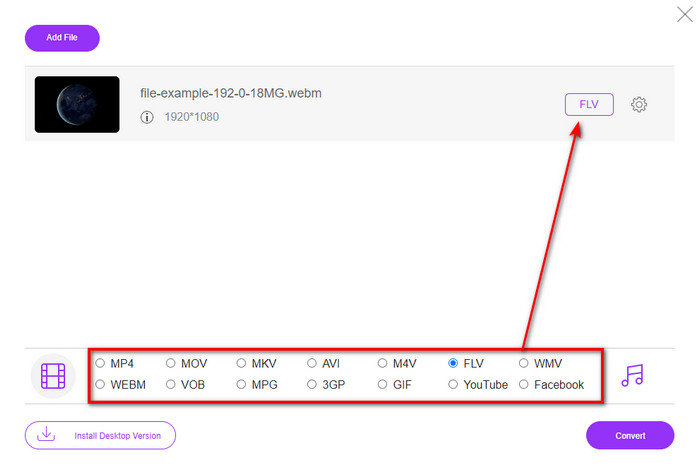
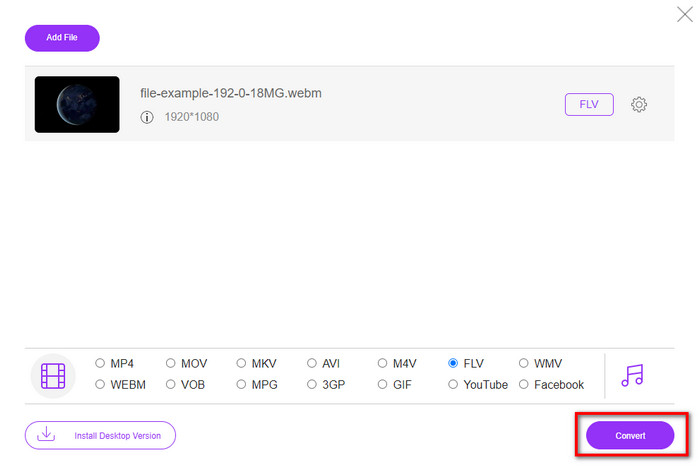
Langkah 4. Untuk mengonversi file, klik Convert.
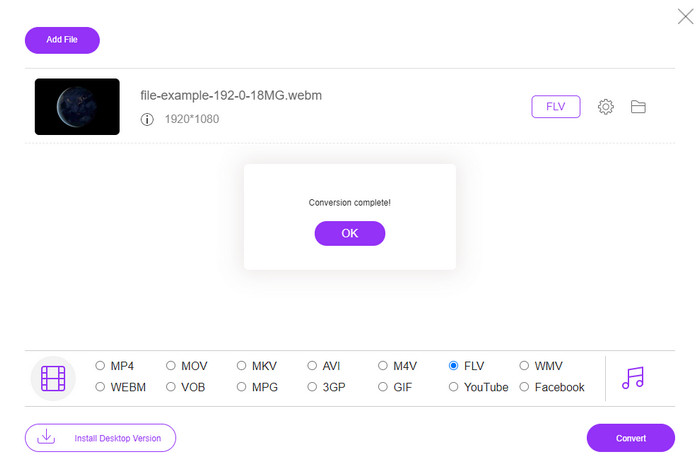
Langkah 5. Setelah konversi selesai, sebuah folder akan muncul di layar Anda.
Pro
- Tersedia dan gratis untuk diakses di semua browser web.
- Tidak ada iklan yang mengganggu, dan bebas malware.
- Ini mendukung format jarak menengah.
Kontra
- Koneksi internet diperlukan.
- Fitur khusus tidak tersedia di konverter ini.
Bagian 3. WebM vs. FLV
WebM dapat dimainkan di sebagian besar browser yang menggunakan HTML5. Tujuan format ini adalah bebas royalti dan tersedia di semua browser web untuk memutar video dan audio. Selain itu, ia dapat beradaptasi dengan situasi bandwidth apa pun yang dimiliki pengguna. Ini terutama memutar video dan audio tanpa mempengaruhi kualitas, meskipun pengguna memiliki konektivitas internet yang buruk. Fitur fantastis lainnya dari format ini adalah menggunakan codec terpisah pada aliran video dan audio. Meskipun format ini dapat berisi video berkualitas tinggi, beberapa ponsel cerdas dan pemutar media tidak dapat memutar video berformat jenis ini. Ada banyak alasan Anda tidak dapat memutar file tersebut, dan salah satunya adalah karena versi OS Anda sudah usang.
Tidak seperti WebM, tujuan FLV adalah mengirimkan konten video melalui internet menggunakan Adobe Flash Player atau Adobe Air. Selain itu, format ini dapat berisi tidak hanya konten video tetapi juga elemen seperti metadata, header pendek, audio, dan aliran video. Meskipun formatnya memiliki plug-in, Anda tidak memerlukannya untuk memutar file di pemutar media atau menyimpannya di ponsel. Sama seperti WebM, format ini juga menggunakan codec kompresi video dan audio yang terpisah.
Untuk membuat file WebM Anda kompatibel, Anda harus mengubah WebM Anda ke FLV. Meskipun Anda dapat menyimpan file WebM di perangkat Anda, itu masih merupakan pemborosan penyimpanan jika Anda tidak dapat menggunakannya. Selanjutnya, mengubah file WebM Anda menjadi format yang dapat dimainkan akan memberi Anda kesempatan untuk melihat file di beberapa perangkat.
Bagian 4. FAQ tentang Konversi WebM ke FLV
Apakah VLC mendukung format WebM?
VLC adalah salah satu pemutar media serbaguna yang dapat Anda unduh di Windows, Mac, dan bahkan ponsel pintar Anda. Aplikasi ini dapat mendukung berbagai pemutaran video dan audio, termasuk file .webm. Namun jika Anda ingin menonton file WebM di pemutar media yang lebih baik, baca artikel ini untuk mengetahui lebih banyak tentang lima software terbaik untuk memutar file WebM.
Bagaimana cara mengubah WebM ke GIF?
Mengonversi file WebM Anda menjadi GIF animasi bisa dilakukan dalam satu menit. Ingin tahu cara mengonversi WebM ke GIF? Jika ya, klik tautan ini untuk mempelajarinya lebih lanjut.
Bisakah saya mengompres file WebM saya?
Tentu saja Bisa, Anda dapat memperkecil ukuran file WebM agar bisa dikirim melalui e-mail atau menghemat ruang di drive Anda. Jika Anda belum memiliki software pilihan, Anda beruntung karena kami telah memilah 2 kompresor WebM gratis yang bisa Anda gunakan.
Kesimpulan
Sekarang setelah kita tahu cara mengonversi file WebM ke format FLV, saatnya memilih konverter yang harus Anda gunakan. Meskipun kedua konverter WebM yang disajikan di sini dapat menjamin keberhasilan, keduanya tetap memiliki kemampuan yang berbeda. Misalnya, jika Anda ingin mengonversi WebM secara online tanpa batasan dan tanpa iklan sama sekali, Anda harus memilih FVC Free Video Converter Online. Namun jika Anda ingin melakukan lebih dari sekadar mengonversi file, pilihan Anda harus FVC Video Converter Ultimate. Masih meragukan kemampuan konverter ultimate ini? Jika demikian, Anda harus segera mengunduhnya di desktop untuk merasakan fungsi lengkap dari konverter ini.
-
 3 Cara Mengonversi WebM ke MP3 tanpa Kehilangan Kualitas Suara
 Mengalami masalah karena file WebM tidak dapat digunakan untuk memutar audio yang Anda simpan? Kemudian baca artikel ini karena kami memberikan bantuan yang efektif dengan mengonversi WebM ke MP3.
-
 3 Perangkat Lunak Menakjubkan yang Digunakan untuk Mengonversi File WebM ke Format AVI
 Tidak tahu cara mengubah WebM menjadi AVI? Kalau begitu mari kita mulai membaca artikel ini. Saat kami menentukan semua detail di WebM dan tiga konverter yang dapat Anda gunakan untuk mengonversi.
-
 Metode yang Mudah Diikuti tentang Cara Mengonversi WEBM ke MOV
 Apakah Anda merasa kesulitan karena video WebM Anda tidak dapat diputar dengan safari, dan Anda tidak ingin beralih ke browser yang mendukung format ini? Baca artikel ini untuk mempelajari cara mengubah WebM ke MOV dengan mudah.
