


 Video Converter Ultimate
 Perekam Layar
 Perbaikan Video
6 Pengontrol Kecepatan Video Terbaik untuk Windows/Mac/Android/iOS
Mempercepat atau memperlambat video dapat menciptakan ilusi yang luar biasa jika Anda sudah bosan menggunakan efek-efek biasa. Teknik pengeditan video ini sederhana namun efektif. Saat Anda mencari di internet, ada banyak pilihan pengatur kecepatan yang berbeda di pasaran, dan kami tahu sulit untuk memilih. Namun jika Anda membaca artikel ini, kami akan mengulas aplikasi pengatur kecepatan yang bisa Anda gunakan untuk mengubah kecepatan pemutaran. Tertarik dengan aplikasi pengatur kecepatan terbaik? Kalau begitu, lanjutkan membaca untuk mengetahui lebih jauh tentang pengatur kecepatan video yang tersedia di berbagai platform Anda.

Bagian 1. Top 6 Pengontrol Kecepatan Video untuk Windows, Mac, Chrome, iOS & Android
Teratas 1. Video Converter Ultimate (Windows & Mac)
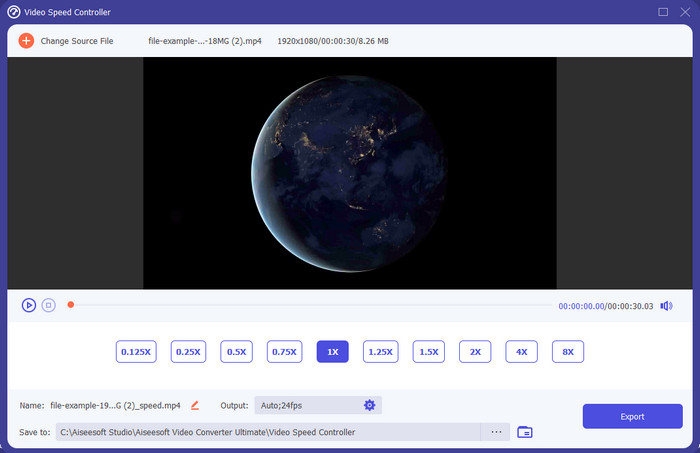
Anda membutuhkan pengatur kecepatan video yang sangat efektif dan efisien untuk mempercepat dan memperlambat video? Kalau begitu, Video Converter Ultimate adalah solusi untuk masalah seperti ini. Ini adalah alat yang paling mudah diakses yang bisa Anda gunakan untuk mengubah kecepatan video tanpa kesulitan, baik saat Anda membutuhkannya dalam kecepatan tinggi maupun slow motion. Meskipun Anda mengubah kecepatannya, kualitas asli video akan tetap sama, hanya gerakan videonya yang berubah karena kecepatannya diubah.
Selain itu, Anda dapat melakukan banyak hal seperti mengonversi, menggabungkan, memotong, dan lainnya; pada dasarnya, ini adalah alat all-in-one. Ingin tahu penawaran lain yang bisa Anda dapatkan dengan aplikasi video percepatan ini? Jika demikian, baca fitur alat untuk mempelajari lebih lanjut, atau Anda dapat mengunduh perangkat lunak di desktop Anda sekarang untuk mengujinya.

Video Converter Ultimate
5.689.200+ Unduhan- Itu dapat dengan tepat mengubah bingkai video ke atas atau ke bawah dengan cepat dalam format video apa pun, seperti MP4.
- Tersedia banyak fitur dan efek pengeditan video.
- Ini fleksibel di semua platform seperti Windows atau macOS.
- Proses ultra-cepat membuat Anda mengunduh atau mengekspor proses dilakukan dalam sekejap mata.
- Mengekspor atau mengunduh video yang Anda edit tidak akan memiliki tanda air.
Unduh GratisUntuk Windows 7 atau yang lebih baruUnduhan Aman
Unduh GratisUntuk MacOS 10.7 atau yang lebih baruUnduhan Aman
Pro
- Ubah frame per frame video meskipun Anda pro atau tidak.
- Opsi pemutaran video yang mudah dipahami.
- Kemampuan berbagi media sosial yang luar biasa.
- Ini gratis untuk diunduh, tetapi menawarkan pembelian dalam aplikasi.
Kontra
- Perlu membeli jika Anda ingin memiliki kemampuan penuh dari alat tersebut.
Atas 2. Clipchamp (Windows)
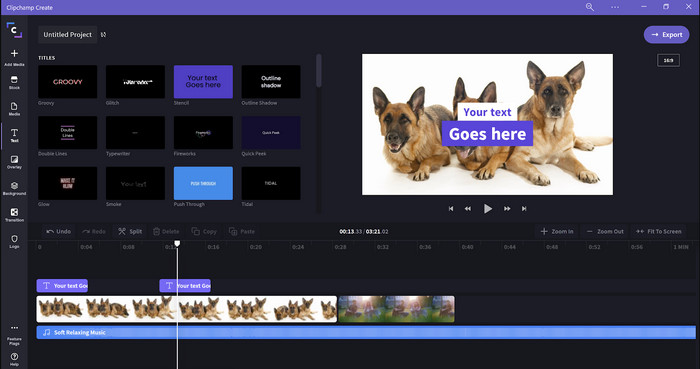
Clipchamp adalah editor kecepatan video yang bisa Anda gunakan di Windows. Alat ini memiliki kurva belajar yang tidak terlalu sulit, jadi Anda mungkin tertarik mencobanya jika Anda masih baru dalam dunia editing. Ia juga mendukung beberapa fitur yang mungkin ingin Anda gunakan. Namun, kelemahan utama alat ini adalah kualitas keluaran videonya. Anda hanya bisa mengekspor file dengan kualitas video 480, yang tergolong rendah dibandingkan alat gratis lainnya. Tetapi jika Anda ingin mengekspor dalam kualitas 720 atau 1080, Anda bisa berlangganan dengan membayar biaya langganan. Selain itu, alat ini cukup bagus, tetapi tetap belum sebaik editor pertama.
Pro
- GUI sederhana dan mudah digunakan.
- Ini menawarkan fitur tambahan untuk mengedit.
- Kontrol pemutaran video dengan mudah.
Kontra
- Untuk versi gratis, hasil akhirnya adalah 480.
- Terkadang alat menjadi tidak fleksibel dengan tugas.
3. Pengontrol Kecepatan Video Teratas (Chrome)

Ingin memakai ekstensi pengatur kecepatan video di Chrome? Maka Anda bisa menggunakan Video Speed Controller. Alat ini tersedia di semua browser Chrome untuk mempercepat atau memperlambat video yang sedang Anda tonton. Alat ini mudah digunakan oleh siapa saja, dan juga aman diakses karena berupa ekstensi Chrome. Namun, jika Anda mengekspor videonya, kecepatan pemutaran akan tetap sama seperti semula meskipun Anda sudah mengubahnya. Sebab alat ini hanya bekerja pada video yang sedang Anda tonton di Chrome dan tidak berlaku di luar itu. Informasi tambahan, setelah Anda mempercepat video dengan ekstensi ini, semua video yang Anda putar di Chrome akan berjalan dengan kecepatan yang sama.
Pro
- Pengontrol kecepatan langsung yang dapat Anda gunakan di Chrome.
- Dapat memundurkan atau mengatur ulang kecepatan pemutaran video di Chrome dengan mudah.
- Ini mendukung perintah tombol pendek.
Kontra
- Panel pengontrol video tidak terlihat.
- Anda tidak dapat mengubah kecepatan video di luar Chrome.
Top 4. Akselerasi untuk Safari (iOS & Mac)
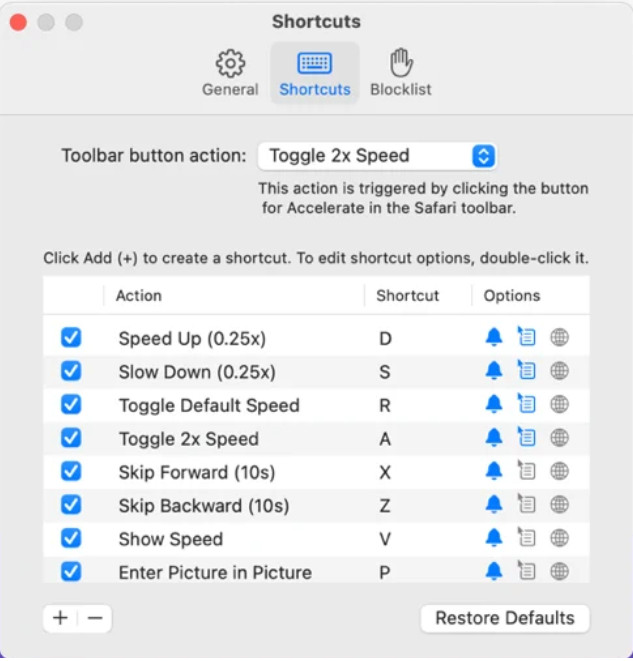
Butuh pengatur kecepatan video di Safari? Accelerate for Safari tersedia di setiap Safari pada perangkat Apple. Alat ini dapat mengubah kecepatan pemutaran semua video HTML5 di Safari. Sama seperti ekstensi Chrome di atas, alat ini terbatas pada perangkat Apple saja. Jadi, jika Anda pengguna Apple, Anda mungkin akan menyukai ekstensi pengatur kecepatan ini untuk mempercepat atau memperlambat video. Selain itu, Anda dapat menggunakan tombol keyboard untuk memberi perintah pada alat ini dalam mengubah kecepatan pemutaran video.
Pro
- Aman digunakan di semua Safari.
- Ini mendukung Picture-in-Picture dan AirPlay juga.
- Tombol pintas tersedia untuk mengontrol alat.
Kontra
- Itu tidak mendukung browser web lain selain Safari.
- Terbatas untuk video HTML 5.
Top 5. Lambat Cepat Lambat - Kontrol Kecepatan Video Anda (iOS)
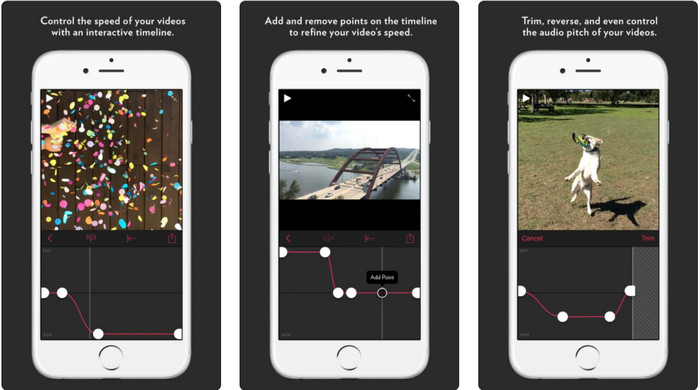
Untuk pengatur kecepatan video di iPhone, Anda bisa menggunakan Slow Fast Slow. Alat ini membantu pengguna iOS memanipulasi kecepatan pemutaran video secara instan; paling optimal digunakan untuk efek slow motion. Selain itu, ia memiliki timeline bawaan yang sangat interaktif untuk menyesuaikan kecepatan. Alat ini juga mendukung fitur lain seperti pitch-bent dan pembalikan klip. Namun, alat ini memerlukan sistem iOS 10, jadi Anda tidak bisa menggunakannya jika sistem Anda belum iOS 10.
Pro
- Ini mendukung fitur lain untuk video Anda.
- Mudah digunakan.
- Dapat memperlambat video hingga 1/16 kecepatan.
Kontra
- Itu tidak mendukung output 4k dan memilih FPS.
- Ini tidak berfungsi pada beberapa perangkat iOS baru.
Top 6. Pengontrol Kecepatan Video Pro (Android)
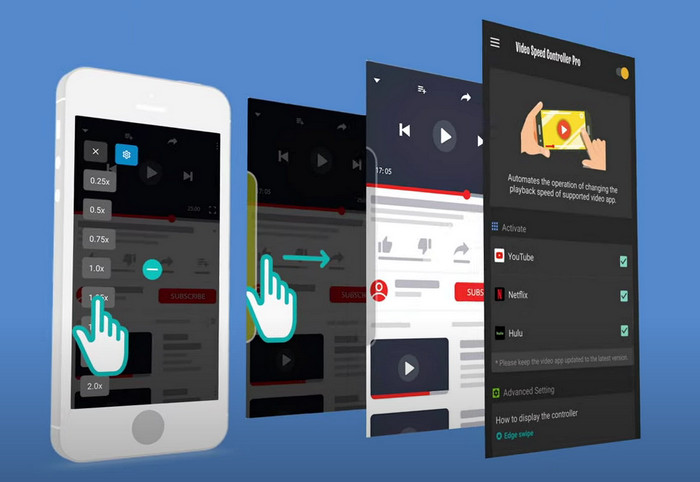
Jika Anda memerlukan pengatur kecepatan video di Android, maka tebak apa? Anda bisa menggunakan Video Speed Controller Pro dengan menginstalnya dari Play Store. Dengan bantuan alat ini, Anda dapat mempercepat video apa pun yang sedang diputar di Android dengan mudah. Selain itu, alat ini mirip seperti ekstensi pengatur kecepatan pada Android. Walaupun alat ini dapat mempercepat video Anda, kecepatan maksimalnya hanya sampai 2x. Namun, jika Anda ingin mempercepat saat menonton video, Anda bisa menggunakannya di YouTube, Netflix, dan platform video lainnya di Android.
Pro
- Hal ini sederhana untuk digunakan.
- Alat itu sendiri tepat sasaran.
- Bilah menu tersedia untuk menampilkan opsi pada pemutaran Anda.
Kontra
- Pilihan kecepatan pemutaran terbatas.
- Terkadang tidak bekerja dengan baik.
Bagian 2. Bagan Perbandingan
| Fitur | Video Converter Ultimate (Windows & Mac) | Clipchamp (Windows) | Pengontrol Kecepatan Video (Chrome) | Akselerasi untuk Safari (iOS & Mac) | Lambat Cepat Lambat – Kontrol Kecepatan Video Anda (iOS) | Pengontrol Kecepatan Video Pro (Android) |
| Kontrol kecepatan |  | | | | | |
| Keluaran Video Berkualitas Tinggi | |  | | | | |
| Fitur Pengeditan | | | | | | |
| Proses Ekspor Sangat Cepat | | | | | | |
Bagian 3. FAQ tentang Pengontrol Kecepatan Video
Mengapa saya perlu menggunakan pengontrol kecepatan?
Dalam beberapa kasus, Anda harus menonton video dengan kecepatan tinggi atau lambat. Contoh yang bagus untuk menonton video yang dipercepat adalah dengan segera menyelesaikan video yang Anda tonton, atau serupa. Mempercepat video sangat membantu pengguna ini. Sementara slow-mo, ini biasanya digunakan pada tayangan ulang instan dari olahraga cepat seperti balap, bola basket, bola voli, dan banyak lagi. Baik dari keduanya, Anda akan memerlukan pengontrol kecepatan yang efektif untuk mengesampingkan kecepatan normal sesuai kebutuhan Anda secara manual.
Bisakah saya mempercepat video di Tiktok?
Ya, Anda bisa merekam video dengan kecepatan tinggi di Tiktok. Namun Anda tidak bisa menonton video di Tiktok dalam kecepatan tinggi. Jadi, jika Anda membutuhkan bantuan alat yang tepat untuk mempercepat, klik dan baca artikel ini untuk mengetahui cara mempercepat video di Tiktok.
Bagaimana cara memperlambat video?
Berlawanan dengan mempercepat video, Anda bisa membuat slow motion pada video dengan bantuan editor yang tersedia di pasaran. Alat mana yang sebaiknya Anda gunakan? Jangan khawatir, karena kami menyajikan perangkat lunak video slow motion terbaik yang bisa Anda gunakan untuk membantu membuat efek slow motion. Jika Anda ingin tahu lebih lanjut, Anda bisa klik tautan ini.
Kesimpulan
Hari ini, Anda sudah mendapatkan banyak informasi tentang aplikasi berbayar dan gratis untuk mempercepat video di berbagai platform. Pengatur kecepatan ini menyediakan serangkaian kemampuan unik untuk membantu berbagai pengguna mempercepat video. Jika kita membacanya dengan saksama, kita dapat melihat bahwa FVC Video Converter Ultimate menyediakan segala yang dibutuhkan pengguna yang memerlukan bantuan. Jadi jika Anda ingin mengunduh alat serba guna ini ke desktop Anda, Anda bisa klik tombol unduh dan nikmati pengalaman lengkap menggunakan alat tersebut.
-
 Cara Mempercepat Video dengan 5 Perangkat Lunak Teratas yang Tersedia [Windows/Mac/Linux]
 Apakah Anda ingin tahu cara mempercepat video dengan mudah? Kemudian baca tulisan ini saat kami menjelaskan cara mempercepat secara efektif di Windows, Mac, dan Linux.
-
 Cara Termudah Mempercepat Video di Perangkat Android Anda [2021]
 Tahukah Anda bahwa Anda dapat mempercepat video di Android? Jadi, jika Anda ingin tahu cara mempercepat video di ponsel Android Anda, baca artikel ini.
-
 Kiat Luar Biasa tahun 2021: Cara Mempercepat Video di iMovie
 Teman Anda menyarankan iMovie untuk membantu Anda dengan masalah Anda tentang cara mempercepat video menggunakan sistem operasi iOS, tetapi Anda tidak tahu harus berbuat apa? Lihat lebih banyak tentang ini saat Anda membaca lebih lanjut artikel ini.
