


 Video Converter Ultimate
 Perekam Layar
 Perbaikan Video
Cara Cepat Mengonversi MTS ke MKV Gratis
In short, for MPEG Transport System, the MTS file is a standard file format that supports 720p and 1080i videos. However, the output file size of this file format may be huge. Therefore, you must convert it to a file format that is widely supported and has a smaller file size like MKV format. And in this article, we present the best ways to convert MTS to MKV for free.

Bagian 1. 2 Alat Online Gratis Terbaik yang Mengonversi MTS ke MKV
Pengonversi Video Gratis FVC Online
People nowadays prefer to use an online converter instead of installing a software converter. FVC Free Online Video Converter is an online converter that allows you to convert files like MTS to MKV, MP4, WMV, AVI, FLV, and more. Despite being a free online converter, it does not concern the quality of your file during conversion. Nevertheless, it has features that can edit the resolution and the video or audio bitrate.
Berikut adalah langkah-langkah tentang bagaimana Anda akan mengonversi file MTS ke MKV menggunakan alat online gratis ini:
Step 1. To use this converter, click this link to be directed to their webpage.
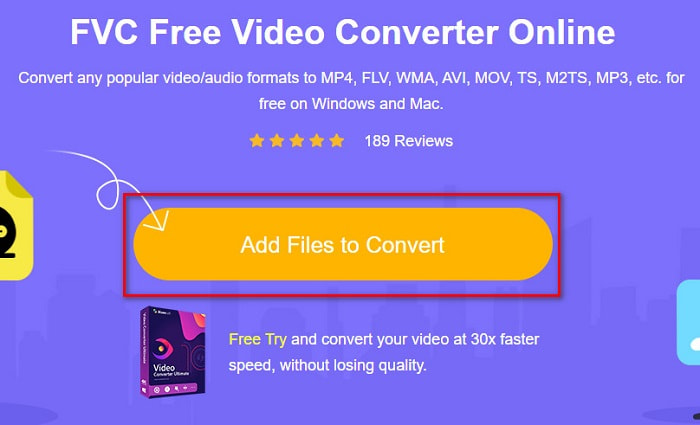
Step 2. The next step is to click the Add Files to Convert button to download the launcher. After the launcher is downloaded, your computer files will appear, then choose your MTS file to upload.
Step 3. After choosing your MTS file, click the MKV file below the software's interface.
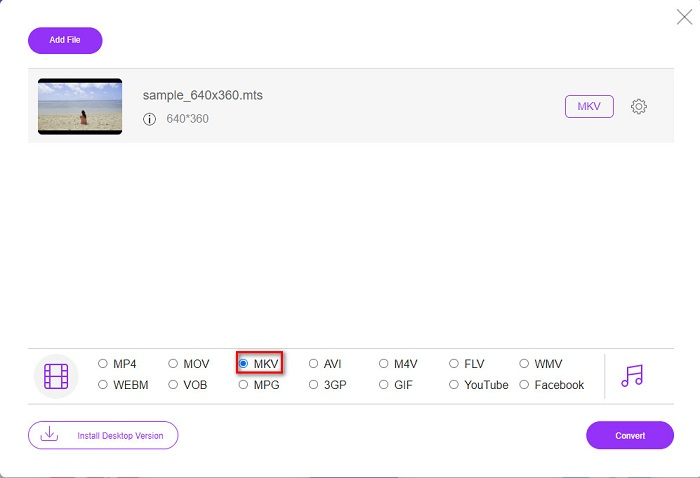
Step 4. Finally, click the Convert button to convert your MTS file to an MKV file. Then wait for your file to be converted.
Dengan mengikuti langkah-langkah sederhana ini, Anda dapat mengonversi MTS ke MKV secara gratis dan online.
AnyConv
Another online converter that you can use to convert files without losing the quality is by using AnyConv File Converter. This converter also converts numerous file formats, including MTS to MKV, AVI, MP4, MOV, MPEG, etc. However, it only has limited features. You cannot edit or change the resolution of your file. It is also web-based; therefore, you may experience having a slow conversion. Nonetheless, it is used by many people because of its convenience.
Langkah-langkah cara menggunakan AnyConv File Converter:
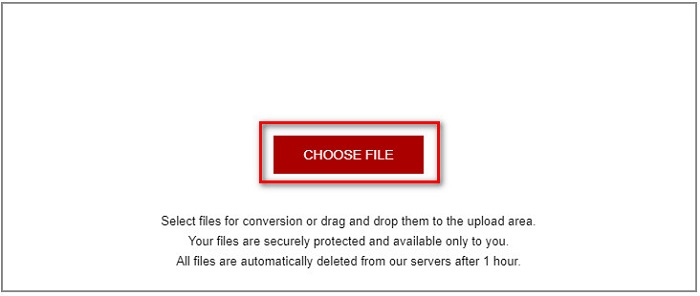
Step 1. Search AnyConv File Converter on your browser. After going through their website, click the Choose Files button, to select your MTS file in your computer files.
Step 2. After selecting your MTS file, click the drop-down button and choose the MKV file format.
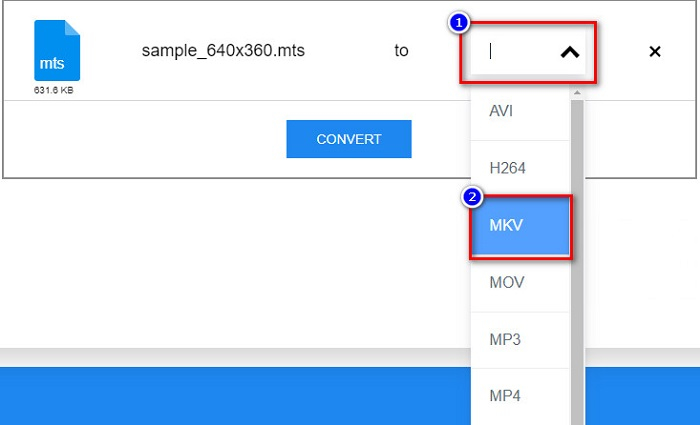
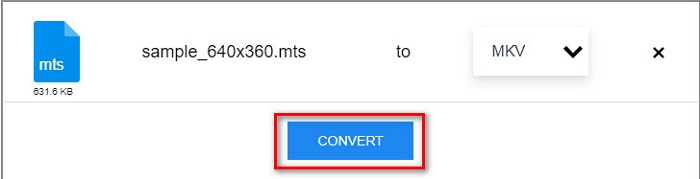
Step 3. Lastly, click the Convert button to start your MTS to MKV file conversion.
Bagian 2. Mengkonversi MTS ke MKV pada Windows 10/11 Losslessly
Jika Anda mencari konverter untuk Windows 10/11, FVC Video Converter Ultimate adalah alat terbaik untuk Anda. Ini mendukung berbagai format file dan dapat mengonversi MTS ke MKV, MP4, WebM, VOB, MPG, AVI, dan banyak lagi. Selain itu, konverter ini memiliki fitur di mana Anda dapat membuat GIF, dan bahkan membuat video 3D. Anda juga dapat mengonversi MTS ke MKV dengan cepat dan mudah tanpa kehilangan kualitas file Anda.

FVC Video Converter Ultimate
5.689.200+ Unduhan- Anda dapat mengonversi file secara batch dengan konverter ini.
- Memungkinkan Anda mengonversi berbagai format file seperti MTS, MKV, MP4, WMV, dll.
- Memiliki fitur yang memungkinkan Anda melakukan konversi ultra-cepat.
Unduh GratisUntuk Windows 7 atau yang lebih baruUnduhan Aman
Unduh GratisUntuk MacOS 10.7 atau yang lebih baruUnduhan Aman
Berikut adalah bagaimana Anda dapat menggunakan FVC Video Converter Ultimate dengan langkah-langkah sederhana ini:
Step 1. First, download the app by clicking the Download button below for Windows. Then run the software application to proceed to the next step.
Unduh GratisUntuk Windows 7 atau yang lebih baruUnduhan Aman
Unduh GratisUntuk MacOS 10.7 atau yang lebih baruUnduhan Aman
Step 2. After opening the converter, click the Add Files button, or you can drag and drop your file to the + sign button to upload your MTS file. Then your file will be uploaded to the list.
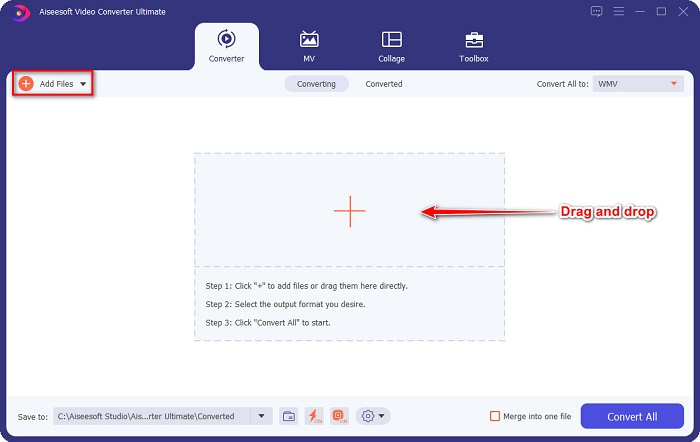
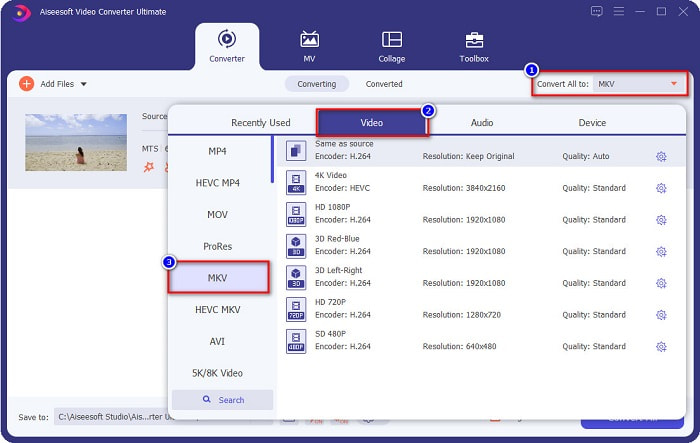
Step 3. To choose the file format you want to convert your MTS file, click the Convert All to button and select the MKV file.
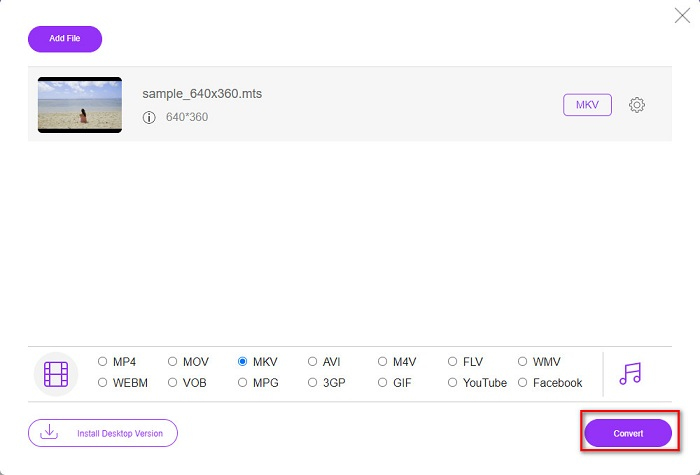
Step 4. To finish, click the Convert All button to start converting your MTS file to an MKV file. And voila! In just a few seconds, your converted file is ready.
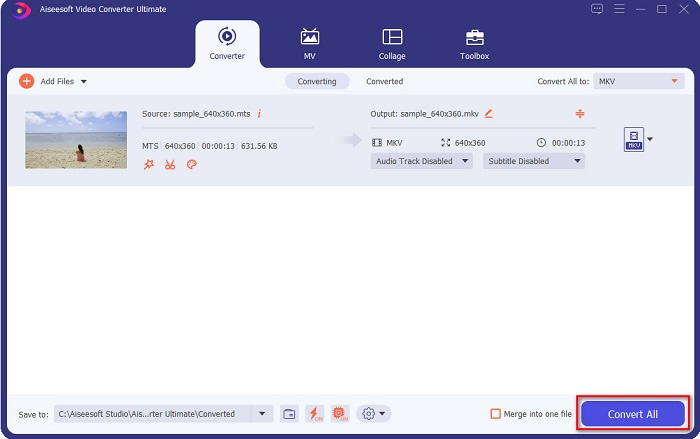
Dengan mengikuti langkah-langkah sederhana tersebut, Anda dapat mengonversi MTS ke MKV secepat 1-2-3!
Bagian 3. Mengapa Mengkonversi File MTS ke Format File MKV
File MTS, kependekan dari MPEG Transport System, adalah format file standar yang terutama digunakan oleh camcorder SONY dan Panasonic HD. Ini adalah file yang menggunakan kompresi video MPEG4/H.264. Selain itu, ini mendukung video 720p dan 1080i, yang tidak didukung oleh format file lainnya. Sejak Panasonic dan Sony mengembangkan file ini, file ini menggunakan File Pengodean Audio Lanjutan yang terkait dengan format file AVCHD. Di sisi lain, file MKV atau Matroska adalah format file standar yang mendukung banyak codec audio dan video. Biasanya digunakan untuk menyimpan klip video pendek dan film.
Selain itu, ini juga mendukung trek subtitle. Itulah sebabnya banyak orang yang melakukan sub-fan menggunakan format file ini. Jadi mengapa mengkonversi MTS ke MKV? Hanya karena ukuran file MKV lebih kecil dari format file MTS berisi.
Bagian 4. Bagan Perbandingan tentang Pengonversi Online & Offline
| FITUR | Konverter Online Gratis FVC | Konverter File AnyConv | FVC Video Converter Ultimate |
| Kecepatan Konversi | Normal | Normal | Sangat cepat |
| Format File untuk Dikonversi | MKV, MP4, MTS, MPG, MOV, AVI, WMV, FLV, dan format file lainnya | MTS, MKV, AVI, MOV, MP4, MPEG, dan format lainnya | Mendukung lebih dari 1000 format file |
| Fitur Pengeditan | – | – |  |
| Konversi Batch | – | – | |
| Koneksi internet | Dibutuhkan | Dibutuhkan | Tidak dibutuhkan |
Bagian 5. FAQ tentang Mengonversi MTS ke MKV
Bisakah Anda menurunkan ukuran file dari file MTS?
Yes. You can compress the file size of an MTS file by using a compressor tool that is available online and offline, like Free Video Compressor.
Di mana Anda dapat memutar format file MKV?
You can play MKV files in Windows Media Player, VLC Media Player, DivX Player, MX Player, and more. You can also use media codecs to encode and decode media files. Or, you can convert your MKV file to MP4 file format, which is a widely used format.
Bisakah Anda mengonversi MTS ke MKV di Rem Tangan?
Ya. Konverter ini juga memungkinkan Anda mengonversi file MTS ke format file MKV. Namun, itu tidak mendukung banyak file dan tidak dapat menggabungkannya menjadi satu.
Kesimpulan
There are a lot of online and offline converters that are available in the market nowadays. And the converters that we listed above are one of the file converters that are being used by many, and proven to be a fantastic converter to use. Moreover, these converters have different features and capability in converting MTS to MKV for free online. But if you are looking for a convenient and efficient converter, we recommend using FVC Video Converter Ultimate. This lightning speed converter will not fail your expectations about it. So, if you are ready to convert files, download it now!
-
 [Gratis & Daring] 6 Cara Mengonversi MTS ke MP4 dalam Kualitas Tinggi
 Tidak tahu cara mengonversi file MTS ke MP4? Dalam panduan ini, Anda akan menemukan 6 cara gratis dan mudah untuk mengubah format MTS ke MP4 di Windows atau Mac tanpa kehilangan kualitas.
-
 Cara Mengonversi MTS ke WMV tanpa Kehilangan Kualitas
 Apakah Anda kesulitan untuk menonton acara favorit Anda karena pemutar media Anda tidak mendukung format video MTS? Cobalah untuk mengubahnya menjadi WMV dengan konverter baru dan terbaik yang ada di artikel ini.
-
 Cara Mengonversi MTS ke MP3 tanpa Penurunan Kualitas (AVCHD ke MP3)
 Punya kebutuhan untuk mengekstrak audio MP3 dari file MTS tetapi tidak tahu caranya? Apa konverter MTS ke MP3 terbaik? Posting ini membagikan 2 cara mudah untuk membantu Anda mengonversi MTS / M2TS ke MP3 dengan kualitas audio tinggi.
