


 Video Converter Ultimate
 Perekam Layar
 Perbaikan Video
 Unduhan Aman
Ketahui Apa itu FPS dan Semua Informasi yang Perlu Anda Ketahui
Saat Anda mendengar singkatan FPS, kedengarannya sangat teknis. Dan Anda akan paling sering mendengar kata ini dari para gamer yang membicarakan PC mereka. Jika Anda termasuk orang yang belum tahu apa arti FPS, kami akan menguraikan maknanya dan semua informasi yang perlu Anda ketahui. Jadi, tanpa berlama-lama lagi, mari kita telusuri lebih dalam semua informasi tentang apa itu FPS.

Bagian 1. Apa Arti FPS?
FPS adalah singkatan dari Frames Per Second, istilah teknis yang digunakan dalam grafik komputer jika Anda bertanya apa singkatan dari FPS. Namun, ini tidak hanya berlaku untuk grafik komputer tetapi juga untuk sistem penangkapan gerak apa pun. Jika Anda bertanya-tanya mengapa film memiliki grafik yang indah dan halus, itu karena Frame per detik. FPS kadang-kadang dikenal sebagai "tingkat ledakan" dan "tingkat pembaruan". Selain itu, FPS adalah jumlah bingkai dalam rangkaian gambar yang berurutan. Dan apakah Anda tahu? Video yang kita tonton tidak bergerak. Ini hanyalah serangkaian gambar yang diputar dalam fase cepat.
Jika video atau klip video Anda memiliki FPS yang lebih tinggi, maka video Anda akan lebih halus. Sebaliknya, grafik video Anda kasar jika video Anda memiliki fps rendah. Dan jika Anda seorang gamer profesional, Anda mungkin ingin memiliki grafik yang halus saat memainkan game online favorit Anda, dan FPS atau frame per detik memainkan peran penting.
Kami berharap pertanyaan Anda tentang apa yang dimaksud dengan FPS sekarang telah terjawab. Baca lebih lanjut untuk mengetahui informasi lebih lanjut tentang FPS.
Bagian 2. FPS dalam Situasi Berbeda
Kecepatan bingkai standar per detik adalah 24. Tetapi di bidang video yang berbeda, ada standar FPS yang berbeda. Bagian ini akan mengetahui perbedaan FPS yang dimiliki setiap situasi.
FPS di Video Youtube
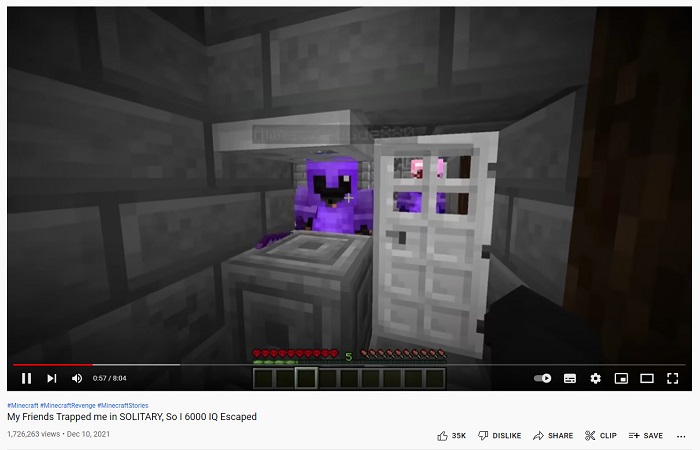
Youtube dapat mendukung 24-60 fps. Namun, FPS yang direkomendasikan untuk video youtube adalah 24 FPS. Namun di bagian ini, Anda akan mengetahui perbedaan preferensi dari konten yang paling banyak dibagikan di video Youtube.
◆ Video Podcast – Video podcast atau acara bincang-bincang TV biasanya memiliki 30 fps. Saat Anda menonton konten seperti ini di YouTube, Anda akan melihat bahwa gerakannya umumnya berupa gestur tangan dan tidak melibatkan gerakan yang berlebihan.
◆ Tutorial make-up – Tutorial make-up biasanya memiliki 60 fps karena jenis konten ini harus memiliki grafik video yang jelas dan mulus agar setiap detail tutorial dapat terlihat.
◆ Materi Video Pembelajaran – Konten ini biasanya memiliki 24–30 fps karena jenis konten seperti ini hanya membutuhkan animasi yang cukup baik dan tidak mencakup gerakan yang berlebihan.
◆ Highlight Game – Untuk konten gaming atau highlight game, fps yang direkomendasikan adalah 60 fps. Konten seperti ini membutuhkan 60 fps agar video tidak terlihat patah-patah atau kasar.
FPS dalam Game
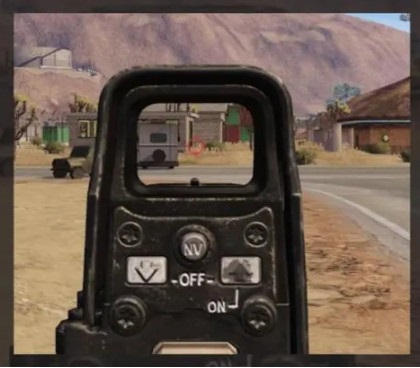
Dalam bermain game, Anda harus memiliki fps tinggi. Tetapi itu tergantung pada kapasitas kartu grafis dan sistem keseluruhan perangkat Anda. Jika Anda memainkan game tembak-menembak orang pertama, ini adalah keuntungan bahwa Anda memiliki fps yang lebih tinggi karena Anda dapat membidik dengan lancar. Game biasanya memiliki 60-240 fps. Namun, monitor 144 Hz hanya dapat menampilkan 144 fps ke bawah. Tetap saja, Anda dapat memutar 240 fps pada monitor 144 Hz, tetapi 96 fps akan terbuang percuma karena hanya menampilkan 144 fps. Jadi, itu tergantung pada perangkat sistem Anda dan kapasitas kartu grafis gim Anda.
FPS di Bioskop

Bioskop atau film yang diproyeksikan di bioskop biasanya memiliki kecepatan 24 fps. Jika Anda menonton film tentang aksi menembak, dan peluru memiliki efek slow-mo pada bagian tertentu di mana peluru akan mengenai antagonis, itu adalah kerja fps. Ketika itu terjadi, fps biasanya turun, lalu di bagian lain film, itu memiliki kecepatan normal yang dimiliki film.
Bagian 3. Ingin Mengedit Kecepatan Video Anda?
FPS memainkan peran besar dalam kelancaran gameplay atau video Anda. Tetapi elemen tertentu juga memainkan peran utama dalam memiliki transisi video yang mulus, yaitu kecepatan video Anda. Dan jika Anda ingin menyesuaikan kecepatan video Anda, Anda dapat menggunakan alat ini yang kami rekomendasikan sebagai alat pengubah kecepatan video terbaik.
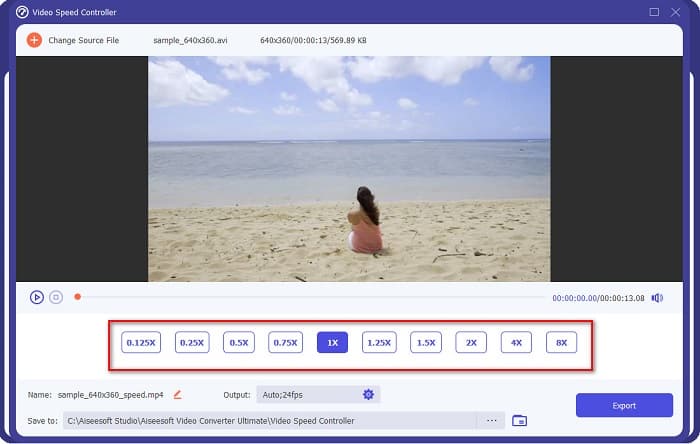
FVC Video Converter Ultimate adalah aplikasi perangkat lunak populer untuk mengubah kecepatan video. Aplikasi ini memiliki antarmuka pemrosesan yang mudah, sehingga ramah untuk pemula. Anda dapat mengubah kecepatan video menjadi 0,125x, 0,25x, 0,5x, 0,75x, 1,25x, 1,5x, 2x, 4x, dan 8x melalui preset kecepatan. Selain itu, Anda dapat mengubah fps Output dengan alat yang andal ini. Aplikasi perangkat lunak ini memungkinkan Anda mengubah fps file video dari 12 fps hingga 60 fps.
Selain itu, FVC Video Converter Ultimate menawarkan fitur pengeditan yang luar biasa, seperti koreksi warna, pembalik video, pemutar video, dll. Ini juga mendukung berbagai format file, termasuk MP4, WMV, FLV, MPEG, WebM, MKV, M4V, dan 1000+ format lainnya. . Oleh karena itu, jika Anda ingin menggunakan alat ini untuk mengubah kecepatan video dan mengubah fps video Anda, ikuti langkah-langkah di bawah ini.
Langkah 1. Unduh FVC Video Converter Ultimate dengan mengklik tombol Download di bawah ini untuk Windows atau Mac. Ikuti proses instalasi, lalu buka aplikasinya.
Unduh GratisUntuk Windows 7 atau yang lebih baruUnduhan Aman
Unduh GratisUntuk MacOS 10.7 atau yang lebih baruUnduhan Aman
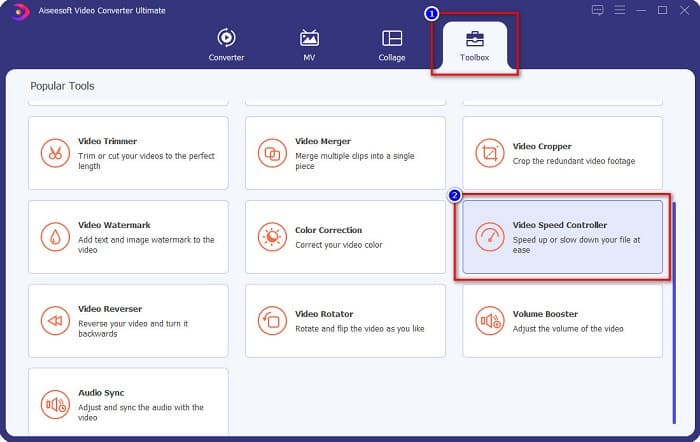
Langkah 2. Lalu, pada antarmuka utama perangkat lunak, pilih opsi Toolbox, kemudian klik Video Speed Controller.
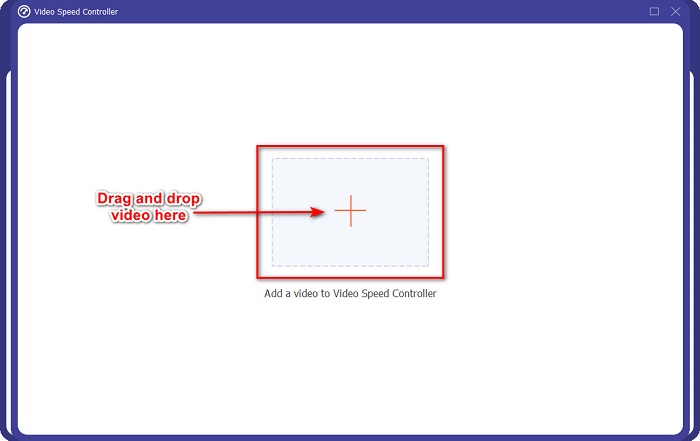
Langkah 3. Selanjutnya, klik tombol tanda +, atau seret dan jatuhkan video Anda ke tanda + tersebut.
Langkah 4. Kemudian, pilih preset kecepatan video yang Anda inginkan untuk video Anda. Anda juga dapat melihat pratinjau video di atas deretan preset tersebut.
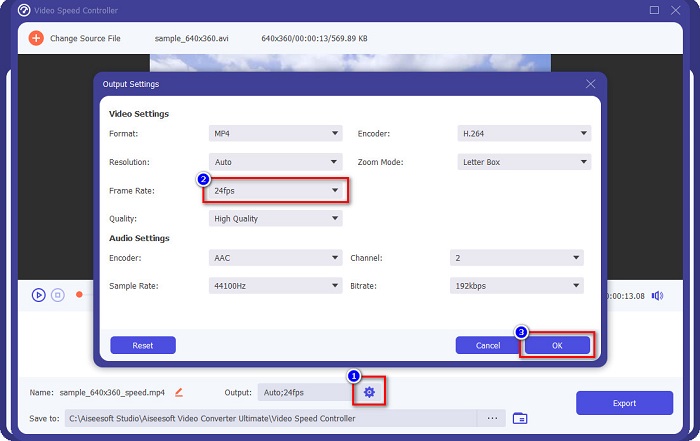
Untuk mengubah fps output video Anda, klik tombol roda gigi di samping Output, klik tombol drop-down di samping frame rate, dan pilih fps yang Anda inginkan untuk output. Lalu klik OK untuk menyimpan perubahan.
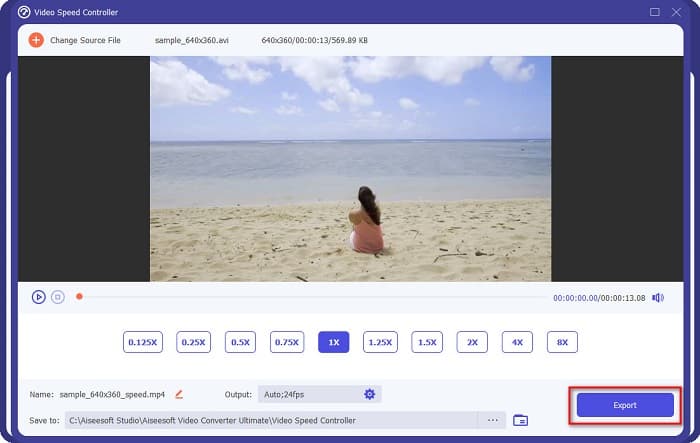
Langkah 5. Terakhir, klik tombol Export untuk menerapkan perubahan pada video Anda. Tunggu beberapa detik, lalu video Anda akan otomatis tersimpan di file komputer Anda.
Mudah kan? Dengan mengikuti langkah-langkah sederhana di atas, Anda dapat dengan mudah mengubah kecepatan dan fps video Anda.
Terkait:
Bagian 4. FAQ tentang Apa itu FPS
Berapa fps yang bisa dilihat mata manusia?
Para profesional mengatakan bahwa mata manusia dapat melihat antara 30 fps hingga 60 fps. Dan yang lain juga mengatakan bahwa mata manusia tidak dapat melihat lebih dari 60 fps.
Bisakah 60 FPS merekam rekaman game yang mulus?
Ya. Karena fps standar untuk merekam game adalah 30 fps hingga 60 fps. Jadi, jika Anda ingin merekam permainan dengan lancar, disarankan untuk memiliki 60 fps.
Apakah mengubah fps video Anda memengaruhi kualitas?
Mengubah fps sebuah video tidak serta-merta memengaruhi kualitas video Anda. Namun, banyak alat pengubah fps yang justru merusak kualitas setelah fps diubah. Jadi jika Anda mencari alat yang tidak akan memengaruhi kualitas video Anda, gunakan FVC Video Converter Ultimate.
Kesimpulan
Pertanyaan Anda tentang apa itu FPS kini telah terjawab. Semua informasi di atas bersifat faktual dan telah diteliti. Dan jika Anda ingin mengubah kecepatan atau fps video Anda, gunakan FVC Video Converter Ultimate, yang digunakan banyak orang untuk mengubah fps video mereka.
-
 Cara Mudah Membuat Video Gerak Lambat di Windows Movie Maker
 Apakah Anda ingin memberikan efek dramatis pada video Anda untuk menekankan atau setidaknya membuat klip menonjol dari yang lain dengan gerakan lambat, dan Anda tidak tahu caranya? Lanjutkan membaca artikel ini untuk mengetahui lebih banyak.
-
 Cara Membuat Slow Motion Menggunakan Final Cut Pro [Soal]
 Anda akan menggunakan Final Cut Pro untuk membuat video gerakan lambat, tetapi Anda tidak tahu bagaimana memulainya? Baca artikel ini untuk mengetahui lebih banyak tentang Final Cut Pro.
-
 Fakta Teratas Yang Harus Anda Ketahui tentang QuickTime Slow Motion
 Sudahkah Anda mencoba menggunakan QuickTime Media Player untuk memutar video dalam gerakan lambat? Baca artikel ini untuk mengetahui lebih lanjut tentang layanan terbaik yang dimiliki pemutar media ini.
