


 Video Converter Ultimate
 Perekam Layar
 Perbaikan Video
 Unduhan Aman
Cara Mengkonversi M2TS ke MKV tanpa Kehilangan Kualitas
“Saya mencari konverter yang bagus. Saya membutuhkannya untuk mengonversi file m2ts saya ke MKV tetapi saya ingin menyimpan opsi subtitle dan opsi audio. File-file ini berukuran sekitar 40GB dan saya ingin mengonversinya menjadi file yang lebih kecil tetapi tidak ada penurunan kualitas. Apakah ada konverter yang disarankan? ”
File M2TS biasanya berukuran besar, jadi Anda mungkin ingin mengonversi M2TS ke MKV agar dapat diputar di beberapa pemutar media. Dalam artikel ini, kami akan menunjukkan cara termudah untuk mengonversi file M2TS ke MKV tanpa kehilangan kualitas di Windows dan Mac.

Bagian 1. Cara Terbaik Mengkonversi M2TS ke MKV Secara Gratis
Meskipun ada banyak konverter di pasaran, hanya sedikit konverter M2TS ke MKV gratis yang benar-benar berfungsi. Namun, Anda bisa melihat sekilas FVC Free M2TS Converter ini. Ini adalah konverter dan editor M2TS serbaguna yang memungkinkan Anda mengonversi file M2TS ke MKV, MP4, AVI, MOV, MP3, dll. untuk diputar di beberapa pemutar media populer.

Konverter M2TS Gratis
112,345+ Unduhan- Konversi M2TS ke MKV, MP4, AVI, TS, VOB, WMV, FLV, SWF, dll.
- Konversi file M2TS ke format file yang didukung perangkat dan media.
- Edit file M2TS seperti gabungkan, kompres, tambahkan tema, dan aktifkan efek 3D.
- Sepenuhnya kompatibel dengan Windows 10/8/7 / Vista / XP (SP2 atau lebih baru).
Unduh GratisUntuk Windows 7 atau lebih baruUnduhan Aman
Unduh GratisUntuk MacOS 10.7 atau lebih baruUnduhan Aman
Langkah 1. Tambahkan file M2TS
Setelah mengunduh Converter M2TS Gratis ini, instal dan luncurkan di komputer Windows Anda. Klik tombol "Add File (s)" untuk mengimpor file M2TS. Jika Anda memiliki beberapa file M2TS untuk digabungkan, Anda dapat mencentang opsi "Gabung menjadi satu file" di bagian bawah.

Langkah 2. Edit file M2TS
Klik tombol "Edit" di bagian atas antarmuka, dan Anda dapat menambahkan tema, mengedit judul, penulis, waktu, dan penyedia pada pembukaan dan penutup.

Langkah 3. Ubah M2TS menjadi MKV
Klik tombol tarik-turun di bawah "Format keluaran" untuk memilih MKV sebagai format keluaran. Anda juga dapat mengatur folder tujuan. Setelah itu, klik tombol "Convert" untuk mulai mengubah M2TS menjadi MKV secara gratis.

Bagian 2. Ekspor MKV dari M2TS Online Gratis
Ingin menemukan alat online gratis untuk mengonversi M2TS ke MKV dengan cepat? FVC Free Online Video Converter menyediakan platform gratis untuk mengonversi file M2TS ke MKV dengan mudah. Selain itu, Anda dapat mengonversi beberapa file M2TS sekaligus ke format MKV. Lihat langkah-langkah terperinci untuk mengonversi file M2TS ke MKV secara online secara gratis.
Langkah 1. Buka situs web dengan mengeklik tautan di atas. Temukan Add Files to Convert lalu unduh dan pasang FVC launcher.

Langkah 2. Setelah penginstalan dan pembaruan selesai, tambahkan video dan pilih format lalu klik Convert.

Langkah 3. Ketik atau buka folder tempat Anda ingin menyimpan video. Tunggu beberapa saat dan Anda akan mendapatkan video MKV Anda.
Bagian 3. Ubah M2TS menjadi MKV dengan FreeConvert.com
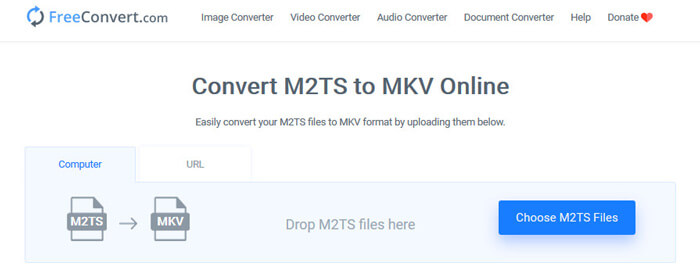
Atau Anda bisa mencoba FreeConvert.com, alat konversi file online gratis untuk mengonversi file Anda (gambar, video, dokumen, dan musik) dari satu format ke format lain.
Langkah 1. Seret dan jatuhkan file M2TS ke area unggah. Anda juga dapat mengklik tombol “Choose M2TS Files” untuk mengimpor file M2TS.
Langkah 2. Di Pengaturan Lanjutan (Advanced Settings), Anda dapat menyesuaikan codec video, ukuran layar, rasio aspek, frame rate, orientasi video, codec audio, bitrate.
Langkah 3. Klik tombol “Convert To MKV” untuk mengonversi M2TS ke MKV. Proses ini hanya memakan beberapa detik. Lalu klik tombol “DOWNLOAD MKV” untuk menyimpan file MKV ke komputer.
Bagian 4. Ubah M2TS ke MKV dengan HandBrake
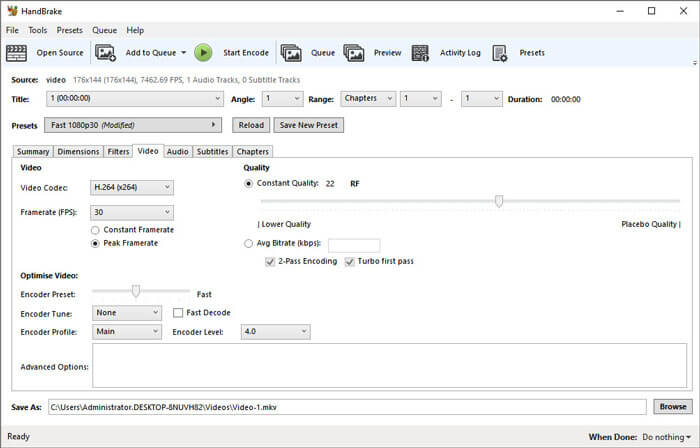
HandBrake adalah converter M2TS ke MKV gratis dan open source yang mengonversi video dari hampir semua format video. Ini mendukung banyak sistem operasi seperti Windows, macOS dan Linux OS. Ikuti panduan langkah demi langkah kami untuk mengonversi file M2TS ke MKV dengan HandBrake.
Langkah 1. Unduh Handbrake ke komputer Anda. Klik tombol “Open Source” untuk memuat file M2TS ke dalam program.
Langkah 2. Di tab Summary, pilih “MKV” sebagai format output. Anda dapat menyesuaikan filter video, codec, kualitas, bitrate, subtitle, dan lainnya di tab lain seperti Dimensions, Filters, Video, Audio, Subtitles, Chapters.
Langkah 3. Klik tombol “Start Encode” untuk mulai mengonversi file M2TS ke MKV.
Bagian 5. Ubah M2TS ke MKV dengan MakeMKV
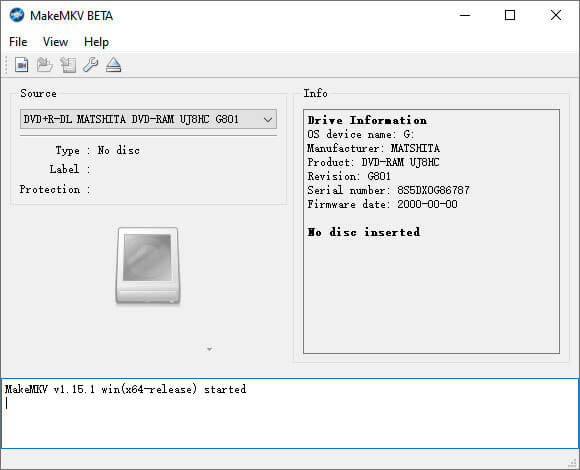
MakeMKV adalah solusi satu klik untuk mengubah M2TS menjadi MKV secara gratis. Anda dapat menggunakan MakeMKV untuk mengonversi M2TS ke MKV di Windows 10 dan Mac.
Langkah 1. Buka MakeMKV di komputer Anda. Pilih “Open Files” dari daftar “File” untuk menambahkan file M2TS ke dalam program.
Langkah 2. Pilih file M2TS yang Anda tambahkan dan klik ikon Folder untuk memilih folder output.
Langkah 3. Klik tombol “Make MKV” untuk mulai mengonversi file M2TS ke MKV secara gratis.
Bagian 6. Tanya Jawab tentang Mengubah M2TS ke MKV
Apa itu video format M2TS?
M2TS adalah singkatan dari BDAV (Blu-ray Disc Audio-Video) MPEG-2 Transport Stream. Ini adalah format file wadah file untuk Blu-ray dan AVCHD (Advanced Video Coding High Definition), yang berisi video, audio, dan aliran lainnya.
Bisakah Plex memutar file M2TS?
Tidak. Plex Media Server tidak dapat memutar file M2TS karena memiliki dukungan codec luar yang sangat terbatas. Jika Anda ingin memutar file M2TS dengan Plex, Anda dapat mengonversi file M2TS ke format yang didukung Plex dengan FVC Free M2TS Converter.
Apakah YouTube mendukung M2TS dan MTS?
Tidak. YouTube tidak mendukung file M2TS atau MTS. Anda perlu mengonversi file M2TS atau MTS ke format file yang didukung seperti MP4, lalu mengunggahnya ke YouTube.
Kesimpulan
Itulah semua solusi yang kami miliki untuk mengonversi M2TS ke MKV di Windows dan Mac. FVC Free Video Converter memastikan output file MKV tanpa kehilangan kualitas. Anda dapat dengan mudah mengonversi video M2TS dari semua handycam HD ke format video lain tanpa penurunan kualitas. Saatnya mencobanya.
-
 Apa Itu File MTS dan Bagaimana Mengkonversi / Memutar File MTS
 Apa itu file MTS dan bagaimana cara memainkannya? Posting ini memberi Anda instruksi dasar tentang file MTS. Selain itu, Anda bisa mendapatkan 3 cara sederhana untuk mengkonversi file MTS ke MP4, MOV, AVI, MPEG, MTS, MKV atau format lain dengan kualitas tinggi.
-
 2 Cara Sederhana untuk Mengonversi MTS ke MP3 secara Gratis
 Punya kebutuhan untuk mengekstrak audio MP3 dari file MTS tetapi tidak tahu caranya? Apa konverter MTS ke MP3 terbaik? Posting ini membagikan 2 cara mudah untuk membantu Anda mengonversi MTS / M2TS ke MP3 dengan kualitas audio tinggi.
-
 Review tentang Snagit dan Alternatif Terbaiknya
 Apa alternatif terbaik untuk Snagit? Apakah ada alat penangkap layar seperti Snagit? Posting ini akan mengulas Snagit dan membagikan alternatif terbaik untuk Snagit untuk menangkap layar.
