


 Video Converter Ultimate
 Perekam Layar
 Perbaikan Video
[2021] Manakah dari 4 Pengonversi AVI ke MOV Gratis Terbaik Online dan Offline
AVI adalah format tidak terkompresi yang dikembangkan oleh Microsoft. Meskipun berkasnya tidak dibatasi, format ini tetap tidak dapat diputar di Mac karena bersifat hak milik Microsoft. Jadi, cara terbaik untuk memutar format AVI adalah dengan mengonversinya ke berkas MOV. Jika Anda ingin tahu cara mengonversi AVI ke MOV, Anda harus terus membaca untuk mengetahui langkah-langkahnya dan alat mana yang paling tepat untuk pekerjaan ini.

Bagian 1. Cara Utama Cara Mengonversi AVI ke MOV
Seperti kata pepatah, mulailah hari Anda dengan kopi atau teh untuk mendapatkan awal yang baik. Sama halnya di sini, mari kita mulai dengan konverter video bertenaga yang dikembangkan oleh FVC. Video Converter Ultimate dapat mengonversi format apa pun ke format baru, misalnya mengonversi AVI ke MOV menjadi mudah jika Anda menggunakan alat ini. Selain itu, Anda dapat mengonversi bukan hanya satu, dua, atau tiga berkas sekaligus, tetapi lebih banyak lagi. Sebenarnya, tidak ada batasan berapa banyak berkas yang bisa dikonversi. Di samping itu, Anda juga dapat meningkatkan kualitas video melalui toolbar yang disediakan alat ini setelah proses konversi. Jadi, jika Anda mencari alat yang mengungguli semua konverter lain di daftar atau di hasil pencarian web, Anda bisa mengatakan pada diri sendiri bahwa pencarian Anda sudah berakhir. Jika Anda masih ragu dengan alat ini, sebaiknya Anda mencobanya terlebih dahulu dan mengikuti langkah-langkah berikut tentang cara menggunakan konverter ultimate yang memberikan konversi maksimal.
Langkah 1. Unduh alat ini dan pasang di hard disk Anda. Ubah pengaturan instalasi alat, lalu klik Finish untuk menyimpan perubahan yang Anda buat.
Unduh GratisUntuk Windows 7 atau yang lebih baruUnduhan Aman
Unduh GratisUntuk MacOS 10.7 atau yang lebih baruUnduhan Aman
Langkah 2. Setelah instalasi dan pengaturan selesai, alat akan otomatis dijalankan dan antarmuka seperti ini akan muncul di layar Anda.
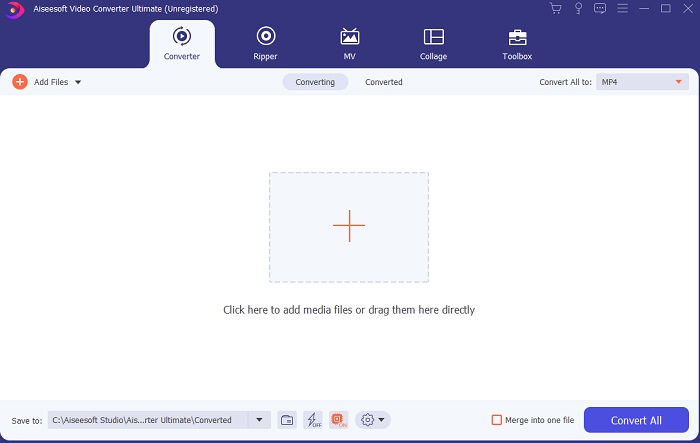
Langkah 3. Klik tanda plus besar di tengah untuk menambahkan berkas yang akan dikonversi dari AVI ke MOV atau ke format lain.
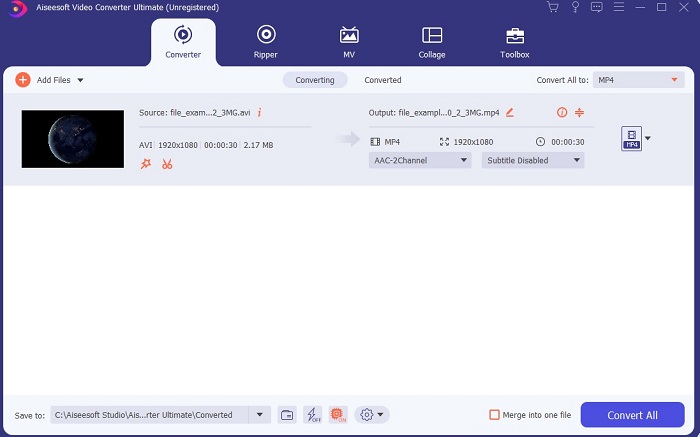
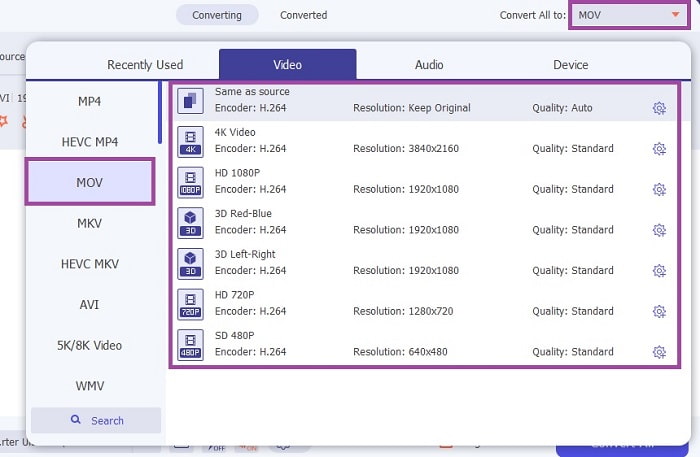
Langkah 4. Ubah format dengan mengeklik tombol drop-down dan pilih MOV atau format lain yang Anda inginkan. Jika berkas sudah siap dikonversi, klik Convert All untuk memulai proses konversi.
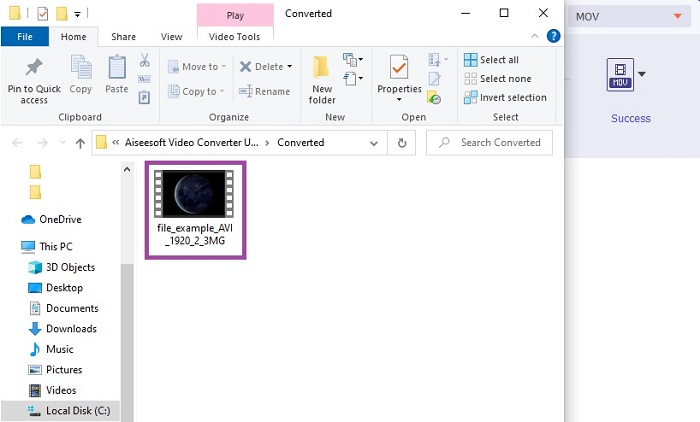
Langkah 5. Proses konversi ini hanya memerlukan waktu kurang dari satu menit. Jika sudah selesai, jendela file explorer akan muncul di layar Anda dan klik berkas yang sudah dikonversi untuk menontonnya. Setelah itu, Anda dapat meningkatkan kualitas video menjadi lebih baik dengan bantuan toolbar.
Bagian 2. Kemungkinan Cara Lain Cara Mengonversi AVI ke MOV Online
1. Pengonversi Video Online Gratis FVC
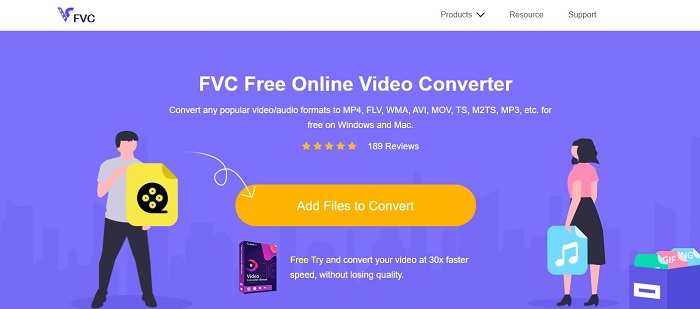
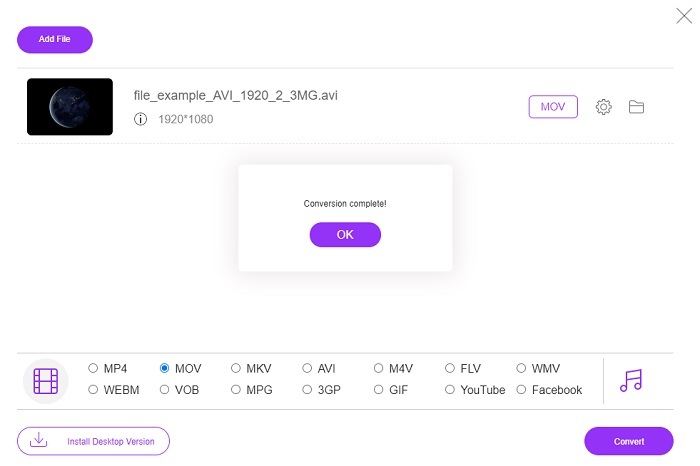
Berbeda dengan alat di atas, alat ini gratis. FVC Free Video Converter adalah versi gratis dari alat di atas, tetapi fitur utama seperti peningkatan kualitas video dan lainnya tidak tersedia di sini. Namun, fitur konversi dasar tetap dapat dilakukan dengan alat ini. Jika Anda ingin tahu bagaimana cara kerja konverter AVI ke MOV gratis online ini, Anda harus mengikuti langkah-langkah sederhana di bawah ini untuk memastikan proses konversi berjalan lancar.
Langkah 1. Klik tautan ini dan klik Add Files to Convert untuk menjalankannya di PC atau Mac Anda.
Unduh Versi Desktop untuk mengonversi file secara batch.
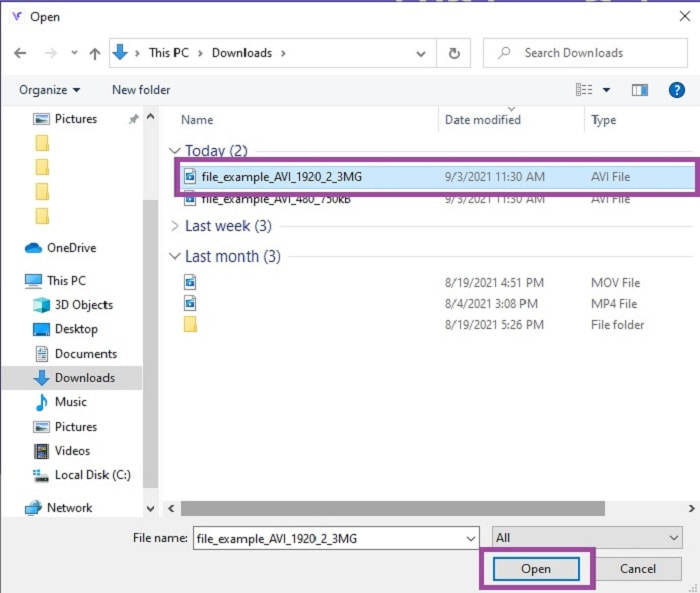
Langkah 2. Setelah mengkliknya, Anda harus memilih berkas mana yang ingin dikonversi. Kemudian klik Open untuk memulai.
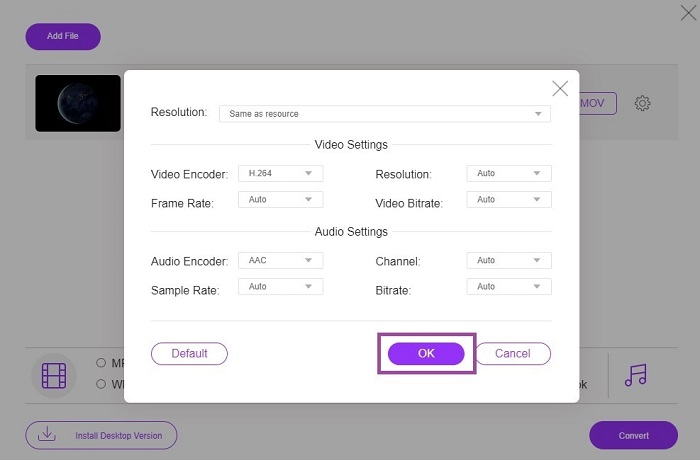
Langkah 3. Klik ikon cog untuk mengubah pengaturan video dan audio jika diinginkan. Untuk menyimpan perubahan yang Anda buat, klik OK.
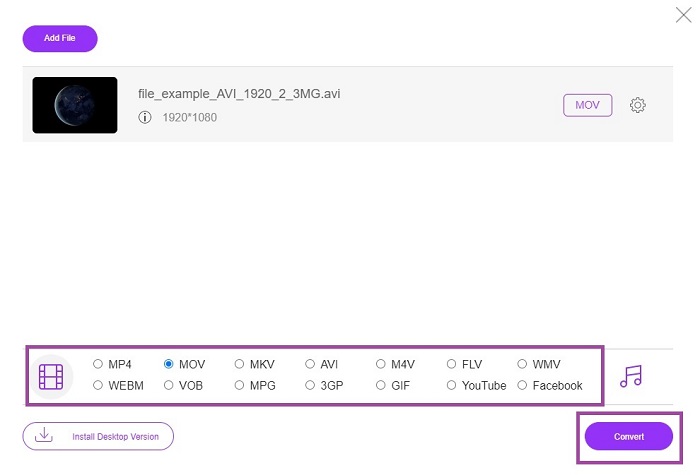
Langkah 4. Jika berkas sudah ada di antarmuka, Anda harus memilih format apa yang Anda inginkan untuk hasil konversi. Kembali ke antarmuka utama, klik Convert untuk memulai proses.
Langkah 5. Jika proses konversi selesai, Anda dapat memeriksa berkas tersebut di file manager nanti.
2. CloudConvert
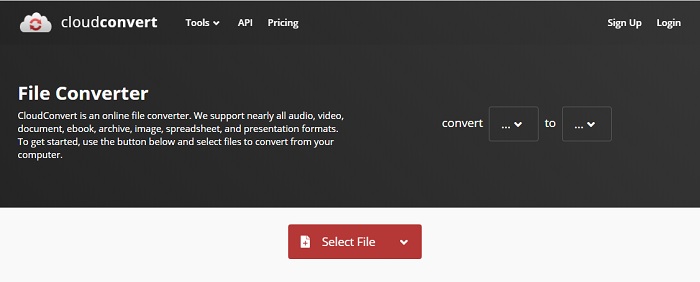
Jika Anda mencari konverter AVI ke MOV online untuk Mac, Anda bisa mencoba CloudConvert. Alat ini memungkinkan pengguna mengonversi berbagai jenis video, audio, dokumen, PDF, dan berkas lainnya ke format baru. Namun, meskipun kemampuan konversinya kuat, alat ini tidak memiliki fitur pengeditan. Jadi, alat ini hanya mengonversi video tanpa meningkatkannya menjadi lebih baik. Namun secara keseluruhan, alat ini unggul dalam hal konversi, tetapi FVC Free Online Video Converter tetap lebih baik daripada ini.
3. FreeConvert.com
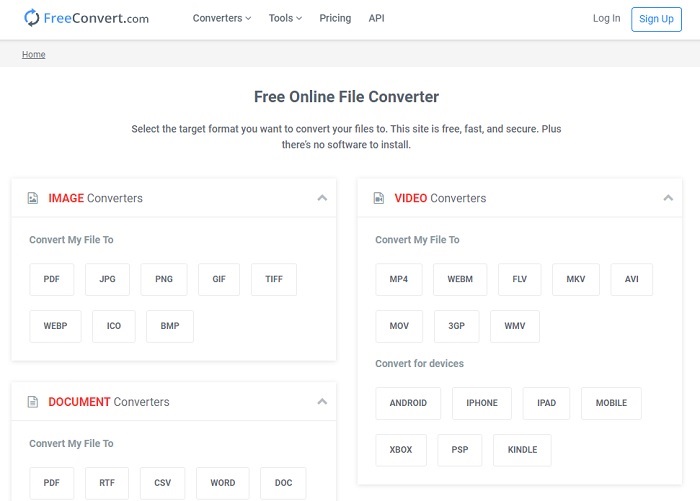
Alat online hebat lainnya yang digunakan untuk konversi adalah FreeConvert.com. Jika alat di atas menawarkan kompresi yang kuat, alat ini juga punya kemampuan yang layak untuk masuk daftar. Ia juga menyediakan fitur pengeditan dasar seperti memotong dan cropping, mengompres berkas, dan konversi khusus perangkat. Tetapi kelemahan alat ini adalah format yang didukung sangat terbatas. Jadi, Anda tidak leluasa memilih karena fitur yang disediakan cukup terbatas.
Bacaan Lebih Lanjut
AVI vs.MOV
Berdasarkan Resource Interchange File Format (RIFF), format AVI diperkenalkan oleh Microsoft pada tahun 1992. Ini dapat menyimpan video/audio berkualitas tinggi karena menggunakan lebih sedikit kompresi. Tapi itu juga menyebabkan ukuran file yang besar dari file AVI, yang mungkin menjadi masalah ketika ada ruang terbatas.
Format MOV dapat digunakan untuk menyimpan film, acara TV, klip video pendek, atau film rumahan. Itu sebenarnya disimpan dalam QuickTime File Format (QTFF), yang diperkenalkan oleh Apple pada tahun 1991. File MOV sering digunakan ketika orang ingin menyimpan video dengan kualitas tinggi.
Bagian 3. FAQ tentang AVI ke MOV
Bisakah QuickTime mengonversi AVI ke MOV?
QuickTime adalah pemutar media bawaan untuk Mac. Alat ini juga bisa mengonversi AVI ke MOV di QuickTime, tetapi bukan yang terbaik dan bukan pilihan paling ideal untuk mengonversi format media, meskipun tetap dapat menjalankan tugasnya.
Mana yang lebih baik? AVI atau MOV?
Setiap format memiliki fitur uniknya sendiri untuk menonjol, tetapi keduanya adalah salah satu yang terbaik. AVI adalah format eksklusif yang dikembangkan oleh Microsoft untuk menyinkronkan pemutaran video dan kualitas yang hebat juga. Tetapi karena Apple ingin bersaing maka mereka mengembangkan MOV yang merupakan format asli QuickTime. Untuk menyimpan beberapa trek dengan datanya seperti audio, video, dan subtitle secara terpisah tetapi dalam satu wadah.
Apakah AVI dan MOV lossy atau lossless?
Mereka bukan kompresi karena AVI dibuat untuk tidak terkompresi jadi ini adalah lossless tetapi MOV adalah lossy yang dikompresi dan ukurannya lebih kecil.
Kesimpulan
Akhirnya, mengonversi berkas AVI bukanlah hal sepele sehingga Anda harus menanganinya dengan serius karena format ini tidak terkompresi. Jadi, jika Anda memilih konverter yang salah, ada kemungkinan sebagian kode akan hilang selama proses. Namun, tidak perlu khawatir karena FVC Video Converter Ultimate siap membantu. Jika Anda ingin proses konversi yang sukses, Anda harus menggunakan alat ini dan bukan yang lain. Selain cepat dan aman, alat ini dapat melakukan konversi banyak berkas sekaligus. Alih-alih menunggu berkas pertama selesai, Anda bisa mengonversi semua berkas AVI dan mengubahnya menjadi format MOV sekaligus, atau ke format apa pun yang Anda inginkan.
-
 FLV ke MOV - Bagaimana mengkonversi FLV ke MOV di Mac / PC / Online Gratis
 Bagaimana cara mengubah FLV ke MOV? Bagaimana cara mengubah FLV ke MOV di Mac? Apakah ada cara gratis untuk mengonversi YouTube FLV ke MOV secara online? Posting ini membagikan 3 konverter FLV ke MOV untuk mengubah file FLV menjadi MOV.
-
 5 Metode yang Dapat Dilakukan untuk Memperbaiki QuickTime Tidak Dapat Membuka File MOV
 Format MOV terutama dibuat untuk pemutaran di QuickTime Player. Namun, terkadang Anda mungkin menemukan bahwa mereka tidak bermain di dalamnya. Pelajari cara memperbaiki QuickTime tidak akan memutar file MOV dari posting ini.
-
 Panduan Luar Biasa tentang Cara Memutar File MOV di Perangkat Seluler Android
 Punya masalah kenapa file MOV kamu tidak bisa diputar di media player android kamu? Kemudian, baca artikel ini, ini akan memberi Anda 2 metode berbeda untuk memperbaiki file MOV dan membuatnya dapat dimainkan.

