


 Video Converter Ultimate
 Perekam Layar
 Perbaikan Video
 Unduhan Aman
4 Cara Gratis Teratas untuk Mengonversi MTS ke MOV
Saya telah merekam beberapa video dengan camcorder Sony saya yang mengekspor file MTS. Saya perhatikan bahwa MTS tidak dapat didukung oleh pemutar media dan iMovie saya. Saya menggunakan Mac dan ingin mengedit video MTS yang diambil ini. Ada bantuan? Apakah ada cara sederhana, terutama cara gratis untuk mengkonversi MTS ke MOV?
MTS adalah format video definisi tinggi yang banyak digunakan oleh handycam Sony dan Panasonic, sebagai ekstensi file AVCHD (Advanced Video Coding High Definition). Setelah merekam video dengan kamera digital, Anda kemungkinan besar akan mendapatkan file MTS. Format ini mendukung HD 720p/1080i dan dapat memberikan kualitas video yang lebih tinggi. Namun, MTS bukanlah format populer yang didukung oleh sebagian besar pemutar media atau perangkat pengeditan.

Saat Anda perlu mengedit MTS di iMovie atau memutarnya dengan pemutar media, Anda sebaiknya mengonversi MTS ke MOV atau MP4 agar kompatibilitasnya lebih baik. Di artikel ini, kami akan menunjukkan kepada Anda 4 konverter MTS gratis untuk membantu Anda mengonversi MTS ke MOV dengan mudah.
Bagian 1. Cara Gratis Terbaik untuk Mengonversi MTS ke MOV tanpa Kehilangan Kualitas
Ada banyak sekali alat konversi MTS yang tersedia di internet yang dapat membantu Anda mengonversi MTS ke MOV dengan kualitas tinggi. Pada bagian pertama ini, kami ingin merekomendasikan perangkat lunak konversi MTS ke MOV gratis terbaik, yaitu Free MTS Converter untuk Anda.
Ini dirancang khusus untuk menangani semua jenis konversi. Ini kompatibel dengan hampir semua format video dan audio seperti MP4, MOV, MKV, MTS, AVI, FLV, WMV, MP3, AAC, FLAC, dan banyak lagi. Anda dapat mengunduhnya gratis dan mengikuti panduan berikut untuk mengonversi MTS ke MOV gratis.
Unduh GratisUntuk Windows 7 atau versi lebih baruUnduhan Aman
Unduh GratisUntuk MacOS 10.7 atau versi lebih baruUnduhan Aman
Langkah 1. Pertama, Anda perlu menginstal dan menjalankan konverter MTS ke MOV gratis ini di komputer Anda. Ia menawarkan versi Windows dan Mac untuk Anda unduh.
Langkah 2. Klik Add File(s) untuk memasukkan file MTS yang ingin Anda konversi. Anda diperbolehkan mengonversi satu atau beberapa file MTS sekaligus.
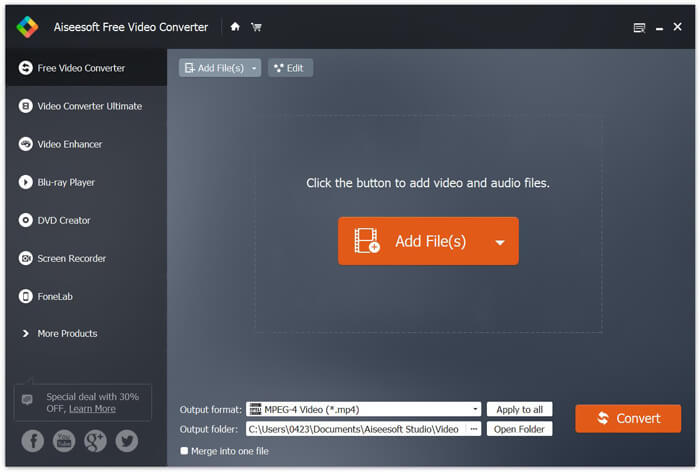
Langkah 3. Pilih MOV sebagai format keluaran dari daftar Output format. Lalu klik tombol Convert untuk mulai mengonversi dari MTS ke MOV.
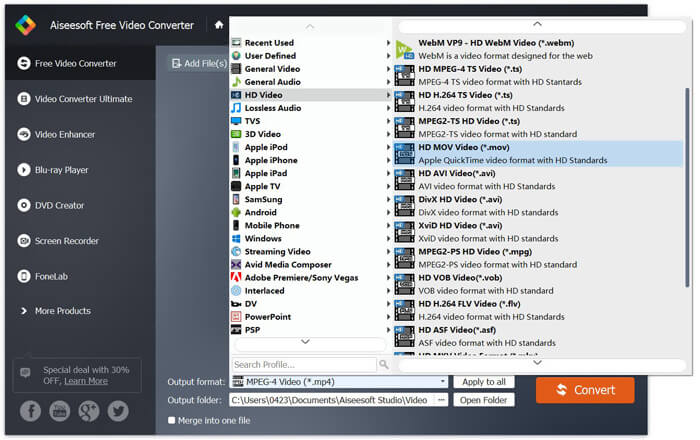
Seperti yang Anda lihat dari atas, konverter MTS ke MOV gratis ini juga membawa beberapa fitur pengeditan dasar. Sebelum konversi terakhir, Anda dapat menggunakannya untuk menyesuaikan file MTS Anda. Dibandingkan dengan konverter online, Pengonversi Video Gratis ini dapat memberi Anda kecepatan konversi yang lebih cepat dan kualitas video keluaran yang lebih tinggi. Itulah mengapa kami menjadikannya sebagai rekomendasi pertama kami.
Bagian 2. Konverter Online Gratis Membantu Anda Mengkonversi Video dengan Mudah
Saat Anda mencari di Google cara mengonversi MTS ke MOV, Anda akan mendapatkan banyak hasil konverter online gratis. Di sini kami memperkenalkan kepada Anda konverter MTS ke MOV online gratis yang mudah digunakan, FVC Free Online Video Converter. Tanpa menginstal perangkat lunak apa pun, Anda dapat mengonversi berbagai format video populer ke MP4, AVI, MOV, dan lain-lain secara gratis. Dan Anda tidak perlu khawatir karena proses konversi aman dan stabil. Tidak ada data yang akan hilang selama proses konversi.
Langkah 1. Buka tautan di atas dan klik tombol Add Files to Convert. Sebelum mengonversi, silakan unduh dan instal FVC launcher. Proses ini hanya memakan waktu beberapa detik.

Langkah 2. Setelah memasang dan memperbarui launcher, pilih video yang ingin Anda konversi. Lalu pilih format yang Anda perlukan dan tekan Convert.

Langkah 3. Buka tautan di atas dan klik tombol Add Files to Convert. Sebelum mengonversi, silakan unduh dan instal FVC launcher. Proses ini hanya memakan waktu beberapa detik.
Bagian 3. Bagaimana Mengkonversi MTS ke MOV Online Gratis dengan ZAMZAR
ZAMZAR adalah salah satu perangkat lunak pengonversi video online paling populer yang dapat membantu Anda mengonversi MTS ke MOV secara gratis. Ini dirancang dengan antarmuka yang ringkas dan fitur konversi sederhana. Anda dapat mengambil panduan berikut untuk melakukan konversi video MTS.
Langkah 1. Buka browser Anda dan arahkan ke situs resmi ZAMZAR. Di sini Anda dapat langsung membuka halaman https://www.zamzar.com/convert/mts-to-mov/. Di sini Anda diperbolehkan untuk langsung mengkonversi MTS ke MOV tanpa melakukan pengaturan lain.
Langkah 2. Klik tombol Add Files untuk memuat file MTS yang ingin Anda ubah. Anda dapat menarik dan melepas file MTS yang sedang diunggah. Satu hal yang harus Anda ketahui adalah, konverter MTS online gratis ini hanya memungkinkan Anda untuk mengonversi file MTS kurang dari 150MB.
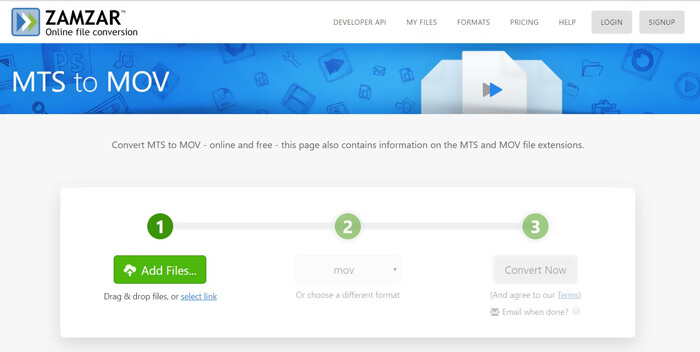
Langkah 3. Setelah mengunggah, Anda dapat mengklik tombol Convert Now untuk mulai mengonversi MTS ke MOV secara online gratis.
Bagian 4. Cara Online untuk Mengkonversi MTS ke MOV dengan FreeConvert
FreeConvert adalah konverter video online populer lainnya yang mampu melakukan konversi video MTS ke MOV secara gratis. Konverter MTS ke MOV gratis ini mendukung MTS dan M2TS dengan sangat baik. Anda dapat mengunggah file MTS hingga 1GB. Selain itu, Anda diizinkan mengunggah hingga 20 file MTS sekaligus untuk dikonversi. Sekarang Anda dapat mengikuti langkah-langkah di bawah ini untuk mengonversi MTS Anda ke MOV.
Langkah 1. Pertama, Anda perlu membuka FreeConvert.com di browser Anda. Di sini Anda dapat langsung masuk ke https://www.freeconvert.com/mts-to-mov untuk melakukan konversi.
Langkah 2. Klik tombol biru besar Choose MTS Files untuk mengunggah file MTS yang ingin Anda konversi ke MOV. Seperti disebutkan di atas, di sini Anda boleh mengunggah satu atau beberapa file MTS untuk dikonversi.
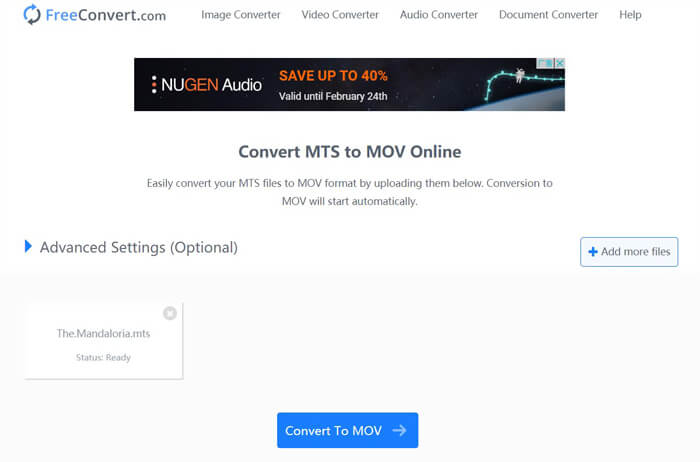
Langkah 3. Klik tombol Convert To MOV untuk memulai proses pengunggahan dan konversi. Setelah itu, Anda perlu mengklik tombol Download untuk menyimpan file yang telah dikonversi ke komputer Anda.
Saat Anda memilih konverter online gratis untuk mengonversi MTS ke MOV, Anda memerlukan waktu yang relatif lebih lama untuk proses pengunggahan dan konversi. Jadi sebaiknya Anda mengonversi file MTS berukuran kecil dengan perangkat lunak konversi online. Jika Anda ingin mengonversi video MTS atau M2TS berukuran besar, Anda sebaiknya mengandalkan Free Video Converter yang sangat direkomendasikan ini.
-
 6 Cara Mudah untuk Mengonversi TS ke AVI / MKV / MOV / WMV di Windows / Mac
 Ingin mengonversi file TS ke AVI / MKV / MOV / WMV dengan cepat? Artikel ini menunjukkan konverter video online dan offline dengan panduan lengkap. Mungkin Anda bisa mendapatkan konverter TS gratis terbaik di sini.
-
 MOV VS MP4 - Mana Yang Lebih Baik
 MOV VS MP4, Mana yang Lebih Baik? Posting ini menjelaskan perbedaan antara MP4 dan MOV, sehingga Anda bisa mendapatkan pilihan yang lebih baik untuk digunakan untuk file video Anda.
-
 Cara Bergabung dengan File MOV (QuickTime) Gratis
 Mungkin sulit bagi pemula untuk menggabungkan beberapa klip video MOV bersama-sama. Jadi, apakah ada cara sederhana dan cepat untuk menggabungkan file MOV? Jika ada, lalu bagaimana cara menggunakannya? Posting ini akan membantu Anda mendapatkan jawaban ini.
