


 Video Converter Ultimate
 Perekam Layar
 Perbaikan Video
Panduan Lengkap tentang Cara Mengonversi GIF Animasi ke FLV dengan Langkah
Menambahkan GIF ke pesan untuk menyampaikan pernyataan yang jelas menjadi tren saat ini. Untuk sekarang, ini digunakan sebagai taktik pemasaran karena cara mereka mendekati audiens. Terlepas dari itu, beberapa platform tidak mendukung GIF untuk diposting di situs mereka. Masalah ini memang menyebalkan, tetapi sangat mudah untuk mengonversi GIF ke format video seperti FLV lalu membagikannya. Tidak tahu cara mengonversi GIF animasi ke FLV di PC, Mac, Online, Android, dan iOS? Mari kita bahas beberapa alat yang bisa Anda gunakan untuk membantu Anda.

Bagian 1. Cara Mengonversi GIF Animasi ke FLV dengan FVC Video Converter Ultimate
Tidak bisa membagikan GIF karena tidak didukung? Cobalah ubah GIF animasi menjadi FLV dengan FVC Video Converter Ultimate. Alat ini mendukung konversi GIF ke lebih dari 200 format yang tersedia dengan berbagai resolusi. Selain itu, alat ini memiliki akselerasi perangkat keras dan kecepatan konversi tinggi sehingga Anda tidak perlu menghabiskan banyak waktu untuk mengonversi file. Lebih jauh lagi, alat ultimate ini tersedia di semua sistem operasi, baik Windows maupun Mac. Tanpa diragukan lagi, ini adalah pilihan terbaik di bidang konversi file media. Jadi mari kita lanjut dan pelajari cara mengubah GIF Anda lalu membagikannya nanti.
Langkah 1. Klik tombol unduh dan pasang alatnya, lalu klik Mulai Sekarang untuk melanjutkan ke langkah berikutnya setelah selesai.
Unduh GratisUntuk Windows 7 atau yang lebih baruUnduhan Aman
Unduh GratisUntuk MacOS 10.7 atau yang lebih baruUnduhan Aman
Langkah 2. Lalu klik Add Files atau tombol + untuk mengunggah file GIF ke dalam perangkat lunak, lalu klik Open.
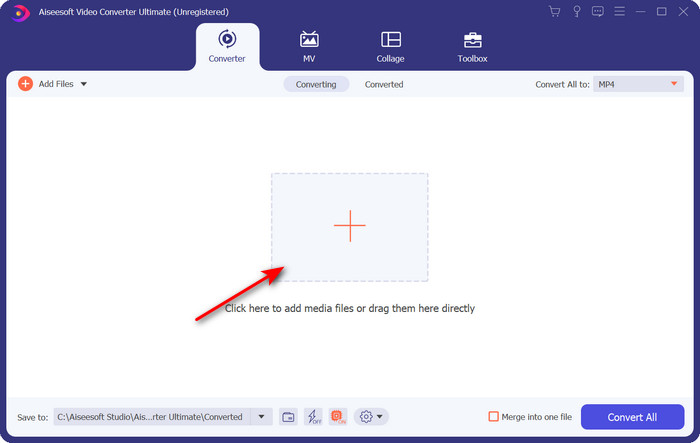
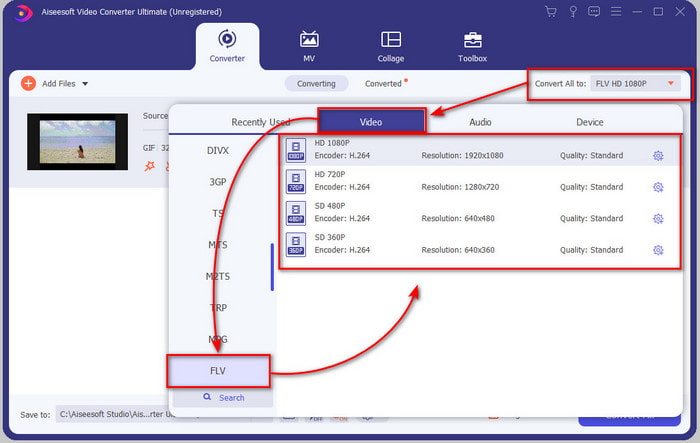
Langkah 3. Di sisi kiri antarmuka converter, klik Convert All to lalu pilih FLV sebagai output akhir.
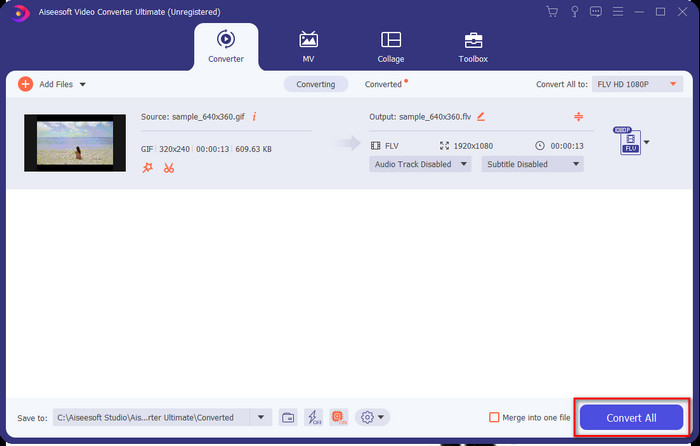
Langkah 4. Jika Anda siap mengonversi GIF ke FLV, klik Convert All.
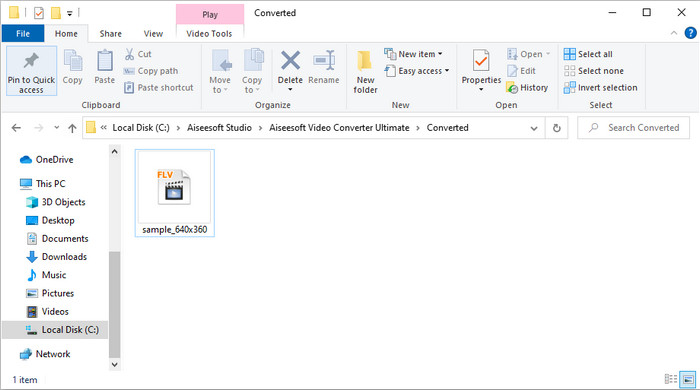
Langkah 5. Sebuah direktori akan muncul di layar bersama file yang telah dikonversi, dan sekarang file tersebut siap untuk dikirim ke semua orang.
Bagian 2. Konversi GIF ke FLV Online
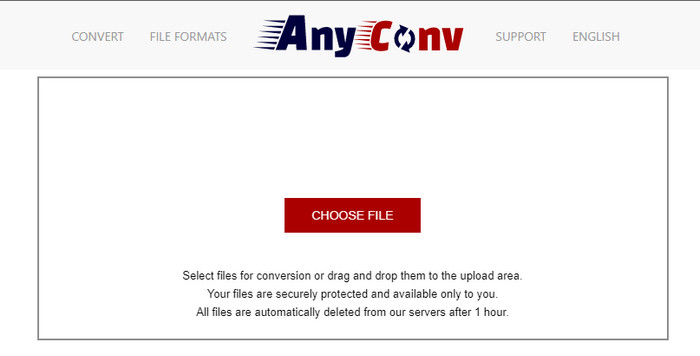
Anda dapat menggunakan AnyConv untuk mengonversi GIF ke FLV secara online dan gratis; selain itu, alat ini mendukung berbagai format file untuk gambar, ebook, dokumen, dan lainnya. Lebih jauh lagi, Anda dapat menggunakan converter ini kapan saja dan di mana saja selama terhubung ke internet. Namun Anda tidak bisa melakukan konversi batch di sini untuk menghemat waktu, sehingga harus mengonversi file satu per satu. Selain itu, Anda tidak dapat mengunggah file media yang lebih besar dari 50 MB karena tidak didukung. Jika ingin tahu cara menggunakan alat web ini, ikuti prosedurnya.
Langkah 1. Buka alat web ini di browser Anda dengan mengakses situsnya.
Langkah 2. Tekan Choose File untuk mengunggah GIF, lalu ubah formatnya menjadi FLV. Setelah selesai, klik Convert untuk memulai proses konversi.
Langkah 3. Klik Download .FLV untuk menyimpannya ke penyimpanan Anda.
Bagian 3. Konversi GIF ke FLV di iPhone
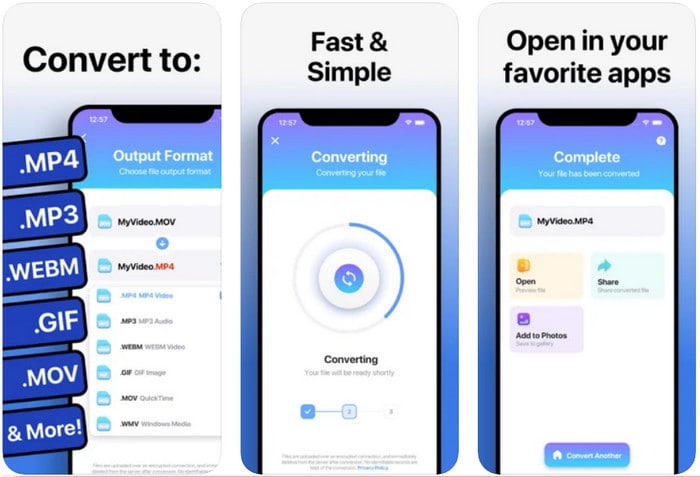
The Video Converter adalah converter kelas atas yang dapat Anda unduh di perangkat iOS untuk mengubah GIF menjadi FLV. Converter iOS ini mendapat rating 4,2 dari para penggunanya karena kinerjanya yang mengesankan. Namun, beberapa pengguna menyesal membeli akses seumur hidup yang ditawarkan alat ini karena sering mengalami crash dan bug setelah pembelian. Tapi jika Anda ingin mencobanya, Anda bisa menggunakan versi gratis dengan mengunduhnya dan mengikuti langkah-langkah di bawah ini.
Langkah 1. Setelah mengunduh alatnya, buka, klik Photos, dan cari GIF.
Langkah 2. Menu drop-down akan otomatis muncul, lalu cari format FLV dan klik.
Langkah 3. Klik Convert Files untuk memulai konversi.
Bagian 4. Konversi GIF ke FLV di Android
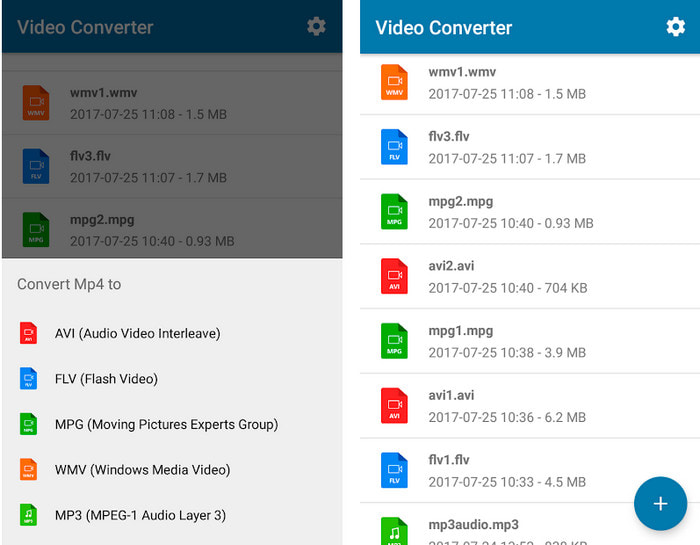
Jika Anda pengguna Android, Anda dapat menggunakan Video Converter: MP3, AVI, MPEG, GIF, FLV, WMV, MP4 untuk mengonversi GIF ke FLV dengan cepat. Alat ini dapat diakses di setiap Play Store di ponsel Anda jika Anda ingin mengonversi format ke versi baru. Berbeda dengan rating alat pertama yang disebutkan, converter ini hanya mendapat rating 2,3 bintang berdasarkan 1.000 ulasan. Meskipun rating-nya sangat rendah, alat ini tetap bisa mengonversi file Anda ke versi baru. Jadi jika Anda ingin tahu cara melakukannya, mari lanjut ke langkah-langkahnya.
Langkah 1. Unduh aplikasinya di Android dengan mencarinya di Play Store.
Langkah 2. Buka, klik tombol plus di bawah GIF untuk mencari file yang ingin Anda konversi. Opsi baru akan muncul, lalu klik FLV (Flash Video).
Langkah 3. Setelah mengonversi file, cari video tersebut di folder di ponsel Anda.
Bagian 5. Diskusi Singkat tentang GIF dan FLV
Format GIF tidak rumit untuk dipahami karena kita melihat dan menggunakannya hampir setiap hari. Format ini berisi gambar bergerak; meskipun file media dianimasikan, itu masih tidak dianggap sebagai format video. Mari kita menggali lebih dalam tentang GIF; format ini mendukung 8-bit per piksel untuk gambar dengan palet warna hingga 256 warna dalam kombinasi warna RGB 24-bit. Walaupun warnanya banyak, tapi ini masih belum cukup, mengingat JPG dan PNG lebih banyak mengandung kombinasi warna. Tetapi jika Anda tidak ingin memiliki gambar diam yang membosankan, Anda harus menggunakan GIF karena kecil dan beranimasi.
Di sisi lain, FLV adalah format terbaik untuk mentransmisikan file video dan audio melalui internet. Mengingat file ini sebagai format video standar pada HTML 5, bahkan Anda tidak menggunakan plug-in flash untuk memutar video. Sejauh ini, format ini telah mendapatkan banyak dukungan dalam berbagi secara online dibandingkan dengan GIF.
Untuk melangkah lebih jauh, jika Anda ingin menambahkan atau membagikan GIF ke semua situs media sosial, Anda harus mengonversi file terlebih dahulu menjadi FLV tanpa kehilangan kualitasnya.
Bagian 6. FAQ tentang Konversi GIF ke FLV
Bagaimana cara membuat GIF?
Walaupun Anda bisa mengunduh atau membuat GIF secara online, akan lebih baik jika Anda membuatnya sendiri. Jika ingin mengetahui rahasia membuat GIF pribadi, klik tautan ini dan baca penjelasan di dalamnya.
Berapa lama GIF dapat diputar?
Panjang maksimum GIF tidak boleh lebih dari 15 detik, tetapi jika GIF Anda dalam satu lingkaran, tidak ada batasan waktu. Ini adalah standar untuk setiap GIF untuk mengirim file lebih cepat dan lebih sedikit memuat.
Bisakah saya memutar GIF di VLC?
Seperti yang sudah dikatakan sebelumnya, GIF adalah format gambar, bukan format video. Jadi, jika Anda mengunggah file GIF ke VLC, GIF itu akan ditampilkan sebagai gambar diam, bukan gambar bergerak. Berikut adalah pemutar GIF terbaik yang bisa Anda gunakan.
Kesimpulan
Berdasarkan penjelasan di atas, sekarang mudah bagi kita untuk mengonversi GIF ke FLV, AVI, MP4, MOV, dan format lainnya tanpa kesulitan. Namun, jika Anda ingin melakukan konversi secara efektif, Anda harus mengunduh FVC Video Converter Ultimate. Karena alat ini bukan hanya yang terbaik untuk mengonversi format, tetapi juga luar biasa dalam banyak hal lainnya. Ingin tahu apa saja fungsi alat ini? Klik tombol unduh ini dan jelajahi semua fitur perangkat lunak tersebut.
-
 Apa Cara Terbaik untuk Mengonversi GIF ke AVI [Sumber terbuka & Premium]
 Apakah Anda ingin mengonversi GIF Anda ke format AVI tanpa kehilangan kualitas video? Teruslah membaca untuk mempelajari cara mengonversi file GIF Anda ke AVI.
-
 Konverter GIF Terbaik untuk Mengonversi GIF Animasi ke Format MOV [2021]
 Konversikan GIF Anda ke format MOV dengan mudah tanpa mempengaruhi kualitas file video. Dengan langkah dan alat yang berbeda pula.
-
 10 Pengonversi GIF ke MP4 Teratas untuk Mengonversi GIF Animasi ke MP4 [2021]
 Cari tahu konverter mana yang terbaik dalam mengonversi GIF ke MP4. Dengan bantuan artikel ini, kita akan berbicara tentang berbagai alat yang dapat Anda gunakan dan tetap ikuti perkembangannya.
