


 Video Converter Ultimate
 Perekam Layar
 Perbaikan Video
Alat Offline dan Online dalam Mengonversi TRP ke FLV Yang Harus Anda Ketahui
TRP adalah format file untuk menyimpan file televisi yang direkam. Karena hanya sedikit pemutar yang dapat menangani tipe file ini dalam versi aslinya, Anda mungkin perlu mengonversi file ke format lain sebelum menontonnya. Untuk mendukung konversi file TRP ke file FLV, Anda perlu menggunakan perangkat lunak yang tepat. Untungnya, hal ini jauh lebih mudah dengan menggunakan perangkat lunak kami atau versi onlinenya yang tidak akan merepotkan Anda selama proses konversi. Ikuti langkah‑langkah yang kami berikan untuk mengonversi video TRP Anda ke format FLV dengan sukses.

Bagian 1. Metode Offline untuk Mengkonversi TRP ke FLV
Format file TRP umumnya tidak dikenal oleh sebagian besar pengguna video dan jarang digunakan oleh para kreator. Karena itu, sebagian besar perangkat lunak dan alat daring tidak mendukung jenis file video ini. Itulah mengapa Video Converter Ultimate layak dipertimbangkan ketika Anda perlu mengonversi video dari satu format ke format lainnya. Perangkat lunak ini dapat mengonversi file TRP Anda ke format apa pun yang Anda inginkan hanya dengan satu klik.
Alat pengonversi video ini menyediakan fitur pengeditan lanjutan dan memiliki antarmuka grafis yang mudah digunakan bahkan jika Anda tidak memiliki pengetahuan atau keterampilan teknis. Dengan bantuan aplikasi ini, Anda dapat mengonversi file dan memanfaatkan waktu konversi super cepat dan output berkualitas tinggi. Di sini kami memberi Anda langkah-langkah sederhana yang harus Anda ikuti:
Langkah 1: Unduh file .exe dengan mengklik tombol Free Download di bawah ini sesuai dengan sistem operasi yang Anda gunakan. Setelah selesai mengunduh, buka file tersebut dan mulai proses instalasi. Tunggu hingga proses instalasi selesai, lalu jalankan perangkat lunaknya.
Unduh GratisUntuk Windows 7 atau yang lebih baruUnduhan Aman
Unduh GratisUntuk MacOS 10.7 atau yang lebih baruUnduhan Aman
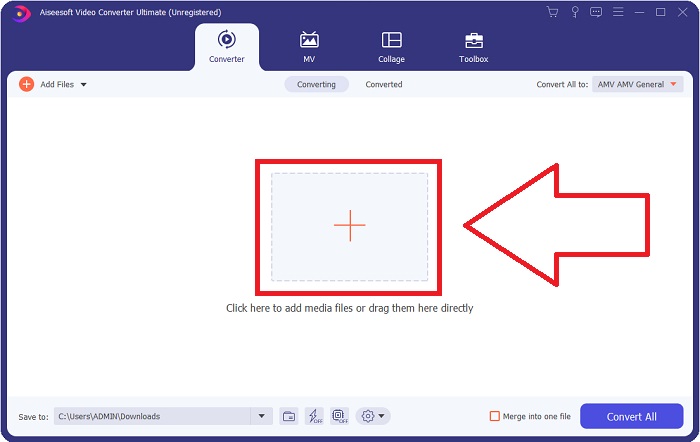
Langkah 2. Sebuah antarmuka akan muncul setelah perangkat lunak berjalan. Dari sana, klik tombol + di tengah dan mulai impor file video yang ingin Anda konversi atau cukup seret dan jatuhkan file tersebut.
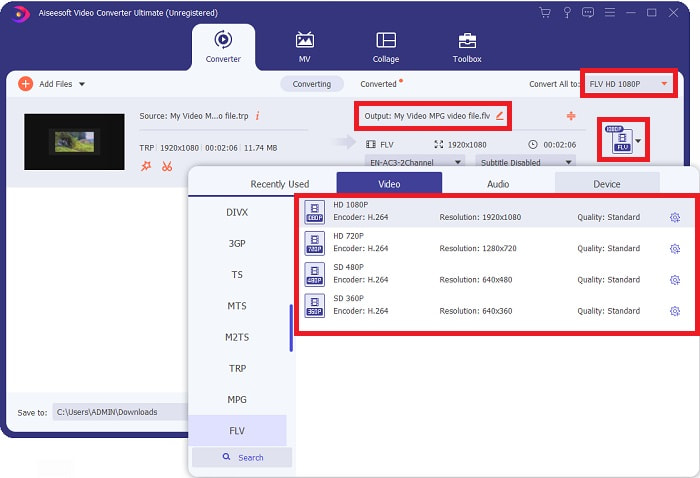
Langkah 3: Anda akan melihat format file video Anda saat ini di sisi kanan file. Untuk memilih format yang akan menjadi hasil konversi video, klik format tersebut dan semua format yang tersedia akan muncul. Cari FLV atau cukup ketikkan di bilah pencarian. Di sebelah kanan juga tersedia pilihan kualitas video untuk Anda.
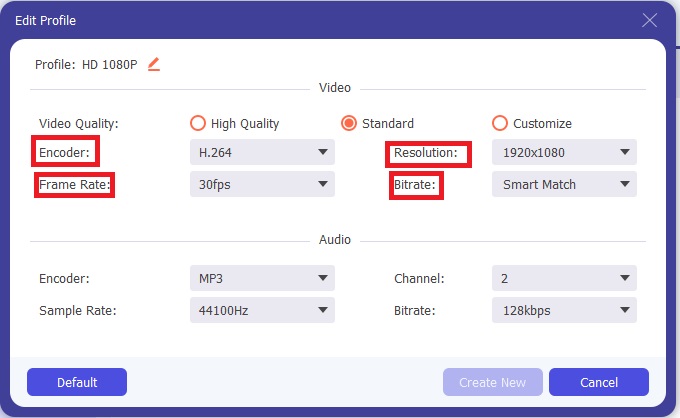
Langkah 4: Untuk fungsi tambahan yang kami maksud, klik ikon roda gigi di sebelah kanan kualitas video yang Anda pilih, dan sebuah antarmuka lain akan muncul. Dari sana, Anda dapat mengedit berbagai pengaturan video dan audio sesuai kebutuhan. Klik tombol Create New untuk menyimpan perubahan.
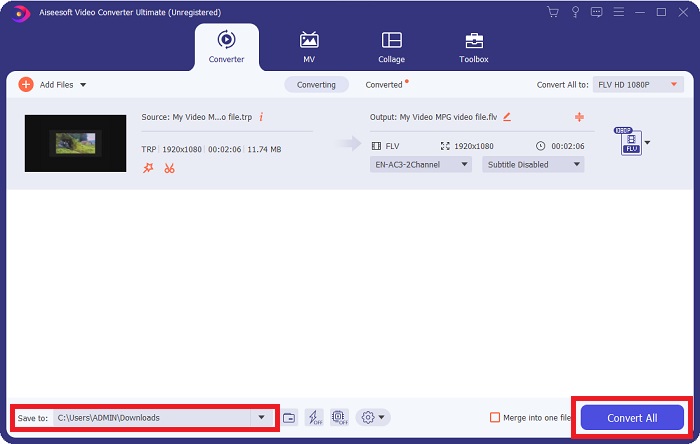
Langkah 5: Setelah selesai menyesuaikan semua pengeditan, klik tombol Convert All di sudut kanan bawah antarmuka untuk memulai proses konversi dan tunggu hingga selesai.
Bagian 2. Metode Online untuk Mengonversi TRP ke FLV
Mengonversi file video juga dapat dilakukan jika Anda ingin menyelesaikan pekerjaan dengan mengunjungi alat web tanpa memasang perangkat lunak lengkap. Dalam hal ini, kami juga memiliki versi online dari perangkat lunak tersebut – FVC Free Video Converter Online. Alat ini tetap menyediakan opsi tambahan seperti pada perangkat lunaknya, meski tidak semua fiturnya tersedia. Namun, alat ini tetap menjalankan fungsinya dengan waktu pengerjaan yang masih terbilang efisien. Untuk menggunakan alat web ini, ikuti langkah‑langkah berikut:
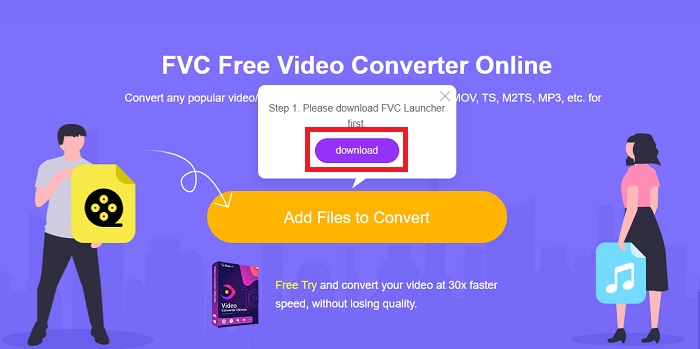
Langkah 1: Buka konverter dengan benar dengan mengklik tautan ini. Dari sana, Anda dapat mulai dengan mengunduh peluncur yang Anda perlukan untuk mengimpor file. Klik tombol Add Files to Convert di tengah halaman untuk memulai prosesnya.
Langkah 2: Klik kembali tombol tersebut dan unggah file video yang ingin Anda konversi. Setelah Anda mengimpor file, sebuah antarmuka baru akan muncul yang menampilkan semua format yang tersedia untuk Anda pilih. Dalam hal ini, pilih FLV.
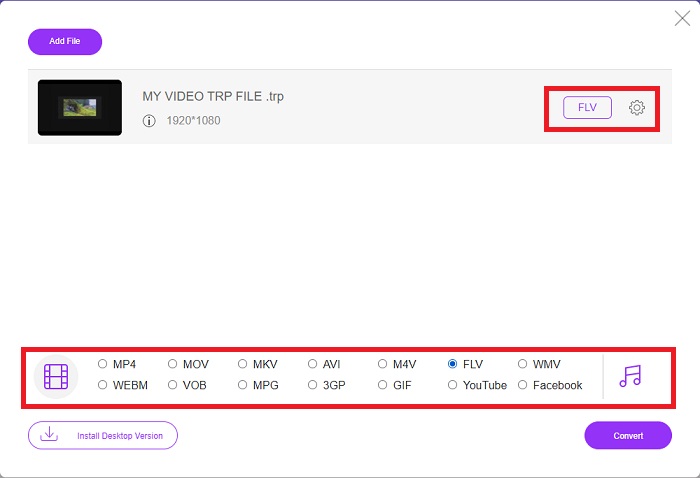
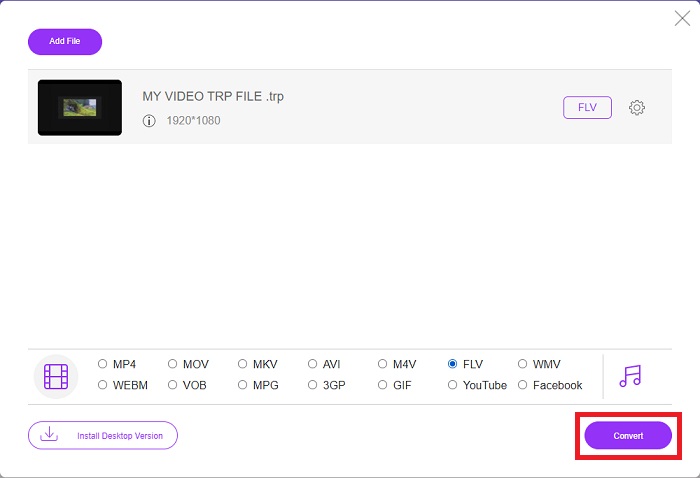
Langkah 3: Untuk opsi tambahan, seperti pada perangkat lunaknya, klik ikon roda gigi di sebelah kanan. Pengaturan video dan audio akan muncul untuk menyunting video Anda lebih lanjut dalam hal resolusi, frame rate, dan banyak lagi. Setelah selesai, klik OK untuk menyimpan perubahan. Terakhir, mulai proses konversi dengan mengklik tombol Convert di sudut kanan bawah.
Terkait:
Bagian 3. Pengetahuan yang Diperluas tentang TRP dan FLV
Untuk mengetahui lebih lanjut tentang kedua format tersebut, kami memberikan informasi singkat serta perbandingan keduanya.
File TRP biasanya dikaitkan dengan VLC VideoLAN. Ekstensi nama file TRP dapat dikumpulkan dengan MPEG-2 Bagian 1 yang menyimpan film definisi tinggi. File TRP dapat berisi dan menyimpan paket data yang dikirim sebagai video dan audio digital melalui jaringan penyiaran video digital, frekuensi radio, atau perangkat perekaman linier seperti perekam video. Beberapa aliran audio dan video, serta kode koreksi kesalahan, disertakan dalam file TRP. Pengguna juga dapat menyertakan metadata seperti waktu pengambilan, id kamera, dan sumber dalam konten file.
Di sisi lain, file dengan ekstensi .flv adalah singkatan dari Flash Video. Ekstensi file FLV mengacu pada file video atau audio yang dikirim melalui internet menggunakan Adobe Flash Player atau Adobe Air. Flash Video telah lama menjadi format video utama untuk hampir semua video yang disematkan di internet, termasuk video di YouTube, Hulu, dan berbagai situs lainnya. Penyedia streaming dan pengembang perangkat lunak, di sisi lain, telah meninggalkan Flash demi HTML5 dan format lain sejak penghentian resmi Adobe.
| TRP | FLV | |
| Ekstensi File | .trp | .flv |
| Pengembang | Tim Proyek VideoLAN | Adobe Systems Incorporated |
| Program Pendukung | SMPlayer Pemutar Media VLC Pemutar QuickTime Apple | Pemain Nyata Pemutar QuickTime Apple Pemain Pemutar Media VLC |
Bagian 4. FAQ tentang Konversi TRP ke FLV
Bagaimana cara membuka format video TRP menggunakan VLC?
Setelah VLC Media Player diinstal di komputer Anda, cari file video TRP di hard drive Anda dan pilih dengan tombol kanan mouse. Pilih 'VLC media player' dari menu tarik-turun 'Buka dengan'. Sistem akan membuka file video yang akan diputar dari program ini segera setelah diluncurkan.
Bagaimana cara mengonversi file FLV ke Windows Media Player?
Anda harus terlebih dahulu memilih file FLV yang ingin Anda konversi. Anda dapat memilih WMV sebagai format yang ingin Anda konversi file FLV Anda. Untuk mengonversi file FLV Anda, pilih 'Konversi' dari menu tarik-turun.
Bisakah saya bermain TRP di mana saja?
Mengonversi TRP ke MP4, AVI, MOV, MKV, FLV, WMV, dan format lain yang dikenal luas adalah opsi yang disarankan jika Anda ingin memutar file TRP di mana saja dan di atau di perangkat atau pemutar media apa pun.
Kesimpulan
Secara keseluruhan, Video Converter Ultimate dan rekan alat online-nya adalah yang Anda cari untuk menyelesaikan seluruh proses konversi sambil menyediakan semua fitur penting yang Anda butuhkan. Ini tidak menyebabkan ketidaknyamanan, ditambah itu tersedia kapan saja sepanjang hari jika Anda menginstal perangkat lunak di desktop Anda. Anda tidak akan pernah tahu kapan Anda akan membutuhkan konverter seperti ini, jadi kami sarankan menggunakan perangkat lunak ini untuk kemudahan Anda.
-
 Panduan termudah tentang Cara Mengonversi TRP ke AVI di Windows & Mac
 Mungkin Anda tidak akrab dengan format video TRP dan bertanya-tanya bagaimana Anda akan mengkonversi TRP ke AVI? Baca artikel ini lebih lanjut untuk mengetahui detail terkait masalah tersebut.
-
 3 Solusi untuk Mengonversi MTS ke FLV Gratis & Online
 Ingin mengonversi MTS ke FLV? Berikut adalah 3 perangkat lunak konverter MTS ke FLV gratis yang dapat Anda coba untuk mengonversi MTS ke FLV di Mac OS X dan Windows 10/8/7.
-
 Cara Terbaik untuk Mengonversi VOB ke FLV [Termasuk Gratis & Online]
 Ingin mengonversi file VOB ke file FLV? Anda dapat dengan mudah menyelesaikan tugas dengan konverter desktop atau online. Baca panduan ini dan pelajari cara mengubah VOB ke FLV dengan mudah dan cepat.
