


 Video Converter Ultimate
 Perekam Layar
 Perbaikan Video
 Unduhan Aman
Cara Terbaik untuk Mengonversi TIFF ke HEIC di Windows dan Mac
TIFF or Tag Image File Format is an image format that is very famous for photographers. This image format can store high image quality and are lossless files. With that being said, TIFF files are large files, making them hard to share with other devices or applications. So, if you want to have an image file that has high quality but does not have a huge file size, the best solution for you is to convert TIFF to HEIC.

Bagian 1. Cara Mengonversi TIFF ke HEIC Online dan Offline
Mengonversi TIFF ke HEIC mungkin terdengar sulit, tetapi sangat mudah dengan bantuan pengonversi TIFF ke HEIC online ini. Dan jika Anda ingin mengetahui konverter online terbaik ini, bagian ini akan memberi Anda konverter TIFF ke HEIC yang paling menonjol dan gratis.
konversi X
XConvert is an online TIFF to HEIC converter that easily converts TIFF to HEIC. This converter is free to use and secure, so you do not need to worry about your data. Moreover, you can convert multiple TIFF files to HEIC in just a few clicks. You can also adjust your image's resolution and file size using this converter. Although it contains many ads, it can still quickly convert your TIFF to HEIC.
Step 1. Open your browser and search XConvert TIFF to HEIC converter. Then on the software’s main interface, click Add Files button. Your computer folders will appear to select your TIFF file to upload.
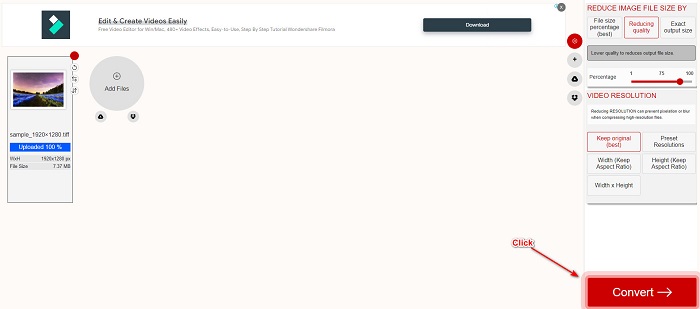
Step 2. When your TIFF file is uploaded, click the Convert button to start converting your TIFF file to HEIC file format. Then just wait for your file to download and proceed to the next step.
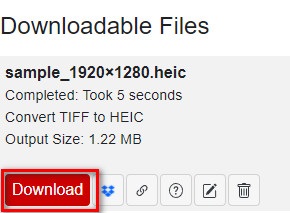
Step 3. Lastly, click the Download button to download your HEIC file.
Pro
- Ini aman untuk digunakan.
- Ini memiliki antarmuka pengguna yang sederhana.
- Ini memiliki proses konversi yang cepat.
Kontra
- Ini berisi iklan sial yang mungkin mengganggu Anda.
Convertio
Convertio is one of the most known online converters around the web. It can also convert TIFF to HEIC files without having a hard time. With that being said, it has a user-friendly software interface and does not contain many ads, unlike the tool mentioned above. Furthermore, it supports various image formats, including TIFF, HEIC, JPG, PNG, GIF, and more. However, since it is a web-based application, you may experience having a slow conversion and downloading process when your internet connection is slow.
Step 1. On your browser, search Convertio online converter. Then on the software's main interface, click the Choose File button to upload your TIFF file.

Step 2. And then, click the drop-down button to select your desired output format, HEIC.
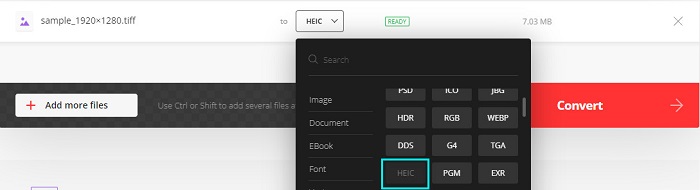
Step 3. Lastly, click the Convert button to begin your conversion process. Then, a new interface will appear to download your HEIC image.

Pro
- Ini mendukung berbagai format file seperti TIFF, HEIC, JPG, PNG, GIF, dan banyak lagi.
- Ini memiliki antarmuka perangkat lunak yang mudah digunakan.
- Dapat diakses di hampir semua browser web, termasuk Google, Firefox, dan Safari.
Kontra
- Anda mungkin mengalami proses konversi yang lambat ketika koneksi internet Anda lambat.
- Ini berisi iklan.
Bintang file
Filestar adalah pengonversi TIFF ke HEIC offline. Konverter ini gratis untuk diunduh dan mudah diakses. Selain itu, ia memiliki antarmuka pengguna yang sederhana menjadikannya alat yang ramah pemula. Yang lebih menakjubkan adalah ia memiliki banyak fitur untuk ditawarkan. Konverter ini dapat mengubah ukuran, menghidupkan, dan bahkan mengompres file Anda. Selain itu, mendukung berbagai format file, termasuk TIFF, HEIC, JPEG, PNG, WEBPM, MP4, dan banyak lagi.
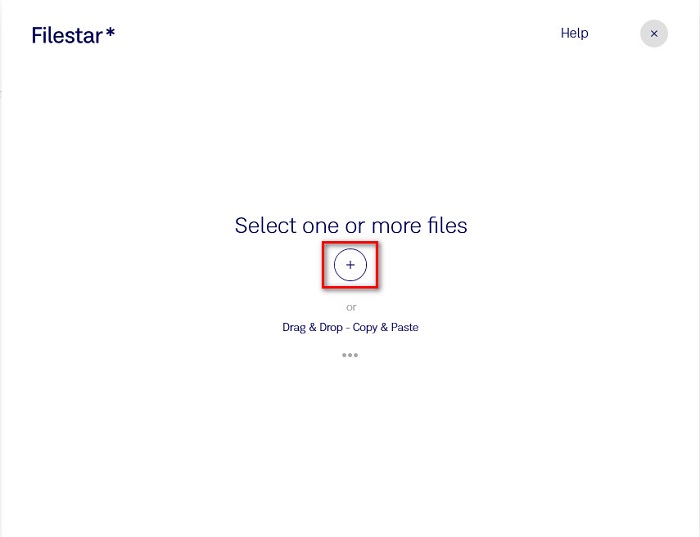
Step 1. Download Filestar to your desktop. Then run the application. Click the + sign button to upload your TIFF file on the software's main interface.
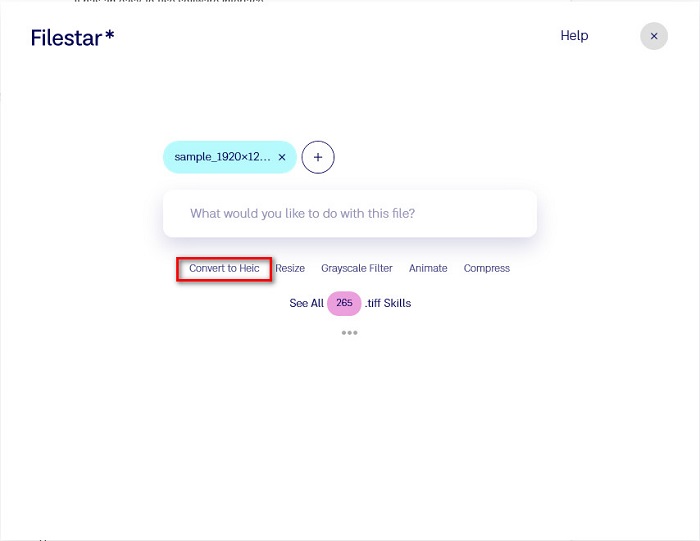
Step 2. And then, on the next interface, click the Convert to HEIC option.
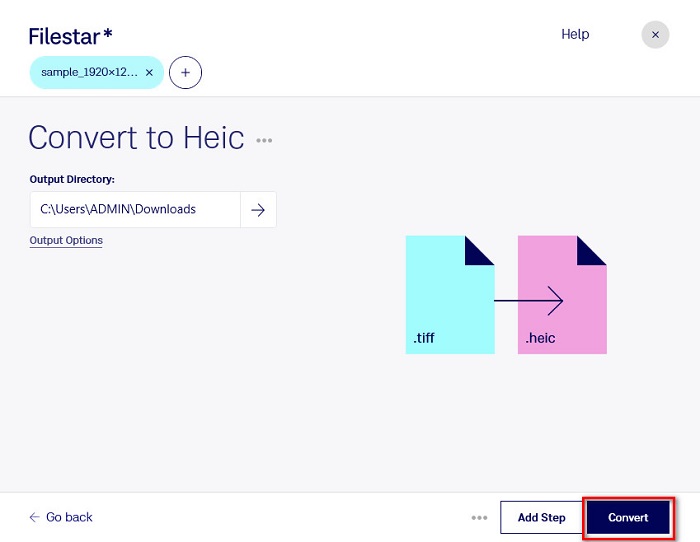
Step 3. For the last step, click the Convert button to convert your TIFF file to HEIC.
Pro
- Ini memiliki antarmuka pengguna yang mudah dioperasikan.
- Ini memungkinkan Anda untuk mengubah ukuran dan mengompres file TIFF Anda.
- Itu dapat mengonversi file TIFF Anda ke format file HEIC.
Kontra
- Hanya tersedia di Windows.
Bagian 2. Rekomendasi: Konversi File HEIC Menggunakan Konverter HEIC Terbaik
If you have a problem viewing HEIC files on your Windows PC, then we have the solution for you. The best way to view a HEIC file on Windows or other editing applications is by converting your HEIC file to a JPG file or PNG file, which Windows and other applications support. It also has a feature to batch convert your HEIC file to PNG or JPG. Moreover, it has a straightforward user interface, making it a beginner-friendly tool. If you are interested in knowing this tool more, read this description below.
Unduh GratisUntuk Windows 7 atau yang lebih baruUnduhan Aman
Unduh GratisUntuk MacOS 10.7 atau yang lebih baruUnduhan Aman
Aiseesoft HEIC Converter:
- 100% gratis untuk digunakan.
- Memiliki antarmuka pengguna yang sederhana.
- Ini dapat mengonversi file HEIC ke JPG dan PNG.
- Tersedia di semua platform lintas media, termasuk Windows dan Mac.
Bagian 3. Perbedaan Antara TIFF dan HEIC
TIFF dan HEIC tidak memiliki karakteristik yang sama; oleh karena itu, jika Anda masih tidak yakin apakah Anda akan mengonversi TIFF ke HEIC, bagian ini akan membantu Anda.
TIFF atau Tag Image File Format adalah file gambar yang fleksibel dengan resolusi tinggi. Fotografer dan desainer grafis biasanya menggunakan file gambar ini untuk foto mereka karena Anda dapat dengan mudah mentransfernya ke perangkat lain dan aplikasi pengeditan gambar lainnya seperti Adobe Photoshop. Selain itu, file gambar ini memiliki kompresi lossless, yang berarti tidak kehilangan kualitas dan data. Apa yang lebih mengesankan tentang file ini adalah bahwa itu juga dapat berfungsi sebagai wadah file untuk gambar JPEG kecil. Selain itu, banyak perangkat dan platform media mendukung jenis file ini.
In contrast, the HEIC file is an image file format that Apple develops. Since Apple develops it, it is only viewable on Apple devices, like iPhone, Mac, and iPad. Even so, this image format has a high quality, making it perfect for taking photos. Furthermore, HEIC files are compressed files, making them low in file size.
Bagian 4. FAQ tentang Cara Mengonversi TIFF ke HEIC
Bisakah Anda melihat gambar TIFF di Mac?
Ya. Menggunakan aplikasi pratinjau di Mac, Anda dapat membuka gambar TIFF secara native di perangkat Mac.
Mana yang lebih baik, TIFF atau HEIC?
Gambar TIFF dan HEIC keduanya memiliki resolusi berkualitas tinggi. Namun, aman untuk mengatakan bahwa HEIC lebih baik karena gambar HEIC memiliki ukuran file terkompresi.
Bisakah Anda mengubah format TIFF ke JPG?
Tentu saja, ya. Beberapa konverter mendukung konverter TIFF ke JPG. Selain itu, beberapa konverter yang disebutkan di atas juga dapat mengonversi TIFF ke JPG.
Kesimpulan
Di sana Anda memilikinya! Ada banyak cara untuk mengonversi TIFF Anda ke file HEIC. Tetapi semua konverter yang disajikan di atas memiliki fitur yang berbeda untuk ditawarkan. Jadi sekarang, ada di tangan Anda konverter apa yang akan Anda gunakan untuk mengonversi file TIFF Anda ke format file HEIC. Tetapi jika Anda mencari konverter HEIC dengan fitur terbaik untuk ditawarkan, maka alat terbaik untuk digunakan adalah Aiseesoft HEIC Converter. Jadi tunggu apa lagi? Unduh sekarang secara gratis untuk merasakan alat konverter HEIC terbaik.
-
 Konversi HEIC ke PDF Menggunakan 4 Cara Peningkatan Teratas pada 2022
 Untuk mengetahui informasi lebih lanjut tentang pengonversi HEIC ke PDF terbaik, Anda dapat mengunduh ini 2022. Anda dapat membaca artikel ini karena kami memberikan ulasan tentangnya.
-
 5 Pilihan Konverter HEIC ke JPG Terbaik Tahun 2022
 Dengan konverter HEIC ke JPC, Anda dapat dengan mudah mengubah format gambar menjadi JPG portabel. Mau tahu apa saja 5 alat tersebut? Baca artikel ini.
-
 Konverter HEIC Gratis & Berbayar Terbaik yang Harus Anda Ketahui [Diperbarui 2022]
 Ingin tahu apa itu konverter HEIC? Jika demikian, kami menyertakan 5 pengonversi HEIC gratis dan berbayar teratas yang dapat Anda gunakan untuk mengubah format HEIC.
