


 Video Converter Ultimate
 Perekam Layar
 Perbaikan Video
Pelajari Cara Mengonversi AMV ke MOV Tanpa Menurunkan Kualitas
AMV adalah format video proprietari yang digunakan untuk menyimpan pemutaran video pada pemutar media S1 MP3 dan MP4. Ekstensi file .amv ini beresolusi rendah dan dikompresi agar dapat disimpan di pemutar media portabel tersebut. Meskipun format ini masih ada, mencari pemutar media yang kompatibel di ponsel cukup sulit karena format ini sudah lama. Daripada repot mencari pemutar media yang kompatibel, mengapa tidak mengonversi file AMV ke format baru yang mendapat banyak dukungan seperti MOV. Jadi, jika Anda ingin tahu cara terbaik untuk mengonversi AMV ke MOV, mari kita mulai pembahasannya.

Bagian 1. Pengenalan Singkat tentang AMV dan MOV
Ide Action Media Video atau AMV adalah untuk menggantikan MP4 sebagai format universal karena format ini lebih baik dan lebih terkompresi. Juga, format ini adalah versi yang lebih baik dari format AVI. Namun format tersebut telah diabaikan melalui era baru ini karena tidak menerima pembaruan untuk meningkatkan kualitas resolusi. Dan sekarang, jika Anda menyimpan format ini di perangkat seluler kami dan memainkannya, Anda diharapkan tidak dapat memutarnya karena formatnya tidak didukung. Jadi jika Anda ingin memutar video dalam format ini, Anda harus mengunduh pemutar media pihak ketiga untuk AMV. Sementara MOV, format ini mendapatkan banyak dukungan karena merupakan format file asli yang dikembangkan oleh QuickTime.
Bagian 2. Konversi AMV ke MOV dengan Perangkat Lunak Desktop Utama
FVC Video Converter Ultimate
Konversikan AMV ke MOV dengan bantuan konverter video profesional yang menghasilkan output fenomenal dan sulit ditandingi, FVC Video Converter Ultimate. Konverter ini tersedia di PC dan Mac, dan keduanya memiliki fitur-fitur canggih yang sama. Selain itu, kecepatan konversi yang tinggi dan akselerasi perangkat keras yang tersedia di PC juga tersedia di Mac. Banyak pengguna sudah memilih perangkat lunak ini sebagai konverter pilihan pertama untuk menyelesaikan masalah mereka. Namun, sebelum Anda bisa menggunakannya, Anda perlu membelinya dari FVC. Meskipun berbayar, Anda tidak perlu mengeluarkan ratusan dolar, dan harganya sepadan dengan yang Anda dapatkan. Tanpa berlama-lama lagi, mari kita uji alat ini untuk melihat apakah kita bisa mencapai konversi maksimal seperti yang dijanjikan namanya.
Langkah-langkah Cara Mengonversi AMV ke MOV dengan FVC Video Converter Ultimate:
Langkah 1. Unduh FVC Video Converter Ultimate di desktop Anda dengan mengeklik tombol di bawah ini; instal perangkat lunak setelah proses pengunduhan selesai.
Unduh GratisUntuk Windows 7 atau yang lebih baruUnduhan Aman
Unduh GratisUntuk MacOS 10.7 atau yang lebih baruUnduhan Aman
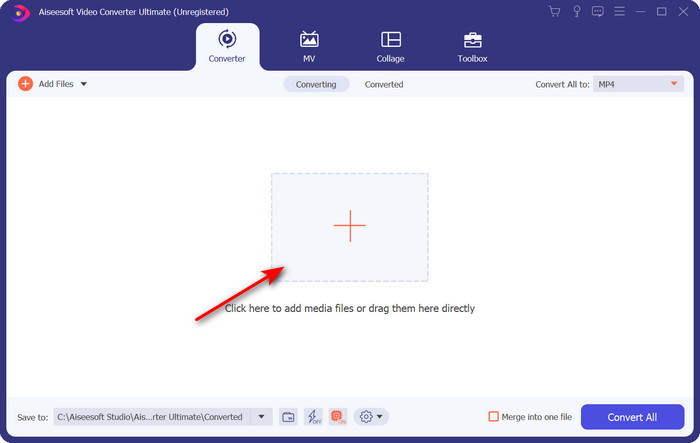
Langkah 2. Buka perangkat lunak untuk mulai menggunakannya, dan untuk mengunggah file .amv, klik tanda +. Cari file di folder dan tekan Open untuk memasukkannya.
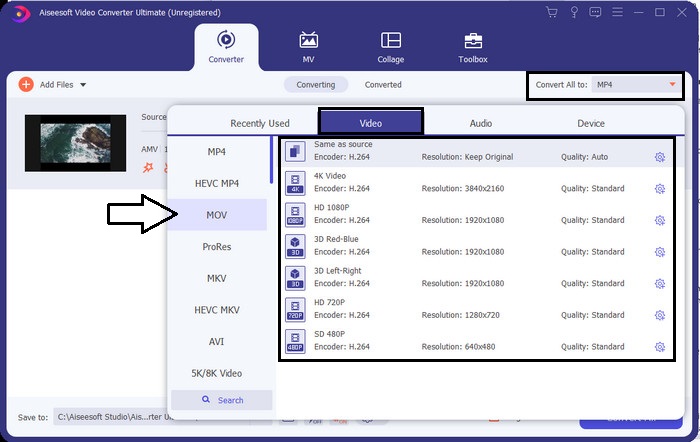
Langkah 3. Untuk mengubah format menjadi MOV, klik Convert All to: dan pilih MOV atau format lain yang Anda inginkan.
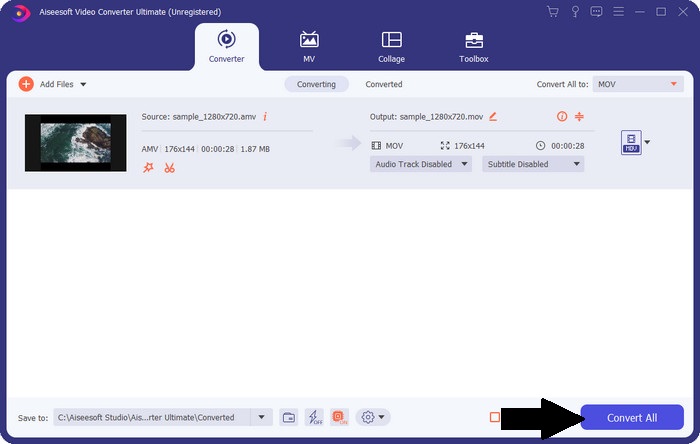
Langkah 4. Untuk mengubah file AMV menjadi MOV, klik Convert All untuk memulai proses konversi.
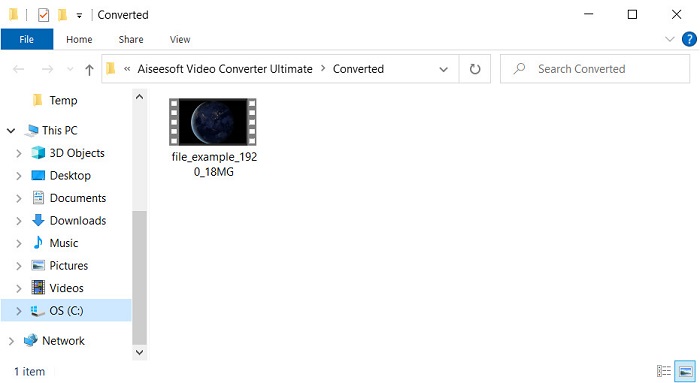
Langkah 5. Proses konversi hanya akan memakan waktu beberapa detik. Lalu tunggu hingga folder muncul dengan file .mov yang baru saja Anda buat; klik file tersebut untuk menontonnya di pemutar media bawaan Anda.
Bagian 3. Konversi AMV ke MOV dengan 2 Konverter Layanan Online Tersedia
1. Konversi File
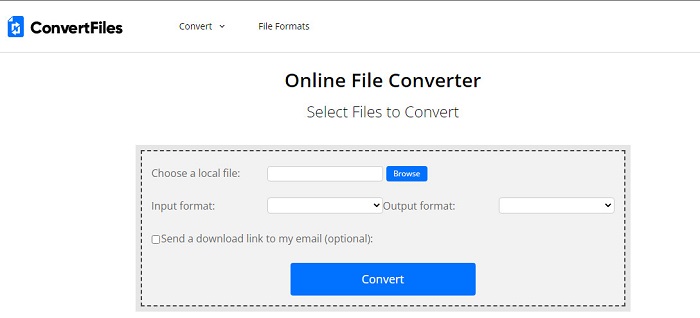
Salah satu konverter online terbaik yang bisa Anda akses di browser favorit Anda adalah ConvertFiles. Alat online ini dapat mengonversi format Anda ke format baru tanpa kesulitan. Selain itu, alat ini mendukung sejumlah kecil format yang bisa Anda pilih. Namun, proses mengunduh file yang sudah dikonversi di sini memakan waktu lama karena tidak menyediakan konversi cepat. Hal lain yang kurang menyenangkan adalah iklan; ada banyak iklan di antarmukanya. Terlepas dari masalah pada proses pengunduhan dan iklan, alat ini tetap berkinerja baik sebagai alat online gratis.
Langkah-langkah Cara Mengonversi AMV ke MOV dengan ConvertFiles:
Langkah 1. Buka browser favorit Anda dan cari ConvertFiles.
Langkah 2. Setelah situs web terbuka, klik Browse untuk menemukan file di folder; pada Output Format, cari MOV, lalu klik Convert.
Langkah 3. Jika proses konversi selesai, klik tulisan biru yang disorot untuk mengunduh file ke komputer Anda.
2. MConverter
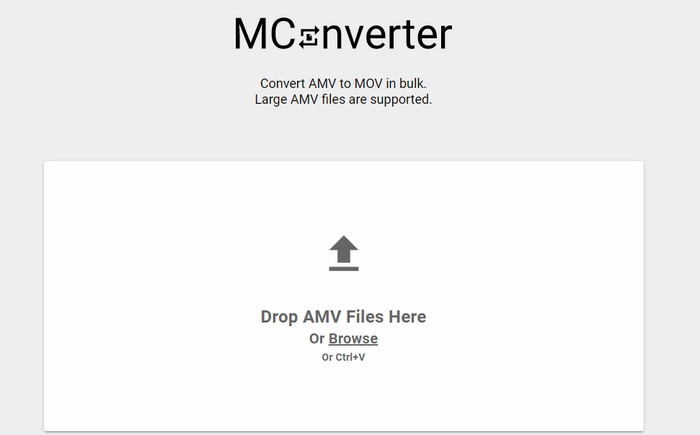
Tidak ingin ada iklan di antarmuka agar bisa mengonversi AMV ke MOV dengan tenang? Cobalah gunakan MConverter yang tersedia di browser Anda. Alat ini juga mendukung konversi batch untuk membuat proses konversi Anda lebih efisien, seperti FVC Video Converter Ultimate. Namun, kelemahan alat online ini adalah ukuran file tidak boleh melebihi 200MB. Jadi, jika Anda ingin mengonversi video yang panjang dan ukuran filenya melampaui batas yang didukung, maka ini bukan pilihan yang tepat. Tetapi jika Anda ingin merasakan proses konversi yang lebih baik dibandingkan ConvertFiles, ikuti langkah-langkah di bawah ini.
Langkah-langkah Cara Mengonversi AMV ke MOV dengan MConverter:
Langkah 1. Cari MConverter di mesin pencari Anda dan buka situsnya.
Langkah 2. Klik tombol Upload untuk memasukkan file, tunggu sebentar hingga alat web memuat, cari MOV, lalu klik. Proses konversi file akan dimulai setelah Anda mengklik format MOV.
Langkah 3. Tekan Download All untuk menyimpan file.
Bagian 4. FAQ tentang AMV dan MOV
Bisakah saya mengubah MP4 saya menjadi AMV?
Anda bisa mengubah MP4 ke AMV untuk memindahkan file secara cepat secara online. Terutama jika videonya berdurasi satu jam, kami menyarankan Anda mengonversi file .mp4 menjadi .amv karena ukurannya jauh lebih kecil jika dibandingkan kedua format tersebut.
Apakah VLC mendukung AMV?
Untungnya, Anda bisa menggunakan VLC Media Player untuk memutar file .amv di pemutar media ini meskipun sudah ketinggalan zaman. Namun tahukah Anda bahwa ada pemutar media yang melampaui pemutar ini? Jadi, jika Anda ingin tahu apa saja pemutar media tersebut, Anda harus mengklik tautan ini untuk mengetahui 5 pemutar media alternatif untuk VLC.
Bagaimana cara mengubah AMV saya menjadi AVI?
AMV adalah versi yang lebih baru dari AVI; namun, jika berbicara soal kualitas, AVI menghasilkan performa yang jauh lebih baik dibandingkan format lama ini. Selain itu, AVI sangat kompatibel dengan semua platform. Jadi sekarang, jika Anda ingin menonton AMV dalam versi yang lebih baik dan di semua platform, Anda harus mempelajari cara mengonversi AMV ke AVI.
Kesimpulan
Diskusi harus berakhir di sini; meskipun kami ingin menyimpan file AMV di disk kami, masalah kompatibilitas adalah salah satu alasan kami perlu mengonversinya. Lagi pula, AMV dikatakan populer sebelumnya karena cara wadah ini mengompresi file. Namun, hari ini Anda harus mempertimbangkan untuk mengubahnya menjadi format baru untuk tetap menggunakannya. Selain itu, solusi yang disediakan di sini mengkonversi secara efektif. Namun, FVC Video Converter Ultimate bekerja secara fenomenal dibandingkan dengan dua alat lainnya. Jadi, jika Anda ingin merasakan alat terbaik, maka Anda harus mengunduh ini di komputer Anda dan menyalin langkah-langkah yang disediakan di atas.
-
 4 Metode Terbaik untuk Mengonversi MOV ke MP3 di Windows dan Mac dengan Mudah
 Saat Anda ingin mengekstrak file audio MP3 dari file MOV, Anda dapat mempelajari lebih lanjut tentang 4 konverter MOV ke MP3 paling efisien untuk mendapatkan file yang diinginkan dari artikel.
-
 MKV ke MOV - Cara Mengonversi MKV ke MOV
 Bagaimana cara saya mengonversi MKV ke MOV di Mac? Bisakah iMovie membaca MKV? Apa artinya format MOV? Posting ini memberi tahu 2 cara sederhana untuk membantu Anda mengonversi MKV ke MOV dengan konverter video online dan profesional gratis.
-
 FLV ke MOV - Bagaimana mengkonversi FLV ke MOV di Mac / PC / Online Gratis
 Bagaimana cara mengubah FLV ke MOV? Bagaimana cara mengubah FLV ke MOV di Mac? Apakah ada cara gratis untuk mengonversi YouTube FLV ke MOV secara online? Posting ini membagikan 3 konverter FLV ke MOV untuk mengubah file FLV menjadi MOV.
