


 Video Converter Ultimate
 Perekam Layar
 Perbaikan Video
Alat Praktis yang Perlu Anda Ketahui yang Mengonversi SWF ke MOV [Terpecahkan]
Animasi berbasis video dan vektor dapat ditemukan dalam file SWF, yang dibuat dengan perangkat lunak Adobe Flash. ShockWave Format adalah sebutan lain untuk Small Web Format, yang merupakan kepanjangan lengkapnya. File SWF biasanya digunakan untuk mendistribusikan konten multimedia di internet secara efektif. Aplikasi web kecil memanfaatkan ActionScript, yang dapat disimpan dalam format ini. Jika Anda bertanya-tanya apakah ada konverter SWF ke MOV gratis karena Anda tidak bisa memutar file dengan format tersebut, artikel ini sangat tepat untuk Anda, karena menyajikan alat terbaik dan paling efisien yang dapat Anda gunakan untuk mengonversi file video. Mari kita mulai!
Bagian 1. Kata Pengantar: SWF & MOV
SWF adalah jenis file yang digunakan untuk mentransfer teks, video, grafik vektor, dan ActionScript melalui internet. Adobe Flash Player diperlukan untuk menggunakan file SWF. Format file SWF dimaksudkan sebagai format transfer yang hemat sumber daya yang dapat digunakan tidak hanya untuk mengirimkan grafis tetapi juga untuk anti‑aliasing dan tampilan di layar, dan lain‑lain. Anti‑aliasing sangat penting untuk proses rendering bitmap yang cepat dan properti‑propertinya, seperti tombol interaktif, efek bayangan, dan animasi.
Namun, file MOV dikodekan menggunakan pedoman pengodean dan standar kompresi data Apple QuickTime Movie, dan file video yang diproduksi dalam format ini memiliki ekstensi .mov. Standar dan kriteria kompresi untuk film digital dan klip video lainnya dikembangkan secara eksklusif oleh Apple. Karena file MOV ini dikodekan dengan dukungan kompatibilitas lintas‑platform, file tersebut dapat diputar pada pemutar video digital berbasis Mac maupun Windows. Windows Media Player juga dilengkapi dengan fungsi pemutaran untuk file MOV ini, yang dapat dibuka dan ditonton menggunakan Apple QuickTime Player atau VLC Media Player di platform Mac maupun Windows.
| Ekstensi File | SWF | MOV |
| Jenis File | Film Flash ShockWave | Film Apple QuickTime |
| Dikembangkan oleh | Sistem Adobe | apel |
| Pro | Animasi web dimungkinkan oleh penggunaan format visual yang dapat dituliskan secara bebas. Karena grafiknya berbasis vektor, ukurannya dapat diubah tanpa kesulitan. dimuat dalam waktu singkat; | Setiap file memiliki komponen audio dan video berkualitas tinggi yang disimpan di trek independen dan dapat diedit untuk waktu dan konten. File dapat dilihat oleh banyak pemutar video gratis yang berbeda. |
| Kontra | Penggunaan CPU yang intensif; video SWF tidak dapat diputar sampai plug-in Flash diinstal pada komputer; dibutuhkan perangkat lunak yang mahal untuk membuatnya, antara lain; | Lingkungan QuickTime memberikan kinerja yang lebih stabil; namun, codec tertentu mungkin diperlukan untuk membuka file a.mov. |
Bagian 2. 3 Alat Efektif untuk Digunakan dalam Mengonversi SWF ke MOV
Opsi 1. Konverter Video Online Gratis
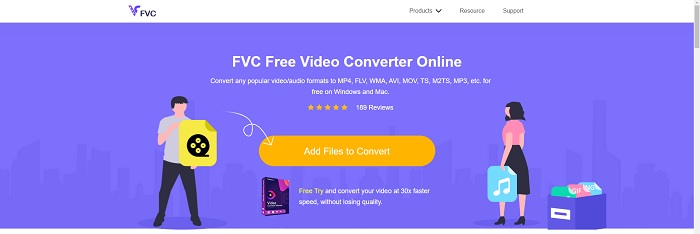
Berbagai macam format video dan audio dapat dikonversi dengan FVC Free Video Converter Online. Video definisi tinggi dapat dengan mudah dikonversi ke codec seperti MP4, FLV, dan WMV tanpa mengorbankan kualitas. Anda tidak perlu khawatir kehilangan kualitas saat mengonversi banyak video atau file audio. Alat konverter video gratis ini terkenal karena kemampuan konversi dan pengeditannya, yang memungkinkan pengguna menyesuaikan video mereka sebebas mungkin.
Pro
- Ini mendukung berbagai format file video.
- Output yang dikonversi berkualitas tinggi.
Kontra
- Karena ini adalah alat web online, diperlukan koneksi yang lebih cepat untuk mengonversi video ukuran file besar.
Opsi 2. Konversi Gratis Online
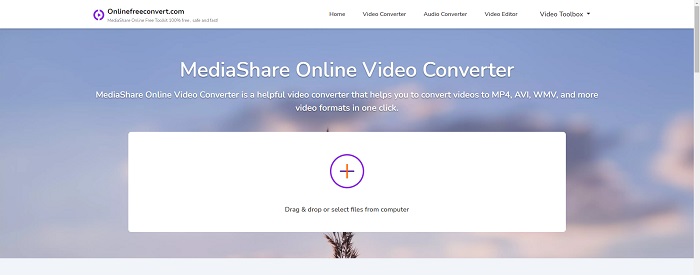
Saat mentranskode video Anda, aplikasi online gratis ini adalah pilihan terbaik. Aplikasi ini menawarkan dua opsi untuk menjaga semuanya tetap sederhana dan mudah digunakan: jenis file dan resolusi. Ikuti petunjuk di layar untuk menggunakan konverter online ini.
Pro
- Ini memiliki antarmuka yang dapat diakses dan ramah pengguna.
- Ini menawarkan alat lain yang dapat meningkatkan kualitas video.
Kontra
- Tidak memiliki banyak format video yang didukungnya.
Opsi 3. Setiap Konv
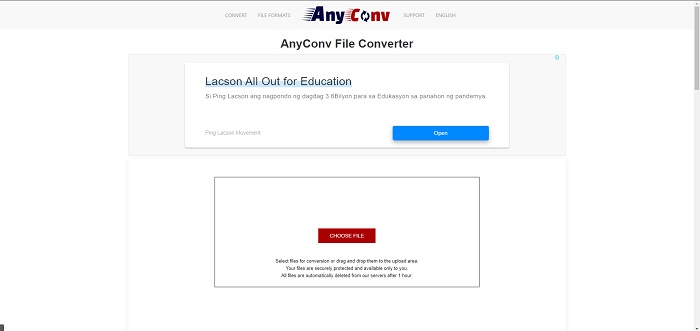
AnyConv adalah konverter online dengan antarmuka pengguna Belanda. Bahkan edisi komersial dari aplikasi ini gratis. AnyConv juga menyertakan batasan konversi 60 file per jam. Dengan menggunakan konverter online, Anda dapat mengonversi file berukuran hingga 50 MB dan memilih lebih dari 300 format output yang berbeda.
Pro
- Ini memiliki berbagai format; bahkan mendukung format non-video dan audio seperti dokumen.
- Ini memberikan petunjuk untuk menggunakan konverter ini.
Kontra
- Ini menunjukkan iklan yang tidak membantu atau tidak sesuai dengan proses konversi atau konten itu sendiri.
Bagian 3. Bagaimana Mengonversi SWF ke MOV di Mac
Artikel ini merekomendasikan Video Converter Ultimate untuk pengguna Mac yang ingin mengonversi SWF ke MOV. Versi Windows dan Mac dari perangkat lunak ini tersedia untuk diunduh secara gratis. Berbagai kalangan dapat menggunakannya karena memiliki alat yang mudah digunakan dan antarmuka yang sederhana. Dengan program ini, Anda dapat mengonversi file dari satu format video ke format lain hanya dalam sekitar satu menit, yang membedakannya dari aplikasi konversi dan sumber daya internet lainnya. Selain itu, perangkat lunak ini memiliki sejumlah fitur tambahan yang dapat membantu Anda meningkatkan video Anda lebih jauh lagi. Dengan asumsi Anda sudah membaca deskripsi perangkat lunaknya, mari kita mulai:
Langkah 1. Untuk memulai proses pengunduhan, cukup klik kanan ikon Free Download yang telah disediakan di bawah ini. Perangkat lunak ini kompatibel dengan komputer yang menjalankan sistem operasi Windows maupun Mac. Setelah selesai mengunduh perangkat lunak, Anda dapat menginstalnya dan mulai menggunakannya dengan memilih tombol Start Now pada layar utama perangkat lunak.
Unduh GratisUntuk Windows 7 atau yang lebih baruUnduhan Aman
Unduh GratisUntuk MacOS 10.7 atau yang lebih baruUnduhan Aman
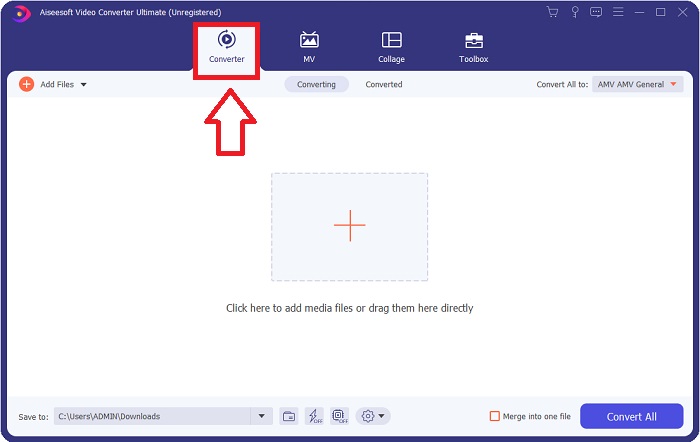
Langkah 2. Setelah Anda mengunduh perangkat lunak, jalankan program tersebut. Informasi ini akan ditampilkan di sebuah jendela ketika perangkat lunak dibuka untuk pertama kalinya.
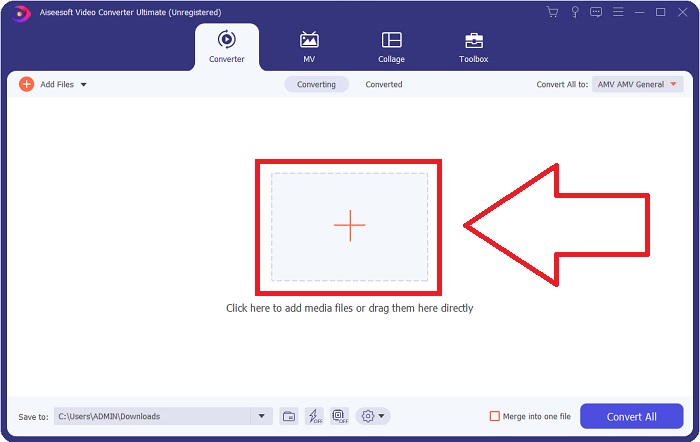
Langkah 3. Proses konversi dimulai dengan memuat file yang ingin Anda konversi ke dalam konverter. Seret dan jatuhkan video yang ingin Anda konversi ke tanda + untuk memulai proses konversi.
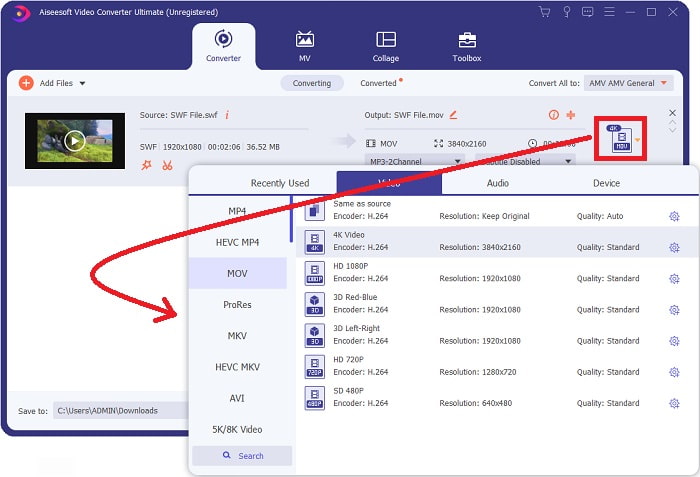
Langkah 4. Menu opsi akan muncul di bagian kanan atas layar, dari sana Anda dapat memilih format video. Pilih MOV sebagai format video dari menu tarik‑turun yang muncul. Bergantung pada file MOV yang Anda pilih, Anda dapat memilih dari berbagai opsi kualitas video. Jika keluaran video yang Anda inginkan tidak tersedia, Anda dapat menyesuaikan pengaturan kualitas di Windows. Anda dapat mengatur frame rate tampilan dan kualitas audio dengan memilih ikon roda gigi di pojok kanan atas. Gunakan tombol Create New untuk menyimpan perubahan setelah Anda selesai mengaturnya.
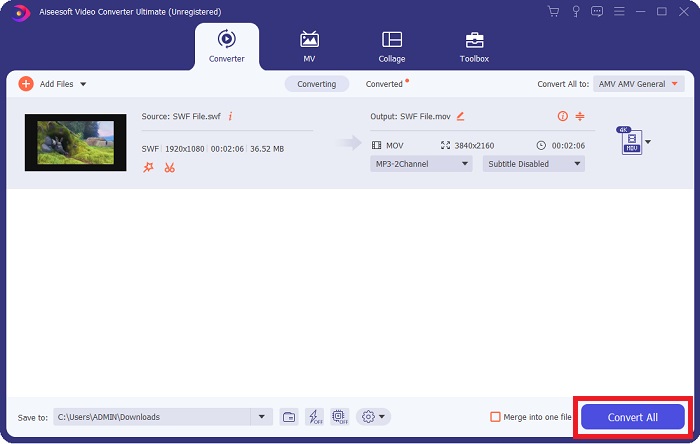
Langkah 5. Setelah Anda selesai mengedit video dan video siap untuk dikonversi, klik Convert All untuk mulai menjalankan proses konversi.
Terkait:
Bagian 4. FAQ tentang Konversi SWF ke MOV
Apakah SWF adalah format video?
Video dan animasi berbasis vektor dapat ditemukan dalam file SWF, yang dibuat dengan perangkat lunak Adobe Flash. Namun, ini juga dikenal sebagai Shockwave Format, yang merupakan singkatan dari SWF. Awalnya dikembangkan oleh Macromedia, format file ini sekarang dimiliki oleh Adobe.
Apakah file SWF aman?
Secara khusus, Flash rentan terhadap berbagai jenis kerentanan yang berbeda. Karena fakta bahwa file SWF diunduh ke klien dan dijalankan di komputer mereka, server Anda tidak berbahaya. Namun, bahkan jika Anda mencoba untuk memeriksa file SWF untuk malware, Anda hanya akan menerima perlindungan minimal.
Browser mana yang masih mendukung Flash 2021?
Adobe Flash tidak akan digunakan lagi di Firefox 84, rilis utama browser berikutnya. Untuk meningkatkan kecepatan dan keamanan, Firefox 85 (dijadwalkan untuk rilis pada 26 Januari 2021) akan menghapus dukungan untuk Adobe Flash.
Kesimpulan
Sebagai penutup, semua hal yang telah dibahas dalam artikel ini perlu diwujudkan dengan menggunakan perangkat lunak yang telah disebutkan di atas. Video Converter Ultimate memungkinkan Anda mengonversi file video dengan mudah dan dapat memberikan hasil berkualitas secara keseluruhan. Berbeda dengan alat atau perangkat lunak lain yang tersedia di internet, perangkat lunak ini dapat memberikan pengalaman penggunaan yang mudah dengan hasil yang istimewa.
-
 SWF ke MP4: Konversi Gratis SWF ke MP4 Online dan PC
 Bagaimana cara membuka file SWF tanpa Adobe Flash Player? Gunakan 3 konverter SWF ke MP4 gratis teratas untuk mengubah SWF ke MP4 secara online dan di PC / Mac secara gratis dalam 3 langkah.
-
 [2 Solusi] Cara Mengonversi File SWF ke GIF dengan Mudah Gratis
 Ketika Anda gagal mengekspor format GIF melalui perangkat lunak Flash, Anda dapat mencoba menyimpan file dalam format SWF terlebih dahulu. Kemudian Anda dapat mempelajari 2 cara mudah untuk mengonversi file SWF ke GIF dari artikel ini.
-
 Konverter GIF Terbaik untuk Mengonversi GIF Animasi ke Format MOV [2021]
 Konversikan GIF Anda ke format MOV dengan mudah tanpa mempengaruhi kualitas file video. Dengan langkah dan alat yang berbeda pula.
