


 Video Converter Ultimate
 Perekam Layar
 Perbaikan Video
Temukan Cara Cara Memutar File MKV di PS4
Bukan hanya Xbox One S yang mendukung pemutaran film. Sekarang PS4 juga mencoba mengikuti tren tersebut. Dengan menggunakan kabel USB dan melalui DLNA, PS4 kini bisa memutar MKV, MP4, AVI, dan banyak lagi. Ini berarti MKV termasuk dalam jenis file yang dapat Anda putar. Untuk melihat daftar lengkap format yang didukung, kunjungi situs resmi PS4. Selain itu, Anda pasti tidak akan terus membaca artikel ini jika tidak tertarik memutar file MKV di PS4. Lanjutkan membaca, semakin jauh Anda akan menemukan cara bagaimana Anda bisa memutar MKV di PS4.

Bagian 1. Bisakah Semua File MKV Diputar di PS4?
Bisakah Saya Memutar File MKV di PS4? Anda pasti bisa. Format file MKV didukung oleh PS4. Namun tidak semua file MKV dapat diputar dengan baik. Anda mungkin mengalami kegagalan dalam memainkannya. Ini karena Anda harus memenuhi standar yang ditetapkan oleh PS4. Sebagian besar, H.264/MPEG-4 AVC didukung. Aturan yang sama berlaku jika Anda akan memutar file MKV dari drive USB. Sementara untuk audio MP3, AAC LC, AC-3 didukung. Sebagian besar format tersebut adalah format Dolby Digital. Jika Anda merasa telah memenuhi standar, Anda dapat melanjutkan ke langkah-langkah tentang cara memainkan MKV di PS4 secara langsung.
Langkah 1. Unduh dan pasang DivX Media Server lalu jalankan pemutarnya. Setelah itu aktifkan fitur berbagi (sharing) di komputer Anda.
Langkah 2. Unggah atau impor file MKV ke server.
Langkah 3. Sebelum melangkah ke tahap berikutnya, pastikan komputer dan PS4 terhubung ke jaringan Wi-Fi yang sama. Selanjutnya unduh dan pasang pemutar media DivX di PS4 Anda. Setelah itu buka aplikasi pemutar media di PS4 dan pilih DivX Media Server dari daftar perangkat yang muncul.
Langkah 4. Terakhir, cari menu Video lalu centang video yang ingin Anda putar dan mulai lakukan streaming.
Bagian 2. Panduan Langkah demi Langkah tentang Cara Memutar MKV di PS4 dari USB
Sementara itu, jika Anda menggunakan Penyimpanan USB pastikan berformat FAT atau exFAT, jika tidak maka tidak akan terdeteksi. Jika Anda merasa sudah siap dan flash drive kompatibel, lihat panduan langkah demi langkah di bawah ini.
Langkah 1. Nyalakan PS4 dan masukkan USB. Pergi ke Menu utama. Lalu pilih Video dan cari nama USB Drive Anda.
Langkah 2. Setelah Anda melihat daftar nama file, klik Display All untuk melihat seluruh daftar file yang tersimpan di USB Anda. Salin file tersebut dan pindahkan ke PS4.
Langkah 3. Terakhir, pastikan ruang penyimpanan Anda masih cukup untuk menyelesaikan proses pemindahan.
Bagian 3. Cara Alternatif untuk Memainkan MKV di PS4 melalui Plex Server
Selain DivX, ada juga pemutar alternatif yang dapat Anda gunakan untuk memutar MKV di PS4. Ada server media streaming bernama Plex. Server media ini memungkinkan Anda melakukan streaming video berkualitas tinggi, musik, acara TV, dan podcast dari komputer Anda. Meskipun beberapa orang mengalami masalah saat memutar file MKV tertentu, Anda tetap dapat menggunakannya sebagai alternatif. Sementara itu, jika Anda ingin tetap menggunakan Plex dan memutar file yang tidak kompatibel, sebaiknya pertimbangkan untuk mengonversi videonya. Beberapa konverter mampu mengubah file MKV Anda ke format yang didukung Plex. Dengan menyesuaikan codec video, frame rate, bitrate, dan parameter lainnya, hal ini bisa dilakukan. Adakah alat yang mampu melakukan itu? Ya, ada, Anda bisa mencoba Video Converter Ultimate. Benar, alat ini mampu melakukannya. Coba gunakan untuk mengatasi masalah ini.
Langkah 1. Unduh dan pasang Video Converter Ultimate di PC Anda.
Unduh GratisUntuk Windows 7 atau yang lebih baruUnduhan Aman
Unduh GratisUntuk MacOS 10.7 atau yang lebih baruUnduhan Aman
Langkah 2. Tambahkan file yang ingin Anda konversi dengan mengklik Add files atau cukup dengan drag and drop file ke antarmuka.
Langkah 3. Setelah itu, pilih format yang didukung Plex dengan mengklik dropdown Convert to All.
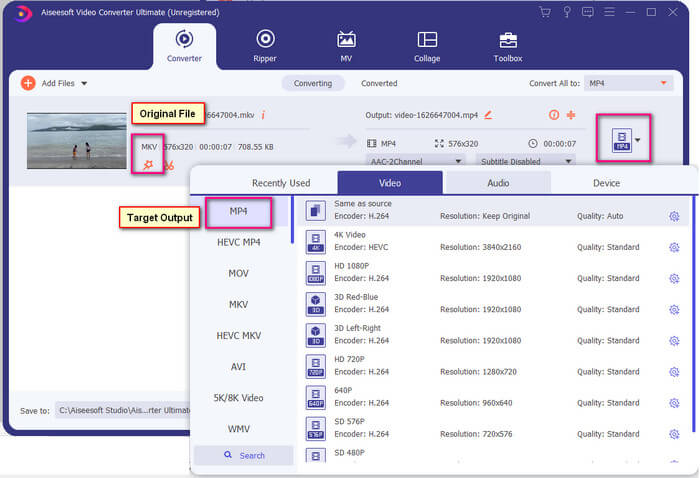
Langkah 4. Setelah format ditentukan, klik tombol Convert All untuk memulai proses konversi. Setelah konversi selesai, folder tempat file disimpan akan muncul.
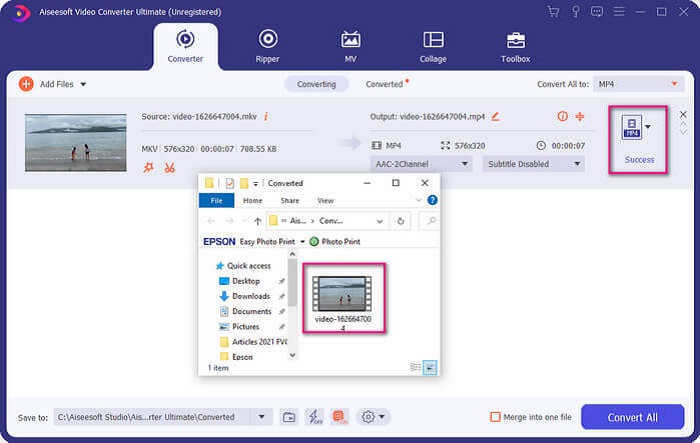
Ada lebih banyak lagi dengan pengonversi video Ultimate. Anda dapat memeriksa daftar kelebihan dan kekurangan di bawah ini untuk mengetahui fitur bagus lainnya yang ditawarkannya.
● Alat ini mengkonversi secepat tiga detik.
● Memiliki teknologi akselerasi yang dapat meningkatkan file yang dikonversi.
● Mendukung kualitas HD.
● Memiliki fitur pengeditan seperti menambahkan filter dan efek dasar.
● Anda dapat menyesuaikan subtitle dan trek audio.
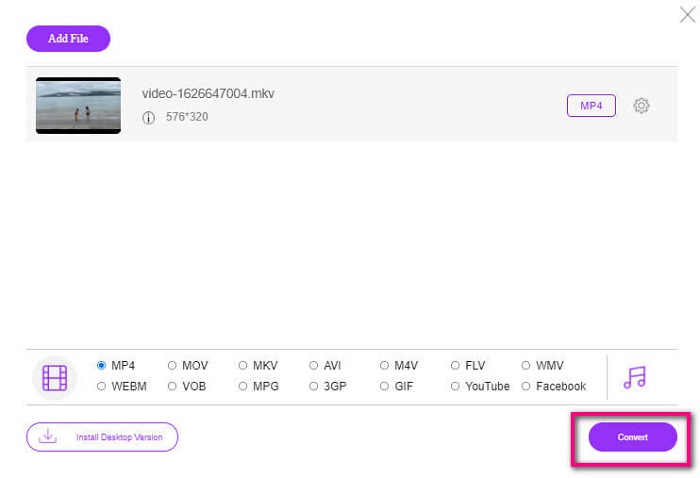
Jika Anda sedang mencari konverter gratis, Anda juga bisa mempertimbangkan FVC Free Online Video Converter. Meskipun mungkin tidak sebaik Ultimate Video Converter, alat ini masih dapat mengimbangi. Tentu saja, alat ini bisa mengonversi file dan membuatnya kompatibel dengan Plex atau DivX. Yang perlu Anda lakukan adalah…
Langkah 1. Jalankan alat ini dengan mengunjungi halaman resmi yang tertera di deskripsi.
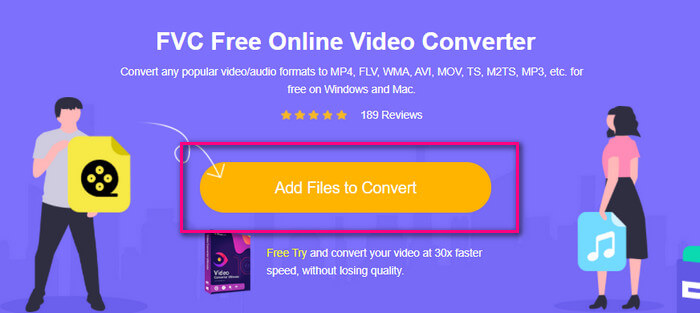
Langkah 2. Unggah video dengan mengklik Add Files to Convert.
Langkah 3. Ubah format dengan menyorot lingkaran di bawahnya.
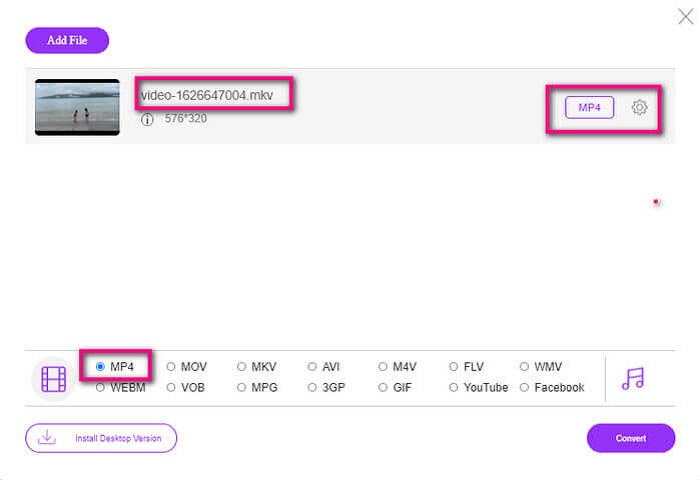
Langkah 4. Terakhir, klik tombol Convert dan pilih lokasi file tempat Anda ingin menyimpan file tersebut. Dari situ klik Okay. Anda bisa klik ikon Folder untuk melihat file yang sudah dikonversi.
Bacaan Lebih Lanjut
Memutar MKV di Windows Media Player
Bagian 4. Informasi lebih lanjut tentang Memutar File MKV di PS4
Berapa harga PS4?
Harga eceran pasar adalah 399,99 USD di Amerika Serikat dan di Kanada adalah CAD 399,99. Harga dapat bervariasi tergantung pada harga eceran di negara Anda.
Apakah ada kemungkinan untuk memainkan CC atau Close Caption MKV di PS4?
Ya, ada. Letaknya di Accessibility Settings. Caranya, masuk ke Settings PS4 Anda, pilih Accessibility, lalu pilih Display Closed Captions. Dari situ klik Options untuk mengaktifkan closed caption.
Jika PS4 mendukung MKV, mengapa file saya tidak diputar?
Seperti disebutkan di atas, Anda perlu memastikan file MKV memenuhi standar pemutar yang Anda gunakan. Anda hanya perlu memeriksa persyaratan PS4 atau server streaming media lainnya. Sebagian besar server media juga memiliki klasifikasi untuk memutar file MKV.
Apa format yang didukung oleh PS4?
Ada beberapa format file yang Didukung PS4. Tetapi Anda akan melihat bahwa sebagian besar format tidak terkompresi dan menyimpan file besar. Meskipun itu juga mendukung yang tidak terkompresi seperti Mp4. Sementara itu, berikut adalah daftar format yang sedang kita bicarakan: MKV, AVI, MPEG-2 PS, MPEG-2 TS, AVCHD, dan XAVC dan MP4.
Kesimpulan
Kesimpulannya ada banyak cara yang bisa langsung atau tidak langsung memutar file MKV di PS4. Apa yang terdaftar adalah media yang paling umum digunakan. DivX Stream Server dan Plex hanyalah beberapa alternatif yang dapat Anda gunakan. Sangat disarankan untuk mengonversi file untuk menghindari kerumitan dan terlalu banyak proses.
-
 [Solusi] VLC Player Tidak Dapat Memutar MKV, Cara Memperbaikinya
 Apakah pemutar VLC mendukung file MKV? Mengapa VLC tidak memutar MKV? Posting ini membagikan 4 tips berguna bagi Anda untuk memperbaiki pemutar VLC tidak akan memutar file MKV.
-
 Cara Memutar File MKV di iPad 2025
 Bagaimana cara memutar file MKV di iPad 2? Bisakah saya mengonversi MKV ke MP4 untuk diputar di iPad Pro/Air/2? Posting ini membagikan 2 cara mudah untuk memainkan MKV di iPad.
-
 Cara Mengunduh MKV Codec di Windows Media Player untuk Pemutaran yang Lancar
 Tidak dapat memutar video MKV di Windows Media Player? Anda dapat mengunduh codec MKV gratis untuk Windows Media Player. Sebaliknya, konversikan MKV agar dapat dimainkan di Windows Media Player.
