


 Video Converter Ultimate
 Perekam Layar
 Perbaikan Video
Cara Mudah dan Profesional tentang Cara Memutar File MKV di Xbox One S
Microsoft baru-baru ini merilis konsol game terbarunya yang bernama Xbox One S. Ini merupakan tambahan pada generasi konsol Xbox yang sudah lebih dulu dirilis. Waktu pemuatan yang lebih cepat, pergantian game yang mudah, dan perluasan penyimpanan hanyalah beberapa fitur terbaik yang dibawa. Lebih dari peningkatan hebat tersebut, ada satu fitur bawaan yang mungkin berguna bagi Anda: pemutar media internal. Kebanyakan orang akan langsung memutar video di sini, terutama karena beberapa aplikasi streaming video dan film juga dapat diakses di konsol ini. Karena itu, sebagian pengguna mungkin ingin tahu cara memutar file MKV di Xbox One S dari drive eksternal atau dari sumber yang terhubung. Dengan mempertimbangkan hal ini, kami merangkum beberapa solusi yang dapat Anda gunakan jika video yang Anda putar tidak didukung.

Bagian 1. 4 Cara Mengonversi MKV ke Format dan Codec yang Didukung Xbox One
Di antara format yang dicakup oleh alat ini, sayangnya MKV adalah salah satu format yang tidak didukung oleh Xbox One. Format yang didukungnya adalah audio 3GP, video 3GP, 3GP2, AAC, ADTS, GIF animasi, .asf, AVI DivX, DV, AVI, AVI uncompressed, AVI Xvid, BMP, JPEG, GIF, H.264 AVCHD, M -JPEG, MKV, MOV, MP3, MPEG-PS, MPEG-2, MPEG-2 HD,MPEG-2 TS, H.264/MPEG-4 AVC, MPEG, SP, PNG, TIFF, WAV, WMA, WMA Tanpa Rugi , MA Pro, Suara WMA, WMV, dan WMV HD. Jadi disarankan untuk mengonversi file ke format yang didukung Xbox One Player. Anda tidak perlu khawatir, kami mencantumkan beberapa konverter yang dapat Anda gunakan.
Cara Gratis-FVC Konverter Video Online Gratis
Yang pertama adalah FVC Free Online Video Converter, sebuah konverter gratis yang dapat diakses secara online. Hanya dengan tiga langkah mudah, Anda dapat menyelesaikan proses konversi. Dalam waktu secepat 3 detik, proses dapat selesai. Proses konversi berjalan mulus selama koneksi internet Anda stabil. Beberapa format yang didukung antara lain MP4, FLV, MKV, MOV, M4V, MTS, TS, M2TS, WMV, ASF, VOB, MP3, AAC dan masih banyak lagi. Selain itu, Anda juga dapat menyesuaikan video dengan mengubah dan memoles video Anda. Beberapa pengaturan yang bisa diubah adalah bitrate, frame rate dan mengunduhnya sebagai berkas tanpa kehilangan kualitas (lossless). Untuk melihat betapa bergunanya alat ini, silakan ikuti panduan di bawah ini.
Langkah 1. Untuk menggunakannya, kunjungi situs resmi FVC Free Online Video Converter dengan mengklik tautan untuk mendapatkan akses ke alat ini.
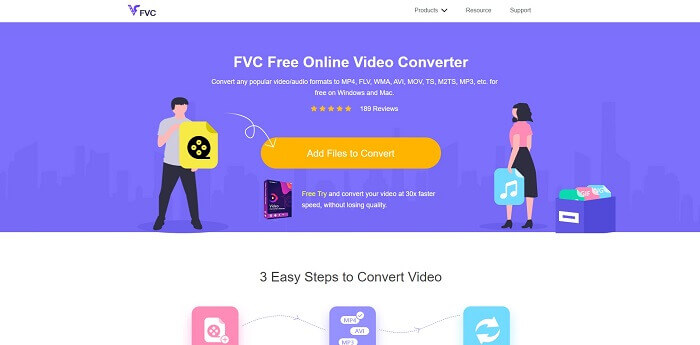
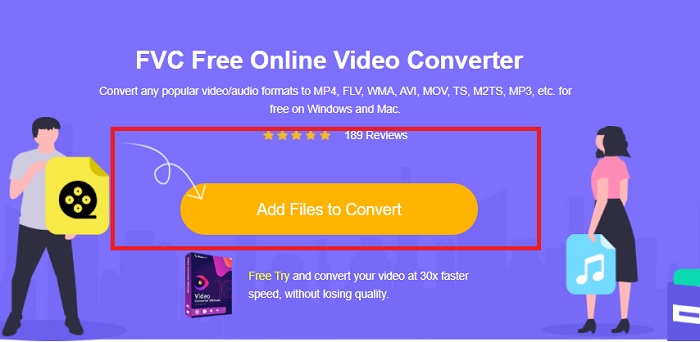
Langkah 2. Setelah masuk ke halaman, klik Add Files to Convert. Cari berkas yang ingin Anda konversi. Lalu klik Open.
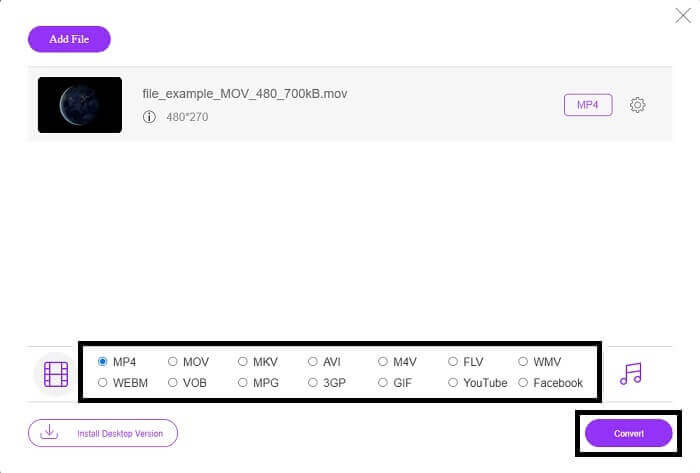
Langkah 3. Video kemudian akan diunggah ke dalam alat. Ubah format video menjadi MP4 dengan mencentang lingkaran di samping MP4 dari opsi yang tersedia.
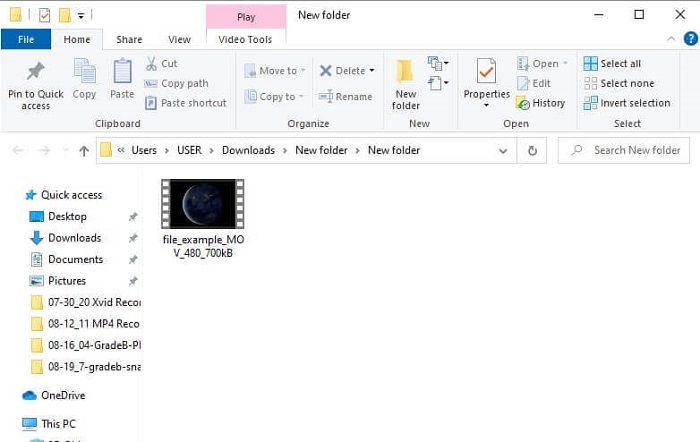
Langkah 4. Terakhir, klik Convert dan pilih lokasi folder tempat file akan disimpan. Tunggu hingga file selesai dikonversi. Setelah selesai, folder tempat video disimpan akan muncul. Klik videonya untuk mempratinjau file yang sudah dikonversi.
Cara Profesional - Video Converter Ultimate
Untuk melakukan konversi secara profesional, Anda bisa menggunakan Video Converter Ultimate dari Aiseesoft. Ini adalah alat yang lengkap dan ringkas yang dapat dijalankan di komputer Mac dan Windows. Anda tidak perlu khawatir lagi jika ada format video yang tidak dapat diputar di Xbox One S karena Video Converter Ultimate siap membantu. Konverter ini mengadopsi teknologi encoding video terbaik yang hanya menghasilkan kualitas terbaik. Selain itu, ada fitur peningkat video (video enhancer) yang dapat digunakan untuk meningkatkan kualitas video. Yang terpenting, alat ini mendukung lebih banyak format dibandingkan alat gratis. Keunggulan lainnya adalah kualitas video: Anda bisa mengonversi video ke kualitas 4K dan kualitas terendahnya adalah 1080p. Mengonversi video MKV menjadi sangat mudah dengan Video Converter Ultimate.
Langkah 1. Unduh aplikasinya ke desktop Anda dan instal.
Unduh GratisUntuk Windows 7 atau yang lebih baruUnduhan Aman
Unduh GratisUntuk MacOS 10.7 atau yang lebih baruUnduhan Aman
Langkah 2. Selanjutnya, unggah file dengan mengklik tombol Add Files atau seret dan jatuhkan file ke antarmuka utama.
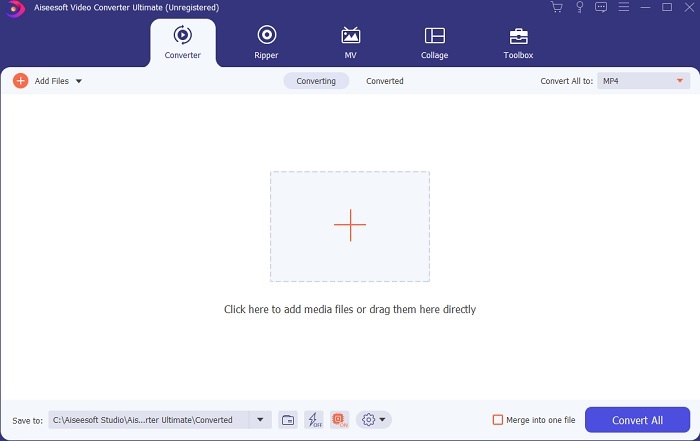
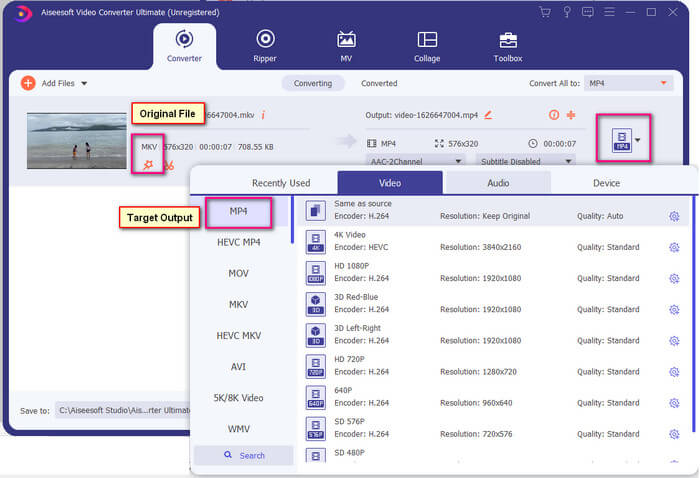
Langkah 3. Sekarang, ubah format file dengan mengklik bagian yang bertuliskan MP4 yang berada di sisi kanan atas antarmuka.
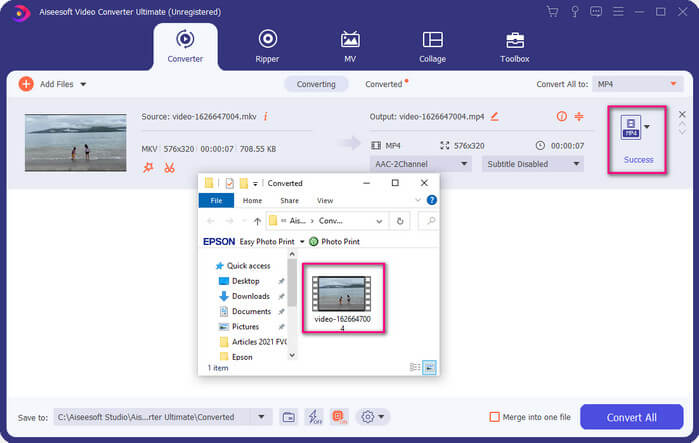
Langkah 4. Terakhir, klik tombol Convert untuk merender file. Setelah file selesai dirender, folder tempat file disimpan akan muncul.
Bagian 2. Cara Streaming dan Memutar file MKV di Xbox One
Secara teknis, Anda tidak dapat memutar video MKV di Xbox One karena pemutar bawaannya sendiri tidak mendukungnya. Jadi sebelum memutarnya, Anda harus mengonversi video terlebih dahulu. Lihat solusi di atas dalam mengonversi file sebelum diputar. Sementara itu, berikut beberapa cara untuk memutar video di Xbox One.
Cara Memutar file MKV di Xbox One melalui USB Flash Drive
Xbox One S mendukung tiga port untuk USB. Namun ada persyaratan agar drive USB dapat diputar di Xbox One S. Drive harus dalam format FAT16, FAT32, NTFS, atau exFAT. Untuk mengetahui apakah drive USB akan berfungsi, coba buka di Mac atau PC Windows Anda. Jika berhasil maka kemungkinan itu dibaca oleh Xbox akan tinggi. Setelah memverifikasi, Anda sekarang dapat menyalin file di PC Anda dan menyimpannya di drive Anda. Keluarkan dan pasang di salah satu port dari depan atau belakang konsol. Ada dua di belakang dan satu di depan. Setelah dicolokkan, Anda akan melihat drive Anda akan muncul sebagai salah satu opsi. Dari sana, buka pemutar media dan mulai mainkan.
Cara Memutar file MKV di Xbox One dengan Casting
Ada fitur bawaan di Windows 10 yang memungkinkan Anda melakukan cast perangkat ke perangkat penerima yang kompatibel seperti Xbox One S. Ini adalah padanan dari fitur Play To di Xbox. Proses ini bergantung pada DLNA. Artinya, Anda memerlukan Wi-Fi agar bisa berfungsi. Yang perlu Anda lakukan adalah masuk ke Settings di Xbox, pilih Preferences dan klik Game DVR lalu aktifkan Allow Play to Streaming untuk mengaktifkannya. Setelah itu, di PC Windows klik Cast to Device. Selanjutnya, klik kanan pada file yang ingin Anda putar lalu pilih XboxOne. Video kemudian akan diputar.
Terkait
● Cara Memutar Musik di Xbox One
● Cara Mengonversi FLV ke Xbox
Bagian 3. Pertanyaan Umum tentang Memutar File MKV di Xbox One
Glitch di Xbox One S, Bagaimana Cara Memperbaikinya?
Pertama, lakukan restart. Dengan menggunakan controller, tekan dan tahan tombol Xbox lalu pilih Turn console off atau Restart Console. Jika itu tidak berhasil, selanjutnya matikan konsol secara langsung. Terakhir, jika semua opsi tersebut tidak berhasil, Anda bisa melakukan master reset pada konsol.
Bisakah saya bermain menggunakan Xbox One S saya tanpa internet?
Untuk pengaturan pertama kali, Anda memerlukan koneksi internet. Setelah mengatur, Anda dapat offline dan menggunakannya. Pastikan Anda mengaturnya terlebih dahulu sebelum Anda dapat menggunakannya secara offline. Saat offline, inilah beberapa hal yang dapat Anda lakukan, menonton TV, bermain game, menyimpan klip atau tangkapan layar, dan mendapatkan pencapaian tetapi dengan batasan.
Apa Kelemahan seri Xbox One S?
Terlepas dari semua fitur hebat yang ditawarkan oleh konsol game, ada satu hal yang pasti akan Anda temukan pada perangkat multitasking seperti itu. Mungkin mencari Disk Drive. Sayangnya, ini tidak didukung. Ini berarti menggunakan game lain yang Anda miliki dengan konsol lama tidak akan berfungsi di sini.
Kesimpulan
Meskipun tidak ada cara langsung untuk memutar file MKV di Xbox One secara langsung, Anda selalu dapat mengonversi video dengan memaksimalkan daftar konverter di atas. Semuanya mendukung semua format yang dapat Anda manfaatkan dari pemutar media Xbox One S. Jika Anda ingin mengetahui cara memperbaiki beberapa masalah tentang Xbox One S, Anda dapat membaca daftar pertanyaan yang paling sering diajukan.
-
 Cara Mengonversi File MKV untuk Diputar di PS3 Dengan Lancar [Terpecahkan]
 Ingin memutar video MKV di PS3 Anda? Namun, PS3 tidak dapat memutar file MKV secara langsung. Artikel ini akan menunjukkan cara untuk mengonversi video MKV ke format video yang didukung PS3 untuk diputar di PS3 tanpa kerumitan.
-
 5 Alternatif Windows Media Player Terbaik untuk Ponsel Android
 Karena Anda tidak dapat mengunduh Windows Media Player untuk Android, Anda harus membaca artikel ini dan mempelajari tentang 5 alternatif terbaik untuk Windows Media Player.
-
 5 Pemutar Video Terbaik untuk iPhone yang Tidak Boleh Anda Lewatkan di Tahun 2025
 Untuk memutar video dalam semua format dan mendapatkan pengalaman menonton yang lebih baik di iPhone, Anda harus membaca artikel ini dan mempelajari tentang 5 pemutar video terbaik untuk iPhone 12/11/X/8/7/6.
