


 Video Converter Ultimate
 Perekam Layar
 Perbaikan Video
Belajar Menggunakan Premiere Pro untuk Mempercepat Video dengan 2 Alternatif Premiere
Premiere Pro adalah salah satu perangkat lunak kelas atas yang dikembangkan Adobe untuk pengeditan video profesional. Selain itu, kinerja alat ini telah dipuji oleh banyak pengguna yang sudah memakainya. Dalam panduan ini, kami akan mengajarkan Anda cara mempercepat video dengan bantuan alat ini. Dengan begitu, Anda tidak perlu melalui terlalu banyak pengaturan atau langkah awal yang merepotkan. Sekarang, mari kami ajarkan kepada Anda cara mempercepat video di Premiere Pro dan apa saja alternatifnya.

Bagian 1. Cara Mempercepat Video di Premiere Pro
Editor video kelas atas yang akan Anda senang beli dan gunakan adalah Adobe Premiere Pro. Alat ini adalah paket lengkap yang pasti disukai para profesional. Karena perangkat lunak ini mampu menangani beban kerja pengeditan yang berat yang akan Anda lakukan jika Anda seorang pro. Selain itu, jika Anda menginginkan hasil yang mengesankan maka Anda harus mempelajari cara menggunakan alat ini. Namun, mempelajari cara menggunakan Premiere Pro jelas akan memakan banyak waktu, jadi jika Anda orang yang sibuk maka ini sebaiknya menjadi pilihan terakhir Anda. Akan tetapi, jika Anda bersemangat untuk belajar dan punya banyak waktu luang, Anda harus mencobanya.
Selain itu, jika Anda ingin menggunakan alat ini maka Anda harus mengeluarkan banyak uang karena secara harfiah mahal dibandingkan dengan alat pengeditan video lainnya. Jadi sekarang, jika Anda ingin mempelajari cara menggunakan Adobe Premiere Pro cc 2018 atau versi yang lebih tinggi untuk mempercepat video, ikuti langkah-langkah sederhana di bawah ini.
Langkah-langkah Cara Mempercepat Video di Adobe Premiere Pro:
Langkah 1. Beli dan unduh Adobe Premiere Pro di situs resminya. Lalu jalankan alatnya untuk mulai melakukan percepatan video.
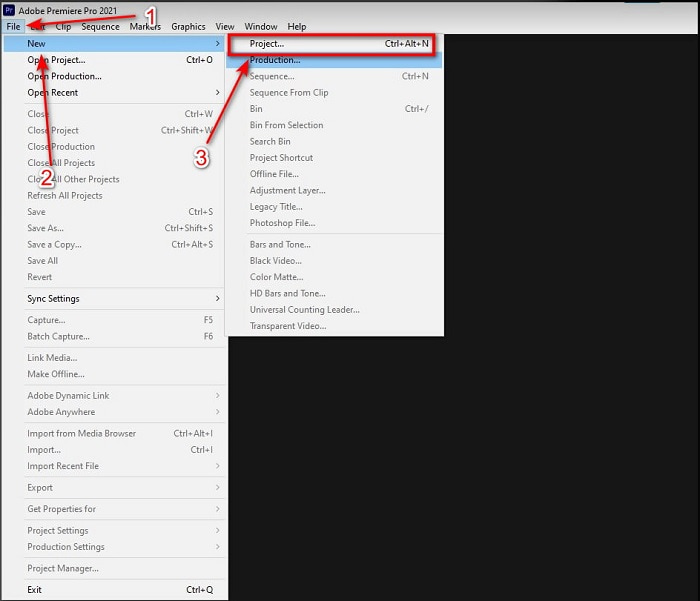
Langkah 2. Klik File, kemudian lanjutkan ke New dan Project, tunggu hingga antarmuka seperti ini muncul lalu klik OK untuk melanjutkan. Buka folder dan temukan videonya, seret dan jatuhkan file ke Media Browser untuk menempelkannya di sebelah Timeline.
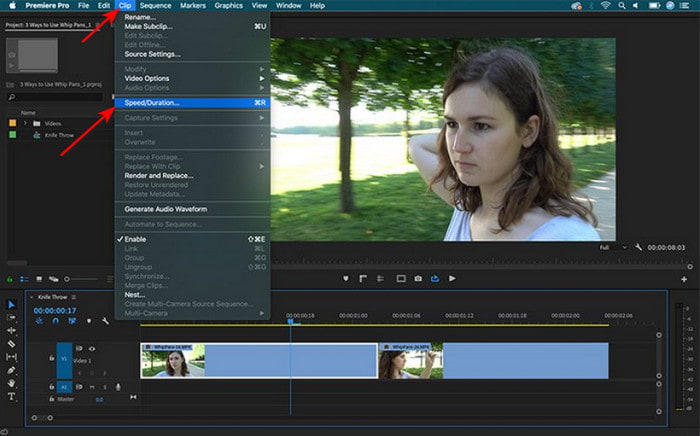
Langkah 3. Klik video yang Anda masukkan ke Timeline lalu klik Clip di bagian atas. Di bawahnya pilih Speed/Duration dan klik. Ubah persentase kecepatan sesuai keinginan Anda lalu klik OK untuk menyimpan perubahan kecepatan, dan untuk menyimpan file klik tombol Export.
Bagian 2. 2 Alternatif Premiere Pro Terbaik untuk Mempercepat Video
1. Video Converter Ultimate
Jika mempercepat video adalah masalah Anda maka inilah solusi yang tepat, yaitu Video Converter Ultimate. Berbeda dengan editor video lain, alat fenomenal ini adalah yang terbaik untuk segala jenis pengeditan, konversi, pembuat GIF, penguat, reverse, speed-up, dan masih banyak lagi. Selain itu, banyak pengguna sudah menyukai perangkat lunak ini karena menyediakan fitur-fitur canggih seperti Adobe Premiere Pro tetapi dalam versi yang disederhanakan. Di luar itu, kami hampir tidak menemukan alat lain yang menyediakan fitur tingkat lanjut yang sangat mudah digunakan. Singkatnya, tidak ada yang seperti Video Converter Ultimate. Meskipun alat ini berbayar, harganya tetap sepadan dengan setiap uang yang Anda keluarkan dan harganya sangat terjangkau. Jadi sekarang, jika Anda ingin tahu alternatif cara mempercepat video di Premiere Pro maka ikuti langkah-langkah di bawah ini dengan benar.
Langkah-langkah Cara Mempercepat Video dengan Bantuan Video Converter Ultimate:
Langkah 1. Unduh perangkat lunak ini ke drive komputer Anda, lalu instal untuk melanjutkan.
Unduh GratisUntuk Windows 7 atau yang lebih baruUnduhan Aman
Unduh GratisUntuk MacOS 10.7 atau yang lebih baruUnduhan Aman
Langkah 2. Jalankan alatnya kemudian klik Toolbox dan cari Video Speed Controller.
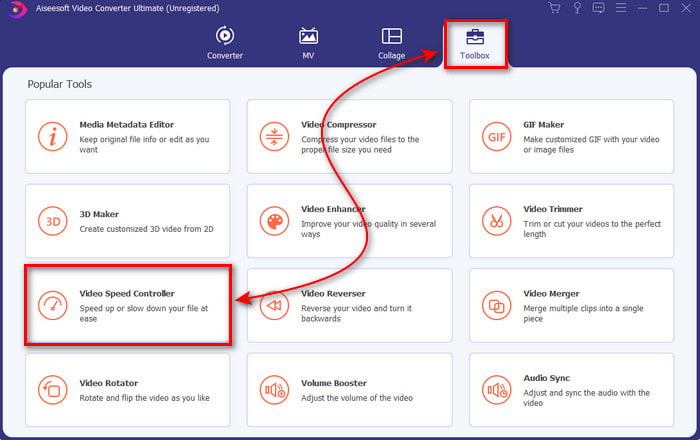
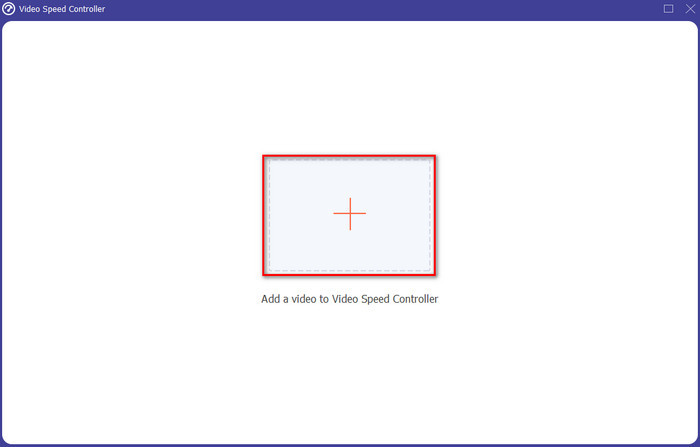
Langkah 3. Untuk menambahkan video yang ingin Anda percepat, klik tombol +. Lalu cari file di folder dan klik Open untuk memasukkan file video.
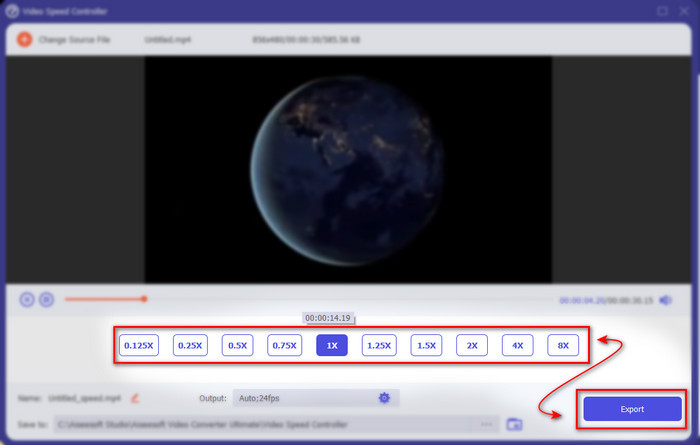
Langkah 4. Kemudian pilih kecepatan yang ingin Anda terapkan pada video dengan mengklik opsi box. Jika Anda sudah puas dengan kecepatan video Anda, klik Export untuk menyimpannya langsung ke komputer Anda.
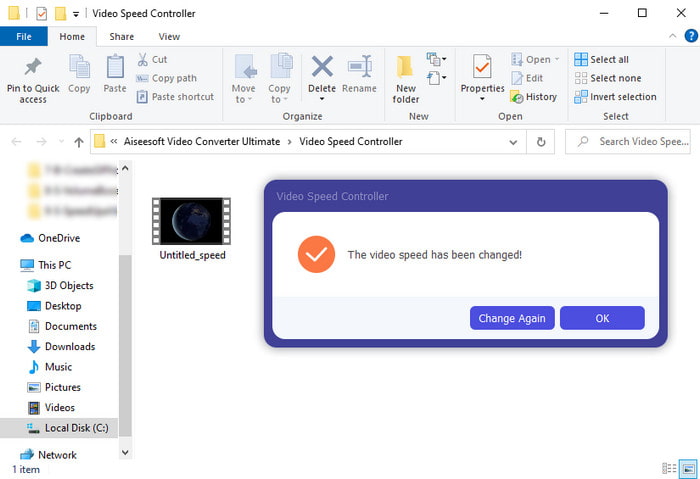
Langkah 5. Sebuah folder akan muncul jika proses ekspor sudah selesai. Klik file yang tadi sudah Anda percepat dan kagumilah hasil percepatan video tanpa penurunan kualitas.
2. iMovie
Jika Anda menggunakan Mac maka wajib menggunakan alat ini karena sudah terpasang sebelumnya di Mac Anda. iMovie adalah salah satu editor video populer yang akan Anda suka gunakan karena fitur gratis yang disediakannya. Jika Anda pengguna Windows maka jangan berharap bisa menggunakan alat ini karena tidak tersedia di PC Anda. Meskipun alat ini gratis digunakan, tetap saja ada beberapa kekurangan seperti fitur pengeditan utama yang mungkin ingin Anda gunakan tetapi tidak tersedia di sini. Namun, jika Anda memiliki anggaran terbatas maka ini bisa menjadi pilihan andalan pengguna Mac. Selain itu, jika Anda ingin mencapai efek seperti Premiere Pro speed up video maka ikuti langkah-langkah di bawah ini.
Cara Mempercepat Video di iMovie:
Langkah 1. Buka iMovie di Mac Anda dan klik File lalu Import Media, pilih file untuk melanjutkan.
Langkah 2. Seret video yang tadi Anda masukkan ke Timeline. Lalu klik file video di Timeline agar bisa menyesuaikan kecepatannya. Di sisi kanan klik Speed kemudian pilih di daftar drop-down kecepatan mana yang ingin Anda terapkan.
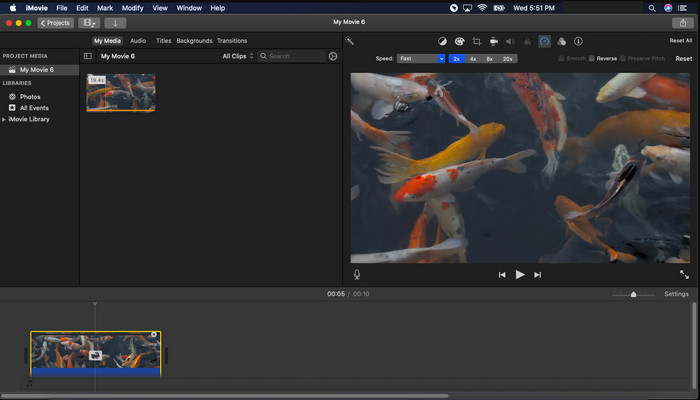
Langkah 3. Setelah menerapkan percepatan, klik Export dan Export File untuk menyimpan versi video yang sudah dipercepat.
Bagian 3. FAQ tentang Premiere Pro Speed Up
Bisakah saya memperlambat video di Premiere Pro?
Tentu saja bisa, cukup ikuti prosedur yang sama seperti yang kita lakukan di atas tetapi sekarang persentase kecepatannya diubah menjadi kurang dari seratus agar videonya lebih lambat. Atau Anda bisa klik di sini untuk mempelajari cara memperlambat video secara lebih detail.
Seberapa cepat saya dapat menyetel video di Premiere Pro?
Persentase maksimum yang dapat Anda atur pada kecepatan video adalah 10.000% persen. Jadi, jika Anda ingin tahu apakah itu asli, periksa sendiri dan atur kecepatannya ke 10.000%.
Apakah Adobe Premiere Pro memiliki persyaratan sistem?
Sebenarnya ya, ada persyaratan minimum yang dibutuhkan perangkat lunak Adobe untuk dapat menggunakan alat ini dengan benar. Seperti, dalam daftar di bawah ini: GPU: Intel® i5-4590 / AMD FX 8350 setara atau terbaru; RAM: ram 8GB atau bahkan lebih tinggi; sistem operasi: Microsoft Windows atau macOS; tampilan harus 1920 x 1080 atau lebih tinggi.
Kesimpulan
Saat kami berakhir, sekarang lebih jelas bagi kami bahwa bahkan kecepatan sederhana pun dapat dilakukan dengan premiere pro. Namun, premier pro sangat mahal, jadi kami mencantumkan beberapa perangkat lunak terjangkau yang ingin Anda gunakan untuk mempercepat. Seperti Video Converter Ultimate karena software ini menyediakan fitur editing high-end meskipun komputer Anda low end. Jadi, jika Anda ingin tahu cara mempercepat video di Premiere Pro dengan mudah, maka unduh Video Converter Ultimate untuk merasakan fitur yang sama tetapi dalam versi yang mudah.
-
 [4 Cara] Cara Mempercepat Video Online Anda dengan Mudah
 Apakah Anda ingin mempercepat video online? Baca artikel ini agar Anda tahu lebih banyak tentang mempercepat video dengan berbagai cara.
-
 Cara Mudah Mempercepat Video Format MP4 [Offline & Online]
 Apakah Anda ingin mempercepat video Anda, tetapi dalam Format MP4? Artikel ini mungkin membantu Anda mengetahui perbedaan cara mempercepat video Anda baik online maupun offline.
-
 4 Pemutar Video Teratas dengan Pengontrol Kecepatan di tahun 2021
 Pernahkah Anda memperhatikan kecepatan pemutaran setiap pemutar media setiap kali Anda memutar video? Artikel ini cocok bagi Anda untuk mempelajari semua tentang pemutar video dengan kontrol kecepatan.
