


 Video Converter Ultimate
 Perekam Layar
 Perbaikan Video
Cara Menghapus Metadata dari File melalui Windows, Mac, Online, dan Ponsel
Setiap file media memiliki metadata yang terhubung dengan file tersebut, baik itu video, gambar, audio, dan lain-lain. Misalkan Anda mengunggah suatu file media secara online; lewat unggahan itu, seseorang bisa mendapatkan informasi seperti koordinat lokasi Anda, waktu, tanggal, pabrikan, model perangkat, dan banyak lagi, yang dikenal sebagai data EXIF. Bukankah menakutkan jika memikirkan bahwa seseorang bisa mendapatkan informasi lewat unggahan Anda hanya dari metadata? Untungnya, artikel ini akan mengajarkan Anda cara menghapus metadata pada file media apa pun di Windows, Mac, secara online, dan bahkan di ponsel Anda sebelum mengunggahnya ke internet.

Bagian 1. Cara Terbaik untuk Menghapus Metadata pada Setiap File di Windows
Cara yang akan kami sajikan dalam artikel ini adalah penghapus data bawaan yang dapat Anda gunakan di Windows dan alat pihak ketiga yang dapat Anda gunakan untuk menghapus metadata dengan mudah. Jadi, untuk memiliki lebih banyak ide tentang cara menghapus metadata pada file Anda, Anda dapat membaca detail di bawah dan mengikuti langkah-langkah untuk melakukannya dengan sukses.
Gunakan Properti di Windows
Di Windows, Anda dapat dengan mudah menghapus metadata dari video jika Anda mau. Dengan mengikuti langkah-langkah di bawah ini, Anda dapat menghapus informasi tentang file Anda sebelum Anda mempostingnya secara online.
Langkah 1. Cari file di desktop Anda dan klik kanan dengan mouse; di bawahnya Anda akan melihat Properties (Properti), lalu klik itu.
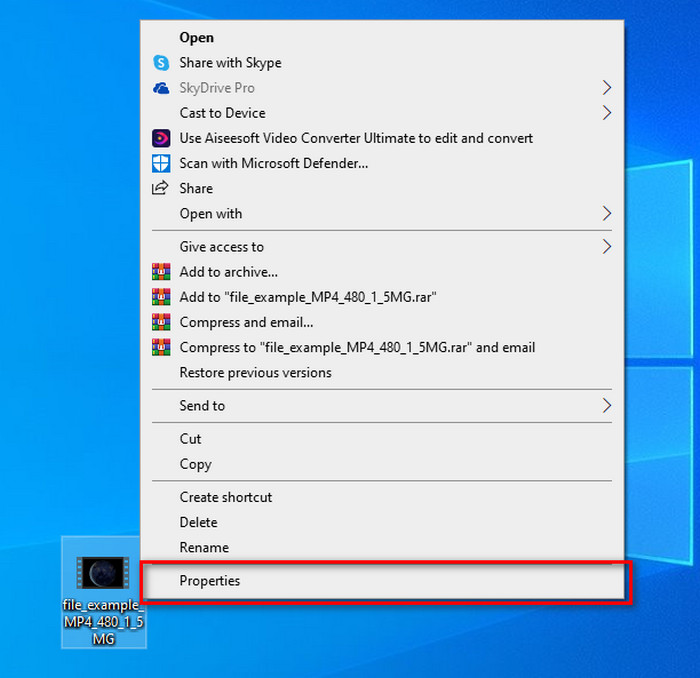
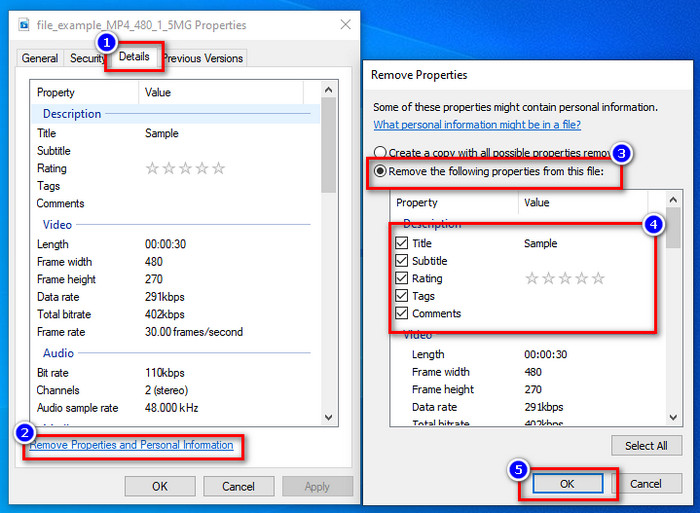
Langkah 2. Buka tab Details (Detail), lalu di bawahnya, klik Remove Properties and Personal Information (Hapus Properti dan Informasi Pribadi).
Langkah 3. Silakan centang kotak metadata yang tidak ingin Anda sertakan pada file media sebelum mengunggahnya. Jika sudah selesai, tekan OK; ini akan membuat salinan file tanpa metadata.
Gunakan Alat Penghapus Metadata Terbaik di Windows & macOS
Jika Anda menginginkan alat penghapus metadata terbaik, maka FVC Video Converter Ultimate adalah alat yang Anda cari. Ini adalah alat pilihan para ahli untuk menghapus metadata pada file media sebelum pengguna mengunggah file tersebut secara online. Meskipun merupakan alat pilihan profesional, siapa pun dapat dengan mudah menggunakannya tanpa perlu mengeluarkan banyak usaha untuk menghapus data pada file Anda. Selain itu, ini adalah opsi pihak ketiga bagi Anda jika teknik yang kami ajarkan tidak dapat sepenuhnya menghapus metadata pada file Anda. Langkah-langkah berikut akan membantu Anda menghapus data yang ingin Anda buang pada file Anda, ikuti saja dengan saksama.
Langkah 1. Sebelum menghapus metadata, Anda harus terlebih dahulu mengunduh alat ini dengan mengklik tombol unduh di bawah. Klik sistem operasi yang sesuai yang Anda gunakan, apakah Windows atau Mac, lalu segera instal. Setelah itu, buka alatnya dengan menekan Start Now.
Unduh GratisUntuk Windows 7 atau yang lebih baruUnduhan Aman
Unduh GratisUntuk MacOS 10.7 atau yang lebih baruUnduhan Aman
Untuk proses yang lancar, Anda harus membiasakan diri dengan UI alat sebelum melanjutkan ke langkah berikutnya.
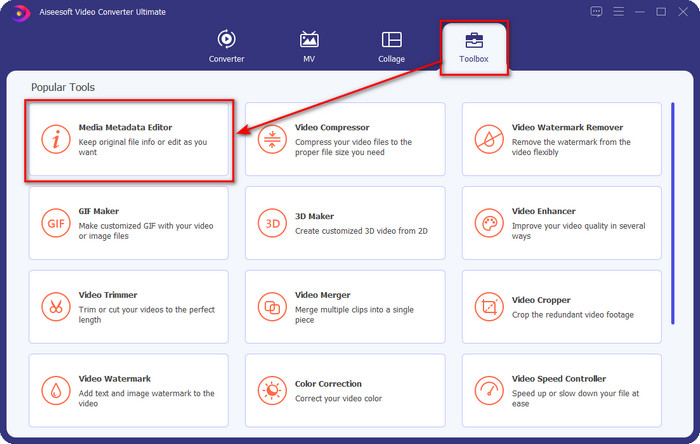
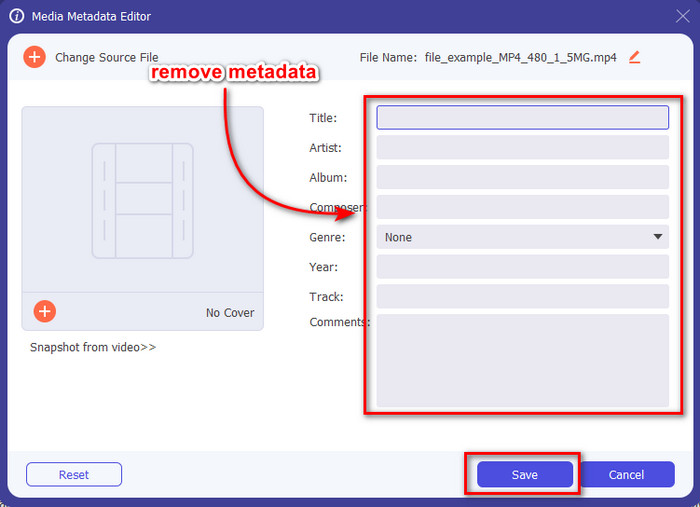
Langkah 2. Sekarang setelah Anda membuka bagian Toolbox, tekan Media Metadata Editor yang ada di dalamnya.
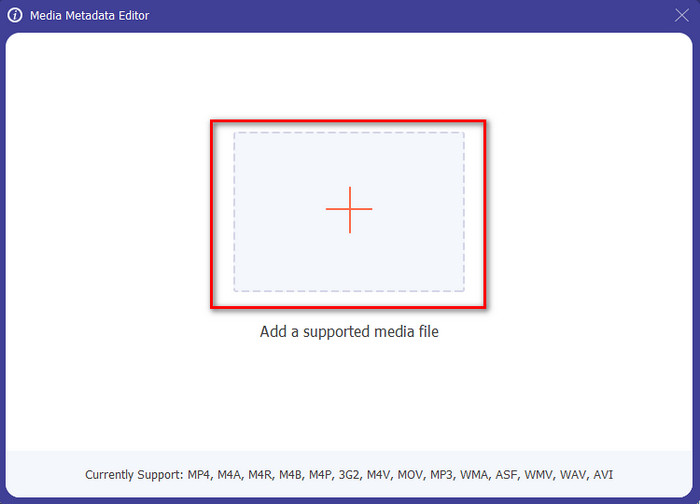
Langkah 3. Jendela baru akan muncul di layar Anda; dengan menekan tombol +, Anda dapat menambahkan file media yang ingin dihapus metadatanya, lalu tekan Open untuk mengunggahnya.
Langkah 4. Klik kotak teks pada setiap metadata yang ingin Anda hapus, lalu tekan tombol Delete pada keyboard Anda. Untuk menyimpan file, Anda dapat mengklik Save, dan alat ini tidak akan membuat salinan baru tanpa metadata. Mudah, bukan? Ini menghemat ruang di desktop Anda karena tidak membuat salinan file yang Anda hapus metadatanya.
Bagian 2. Cara Terbaik untuk Menghapus Metadata dari File di Mac
Di Mac, Anda dapat dengan mudah menghapus informasi tentang foto Anda; namun, Anda hanya dapat menghapus data lokasi. Jadi, jika Anda ingin belajar menghapus metadata dari file di Mac lebih dari lokasi, Anda harus menggunakan alat yang kami sajikan di atas.
Langkah 1. Buka Preview dan buka filenya.
Langkah 2. Klik Tools, lalu Show Inspector dan klik ikon i untuk melihat data lokasi.
Langkah 3. Pada tab GPS, klik Remove Location info, dan informasi lokasi pada file media Anda akan langsung terhapus.
Bagian 3. Cara Menghapus Metadata di Perangkat Android dan iOS
Gunakan Exiftool – lihat, edit metadata foto dan video (Android)
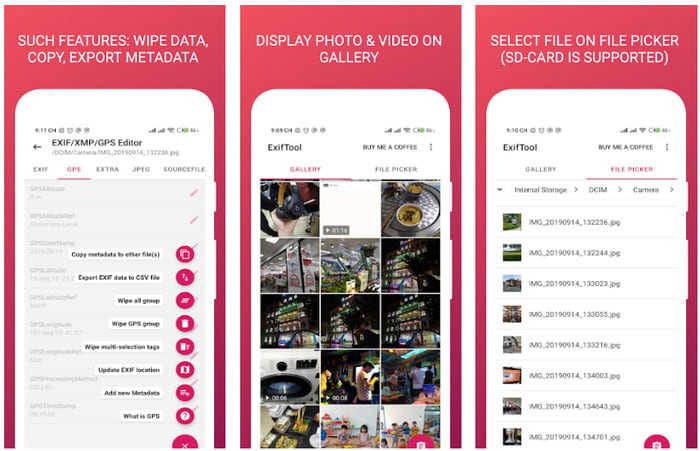
Exiftool – view, edit metadata of photo and video dapat membantu Anda menghapus metadata video di Android dengan mengunduh alat ini. Dengan alat ini, Anda dapat menambah, menghapus, dan memperbarui data EXIF pada video dan foto secara gratis. Jadi, jika Anda ingin menggunakan aplikasi ini, ikuti langkah-langkah di bawah ini.
Langkah 1. Unduh aplikasinya di Playstore dan klik Install.
Langkah 2. Buka aplikasi dan pilih file yang ingin Anda hapus metadatanya.
Langkah 3. Tekan option lalu klik Wipe Quicktime Group untuk menghapus metadata secara otomatis.
Gunakan Penghapus Metadata Foto & Video (iOS)
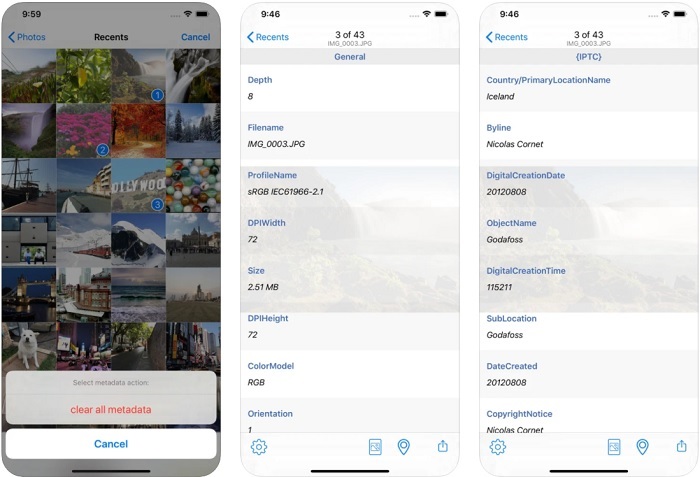
Jika Anda pengguna iOS, Anda dapat menggunakan Penghapus Metadata Foto & Video dan mempelajari cara menghapus metadata di perangkat iOS Anda. Aplikasi ini mendukung semua format media asli di perangkat Apple, dan aplikasi ini melakukan tugasnya sebagai penghapus metadata. Jika Anda memiliki perangkat iOS, Anda dapat menyalin langkah-langkah di bawah ini.
Langkah 1. Untuk mengunduh aplikasinya, Anda harus membuka App Store, mencarinya, lalu menginstalnya.
Langkah 2. Buka alatnya dan izinkan aplikasi mengakses Foto Anda, lalu pilih video atau foto yang ingin Anda hapus metadatanya.
Langkah 3. Ketuk ikon gear, lalu klik clear all metadata, dan ini akan membuat salinan file tanpa metadata.
Bagian 4. Cara Menghapus Metadata Menggunakan Alat Web Gratis
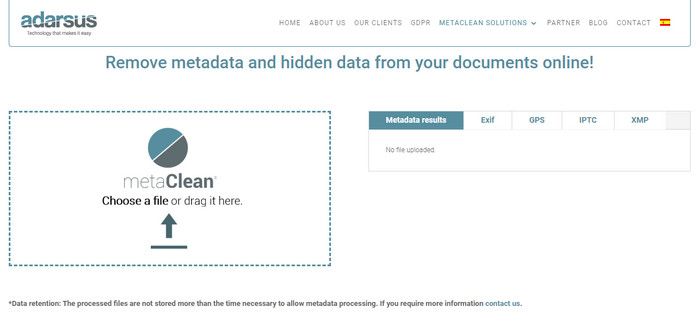
Adarsus – Remove Metadata dapat membantu Anda menghapus metadata secara online dan gratis. Berbeda dengan konverter lain di atas, Anda tidak perlu mengunduh alat ini ke desktop untuk menggunakannya karena ini adalah alat berbasis web; untuk mengaksesnya, Anda memerlukan koneksi internet. Jika Anda ingin merasakan penghapusan metadata secara gratis, ikuti langkah-langkah di bawah ini.
Langkah 1. Buka peramban web Anda, dan cari alat tersebut.
Langkah 2. Di situs web alat itu, klik tombol upload dan pilih file yang metadatanya ingin Anda hapus.
Langkah 3. Klik Get my File Clean, dan alat ini akan membuat salinan tanpa metadata.
Bagian 5. Bagan Perbandingan tentang Metadata Remover di Windows, Mac, Online, Android, dan iOS
| fitur | FVC Video Converter Ultimate | Properti di Windows | Pratinjau di Mac | Exiftool – melihat, mengedit metadata foto dan video (Android) | Penghapus Metadata Foto & Video | Adarsus – Hapus Metadata |
| Aman Digunakan |  | | | | | |
| Mudah digunakan | | | | | | |
| Hapus Seluruh Metadata | | |  | | | |
| Sunting Metadata | | | | | | |
| Gandakan file | | | | | | |
| Batasan/s | Ini tidak tersedia di perangkat seluler dan online | Terkadang data tidak terhapus seluruhnya. | Itu tidak menghapus metadata lain selain lokasi. | Tidak seefektif alat pamungkas. | Sebagian besar waktu, itu gagal menghapus metadata | Ada batasan ukuran file, yaitu 5MB. |
Bagian 6. FAQ tentang Menghapus Metadata
Apakah menghapus metadata mengurangi ukuran file?
Ya, karena metadata menambah ukuran file media dengan informasinya. Anda dapat menghemat lebih sedikit ruang dengan menghapusnya, dan itu akan menjadi lebih kecil dari sebelumnya. Namun, informasi yang ada di file Anda akan dihapus.
Setelah menghapus metadata, apakah kualitas akan memengaruhinya?
Tidak, tidak akan; kualitas tidak akan terpengaruh bahkan jika Anda mengubah atau menghapus metadata file media Anda. Jadi, jangan khawatir karena Anda akan tetap memiliki kualitas yang sama meskipun tanpa atau dengan metadata di dalamnya.
Apakah semua format file memiliki metadata?
Kebanyakan format media memiliki struktur metadata yang berbeda-beda, tetapi tidak semua format media memiliki metadata. Dalam beberapa kasus, suatu format tidak dapat memuat metadata karena cara pembuatan, desain, dan banyak faktor lainnya.
Kesimpulan
Sekarang kita telah mempelajari cara menghapus metadata pada file untuk melindungi privasi Anda dengan sangat mudah. Dengan alat yang disajikan dalam artikel ini, menjadi mungkin untuk menghapusnya sebelum mengunggah ke web. Meskipun kami menawarkan lima alat untuk menghapus metadata, tidak ada keraguan mengenai kemampuan FVC Video Converter Ultimate karena alat ini dapat sepenuhnya menghapus seluruh data atau bagian-bagian tertentu secepat 1-2-3. Jika Anda ragu dengan ulasan kami, Anda dapat memeriksa sendiri alat ini dengan mengunduhnya ke komputer Anda dan mengujinya apakah memang sebagus yang dikatakan!
-
 4 Cara Mengonversi WMV ke MKV di Mac, Windows & Online Tanpa Rugi
 Ingin mengonversi WMV ke MKV di Mac dan Windows? Artikel ini menyajikan cara terbaik untuk mengonversi WMV ke MKV dengan cepat.
-
 4 Penampil Metadata Online & Offline Terbaik [Diperbarui 2022]
 Dapatkah saya memeriksa metadata file saya? Ya, Anda bisa, dengan bantuan posting ini kami akan memperkenalkan kepada Anda berbagai metadata viewer yang dapat Anda gunakan.
-
 Pengonversi WebM ke MKV Terbaik yang Harus Anda Gunakan untuk Mengonversi dengan Cepat
 Apakah Anda mencari cara untuk mengonversi file WebM ke MKV? Artikel ini menyajikan konverter WebM ke MKV terbaik untuk Anda coba.
