


 Video Converter Ultimate
 Screen Recorder
 Riparazione video
Come ridurre la risoluzione di un video su Windows, Mac e telefoni cellulari
I video in HD 1080 e 720 offrono la migliore risoluzione che amerai usare, soprattutto per la visione. Sebbene queste risoluzioni siano le migliori, prima o poi avrai bisogno di convertire la risoluzione del video in una più bassa per risparmiare spazio sul disco. Ma la domanda è: come convertire la risoluzione del video per abbassarla? Questo articolo presenterà i principali convertitori di risoluzione video per abbassare la risoluzione video su Windows, Mac, Online, Android e iPhone.

Parte 1. Perché è necessario ridurre la risoluzione video
Come preparazione prima di ridurre la risoluzione video, determiniamo innanzitutto la causa per cui è necessario modificare la risoluzione di un video. Le informazioni che forniamo di seguito sono l'istanza più comune di cui avrai bisogno per ridurre la risoluzione.
Motivo 1. Non supportato su dispositivi mobili
Alcuni dispositivi mobili non supportano una risoluzione video più elevata perché il tuo cellulare non la riconosce. A volte, abbiamo pensato che il video non si aprisse a causa della compatibilità del formato, ma questo è un altro motivo alla base. Se vuoi riprodurre il video, devi tenere a mente la risoluzione del video che hai salvato sul telefono.
Motivo 2. Prenditi del tempo per caricare il file su un lettore multimediale
Ogni lettore multimediale può riprodurre il tuo video con la massima risoluzione possibile, ma non tutti possono caricare immediatamente il video con un'alta qualità. Anche se guardare un video ad alta risoluzione è più divertente che guardarne uno inferiore. Imparare ad abbassare la risoluzione di un video è d'obbligo se vuoi guardare il video istantaneamente con poco o meno carico sul lettore multimediale.
Motivo 3. I video di alta qualità occupano molto spazio
Questo motivo non è nuovo per noi; è più probabile che un video di alta qualità abbia dimensioni di file enormi. A causa dell'output di alta qualità, devi aspettarti che le dimensioni del file siano grandi. Ad esempio, 720 e 1080 sono tra le migliori qualità, ma la dimensione del file di 720 video è molto più piccola di 1080 video. D'altra parte, la risoluzione di 1080 è molto superiore a 720.
Ora che abbiamo l'idea del motivo per cui dobbiamo ridurre la risoluzione del video, le informazioni successive di seguito ti insegneranno i diversi set di strumenti che puoi utilizzare per ridurre la risoluzione del tuo video. Continua a girare la palla per avere un'idea completa al riguardo.
Parte 2. Il modo più semplice per ridurre la risoluzione video sul desktop
Se ti serve un convertitore video facile da usare che ti aiuti a cambiare rapidamente la risoluzione del video, allora Video Converter Ultimate fa al caso tuo. Questo strumento supporta oltre 200 formati con diversi preset tra cui puoi scegliere. Vuoi sapere cosa ci ha colpito di questo convertitore? Con questo strumento puoi creare preset che arrivano fino al 4K o scendono fino a una risoluzione di 360p. Inoltre, non devi essere un montatore video professionista per imparare come convertire un video a una risoluzione più bassa; seguendo i passaggi qui sotto potrai convertire la risoluzione con successo.
Passaggio 1. Clicca il pulsante appropriato per scaricare la versione che stai utilizzando, Windows o Mac. Apri il file scaricato per installare il software e segui la procedura guidata per installarlo correttamente. Dopo l’installazione, apri Video Converter Ultimate e passa al passaggio successivo.
Download gratuitoPer Windows 7 o versioni successiveDownload sicuro
Download gratuitoPer MacOS 10.7 o versioni successiveDownload sicuro
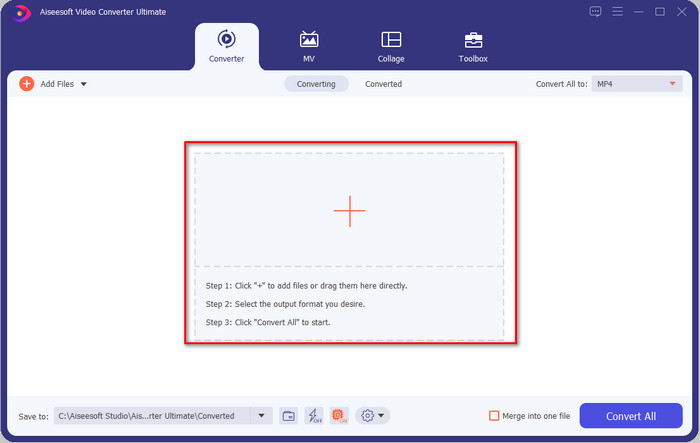
Passaggio 2. Carica il video con la risoluzione più alta trascinandolo e rilasciandolo sull’interfaccia dello strumento. In alternativa, puoi cliccare il pulsante + per aprire la cartella, individuare il file e cliccare su Apri per caricare il video.
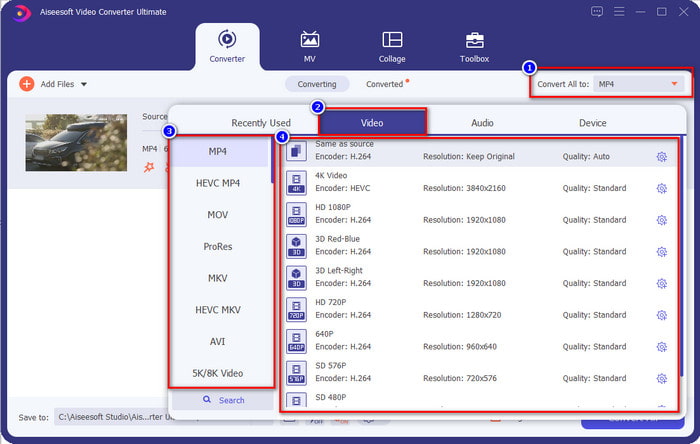
Passaggio 3. Clicca su Converti tutto in e verrà mostrato un elenco di formati predefiniti. Puoi selezionare diversi formati come MP4, MOV, AVI, MKV e oltre 200 altri con varie risoluzioni; clicca sul formato che desideri e procedi.
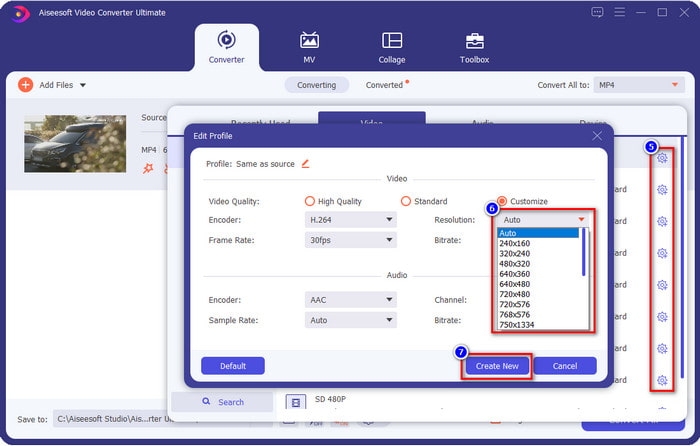
E se la risoluzione che vuoi ottenere non è nell’elenco predefinito? Nessun problema: puoi creare la tua risoluzione. Dopo aver cliccato su Converti tutto in, scegli il formato che vuoi e clicca sull’icona ingranaggio con un segno più. Clicca sul pulsante a discesa, seleziona la risoluzione che desideri, clicca su Crea nuovo e poi seleziona il preset che hai creato.
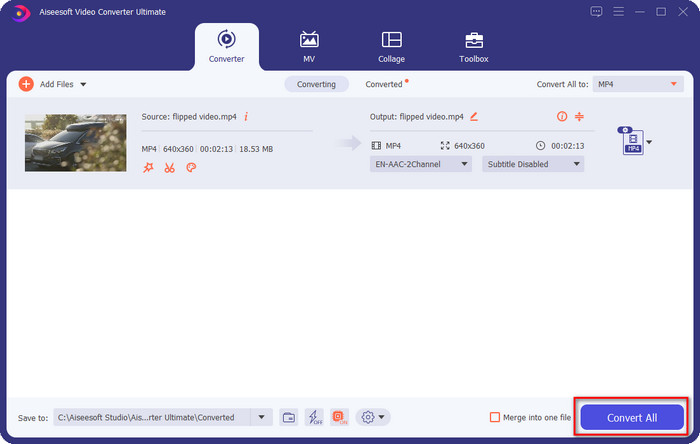
Passaggio 4. Per iniziare ad abbassare la risoluzione del tuo video, premi il pulsante Converti tutto. Grazie alla conversione ultra-rapida, il download richiederà meno di un minuto. Ed ecco fatto: la risoluzione del tuo video è ora più bassa, tutto grazie a questo strumento definitivo.
Parte 3. Modo gratuito per convertire la risoluzione video in una risoluzione inferiore sul Web
Se stai cercando un modo per convertire un video HD in una risoluzione più bassa online, puoi usare FVC Free Video Converter Online come soluzione. Questo strumento web supporta numerosi formati in cui puoi caricare ed esportare. A differenza dello strumento “ultimate”, non devi scaricarlo per convertire il video ad alta risoluzione in uno a risoluzione inferiore. Tuttavia, lo strumento non offre una conversione ultra-rapida e i formati supportati non sono tanti quanto quelli dello strumento “ultimate”. Quindi, se vuoi provare a usare questo strumento online, puoi seguire i passaggi qui sotto.
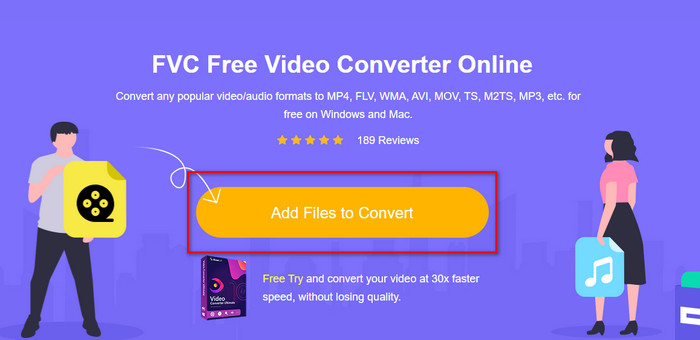
Passaggio 1. Per andare alla pagina principale di FVC Free Video Converter Online, clicca questo link.
Passaggio 2. Premi Add Files to Convert per caricare il video di cui vuoi abbassare la risoluzione. Inoltre, se è la prima volta che usi lo strumento, devi scaricare il launcher. Dopodiché, clicca di nuovo Add Files to Convert per caricare il file.
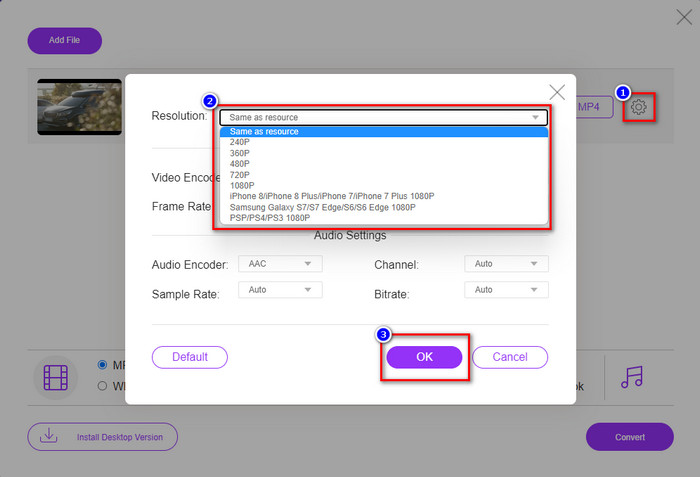
Passaggio 3. Clicca l’icona a forma di ingranaggio sul lato destro della finestra che comparirà. Scegli la risoluzione che desideri cliccando sul pulsante a discesa e premi OK per salvare.
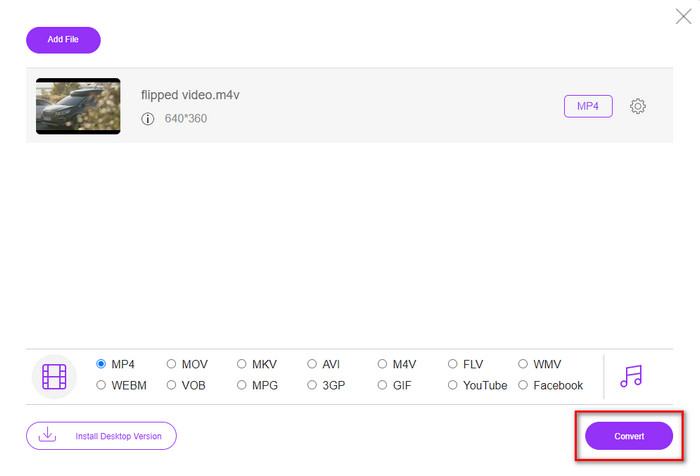
Passaggio 4. Per esportare il video a qualità inferiore, clicca Convert e attendi che venga scaricato sul tuo disco.
Parte 4. 2 migliori app per ridurre la risoluzione video su iPhone e Android
Fabbrica di formati video (solo per utenti Android)
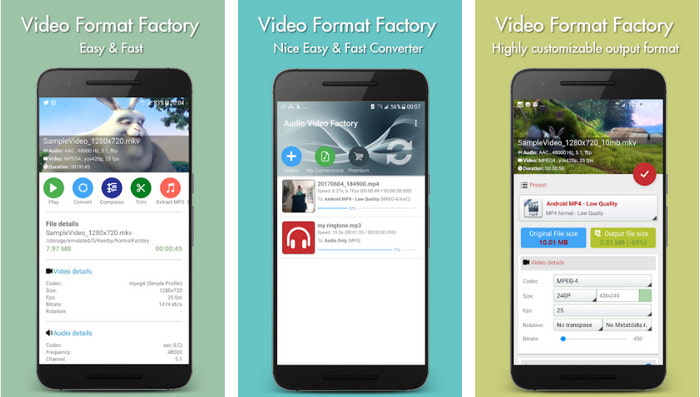
Se hai bisogno di imparare come ridurre la risoluzione video su Android, Audio Video Factory può aiutarti. Con questa app, puoi convertire facilmente la risoluzione video del tuo video gratuitamente. Tuttavia, alcuni annunci verranno visualizzati durante la conversione e non puoi utilizzare tutto il potenziale dello strumento se non lo acquisti. Quindi, per insegnarti come usarlo, segui i passaggi.
Passaggio 1. Scarica l’app dal Play Store, quindi aprila.
Passaggio 2. Clicca su Add per caricare il video, scegli dove si trova il tuo video e clicca sul video. Dopodiché, clicca su Convert; clicca su Size e scegli la risoluzione che desideri.
Passaggio 3. Scorri verso l’alto e clicca su Convert Now per avviare il processo.
Fotocamera a bassa risoluzione (solo per utenti iOS)
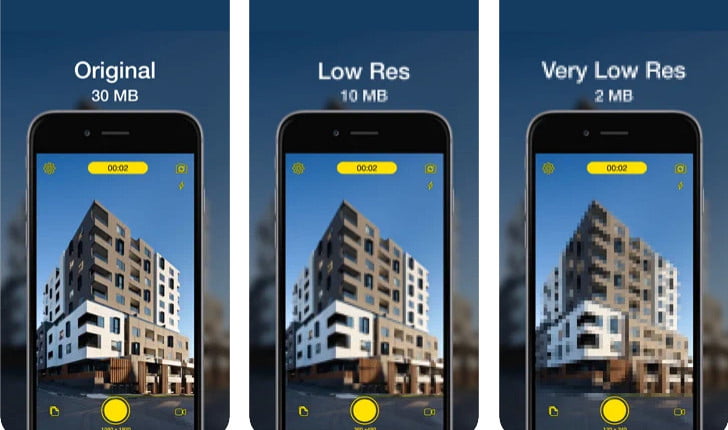
Se sei un utente iOS, puoi comunque imparare come ridurre la risoluzione del video su iPhone usando Lower- Very Low Res Camera. A differenza degli strumenti in questo elenco, se scarichi questa app dall’App Store puoi girare direttamente un video a risoluzione più bassa. Tuttavia, lo strumento presenta alcune limitazioni e mostra annunci pop-up durante l’uso dell’app.
Passaggio 1. Scarica l’app dall’App Store, quindi cliccaci sopra per aprirla.
Passaggio 2. Clicca sull’icona dei file e seleziona il video che vuoi convertire; dopo aver cliccato sul video, premi Resize.
Passaggio 3. Seleziona la Recording Quality e inizierà il processo di conversione.
Parte 5. Domande frequenti sull'abbassamento della risoluzione video
VLC supporta la risoluzione 4k?
Sì, VLC 3.0 supporta la riproduzione di video in risoluzione 4K. Ma sapevi che VLC può fare molte altre cose? Se vuoi esplorare meglio VLC, clicca questo link e scopri VLC e le sue altre perfette alternative da usare.
Quali sono gli altri strumenti che posso utilizzare per convertire la risoluzione video?
In questa recensione scoprirai 8 dei migliori convertitori di risoluzione video che puoi usare su diverse piattaforme. Cliccando questo link, avrai informazioni più dettagliate e varie opzioni di convertitori tra cui scegliere.
Qual è la risoluzione video più alta che posso avere?
La risoluzione video 8k è la più alta risoluzione video che puoi utilizzare sulla TV. Questa risoluzione è 4 volte più nitida del 4k e 16 volte migliore del 1080.
Conclusione
Infine, ora abbiamo un’idea più chiara di come abbassare la risoluzione video sulla tua piattaforma; che tu stia usando Windows, Mac, uno strumento online, Android o iPhone, puoi utilizzare i convertitori presenti in questo elenco. Ma se vuoi uno strumento che possa cambiare la risoluzione senza ridurre la qualità, ti consigliamo di usare FVC Video Converter Ultimate. Come abbiamo mostrato sopra, ci sono molti motivi per cui dovresti usare questo strumento e, se ancora non ci credi, puoi scaricarlo e provare se funziona come abbiamo spiegato in questo articolo.
-
 Guida definitiva Come modificare la risoluzione video disponibile in multipiattaforma
 Hai bisogno di cambiare la risoluzione video del video? In tal caso, scopri i diversi modi in cui puoi facilmente modificare la risoluzione video del video che stai guardando.
-
 I migliori convertitori di risoluzione video 8 da utilizzare in multipiattaforma [Aggiornato 2022]
 Don'non hai idea del miglior convertitore di risoluzione video sul tuo dispositivo? In tal caso, puoi leggere completamente questo articolo per saperne di più sui convertitori video disponibili.
-
 Il miglior lettore video HD 1080p per Windows/Mac/iOS/Android nel 2021
 Se stai cercando un lettore video per guardare video ad alta definizione 1080p sul tuo computer, controlla le nostre scelte dei migliori lettori video HD 1080p per Mac, PC Windows, iOS e Android.
