


 Video Converter Ultimate
 Screen Recorder
 Riparazione video
 Download sicuro
Rimuovi la filigrana Dreamstime con i 4 modi che devi sapere
Se hai bisogno di immagini pronte per l'uso per la tua presentazione o progetto, non puoi mai sbagliare scegliendo Dreamstime. Questa app può darti foto d'archivio royalty-free pronte per essere utilizzate in qualsiasi momento. Aiuta già gli utenti che cercano un'immagine specifica con un output di alta qualità a un prezzo basso. Sebbene tu possa scaricare 15 immagini gratuitamente qui, questo prodotto lascia una filigrana per promuovere l'app quando usi l'immagine che scarichi qui.
Non si può negare che la sua usabilità sia eccellente e che i prezzi delle immagini siano bassi, ma non tutti possono permettersi di acquistare crediti sulla piattaforma. Niente paura! Perché ti veniamo in aiuto: nelle informazioni qui sotto trovi i metodi che puoi seguire per rimuovere la filigrana di Dreamstime che compare sul risultato finale.

Parte 1. Come rimuovere la filigrana Dreamstime acquistando i crediti
Non possiamo lasciarci alle spalle l'opzione di acquisto perché è l'opzione di rimozione della filigrana Dreamstime più efficace che puoi utilizzare. Prima di procedere, devi sapere che Dreamstime ha bisogno di te per poter acquistare un'immagine senza filigrana. Il nome di credito è una valuta Dreamstime; utilizza denaro reale e lo converte in uno digitale accettato da Dreamstime. Supponiamo che tu non abbia un credito su Dreamstime. In tal caso, puoi seguire i seguenti passaggi per acquistare un credito da scaricare e avere l'immagine senza alcun logo dei prodotti lasciato.
Passaggio 1. Apri il sito ufficiale di Dreamstime, quindi crea un account prima di acquistare crediti su Dreamstime. Se hai già un account, devi prima accedere per poterlo utilizzare correttamente.
Passaggio 2. Una volta effettuato l’accesso al tuo account Dreamstime, fai clic su Prezzi e piani di download, poi vai su Pacchetti di crediti per vedere quali tariffe sono disponibili.
Passaggio 3. Compila completamente i dati richiesti e poi fai clic su Completa il pagamento per elaborare il pagamento inserito nello strumento. Con la stessa facilità avrai acquistato crediti come valuta per comprare immagini su Dreamstime.
Parte 2. Come rimuovere gratuitamente la filigrana Dreamstime sul Web
Rimozione di filigrane online senza FVC
Uno dei più noti rimozione di filigrane online di Dreamstime che puoi utilizzare non è altro che FVC Free Watermark Remover Online. Puoi sfruttare questo strumento per rimuovere la filigrana presente nell'immagine che hai. Per quanto riguarda le prestazioni, questo strumento online è più capace di ciò che pensi, in particolare rimuovendo il logo, la filigrana, i timbri, le date, l'oggetto, ecc., Dall'immagine. Non dubiti ancora di questo strumento? In tal caso, leggi i passaggi che abbiamo aggiunto di seguito e puoi seguirli anche per rimuovere la filigrana aggiunta da Dreamstime.
Passaggio 1. Cliccando su questo link si aprirà una nuova scheda nel tuo browser.
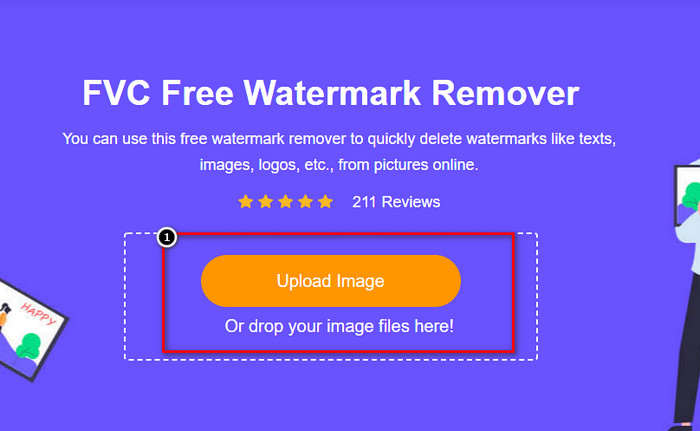
Passaggio 2. Clicca su Carica immagine per importare le foto che hai esportato da Dreamstime con la filigrana.
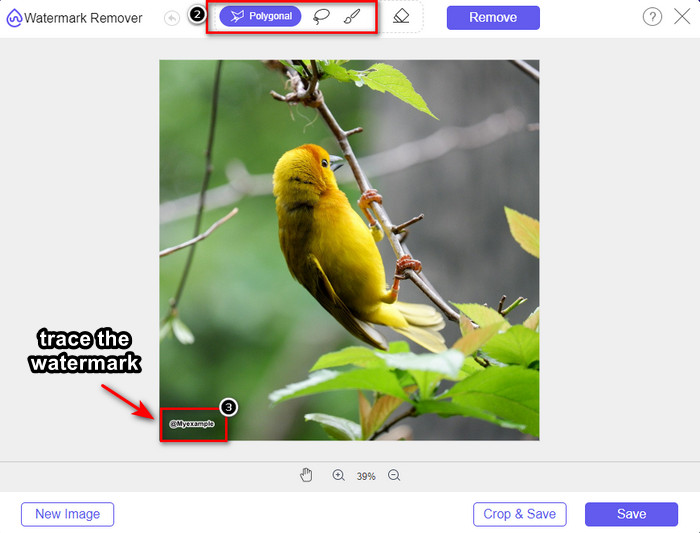
Passaggio 3. Puoi usare gli strumenti per tracciare la filigrana, scegline uno e poi tracciala con quello.
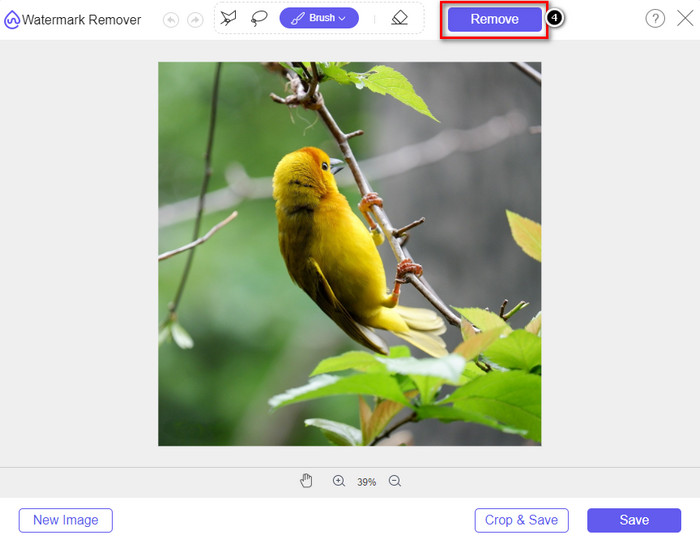
Passaggio 4. Clicca prima sull’icona Rimuovi prima di procedere con l’esportazione dell’immagine.
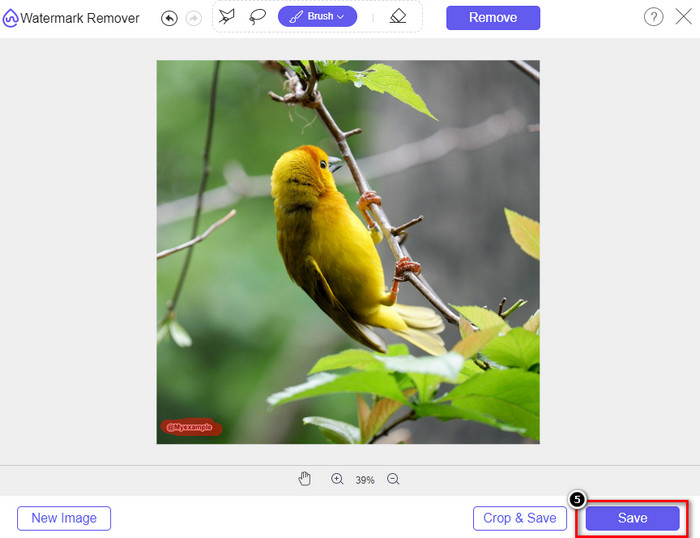
Passaggio 5. Infine, clicca su Scarica per salvare l’immagine senza la filigrana incorporata che hai evidenziato qui.
WatermarkRemover.IO
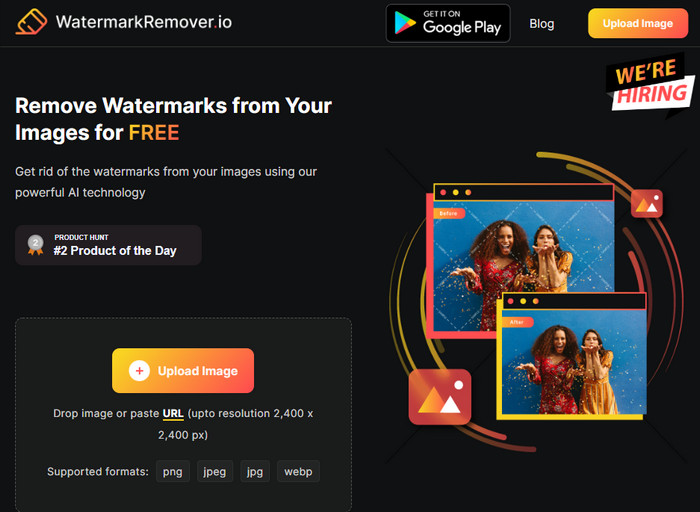
WatermarkRemover.io è uno strumento online per rimuovere la filigrana dalle foto di Dreamstime che puoi usare sul web e che può assisterti in questa operazione. Questo strumento è gratuito, proprio come il primo rimuovitore di filigrane menzionato. Non devi preoccuparti di registrarti, perché è utilizzabile su qualsiasi browser. Inoltre utilizza una tecnologia AI per rimuovere la filigrana dalle tue immagini non appena lo usi. Per aiutarti a procedere, continua a leggere le informazioni qui sotto.
Passaggio 1. Apri il sito ufficiale di questo rimuovitore di filigrane cercandolo nel tuo browser.
Passaggio 2. Clicca sull’icona Carica immagine per caricare la foto con la filigrana che vuoi rimuovere.
Passaggio 3. Una volta terminato il caricamento dell’immagine con la filigrana, fai clic su Scarica immagine, perché lo strumento rimuoverà automaticamente la filigrana dalla tua immagine.
Parte 3. Come rimuovere la filigrana Dreamstime sui video utilizzando la soluzione definitiva
Puoi scaricare un programma per rimuovere la filigrana Dreamstime dai video, come FVC Video Converter Ultimate. È lo strumento più flessibile, sempre pronto all’uso e in grado di portare a termine il lavoro in qualsiasi momento. Questo strumento risolve i problemi che potresti incontrare con i tuoi video, come audio di bassa qualità, risoluzione, formato non supportato e fastidiose filigrane. Rispetto ad altri software che puoi installare per rimuovere la filigrana, questo è straordinario per prestazioni, velocità di elaborazione e facilità d’uso. Continua a seguirci perché ti mostreremo in dettaglio come rimuovere la filigrana dai tuoi video.
Passaggio 1. Prima di tutto, devi scaricare il software sul tuo desktop facendo clic sul pulsante di download riportato qui sotto. Seleziona la versione corretta da installare, segui la rapida procedura di configurazione e avvia il software.
Download gratuitoPer Windows 7 o versioni successiveDownload sicuro
Download gratuitoPer MacOS 10.7 o versioni successiveDownload sicuro
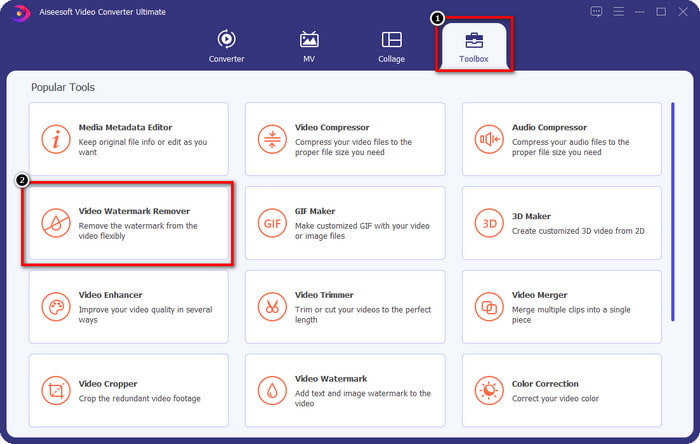
Passaggio 2. Apri la Scatola degli attrezzi multifunzionale inclusa nel software, quindi seleziona Rimuovi filigrana video.
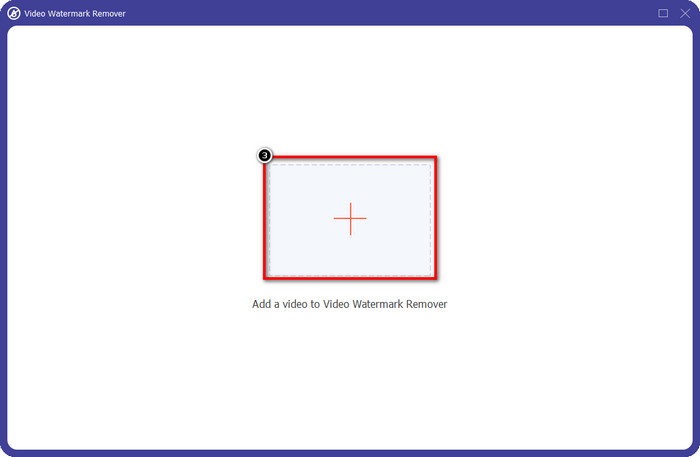
Passaggio 3. Successivamente, fai clic sull’icona + per caricare il video che hai scaricato e iniziare a rimuovere la filigrana di Dreamstime.
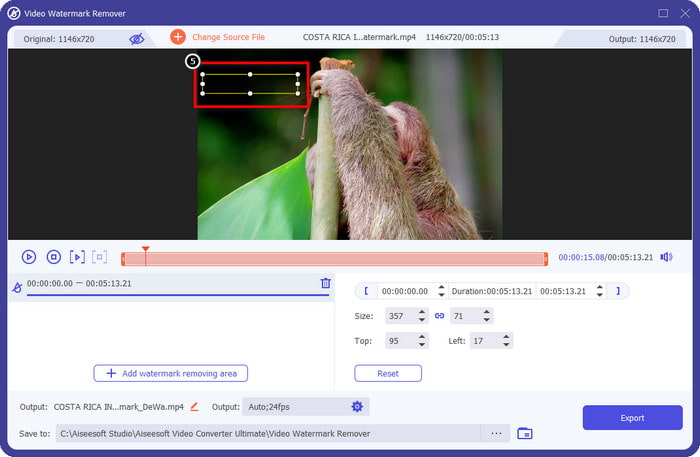
Passaggio 4. Poi clicca su Aggiungi area di rimozione filigrana per posizionare il riquadro di selezione sulla filigrana.
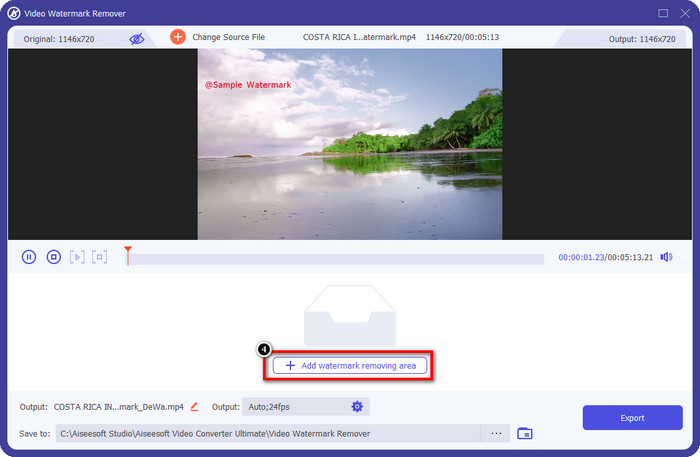
Passaggio 5. Dopo aver cliccato su Aggiungi area di rimozione filigrana, sullo schermo apparirà una forma rettangolare: posizionala sulla filigrana per rimuoverla.
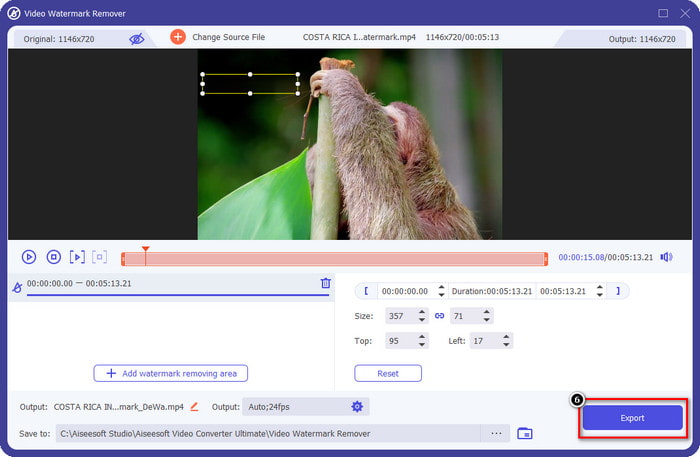
Passaggio 6. Clicca sul pulsante Esporta per scaricare il video senza la filigrana di Dreamstime.
Correlato:
Rimuovere la filigrana da Coub
Parte 4. Domande frequenti su come rimuovere la filigrana Dreamtime
Posso rimuovere illimitatamente la filigrana su Dreamtime dopo l'acquisto?
Non puoi se hai acquistato un credito, ma puoi continuare e scorrere un po' di più e vedrai che c'è un accesso illimitato alle immagini di cui puoi avvalerti se lo usi regolarmente. Il suo prezzo non è lo stesso in diverse regioni o luoghi in tutto il mondo.
Che tipo di carta supporta Dreamstime?
Ora che hai deciso di acquistare un credito o una quota di abbonamento qui, puoi utilizzare la tua Master Card, Visa, AMEX e le altre principali carte di credito; puoi verificarlo sul sito ufficiale per conoscere gli altri.
Posso utilizzare i crediti su Dreamstime per acquistare video senza filigrana?
Puoi utilizzare il credito per acquistare il video o qualsiasi prodotto di questa piattaforma. Lo scopo del credito non è solo per immagini e video; puoi anche usarlo per acquistare l'audio qui.
Conclusione
Come rimuovere la filigrana Dreamstime? Bene, sai già come gestire la filigrana nelle tue immagini con i due strumenti che arruolamo e il video con l'ultimo strumento di rimozione della filigrana che puoi utilizzare. Quindi, se hai un problema con la filigrana su video o immagini, puoi utilizzare liberamente il software sopra e seguire il tutorial che abbiamo aggiunto. Non dire addio al problema perché è risolto!
-
 2 modi per rimuovere rapidamente la filigrana VSDC su Windows e Mac
 Stai cercando un modo per rimuovere la filigrana VSDC sui tuoi video? Con questo articolo, forniamo strumenti che puoi utilizzare per eliminare la filigrana.
-
 Rimuovi la filigrana Animoto sui video in modo semplice ed efficace
 Come rimuovere la filigrana Animoto sul video? Continua a leggere questo articolo poiché abbiamo fornito un tutorial completo su come farlo.
-
 Come rimuovere la filigrana dal video utilizzando Final Cut Pro [Guida completa]
 Hai un problema con la filigrana sui video? Non ha detto altro, perché abbiamo fornito un tutorial su come rimuovere la filigrana dal video utilizzando Final Cut Pro.
