


 Video Converter Ultimate
 Screen Recorder
 Riparazione video
 Download sicuro
Ripara i video interrotti online gratuitamente e con facilità
Ti è mai capitato di provare frustrazione vedendo un video danneggiato che stai per riprodurre? Vorresti sistemarlo subito con una soluzione online, ma sei titubante sull’efficacia e non sai quale scegliere. Niente paura, perché questo articolo fa proprio al caso tuo! Qui di seguito puoi scoprire i modi migliori per riparare online gratis video rotti e pixellati. Dunque, senza ulteriori indugi, iniziamo a esplorare le soluzioni per sistemare i video problematici che hai.

Parte 1. È davvero possibile riparare un video danneggiato online?
Con la tecnologia odierna, è possibile riparare video fisicamente danneggiati online. Quindi, se il tuo file video è danneggiato a causa di dati mancanti o errori di codifica, alcuni strumenti online affermano di ripararli. Tuttavia, il loro tasso di successo nel riparare gratuitamente video danneggiati online può ancora variare e si consiglia cautela quando si utilizzano gli strumenti. Quindi, è essenziale notare che se il tuo video è fisicamente danneggiato, ci sono problemi con il supporto di memorizzazione stesso o la struttura del file è gravemente compromessa, gli strumenti online potrebbero non essere efficaci al cento per cento. Ma d'altro canto, il nostro campo tecnologico è in continua evoluzione e potrebbero ancora emergere nuovi servizi o strumenti, dandoti la speranza di una soluzione migliore nel prossimo futuro.
D'altro canto, esistono già strumenti che esprimono un'efficienza maggiore rispetto agli altri, che fortunatamente possiamo presentare nelle informazioni di seguito.
Parte 2. I migliori strumenti online per riparare i video non funzionanti
1. Convertitore online
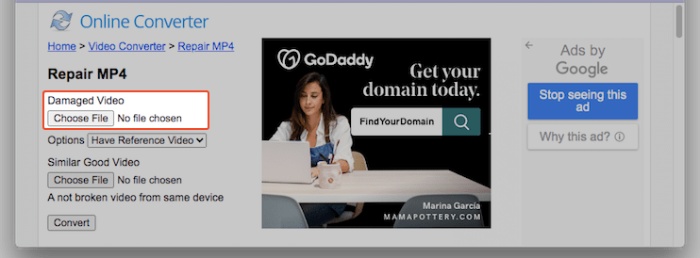
Per mostrare innanzitutto le capacità di correzione dei video scattosi online, si può usare questo Online Converter. Questo strumento di riparazione video MP4 online è progettato per correggere errori di base nei file video direttamente dal browser. Affronta efficacemente problemi come interruzioni di riproduzione o corruzione dei file. Inoltre, il servizio di riparazione video online gratuito estrae i dati utili dai video danneggiati e offre funzionalità di riparazione per video MP4, MOV, 3GP e M4V, con formato di uscita MP4. Tuttavia, non può aprire file video protetti da crittografia o password. Per ottenere risultati ottimali, è consigliabile usare come riferimento un video simile, riproducibile e registrato con lo stesso dispositivo del video danneggiato, come lo stesso telefono o la stessa fotocamera.
Come correggere i video pixelati online gratuitamente con Online Convert
Passaggio 1. Vai allo strumento Repair MP4 sul sito web e fai clic sul pulsante Choose File per caricare il video.
Passaggio 2. Seleziona la destinazione di output e premi il pulsante Repair.
Passaggio 3. Al termine del processo, scarica il video riparato.
2. Ripristinare. media
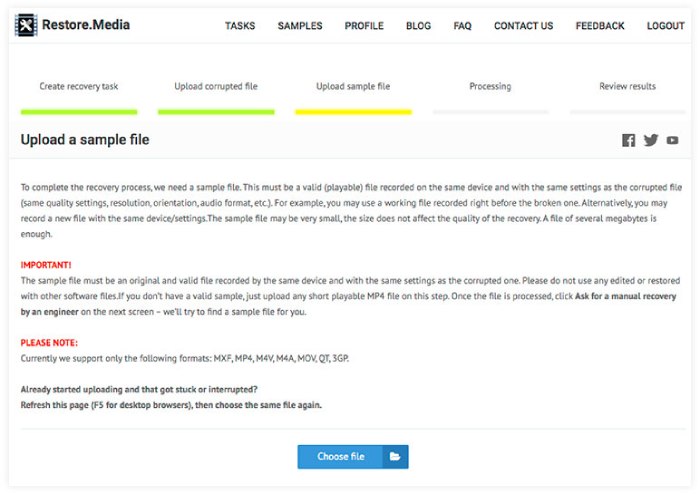
Il prossimo in lista è Restore.media, un'altra soluzione online affidabile per risolvere gratuitamente i tuoi problemi video. Questo programma ripara senza sforzo i file audio danneggiati in modo rapido, registrandoti gratuitamente per un account gratuito. Non sono richiesti download o installazioni. Il processo di riparazione video online può essere eseguito senza problemi tramite il tuo browser web. Inoltre, questo programma ha la capacità di riparare i file audio registrati su quasi tutti i dispositivi. Nel frattempo, supporta formati di file, tra cui MP4, MOV, M4A, 3GP, MXF, INSV e molti altri. Tuttavia, lo strumento online ti fornisce solo un'anteprima gratuita del file ripristinato in una risoluzione inferiore. Dopo l'approvazione, è possibile effettuare il pagamento per recuperare la qualità e la risoluzione iniziali del file.
Come riparare i video MP4 online con Restore.media
Passaggio 1. Registra un account gratuito e fai clic sul pulsante Get Started.
Passaggio 2. Una volta fatto, fai clic sul pulsante Choose File e carica il video sgranato o danneggiato. Successivamente, carica anche un video di esempio.
Passaggio 3. Lo strumento ripristinerà automaticamente il video danneggiato al termine del processo.
3. Correggi.VIDEO
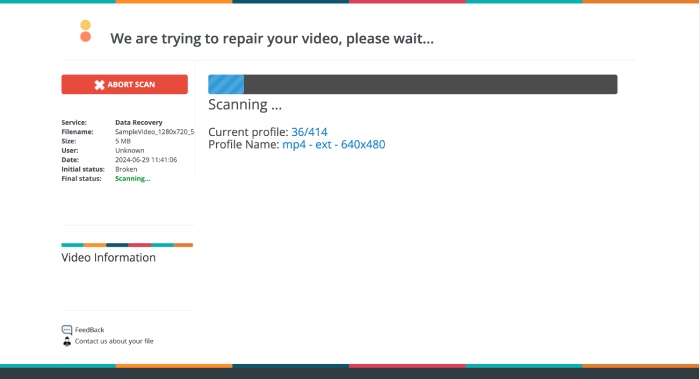
Il tuo video non si riproduce? Entra in gioco Fix.VIDEO. Questo programma offre una soluzione semplice per riparare video corrotti o danneggiati, inclusi quelli troncati, corrotti e danneggiati. Inoltre, anche se i tuoi file video sono danneggiati, troncati, rotti o illeggibili, questi strumenti Fix.VIDEO possono ripristinarli senza difficoltà. Il processo di riparazione avviene online tramite il browser che preferisci, garantendo la massima comodità. Nel giro di pochi minuti, il file video riparato sarà disponibile per il download, e lo strumento eliminerà qualsiasi richiesta di download aggiuntivo o di registrazione durante l’intera procedura. Inoltre, questo strumento online ti consente di lavorare su quanti video desideri. Tuttavia, potresti notare che la sua interfaccia è leggermente diversa rispetto alle altre.
Come correggere i video granulosi online con FIX.VIDEO
Passaggio 1. Nell’interfaccia principale del sito, carica il video sgranato usando il pulsante Upload Your Broken Video.
Passaggio 2. Dopodiché, attendi che il processo si concluda con successo.
Passaggio 3. Una volta completata la riparazione, ti basterà fare clic sul pulsante Download Full Video.
Parte 3. Bonus: Ripara i video interrotti offline in modo potente
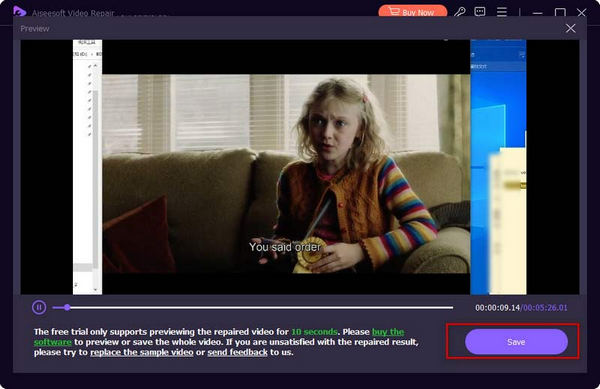
Gli strumenti online sono validi, ma se vuoi un modo più potente per riparare i tuoi video, allora scegli una soluzione offline come Video Repair consigliato da FVC. Come gli strumenti online, FVC Video Repair ha il processo più rapido per caricare, riparare ed esportare. Contrariamente agli strumenti web, FVC è dotato di tecnologia all'avanguardia per riparare video in ritardo online, garantendo che i tuoi ricordi preziosi o le tue attività professionali appaiano ugualmente impressionanti rispetto al video di riferimento, salvaguardando ogni dettaglio e chiarezza per migliorare il tuo divertimento o la tua presentazione. Inoltre, impiega un magico ripristino video entro un minuto dal processo. Ecco come.
Passaggio 1. Installa lo strumento di riparazione video sul computer facendo clic sui pulsanti Free Download qui sotto, quindi avvialo.
Download gratuitoPer Windows 7 o versioni successiveDownload sicuro
Download gratuitoPer macOS 10.7 o versioni successiveDownload sicuro
Passaggio 2. Poi carica il video di esempio tramite il pulsante blu Add e il video danneggiato tramite quello rosso. Una volta caricati, fai clic sul pulsante Repair.
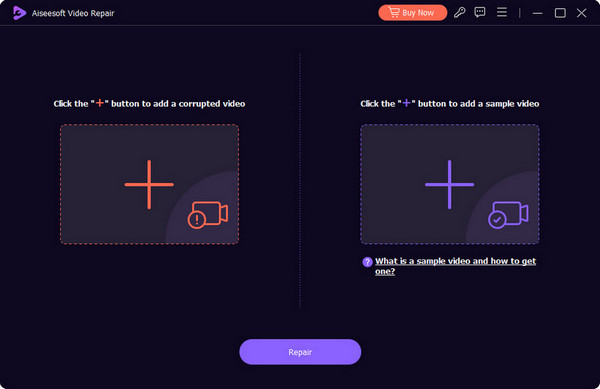
Passaggio 3. Dopo qualche secondo, potrai già premere il pulsante Save per esportare il tuo video riparato.
Parte 4. Domande frequenti sulla riparazione video online
Perché non riesco a guardare video online?
Le possibili ragioni per cui non riesci a guardare i video online sono la corruzione del file video, la lentezza della connessione Internet e problemi del browser.
Devo tenere aperti i browser durante la riparazione?
Dipende dallo strumento di riparazione che utilizzi. Alcuni strumenti potrebbero richiedere browser aperti, mentre altri possono funzionare in background.
È sicuro utilizzare uno strumento di riparazione video online?
In genere, è sicuro usare uno strumento di riparazione online. Tuttavia, questo vale solo se si scelgono strumenti affidabili e si è cauti nel caricare video sensibili o privati.
Conclusione
Questo articolo presenta vari strumenti online per riparare gratis video danneggiati online. Inoltre, introduce un potente programma desktop, il FVC Video Repair, progettato appositamente per la riparazione video, che ti permette di sistemare i video danneggiati direttamente sul tuo computer.
-
 Che cos'è il video con schermo nero e come dovrei risolverlo
 Ti chiedi perché lo schermo diventa nero durante lo streaming di video? Non preoccuparti più perché, in questo articolo, ti aiuteremo a risolvere il problema del video con schermo nero.
-
 Come risolvere il codice di errore video 224003: la tua guida definitiva alla correzione
 Scopri come risolvere il problema relativo all'impossibilità di riprodurre il video con il codice di errore 224003 e risolvi il problema per un'esperienza utente fluida. Rimettiti in carreggiata con la nostra guida!
-
 Come risolvere facilmente il problema relativo all'errore 5 di Impossibile riprodurre il video
 Hai sperimentato la riproduzione di uno dei video scaricati ma sei stato interrotto dal messaggio di errore 5 Impossibile riprodurre il video? Ecco tutto quello che devi sapere.
