


 Video Converter Ultimate
 Screen Recorder
 Riparazione video
 Download sicuro
3 metodi efficienti per convertire gratuitamente FLV in VOB
Se scarichi un video da YouTube e desideri salvarlo su un DVD, potresti notare che il video proveniente da Internet è in formato FLV. Per masterizzarlo su un DVD, devi convertire i file FLV in VOB. Pertanto, questo articolo ti presenta 3 metodi per convertire FLV in VOB gratuitamente, che puoi facilmente utilizzare sui dispositivi desktop.

Parte 1. Come esportare VOB da FLV gratuitamente
FVC Free FLV Converter è uno strumento ideale per trasformare FLV in VOB. Come convertitore video tutto‑in‑uno, ti consente di convertire, unire e personalizzare i file FLV con alta qualità e velocità. Puoi anche aggiungere temi per abbellire i tuoi video e condividerli su vari dispositivi, inclusi iPhone e iPad.

- Converti FLV in VOB e altri formati gratuitamente con un clic.
- Consente di disabilitare o modificare le tracce audio in modo selettivo.
- Aggiungi un tema per il tuo video FLV prima della conversione.
- Offri un modo gratuito, veloce e semplice per convertire in batch i file FLV.
Download gratuitoPer Windows 7 o versioni successiveDownload sicuro
Download gratuitoPer macOS 10.7 o versioni successiveDownload sicuro
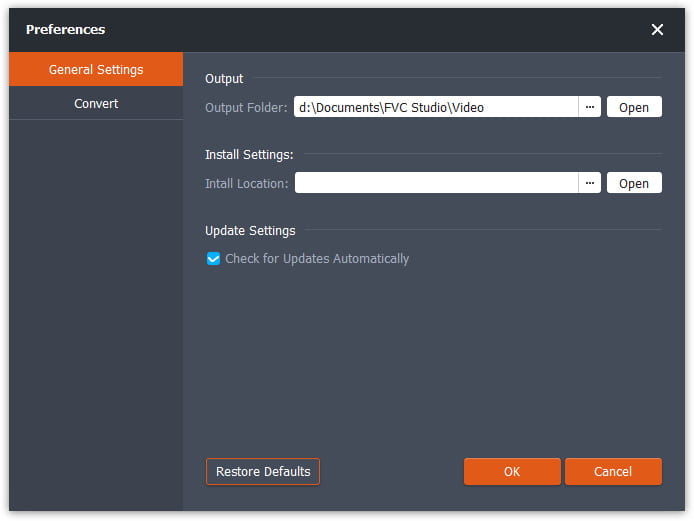
Passaggio 1. Dopo aver scaricato e avviato Free FLV Converter, puoi selezionare una cartella in cui salvare il file VOB. Fai clic sull’opzione Menu nella parte superiore dell’interfaccia e vai su Preference. Nelle General Settings, puoi scegliere la cartella di output.
Passaggio 2. Per aggiungere file FLV, devi fare clic sul pulsante Add Files nell’interfaccia. Quindi puoi selezionare i file nella finestra di esplorazione. Poi devi fare clic sul campo Output Format e selezionare il formato VOB.

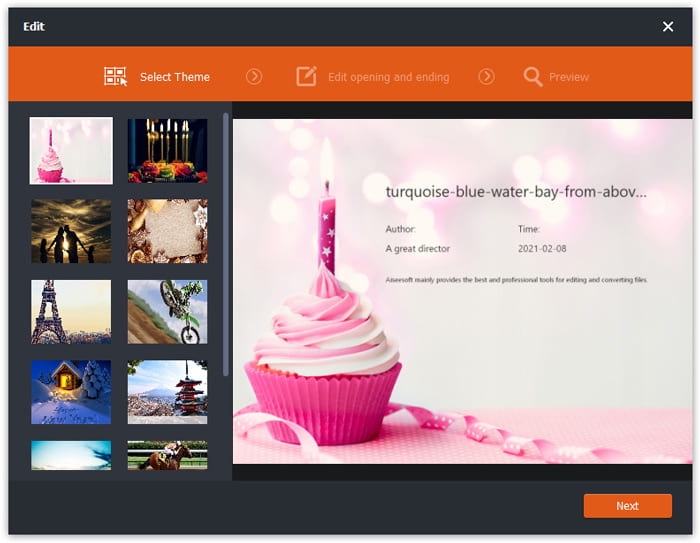
Passaggio 3. Puoi aggiungere temi al tuo file video prima della conversione. Fai clic sul pulsante Edit nell’interfaccia e vai su Select Theme. Puoi scegliere un tema come compleanno, famiglia o paesaggio per il tuo video FLV. Quindi puoi visualizzare in anteprima gli effetti del video e salvarlo.
Passaggio 4. Per avviare la conversione, devi fare clic sul pulsante Convert nell’interfaccia principale. La cartella si aprirà automaticamente e potrai trovare al suo interno il file VOB.
Free FLV Converter è un software versatile per trasformare i video FLV e puoi aggiornare i tuoi video con funzionalità di modifica avanzate.
Parte 2. Come cambiare FLV in VOB online
FVC Free Online Video Converter è uno strumento online gratuito per convertire FLV in VOB. Ha un’interfaccia ben organizzata e pulita, adatta a tutti gli utenti. Essendo uno strumento online, non è necessario scaricare o installare nulla.
- 1. Un clic per convertire FLV in VOB in pochi secondi senza perdere qualità.
- 2. Personalizza il file FLV prima della conversione.
- 3. Sicuro e stabile da usare.
Passaggio 1. Vai al sito web di Free Online Video Converter. Devi fare clic sul pulsante Add Files to Convert. Si aprirà una finestra di esplorazione che ti permetterà di aggiungere i file FLV.
Scarica la Versione Desktop per convertire i file in batch.
Passaggio 2. Dopo aver aggiunto i file, devi selezionare il formato in cui esportarli. In fondo alla finestra sono elencati diversi formati. Trova VOB e fai clic sul cerchio accanto ad esso.
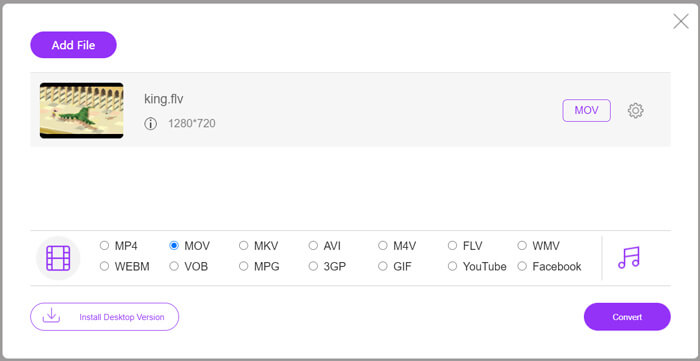
Passaggio 3. Prima della conversione, puoi fare clic sull’icona a forma di Gear per regolare parametri come la risoluzione video, il codec, il volume audio e il canale del file FLV.
Passaggio 4. Fai clic sul pulsante Convert per avviare la conversione. Al termine, potrai trovare il file VOB nella cartella che hai impostato.
In conclusione, Free Online Video Converter è uno strumento comodo ed efficiente per convertire FLV in VOB online gratuitamente. Inoltre, qui puoi anche comprimere i file FLV.
Parte 3. Come usare il freno a mano per transcodificare FLV in VOB
Handbrake è un transcoder gratuito e open source che puoi utilizzare per convertire FLV in VOB. Supporta i sistemi Windows e Mac. Ecco i passaggi per convertire FLV in VOB con Handbrake.
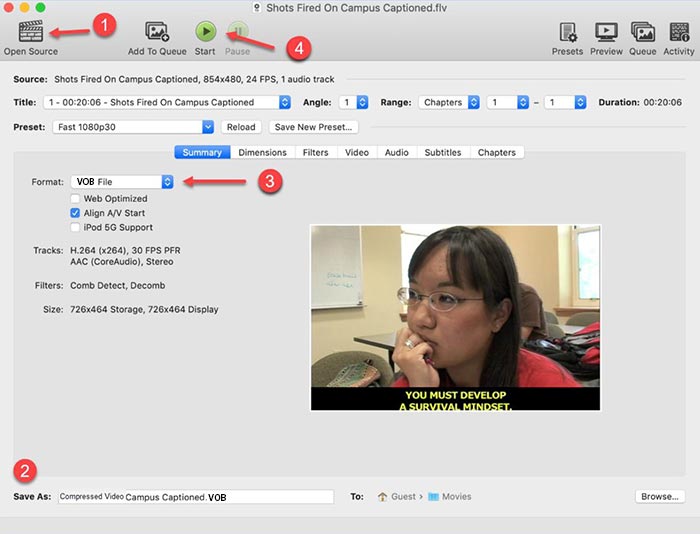
Passaggio 1. Scarica e avvia HandBrake. Per aggiungere i file FLV, devi fare clic sul pulsante Open Source. Puoi trovare il file FLV nella finestra di esplorazione.
Passaggio 2. Poi imposta la cartella in cui salvare il file VOB di output facendo clic sul campo Save As nella parte inferiore dell’interfaccia.
Passaggio 3. Quindi seleziona il formato VOB nel campo Format.
Passaggio 4. Fai clic sul pulsante Start per avviare la conversione.
FLV contro VOB
Adobe Flash Player utilizzava FLV per fornire contenuti video come film e programmi TV. Al giorno d'oggi, Adobe non sviluppa più il lettore e consiglia agli utenti di disinstallarlo per motivi di sicurezza. Tuttavia, puoi ancora utilizzare il formato FLV su molti programmi non Adobe/Macromedia.
Il formato VOB viene spesso utilizzato per memorizzare i dati del film di un disco DVD, che include video, audio, sottotitoli, menu DVD e altri contenuti. Di solito è formattato come flussi di sistema MPEG-2. Puoi aprire file VOB su vari strumenti di riproduzione video.
Parte 4. Domande frequenti sulla conversione di FLV in VOB
1. Qual è il formato FLV?
FLV (Flash Video) è un file che utilizza Adobe Flash Player per trasmettere video o audio su Internet. È il formato standard per i video su piattaforme e siti web come YouTube e Hulu. (Trova qui un lettore FLV)
2. Perché dovrei convertire FLV in VOB?
Quando devi archiviare video da Internet su un DVD, devi convertire FLV in VOB. VOB è un formato che contiene lo streaming video in formato MPEG-2 e lo streaming audio in diversi formati in DVD.
3. Come posso tagliare il file FLV prima della conversione?
Puoi utilizzare un software di editing video professionale per tagliare file FLV come Video Converter Ultimate. Ti consente di impostare il punto di inizio e di fine sulla timeline per ritagliare il video.
Conclusione
Questo articolo ti offre 3 metodi verificati per convertire FLV in VOB. Puoi usare FVC Free FLV Converter e Free Online Video Converter per convertire facilmente e gratuitamente. Esistono anche altri software gratuiti che puoi usare per la conversione, come HandBrake o VLC Media Player. Puoi scaricarli e provarli per vedere se riescono a risolvere il tuo problema. Se hai domande sulla conversione da FLV a VOB o vuoi saperne di più, lascia un commento qui sotto.
Download gratuitoPer Windows 7 o versioni successiveDownload sicuro
Download gratuitoPer macOS 10.7 o versioni successiveDownload sicuro
-
 VLC non riproduce DVD, come risolverlo
 VLC può riprodurre un DVD? Perché VLC non ha riprodotto il mio DVD? Come posso ottenere VLC per riprodurre un DVD su Windows 10? Questo post condivide 3 suggerimenti per risolvere il problema con VLC che non riproduce il DVD.
-
 I 3 migliori modi gratuiti per convertire rapidamente MP4 in VOB
 Come convertire un MP4 in VOB su PC Windows e Mac? Per risolvere questo problema, questo post condividerà 3 modi migliori per aiutarti a convertire gratuitamente MP4 in VOB.
-
 I modi migliori per convertire VOB in FLV
 Vuoi convertire un file VOB in un file FLV? Puoi facilmente completare l'attività con convertitori desktop o online. Leggi questa guida e impara come trasformare VOB in FLV in modo facile e veloce.

