


 Video Converter Ultimate
 Screen Recorder
 Riparazione video
 Download sicuro
Correggi il denoising delle immagini in meno di un secondo con le migliori soluzioni [online e offline]
Il rumore nelle immagini è diventato un grosso problema per chi scatta foto, e avrai bisogno di uno strumento di riduzione del rumore dell’immagine per risolverlo. Questa imperfezione è causata dal sensore della fotocamera o da componenti interni; di conseguenza, l’immagine risulta granulosa e la qualità non è delle migliori. Come parte della post-produzione, avrai bisogno di un denoiser che ti aiuti a rimuovere o ridurre il rumore nella tua immagine. Inizia leggendo questo articolo e passa subito ai cinque strumenti di denoising fotografico che abbiamo trovato su internet, in grado di aiutarti a risolvere il problema immediatamente senza peggiorare la situazione.

Parte 1. Cosa causa il rumore dell'immagine nella tua fotografia
Prima di sapere cos'è il rumore dell'immagine, devi prima sapere che due tipi di rumore si verificano sulla tua immagine. Questi sono il rumore interno e di interferenza. Ma cosa sono questi due, e quali sono le cause per cui accade in ogni foto che abbiamo scattato? Scaviamo più in profondità mentre spieghiamo le informazioni importanti di seguito.
Rumore interno
È comune che il denoising accada a ogni immagine che catturiamo, specialmente in una situazione di scarsa illuminazione in cui l'ISO viene spinto. Quando le foto sono sovravolte, puoi vedere il risultato riflesso di ogni fluttuazione dell'onda. Elettricità, calore e sensore I livelli di illuminazione sono le tre cose che causano il rumore interno nelle immagini.
Rumore di interferenza
Rumori come questo possono essere visti come uno schema sovrapposto alla tua immagine. A differenza del rumore interno, il rumore di interferenza si verifica occasionalmente e di solito accade quando c'è una trasmissione robusta nell'area in cui si visualizza l'immagine. Lo schema che abbiamo menzionato in precedenza è molto probabilmente la lunghezza d'onda sulla trasmissione nota come rumore elettronico.
Questi rumori sono evitabili? Sì, ma non sempre. Cosa succede se la tua immagine ha del rumore e vuoi rimuoverlo? Cosa dovresti fare? Le seguenti informazioni che aggiungeremo sono l'elenco dei migliori denoiser di immagini che puoi utilizzare per rimuovere facilmente il rumore dall'immagine. È possibile scaricare il software sulla rispettiva pagina Web o utilizzarlo sul Web.
Parte 2. I 4 migliori denoiser di immagini che puoi scaricare o utilizzare sul Web [a pagamento e gratuiti]
Upscaler di immagini senza FVC

FVC Free Image Upscaler è la soluzione preferita dagli utenti che puoi usare per ridurre il rumore nelle immagini online. Anche se il software è uno strumento online, non dovrai preoccuparti delle sue prestazioni, perché è uno dei migliori editor basati sull’IA che puoi usare gratuitamente. Può correggere qualsiasi difetto nella tua immagine, che si tratti di rumore, sfocatura, contrasto, luminosità, pixel mancanti, ecc. Grazie all’interfaccia intuitiva, tutti i principianti che provano questo software hanno la sensazione di averlo già usato a lungo. In termini di prestazioni, ci sono pochissimi strumenti in grado di superare la sua tecnologia di IA e l’ottima qualità di editing che offre.
Puoi ottenere il miglior risultato utilizzando questo strumento web in questo momento.
Professionisti
- È un editor di immagini completo basato sull'intelligenza artificiale di cui avrai mai bisogno.
- Supporta la modifica di molti formati di foto come JPEG, PNG, BMP, SVG, ecc.
- Non avresti bisogno di fare il tweaking perché può rilevare i difetti con l'algoritmo e correggerli immediatamente.
- Otterrai un risultato soddisfacente dopo aver rimosso il denoise su ogni foto che hai con questo strumento.
- Ha un riquadro prima e dopo per confrontare la qualità dell'immagine caricata.
Contro
- Non supporta la modifica manuale delle impostazioni dell'immagine.
- Avrai bisogno di Internet per usarlo.
Denoiser di immagini AI
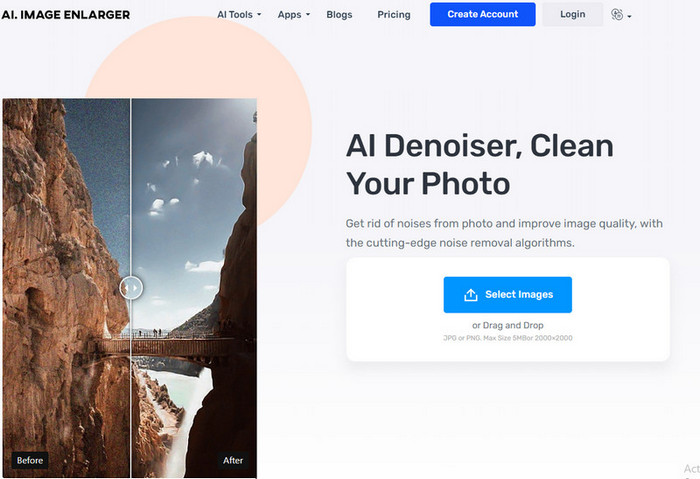
AI Image Denoiser è un altro strumento di riduzione del rumore nelle immagini basato sull’intelligenza artificiale che puoi usare sul web. Una volta caricate qui le tue foto, questo strumento offre un processo fluido e semplice per correggere le imperfezioni presenti nelle immagini. Come nel caso del primo software citato, non dovrai regolare altre impostazioni perché questo strumento utilizza una funzione di auto-editing. Sebbene il software sia facile da usare e sfrutti la potenza dell’IA, non dispone ancora di altre funzioni speciali che potrebbero aiutarti a correggere ulteriormente il rumore nelle tue foto. Quindi, se decidi di usare questo strumento, puoi visitare liberamente il sito ufficiale e iniziare a risolvere il problema caricando qui le tue immagini.
Professionisti
- Supporta un'interfaccia di facile comprensione.
- I nuovi utenti non avrebbero problemi a denominare la fotografia che hanno.
- Il risultato che fornisce è inaspettatamente buono.
Contro
- Non ha caratteristiche e funzioni aggiuntive.
- C'è una limitazione sulla dimensione e dimensione dell'immagine.
- Annunci sul sito web.
TopazLabs Denoise AI
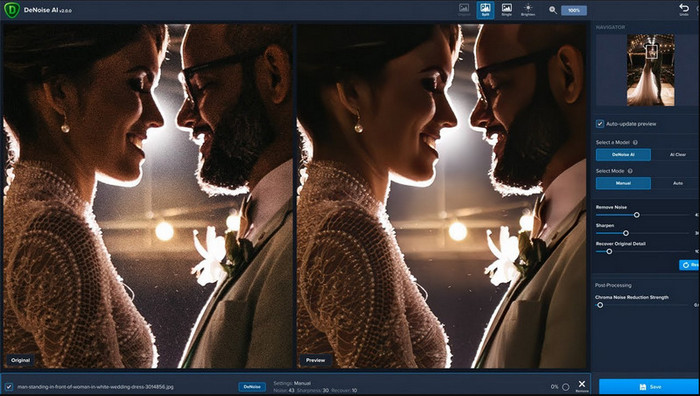
TopazLabs Denoise AI è un potente strumento di riduzione del rumore nelle immagini che puoi scaricare sul desktop. Come gli altri software online, questo strumento è alimentato dall’IA. È in grado di individuare con precisione cosa non va nella tua immagine e di migliorala per ottenere la migliore qualità possibile e dettagli molto fini. Molti utenti hanno scaricato questo software sul proprio computer per la sua efficacia nel restituire risultati impressionanti; gli esiti sono entusiasmanti. A causa delle sue funzioni avanzate di fotoritocco, dovrai acquistare il software da TopazLabs per sfruttare appieno tutta la potenza di questo denoiser.
Professionisti
- Puoi scaricare liberamente questo software sul tuo desktop.
- Supporta funzionalità e funzioni di modifica esperte per avere un'immagine perfetta.
- Ha un'intelligenza artificiale che supporta la rimozione dei rumori sulle foto che hai caricato.
Contro
- Questo strumento può essere un po' scomodo per i nuovi.
- Il prezzo è più alto.
SoftOrbits Easy Photo Denoise
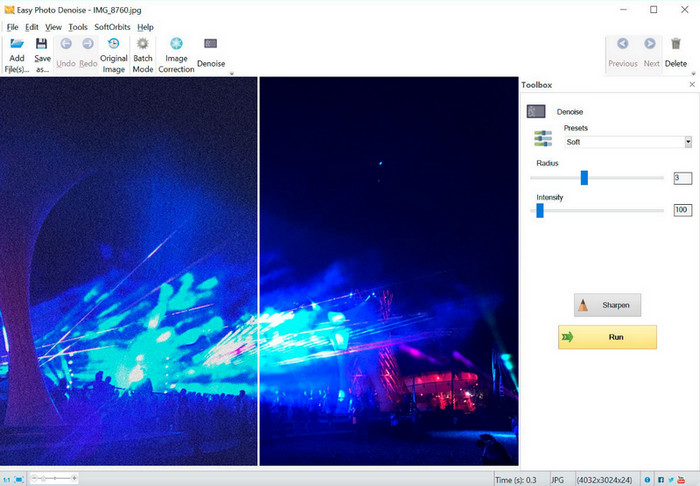
Come dice il nome, SoftOrbits Easy Photo Denoise è uno degli strumenti più accessibili che ogni principiante può usare per rimuovere il rumore da un’immagine. Anche se lo strumento non supporta l’IA come gli altri tre denoiser che abbiamo presentato, rimane comunque piuttosto semplice da usare. Diversamente da altri software complessi, puoi regolare pochi parametri e vedere subito il risultato sulla tua immagine. Non avrai bisogno di conoscenze approfondite di fotoritocco se hai scaricato questo software sul desktop. Il fatto che il software sia facile da usare non significa che sia gratuito. Il prezzo è comunque abbastanza contenuto rispetto a TopazLabs. Tuttavia, le sue funzioni non sono così approfondite come quelle di altri editor professionali che puoi scaricare.
Professionisti
- Ha un'interfaccia concisa, quindi puoi padroneggiarlo rapidamente usandolo in pochissimo tempo.
- Puoi caricare più immagini qui e modificarle.
- Regola liberamente il parametro per rimuovere il rumore più velocemente.
Contro
- I preset hanno bug.
- Non ha caratteristiche di profondità.
Parte 3. Come utilizzare il miglior software di riduzione del rumore dell'immagine sul Web
Per mostrarti come ridurre il rumore nelle immagini con FVC Free Image Upscaler, puoi seguire i passaggi riportati di seguito. Seguili nell’ordine per eliminare il problema del rumore nella tua foto.
Passaggio 1. Apri lo strumento web cliccando su questo link; si aprirà direttamente una nuova scheda nel browser.
Passaggio 2. Premi Upload Image per aggiungere la foto che vuoi ingrandire e dalla quale vuoi rimuovere il rumore.
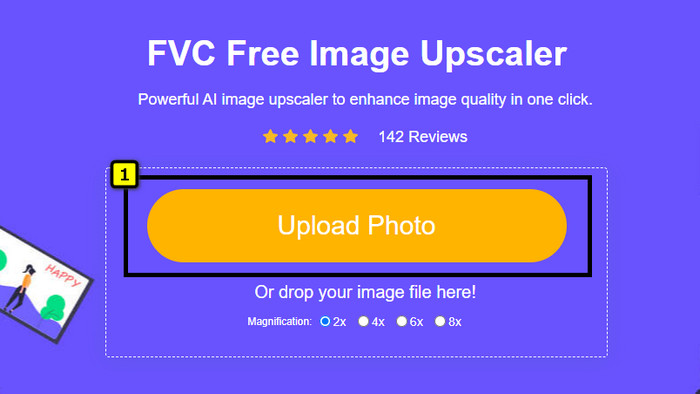
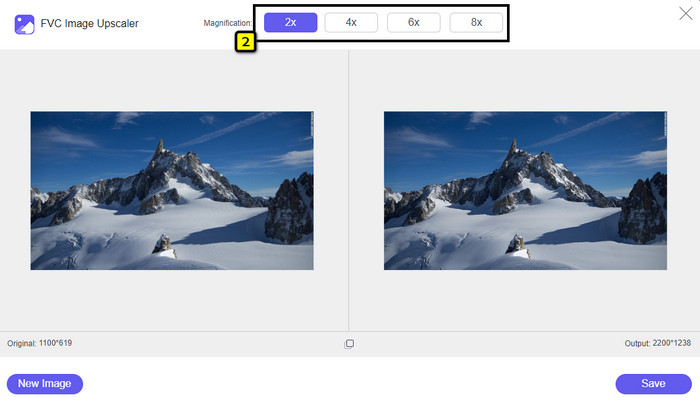
Passaggio 3. L’IA eseguirà automaticamente l’upscaling dell’immagine; puoi scegliere altre opzioni nella parte superiore, come 2x, 4x, 6x o 8x.
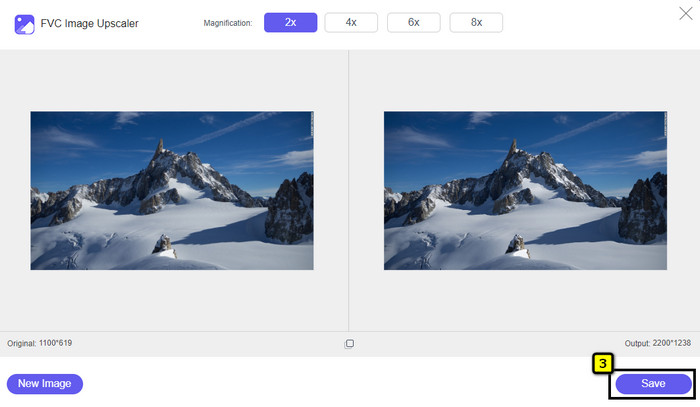
Passaggio 4. Al termine, fai clic sul pulsante Save per scaricare la foto senza alcun rumore.
Parte 4. Domande frequenti sui denoiser di immagini
Cosa causa rumore nella mia fotografia?
Se la tua fotocamera è impostata o ha un ISO elevato, un sensore della fotocamera piccolo, una velocità dell'otturatore e altro, ciò potrebbe causare disturbi all'immagine. È evitabile? Sì, lo è se utilizzi un'opzione o un equipaggiamento standard.
Ho bisogno di un denoiser dell'immagine per rimuovere il rumore dall'immagine?
Sì, avrai bisogno di un denoiser di immagini affidabile per eliminare il rumore dell'immagine. Puoi fare affidamento sullo strumento web online che introduciamo per primo e seguire il passaggio che aggiungiamo nella parte 3.
Come posso rendere più nitide le immagini facilmente?
Per sapere come rendere le immagini più nitide online e offline, puoi cliccare su questo link e leggere l’elenco dei software che abbiamo aggiunto, in grado di aiutarti a rendere qualsiasi foto più definita con facilità.
Conclusione
Infine, speriamo che le tue esigenze di riduzione del rumore nelle immagini siano state soddisfatte leggendo attentamente questo articolo, in cui riportiamo i fatti e prendiamo in considerazione il meglio del meglio tra cui puoi scegliere. Per gli utenti che non amano scaricare software sul proprio computer, inizia a usare FVC Free Image Upscaler per svolgere il tuo lavoro e completarlo subito.
-
 Come ridimensionare l'immagine – Adobe Resize Image [Online e Offline]
 Se stai cercando Adobe ridimensiona l'immagine, allora abbiamo la soluzione per te. Visualizza attentamente questo post per scoprire come ridimensionare le immagini utilizzando Adobe sul tuo PC.
-
 Come ridimensionare la foto per Facebook [Passaggi facili e veloci]
 Se hai problemi a caricare un'immagine di grandi dimensioni su Facebook, abbiamo una soluzione per te. Completa questo articolo per scoprire come ridimensionare le foto per Facebook.
-
 Le migliori app per ridimensionare foto online e offline per computer
 Cerchi le migliori applicazioni di ridimensionamento delle foto per il tuo desktop? Abbiamo elencato le app di ridimensionamento delle foto online e offline con le migliori prestazioni che dovresti provare.
