


 Video Converter Ultimate
 Screen Recorder
 Riparazione video
 Download sicuro
Come rimuovere Movavi Watermark gratuitamente sul desktop senza sforzo
Movavi è il miglior video editor, registratore dello schermo, editor di foto e molto altro di cui avrai mai bisogno sul tuo desktop. Offre gli strumenti di editing e registrazione, sia professionali che di base, di cui hai bisogno per far apparire ogni contenuto eccezionale e migliore degli altri. Questo software è diventato popolare tra gli utenti grazie alla sua facilità d’uso, al chroma key, alle transizioni fluide, alla creazione di filmati ecc. Tuttavia, se utilizzi la versione non registrata, sul prodotto finale che stai per esportare verrà applicata una filigrana. Sei infastidito dalla filigrana? Non preoccuparti, perché esistono modi per rimuovere gratis la filigrana di Movavi direttamente dal tuo desktop. Quindi, se vuoi eliminare la filigrana di Movavi, leggi le informazioni qui di seguito che abbiamo aggiunto per te.

Parte 1. Come rimuovere Movavi Watermark gratuitamente utilizzando i 3 servizi Web e offline
FVC Video Converter Ultimate - Il miglior dispositivo di rimozione di filigrane Movavi [consigliato]
Vuoi sapere come rimuovere la filigrana dal video registrato con Movavi Screen Recorder e poi esportato? Il miglior strumento è a portata di mano: FVC Video Converter Ultimate. Questo strumento è impareggiabile per quanto riguarda la rimozione della filigrana da qualsiasi video. La sua efficacia nella rimozione delle filigrane è, di gran lunga, la migliore e la più efficace. Inoltre, se utilizzi questo software per rimuovere la filigrana di Movavi, puoi aspettarti di non vedere alcuna traccia sul video, come se non ci fosse mai stata. Dunque, se vuoi usare questo software per rimuovere la filigrana che è diventata parte del video, devi servirti di questo strumento definitivo.
Inoltre, con questo strumento puoi anche aggiungere una filigrana al video che desideri; oltre a ciò, offre molte altre funzioni e caratteristiche che persino Movavi non possiede. Sorprendente, vero? Bene, andiamo al sodo e passiamo ai passaggi. Per aiutarti a rimuovere la filigrana dal video che esporti con Movavi, puoi seguire il tutorial che riportiamo qui sotto.
Passaggio 1. Clicca il pulsante di download e scegli tra Windows e Mac per scaricare la versione corretta del software definitivo. Poi fai clic sul file scaricato per installarlo e apri il software per iniziare a usarlo.
Download gratuitoPer Windows 7 o versioni successiveDownload sicuro
Download gratuitoPer MacOS 10.7 o versioni successiveDownload sicuro
Passaggio 2. Una volta avviato lo strumento definitivo, vai alla sezione Casella degli strumenti e clicca su Video Watermark Remover tra le funzioni disponibili.
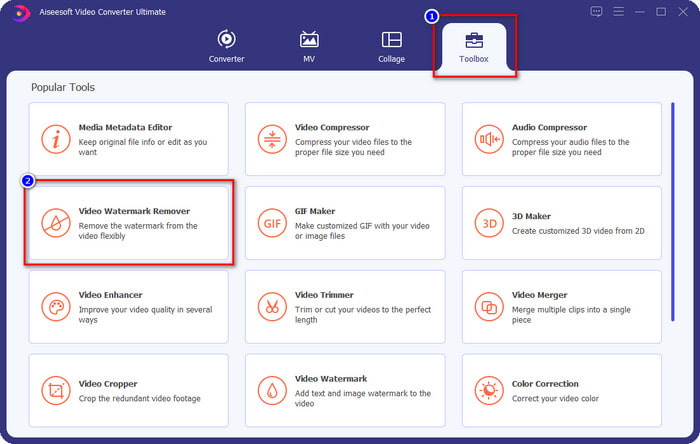
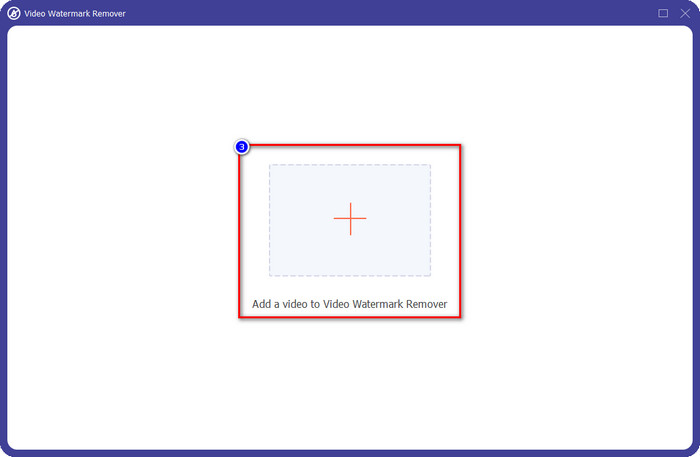
Passaggio 3. Dopo aver fatto clic, si aprirà una nuova finestra sullo schermo. Clicca sull’icona +, carica il video di Movavi con la filigrana e clicca su Apri.
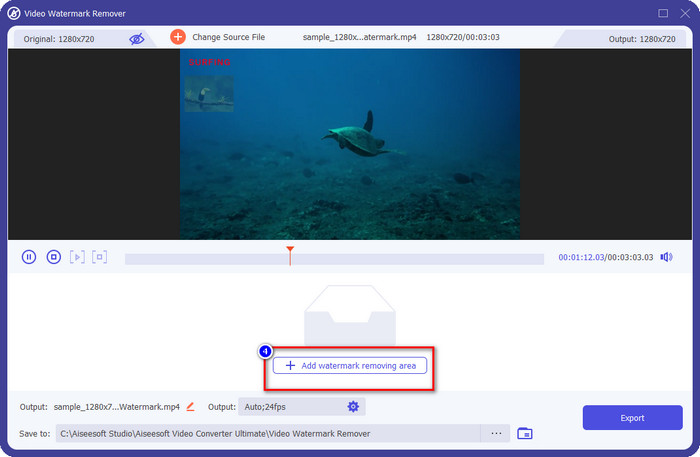
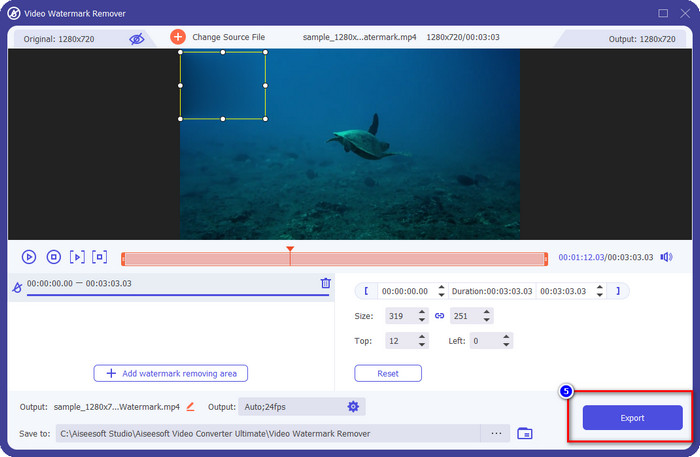
Passaggio 4. In Video Watermark Remover, clicca sul pulsante Add Watermark Removing Area per iniziare a rimuovere la filigrana di Movavi.
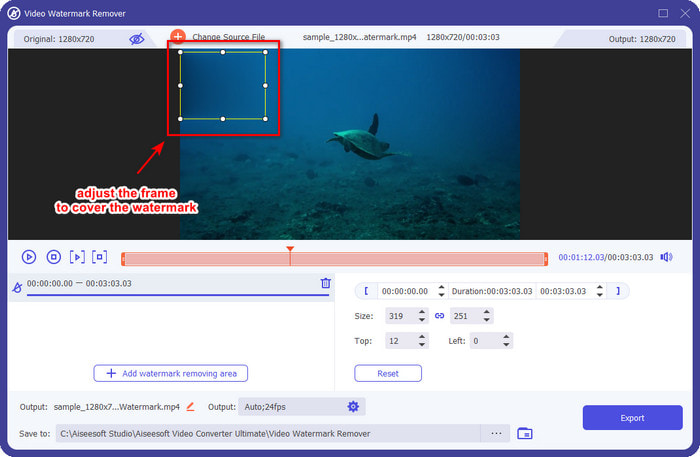
Passaggio 5. Tieni premuto e posiziona il riquadro di selezione sulla filigrana per cancellarla; puoi allargarlo se il riquadro è troppo piccolo o ridurlo se è troppo grande.
Opzionale: Qui puoi modificare le impostazioni di output facendo clic sul pulsante a discesa. Cambia le impostazioni video e audio in base alle tue preferenze e clicca su OK per salvare le modifiche applicate.
Passaggio 6. Per iniziare a esportare il video di Movavi da cui hai rimosso la filigrana, clicca su Esporta e inizierà il processo di rimozione della filigrana. Dopo un minuto o meno, la cartella verrà mostrata sullo schermo e potrai vedere dove si trova il file nella posizione indicata.
Rimozione filigrana senza FVC
Vuoi sapere come rimuovere la filigrana del photo editor di Movavi dalle immagini che hai esportato? Allora devi dare un’occhiata a FVC Free Watermark Remover, che puoi usare gratuitamente sul web. Questo software è il migliore per rimuovere professionalmente la filigrana dalle immagini. Anche se è gratuito, l’effetto di rimozione che offre è di altissimo livello e non vedrai alcuna sbavatura sull’immagine dopo averla ripulita.
Le sue caratteristiche e funzioni non sono ampie come lo strumento definitivo, ma le sue prestazioni nella rimozione della filigrana sono eccellenti. Quindi, se desideri rimuovere la filigrana dell'immagine che esporti nell'editor di foto, puoi copiare i passaggi seguenti.
Passaggio 1. Clicca sul link qui sopra per aprire il sito ufficiale del watermark remover.
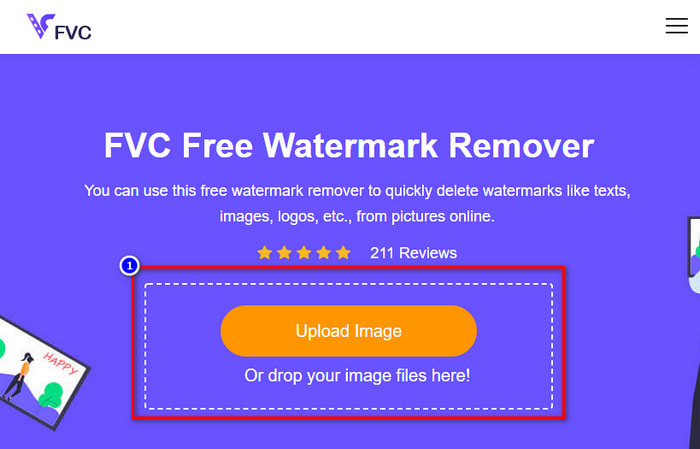
Passaggio 2. Nello strumento online per la rimozione della filigrana, clicca su Upload Image, quindi trova l’immagine con la filigrana. In alternativa, puoi anche trascinare e rilasciare il file qui, se preferisci.
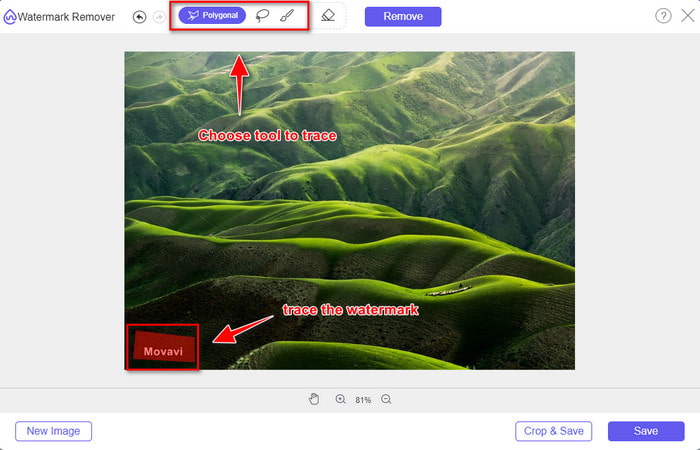
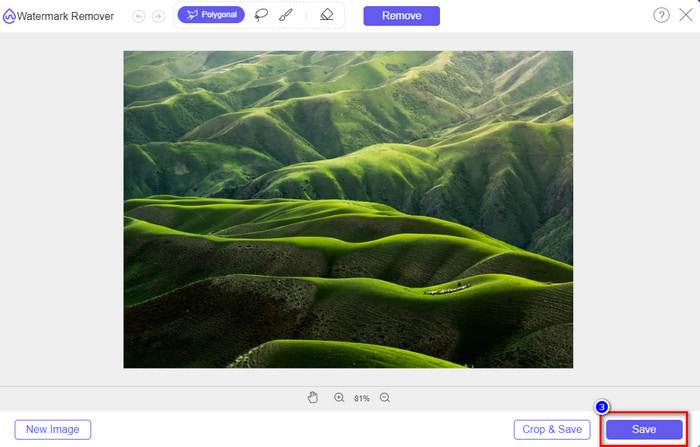
Passaggio 3. Una volta caricato il file, traccia la filigrana di Movavi sull’immagine; puoi usare diversi strumenti.
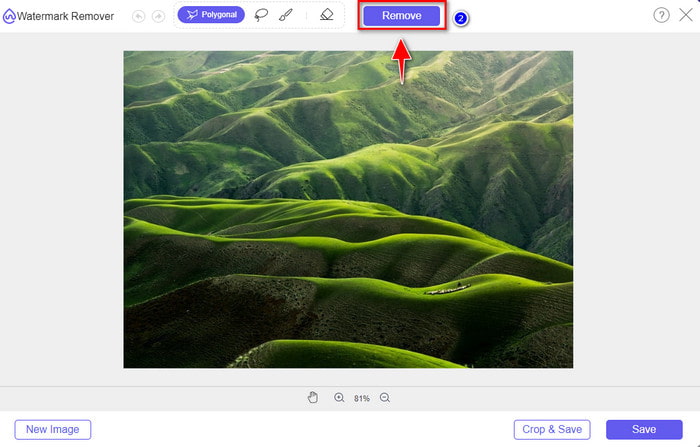
Passaggio 4. Clicca sul pulsante Remove per eliminare la filigrana dalla tua immagine.
Passaggio 5. Premi Save per scaricare l’immagine da cui hai rimosso la filigrana.
Rimozione filigrana Media.io
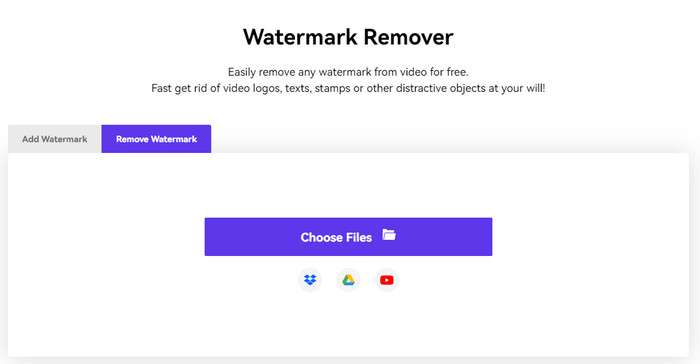
Media.io Watermark Remover è un altro strumento web che puoi usare per rimuovere la filigrana lasciata da Movavi. Questo strumento è gratuito e non richiede alcun download, quindi non avrai bisogno di scaricare o avviare alcun programma. Quindi, se desideri rimuovere la filigrana dai tuoi video senza scaricare file e gratuitamente, potresti provare questo strumento. Anche se a colpo d’occhio l’interfaccia generale dello strumento è ottima, i processi di caricamento e download richiedono più tempo rispetto al primo strumento online. Se per te l’attesa non è un problema e vuoi imparare come rimuovere gratis la filigrana dall’editor video di Movavi, leggi i passaggi qui sotto.
Passaggio 1. Apri il remover online cercandolo nel browser web.
Passaggio 2. Clicca su Choose File per caricare il video di Movavi con la filigrana e attendi il termine del caricamento.
Passaggio 3. Premi Add Area sul lato destro e copri la filigrana.
Passaggio 4. Quindi clicca su Export per salvare il video senza la filigrana di Movavi.
Parte 2. Domande frequenti su come rimuovere Movavi Watermark
Come rimuovere la filigrana di prova Movavi senza utilizzare un dispositivo di rimozione della filigrana?
Si supponga di voler rimuovere la filigrana applicata al file esportato. In tal caso, devi considerare l'acquisto e la registrazione in modo che la filigrana Movavi sparisca quando esporti. Puoi visitare il suo sito Web ufficiale per vedere le offerte che offre.
La rimozione della filigrana Movavi riduce la qualità del video?
Dopo aver rimosso la filigrana Movavi sul video, anticipa che non vedrai alcuna pessima qualità quando stai per esportarlo. Tuttavia, a volte il software distrugge la qualità del video, quindi è meglio scegliere con attenzione quale strumento stai per utilizzare.
Dopo aver rimosso la filigrana Movavi, diventa sfocata?
La maggior parte dei software rende sfocata la filigrana di Movavi, mentre altri no. Quindi, supponiamo di voler sfocare la filigrana Movavi. In tal caso, puoi provare a utilizzare il software sopra in quanto hanno sfocato la filigrana per renderla invisibile sul video o sulla foto.
Conclusione
Il tutorial su come rimuovere gratis la filigrana di Movavi è stato reso possibile grazie all’aiuto di questi software disponibili per desktop. Ma quale strumento dovresti usare? Gli altri due strumenti possono coprire gratuitamente la filigrana per te. Tuttavia, se desideri un software professionale che elimini completamente la filigrana di Movavi dal video, allora devi usare FVC Video Converter Ultimate. Perché dovresti usare questo software definitivo? Perché è il miglior strumento per rimuovere la filigrana di Movavi senza lasciare alcuna traccia sul video. Allora, cosa aspetti? Scaricalo subito sul tuo desktop per iniziare a usarlo immediatamente.
-
 Come aggiungere filigrana a un video in iMovie su Mac [All Embracing]
 Vuoi conoscere i segreti per aggiungere una filigrana a un video in iMovie? Non versare il tè su nessuno e imparalo leggendo questo articolo.
-
 3 modi più semplici per aggiungere filigrana a una GIF online e offline
 Aggiungere una filigrana a una GIF può essere facile come 1-2-3 se usi correttamente lo strumento giusto. Gli strumenti sul mercato sono troppo ampi, ma presenteremo i tre strumenti su cui puoi fare affidamento.
-
 4 modi migliori per rimuovere la filigrana dalla GIF [Online & Offline]
 Hai bisogno di rimuovere la filigrana dalla GIF? Con lo strumento in questo articolo, imparerai i diversi stili con il diverso dispositivo di rimozione della filigrana disponibile sulla tua piattaforma.
