


 ビデオコンバーター究極
 スクリーンレコーダー
 ビデオ修復
ビデオ修復数回のクリックでビデオを2倍速くするために利用できる5つの最高のツールをダウンロードしてください
動画を2倍速に上げて再生したいときがあります。見飛ばしたい部分があったり、全体の再生時間を短くするために動画を速く再生したい場合などです。もし動画を速く再生する方法を知りたいのであれば、この記事を読み進めてください。どのように操作するのか、またなぜ2倍速を使うべきなのかについて、十分なアイデアと知識を得ることができます。

パート1。2xビデオとは何ですか?
スピードウォッチングは、自然な再生速度に加速されたビデオを視聴する行為です。私たちが見ているビデオの速度を調整するだけです。それはさまざまな方法で私たちを助けることができます。したがって、自然な速度のビデオを2倍のビデオ速度にすることの利点を知りたい場合。次に、以下の詳細を読んで詳細を確認してください。
動画を倍速視聴することのメリット
◆2倍速で動画を再生すると、動画を見る価値があるかどうかを簡単に判断できます。これは、長時間の動画に当てはまる可能性があり、ほとんどの場合、通常の速度ですべてを視聴するのは退屈です。
◆通常の再生速度よりも大幅に時間を節約できます。この場合、15分の長さの2つ以上のビデオを視聴する必要がある場合は、2倍速く視聴することをお勧めします。通常の速度で見るよりも速く細部を吸収するため。したがって、15分で1つのビデオを見る代わりに、その時間内に2つのビデオを見ることができます。
◆高速再生で再生される動画を見るのが好きな人のほとんどは、1分以内にすべてを覚えるのが好きな人です。これは忙しい人や急いでいる人に最適です。
◆通常の2倍速で動画を再生すると、フォーカスとリスニングのスキルが向上し、トレーニングが向上します。これで、動画の速度を上げることの利点について理解できました。今こそ、ビデオの速度を上げるのに役立つツールに進むのに適切な時期です。次のパートでは、使用する必要のあるさまざまなツールについて説明します。
パート2。2倍のビデオを作成する方法
動画を2倍速で再生したいなら、高機能な動画編集ソフトであるVideo Converter Ultimateを試してみてください。このツールは、変換やGIF作成、画質向上など、さまざまな問題の解決に多くのユーザーをすでに助けてきました。そのため、このツールを使えば動画の再生速度を速くすることも簡単に行えます。また、速度を上げている最中でも、下部で2倍速のプレビューを確認できます。そのスピードが自分に合っているかどうかを判断するのに役立ちます。それでは、以下の手順に従って、動画の再生速度を変更する方法を見ていきましょう。
ビデオを2倍の速度まで高速化する方法の手順
ステップ1. ツールをデスクトップにダウンロードし、ダウンロードが完了したらインストールします。
無料ダウンロードWindows 7 以降に対応安全なダウンロード
無料ダウンロードMacOS 10.7 以降に対応安全なダウンロード
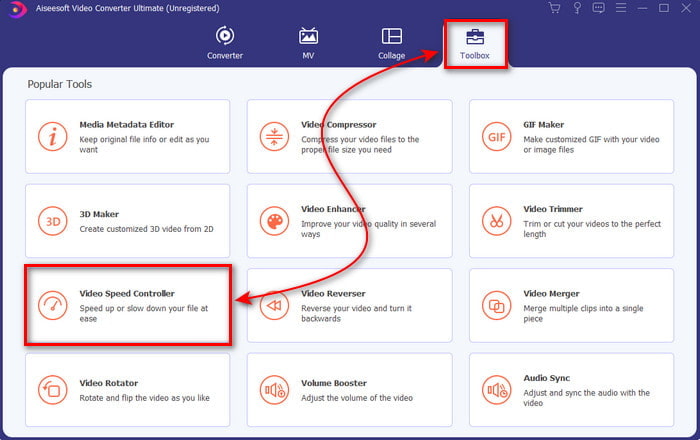
ステップ2. その後、ツールボックスに進み、動画速度コントローラーを探します。
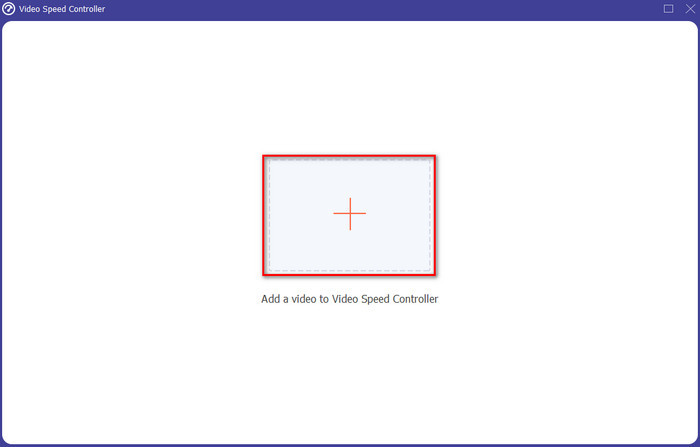
ステップ3. +ボタンをクリックして、2倍速で視聴したいファイルを追加し、開くをクリックして進みます。
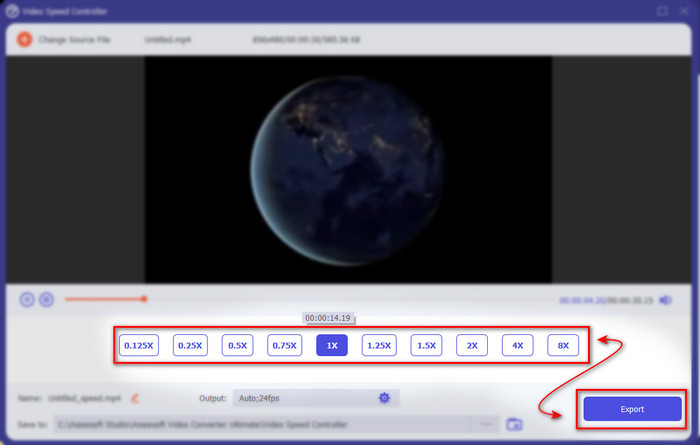
ステップ4. ファイルを追加したら、利用可能な動画速度リストの中から2xを選択します。その後、動画速度を保存するために書き出しボタンをクリックします。
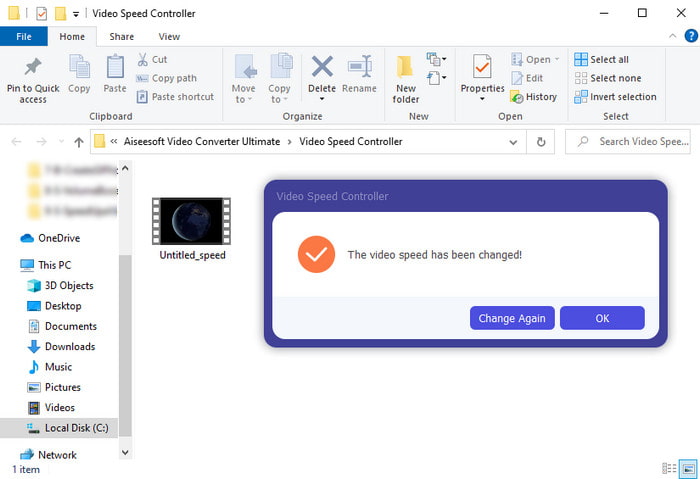
ステップ5. ファイルの書き出しが完了すると、フォルダーが画面に表示されます。そのファイルをクリックして、スピードアップされた動画を再生します。
パート3。2倍速でビデオを再生する方法
1.VLCメディアプレーヤー
PCやMacにダウンロードできる最も有名なメディアプレーヤーのひとつが、VLCメディアプレーヤーです。このデスクトップツールは、映画クリップの視聴が好きなユーザーによく使われています。また、このツールは、一般的にウェブ上で見かけるほとんどすべての形式に対応しています。ただし、AVIやMKVのような複雑なコーデックを使った一部の動画は再生できない場合があります。そこで、VLCメディアプレーヤーで動画を2倍速にする方法を知りたい方は、以下の手順に従ってください。
ステップ1. VLCをデスクトップにダウンロードして起動します。
ステップ2. ファイルをインターフェース上にドラッグ&ドロップし、ここに追加した動画ファイルをクリックします。
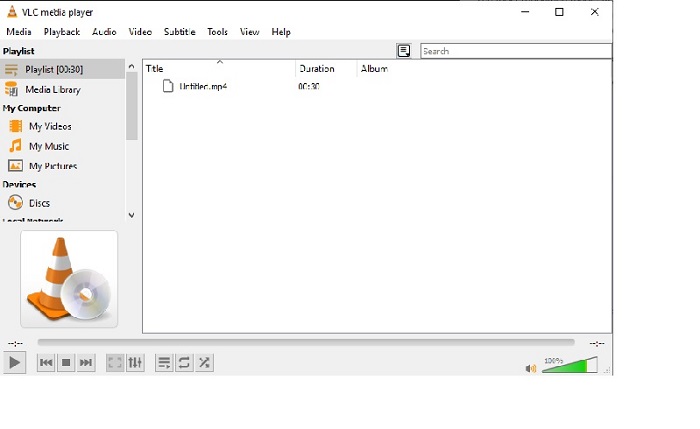
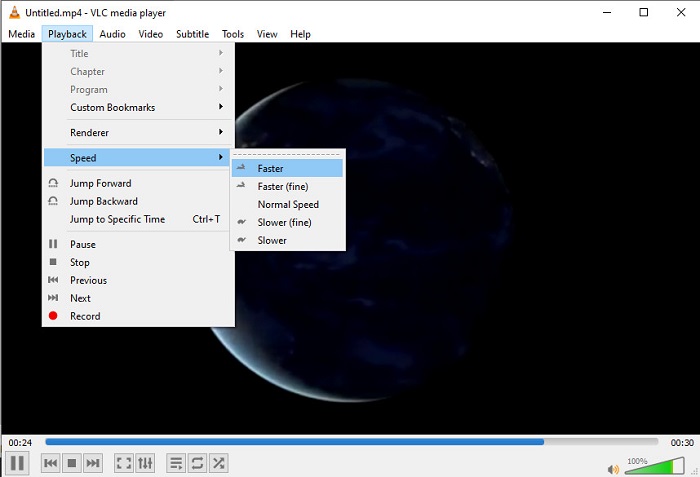
その後、再生メニューに進み、速度をクリックして、動画の通常の再生速度を変更します。
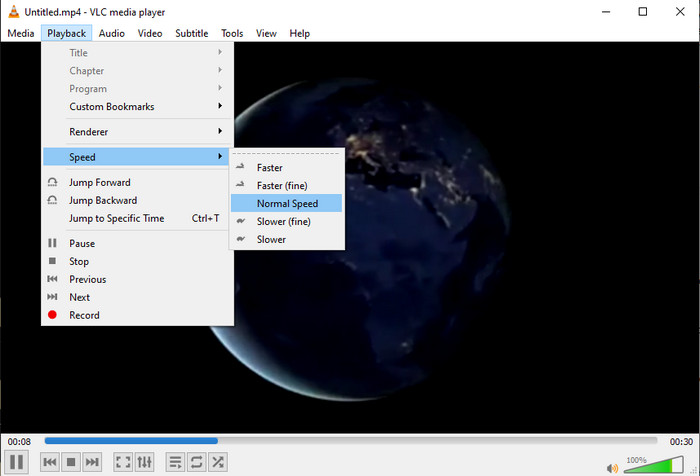
ステップ3. 速度を元に戻したい場合は、再生メニューから速度をクリックし、標準を選択します。
2.QuickTimeプレーヤー
Macに標準搭載されているメディアプレーヤーを使えば、2倍速で動画を再生できます。QuickTime Playerは、Macにプリインストールされているメディアプレーヤーです。VLCと違い、このツールはわざわざダウンロードする必要がありません。ただし、Windowsユーザーはこのツールを利用できません。Windows PCには対応していないためです。さらに、Macで利用できるとはいえ、対応していない機能も多く、特にフォーマット面で制限があります。Windowsで開発された形式の多くはここでは再生できません。では、Macをお使いの場合は、以下の手順に従って操作してみてください。
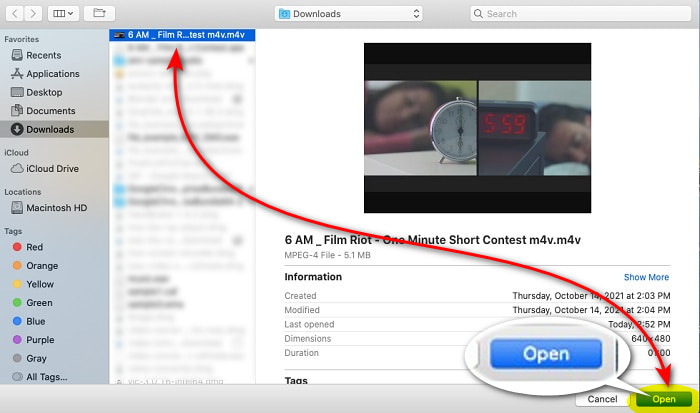
ステップ1. FinderでQuickTimeを探して起動します。ファイルをクリックし、ファイルを開くから動画を選択して開きます。
ステップ2. 動画の再生中に、早送りボタンをクリックして再生速度を上げます。
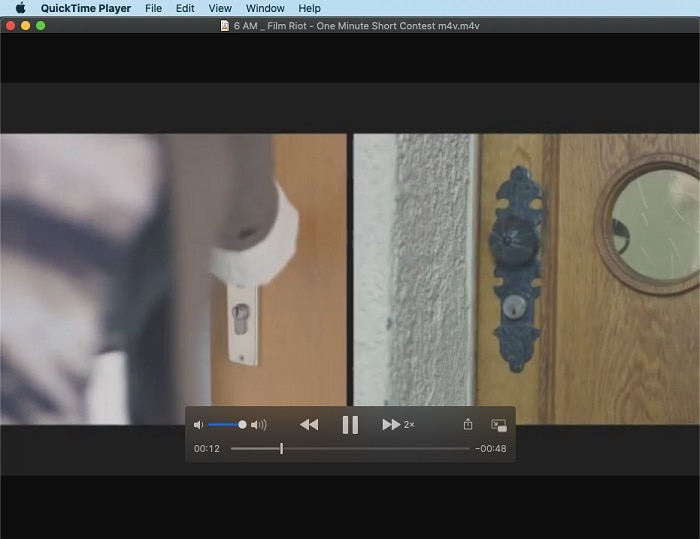
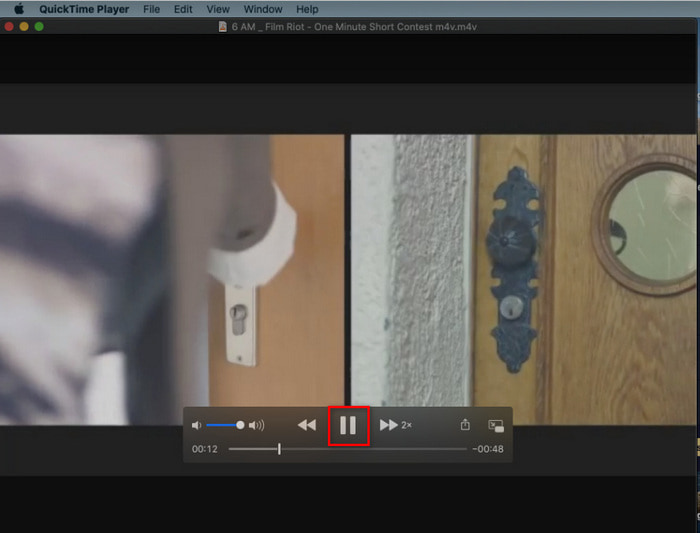
ステップ3. スピードアップをやめたい場合は、一時停止/再生ボタンをクリックします。
3. Windows MediaPlayer
Macにプリインストールされたメディアプレーヤーがあるように、Windowsにも独自のメディアプレーヤーであるWindows Media Playerがあります。QuickTimeと同様に、このツールもすでにWindowsにプリインストールされており、そのまま動画を視聴したり、通常より2倍速で再生したりすることができます。ただし、このツールの倍速再生はあまりおすすめできません。映像が途切れてしまい、スムーズに速く再生する代わりに数秒単位で飛んでしまうからです。それでも問題ないのであれば、以下の手順に従って速度を上げてください。
ステップ1. Windowsデスクトップでツールを起動します。
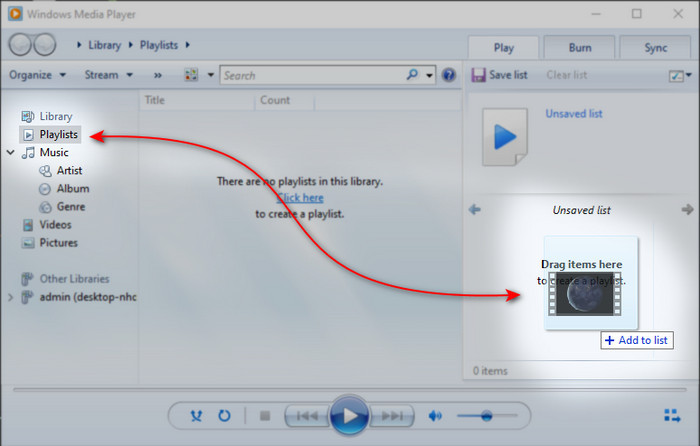
ステップ2. プレイリストをクリックし、右側の小さなボックスに動画ファイルをドラッグ&ドロップします。
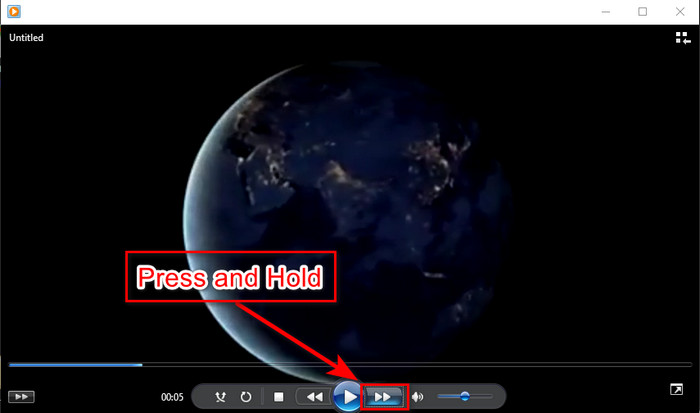
ステップ3. 動画は自動的に再生されます。速度を上げたい場合は早送りボタンを押し続け、止めたいときにボタンを離します。
パート4。2xビデオに関するFAQ
スローモーションとスピードアップのどちらが良いですか?
実際には、それはあなたがそれを使用しようとしていると思われる状況に依存します。あなたがする両方の調整はあなたを助けるでしょうが。したがって、チュートリアルを見ている場合、またはマジシャンのトリックを明らかにしたい場合は、スローモーションを使用してください。ただし、急いでいて多くのビデオクリップを見る必要がある場合は、再生を高速化するためにそれを見る必要があります。
超高速モーション再生に録音できますか?
はい、タイムラプスを使用して、1時間のビデオを1分または1秒にすることができます。ただし、スピードアップとは異なり、タイムラプスは通常の2倍、4倍、8倍のスピードアップよりもはるかに高速です。
2倍速でビデオを見るデメリットは何ですか?
この種の速度でビデオを見ると大いに役立ちますが、その速度で再生すると多くの欠点が発生する可能性があります。たとえば、これにビデオを再生することが習慣になると、ビデオの通常の速度が遅くなります。
結論
これで、動画を2倍速で視聴するために使えるさまざまなツールについて理解できたと思います。あとは、どれを選ぶかを決めるだけです。この記事が、どの方法が自分に合っているかを判断する助けになれば幸いです。速度調整だけを行いたいならメディアプレーヤーを使うのもよいですし、Video Converter Ultimateのような編集ソフトを利用するのもよいでしょう。どの方法を選んだとしても、ユーザーであるあなたにとって十分に実用的な手段であることに変わりはありません。
-
 さまざまな用途のAndroidモバイル向けのトップ4ベストVOBプレーヤー
 VOBビデオをダウンロードしてAndroidで視聴したい場合は、この記事の次の上位4つのVOBプレーヤーから最適なビデオを選択できます。
-
 Androidモバイル向けのトップ5のベストWindowsMediaPlayerの選択肢
 Android用のWindowsMedia Playerをダウンロードすることはできないため、この記事を読んで、Windows MediaPlayerの5つの最良の代替案について学ぶ必要があります。
-
 2025年に見逃せないiPhone向けベストビデオプレーヤートップ5
 すべての形式のビデオを再生し、iPhoneでより良い視聴体験を得るには、この記事を読んで、iPhone 12/11 / X / 8/7/6に最適な5つのビデオプレーヤーについて学ぶ必要があります。
