


 ビデオコンバーター究極
 スクリーンレコーダー
 ビデオ修復
ビデオ修復SWFをMOVに変換する知っておくべき便利なツール[解決済み]
ビデオおよびベクター形式のアニメーションは、Adobe Flash ソフトウェアで作成される SWF ファイルに含まれています。ShockWave Format は Small Web Format の別名であり、その完全な略称です。SWF ファイルは、マルチメディア素材をインターネット上で効率的に配布するためによく使用されます。小規模な Web アプリケーションでは、この形式に保存できる ActionScript が役立ちます。指定された形式のファイルを再生できず、無料の SWF から MOV への変換ソフトがあるかどうか気になっているなら、この記事はまさにうってつけです。動画ファイルを変換する際に利用できる、最良かつ最も効率的なツールを紹介していきます。さっそく始めましょう!
パート 1. はじめに: SWF と MOV
SWF は、インターネット上でテキスト、ビデオ、ベクターグラフィック、ActionScript を転送するために用いられるファイル形式です。SWF ファイルを利用するには Adobe Flash Player が必要です。SWF ファイル形式は、単にグラフィックを転送するだけでなく、アンチエイリアス処理や画面表示などにも使用できる、リソース効率を重視した転送形式として設計されています。アンチエイリアスは、ビットマップおよびそれに付随するインタラクティブボタン、陰影、アニメーションなどのプロパティを高速に描画するために不可欠です。
一方、MOV ファイルは Apple の QuickTime ムービーのエンコード規格およびデータ圧縮標準に従ってエンコードされており、この形式で作成された動画ファイルには .mov という拡張子が付きます。デジタルムービーやその他の動画クリップ向けの標準および圧縮基準は、Apple によって専用に策定されました。これらの MOV ファイルは、クロス互換性に対応したエンコードが施されているため、Mac だけでなく Windows ベースのデジタル動画プレーヤーでも再生できます。Windows Media Player もこれらの MOV ファイルの再生機能を備えており、Mac/Windows の両方で Apple QuickTime Player や VLC Media Player を使って開いて視聴することができます。
| ファイル拡張子 | SWF | MOV |
| ファイルタイプ | ShockWave Flash ムービー | Apple QuickTime Movie |
| によって開発された | アドビシステム | 林檎 |
| 長所 | Web アニメーションは、自由にスクリプト可能なビジュアル形式を使用することで可能になります。グラフィックはベクターベースであるため、問題なくサイズを変更できます。短時間でロードされます。 | 各ファイルには、独立したトラックに保存される高品質のオーディオおよびビデオ コンポーネントが含まれており、時間とコンテンツの両方を編集できます。ファイルは、さまざまな無料のビデオ プレーヤーで表示できます。 |
| 短所 | 集中的な CPU 使用率。 Flash プラグインがコンピュータにインストールされるまで、SWF ビデオは再生できません。とりわけ、作成には高価なソフトウェアが必要です。 | QuickTime 環境はより安定したパフォーマンスを提供します。ただし、.mov ファイルを開くには、特定のコーデックが必要になる場合があります。 |
パート 2.3 SWF を MOV に変換する際に使用する効果的なツール
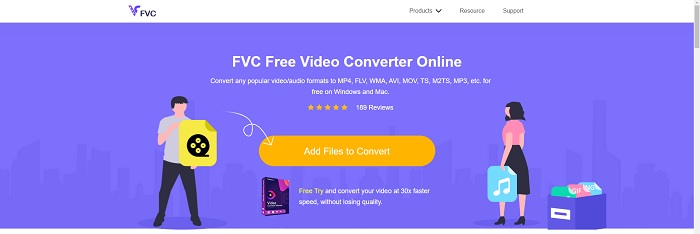
オプション 1. 無料のビデオ コンバーター オンライン
FVC Free Video Converter Online を使えば、さまざまな動画および音声形式を変換することができます。高解像度の動画を、画質を損なうことなく MP4、FLV、WMV などのコーデックに容易に変換できます。複数の動画や音声ファイルを変換する際にも、品質の低下を心配する必要はありません。この無料の動画変換ツールは、変換機能だけでなく編集機能でもよく知られており、ユーザーは思いどおりに動画をカスタマイズできます。
長所
- 多数のビデオファイル形式をサポートしています。
- 変換された出力は高品質です。
短所
- これはオンライン Web ツールであるため、大きなファイル サイズのビデオを変換するには、より高速な接続が必要です。
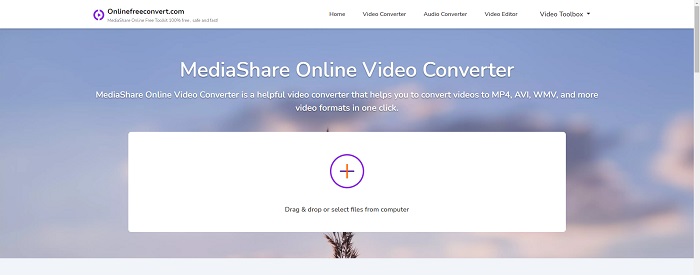
オプション 2. オンライン無料変換
ビデオをトランスコードする場合、この無料のオンライン アプリケーションが最適なオプションです。このアプリケーションは、物事をシンプルかつ使いやすくするために、ファイルの種類と解像度という 2 つのオプションを提供します。このオンライン コンバーターを利用するには、画面の指示に従ってください。
長所
- アクセスしやすく、ユーザーフレンドリーなインターフェースを備えています。
- ビデオの品質を向上させることができる他のツールを提供します。
短所
- サポートするビデオ形式は多くありません。
オプション 3. 任意のコンバージョン
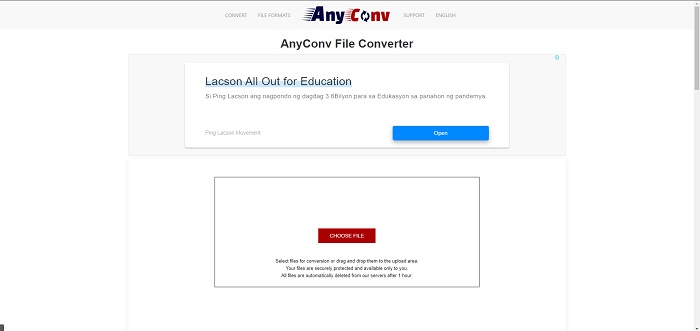
AnyConv は、オランダ語のユーザー インターフェイスを備えたオンライン コンバーターです。このアプリケーションの商用版も無料です。 AnyConv には、1 時間あたり 60 ファイルの変換制限も含まれています。オンライン コンバーターを使用すると、最大 50 MB のサイズのファイルを変換し、300 を超えるさまざまな出力形式から選択できます。
長所
- 幅広いフォーマットがあります。ドキュメントのようなビデオやオーディオ以外のフォーマットもサポートしています。
- このコンバーターの使用方法を説明します。
短所
- 変換プロセスやコンテンツ自体に役立たない、または適していない広告が表示されます。
パート 3. Mac で SWF を MOV に変換する方法
この記事では、SWF を MOV に変換したい Mac ユーザー向けに Video Converter Ultimate を提案します。このソフトウェアは、Windows 版と Mac 版の両方が無料でダウンロード可能です。ツールが使いやすく、インターフェースもシンプルなため、幅広いユーザーが利用できます。このプログラムを使えば、動画ファイルを別の形式に約 1 分で変換でき、これは他の変換アプリケーションやオンラインサービスと比べた際の大きな特徴です。さらに、本ソフトには動画をより一層向上させるための追加機能も多数備わっています。ソフトウェアの説明に一通り目を通した前提で、次の手順に進みましょう。
ステップ 1. ダウンロードを開始するには、下に用意されている 無料ダウンロード アイコンを右クリックするだけです。このソフトウェアは、Windows と Mac の両方のオペレーティングシステムに対応しています。ソフトウェアのダウンロードが完了したら、インストールを行い、メイン画面の 今すぐ開始 ボタンを選択して使用を開始できます。
無料ダウンロードWindows 7 以降に対応安全なダウンロード
無料ダウンロードMacOS 10.7 以降に対応安全なダウンロード
ステップ 2. ソフトウェアのダウンロードが完了したら、起動してください。ソフトウェアを初めて開いたときには、この情報がウィンドウに表示されます。
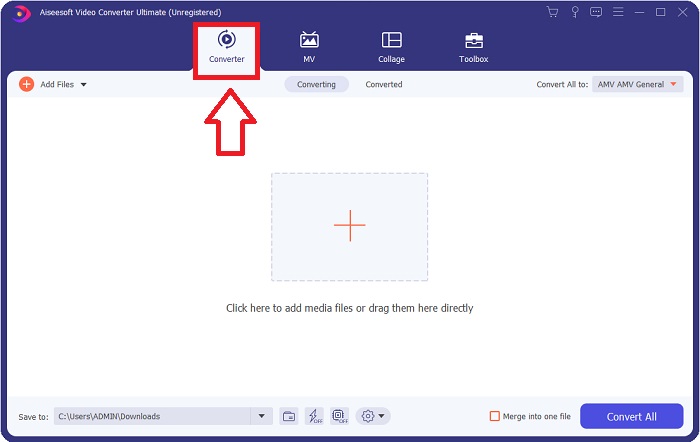
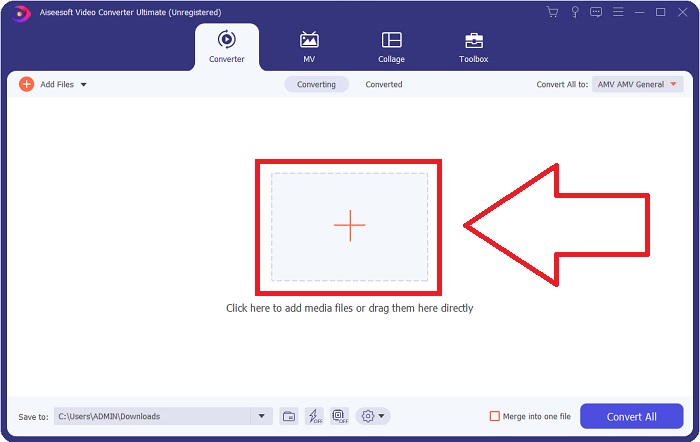
ステップ 3. 変換処理は、変換したいファイルをコンバーターに読み込むところから始まります。変換したい動画をドラッグ&ドロップで「+」のアイコン上に移動し、変換プロセスを開始します。
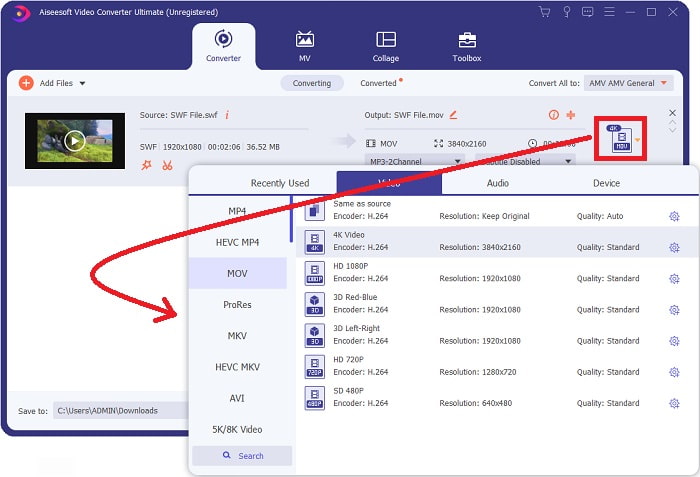
ステップ 4. 画面右上のエリアにオプションメニューが表示され、そこで動画形式を選択できます。表示されるプルダウンメニューから動画形式として MOV を選択してください。選択した MOV ファイルに応じて、さまざまな画質オプションを選べます。希望する動画出力が一覧にない場合は、Windows で画質設定を調整できます。右上の歯車アイコンを選択すると、フレームレートや音質などの表示設定を変更できます。変更を加えたら、新規作成 ボタンを使って設定を保存してください。
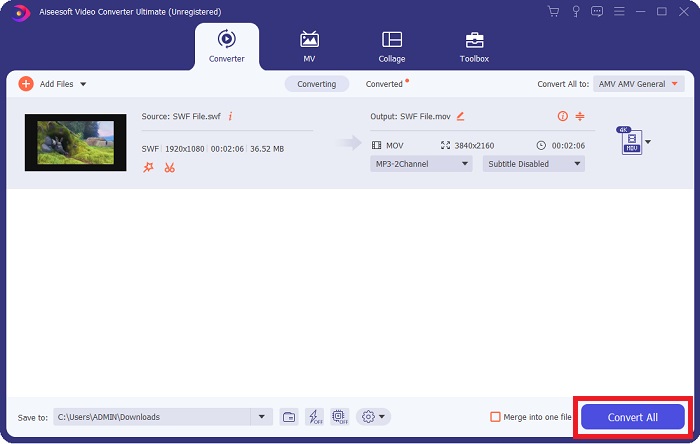
ステップ 5. 動画の編集を終え、変換の準備が整ったら、すべて変換 をクリックして変換処理を開始します。
関連記事:
パート 4. SWF から MOV への変換に関する FAQ
SWF はビデオ形式ですか?
ビデオおよびベクターベースのアニメーションは、Adobe Flash ソフトウェアで作成された SWF ファイルに含まれています。ただし、SWF の完全な省略形である Shockwave Format とも呼ばれます。このファイル形式は、もともと Macromedia によって開発されましたが、現在は Adobe が所有しています。
SWF ファイルは安全ですか?
具体的には、Flash はさまざまな種類の脆弱性にさらされる傾向があります。 SWF ファイルはクライアントにダウンロードされ、クライアントのコンピューターで実行されるため、サーバーは危険ではありません。ただし、SWF ファイルのマルウェアをチェックしようとしても、最小限の保護しか受けられません。
Flash 2021 をまだサポートしているブラウザーはどれですか?
Adobe Flash は、ブラウザーの次のメジャー リリースである Firefox 84 で廃止されます。速度と安全性を向上させるため、Firefox 85 (2021 年 1 月 26 日リリース予定) では Adobe Flash のサポートが削除されます。
結論
まとめると、本記事で説明してきた内容は、すべて上記のソフトウェアを使うことで完結させることができます。Video Converter Ultimate を使えば、動画ファイルを簡単に変換でき、全体として高品質な仕上がりが期待できます。インターネット上にある他のツールやソフトウェアとは異なり、このソフトは操作性に優れており、まるで作品を仕上げるような感覚で扱うことができます。
-
 SWFからMP4へ:無料でSWFをMP4オンラインとPCに変換
 Adobe Flash PlayerなしでSWFファイルを開く方法は?無料のトップ3SWFからMP4へのコンバーターを利用して、オンラインおよびPC / Macで3ステップ以内にSWFからMP4に自由に変更できます。
-
 [2つの解決策] SWFを無料で簡単にGIFファイルに変換する方法
 Flashソフトウェアを介してGIF形式をエクスポートできない場合は、最初にファイルをSWF形式で保存してみてください。次に、この記事からSWFをGIFファイルに変換する2つの簡単な方法を学ぶことができます。
-
 アニメーションGIFをMOV形式に変換するための最高のGIFコンバーター[2021]
 ビデオファイルの品質に影響を与えることなく、簡単な方法でGIFをMOV形式に変換します。手順とさまざまなツールもあります。
