


 ビデオコンバーター究極
 スクリーンレコーダー
 ビデオ修復
ビデオ修復DVをFLVに簡単に変換するための有利な方法
DV ファイルとはデジタル動画を含むファイルのことです。DV ファイルを解析した結果、この形式はデジタルビデオの保存に利用されていることが分かっています。これらのファイルに何が含まれているのか、またユーザーがどのように利用しているのかについては、まだ完全には解明できていませんが、当チームは何千種類ものファイル形式を扱っています。この形式について何か情報をお持ちであれば、ぜひお知らせください。 一方で、.flv というファイル拡張子は FLV(Flash Video)ファイルを示します。ユーザーは Adobe Flash Player や Adobe AIR を利用して、インターネット上で FLV を使った音声・動画ストリーミングを行うことができます。FLV ファイルは、SWF ファイルと同じ方法でデータをエンコードします。DV 動画形式に関する問題を解決する際には、より多くのメディアプレーヤーで再生できる FLV 形式へ変換することが一般的です。そのため、DV を FLV 動画形式に変換するツールをお探しなら、この記事を読み進めてください。

パート1。オフラインでDVをFLVに変換する最良の方法
Video Converter Ultimate は、DV 動画形式を FLV に変換するのに役立つ優れたソフトウェアのひとつです。超高速ブーストシステムにより、他のツールでは太刀打ちできないほど、DV から FLV への変換を数秒で行えます。このソフトのおかげで、DV を別の形式に変換することについて悩む必要はありません。というのも、このソフトは MP4、MOV、3GP、FLV、WMV、WEBM、MPEG など、想像以上に多くの形式をサポートしているからです。変換機能に加え、このソフトには、トリミング、強化、結合、速度変更など、動画をワンランク上に仕上げるためのさまざまな便利機能も搭載されています。

ビデオコンバーター究極
6,357,200以上のダウンロード- 1000以上の異なるビデオおよびオーディオフォーマットをサポートします。
- 他のコンバーターより30倍速く変換します。
- 最大4KのHD品質のビデオを変換できます。
- それはあなたのビデオを改善するのを助ける他の多くの注目のツールを提供します。
- 動作するのに重いメンテナンスハードウェアは必要ありません。
無料ダウンロードWindows 7 以降に対応安全なダウンロード
無料ダウンロードMacOS 10.7 以降に対応安全なダウンロード
ステップ 1: 上にある無料ダウンロードボタンをクリックしてソフトをダウンロードします。その後、パソコンにインストールし、インストール完了後に表示される今すぐ開始をクリックして起動します。
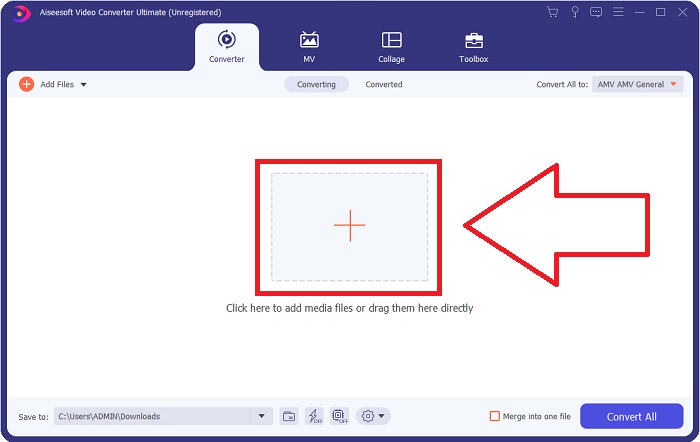
ステップ 2: すると、画面にウィンドウが表示されます。ソフトには変換機能が表示されます。パソコンからファイルを読み込むには、中央の+ボタンをクリックするか、DV 動画ファイルを中央部分にドラッグ&ドロップします。
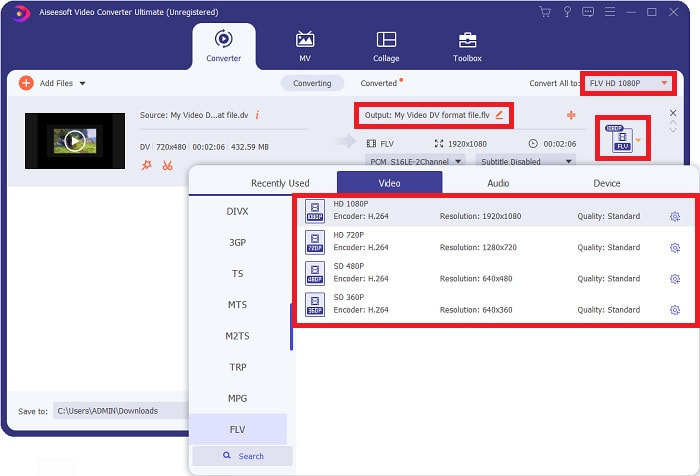
ステップ 3: 作業はすでに半分完了しています。出力欄のすぐ横にある形式選択アイコンをクリックし、FLV 動画形式を選択します。その後、ソフトが提供するさまざまな画質を選ぶこともできます。
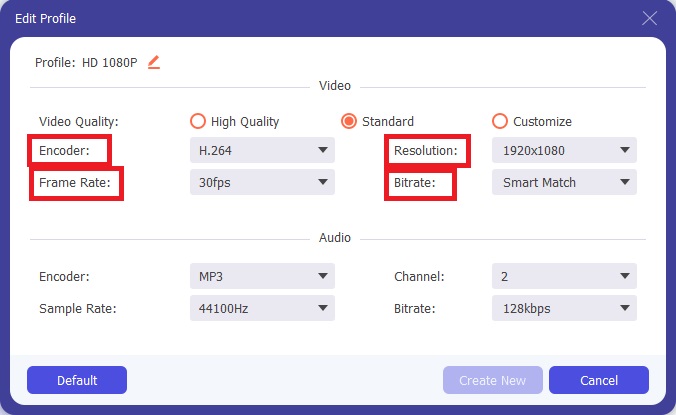
ステップ 4: 仕上げまであと少しです。用意された画質がどれも物足りない場合は、画質選択の横にある歯車アイコンをクリックして、出力動画の画質をカスタマイズできます。
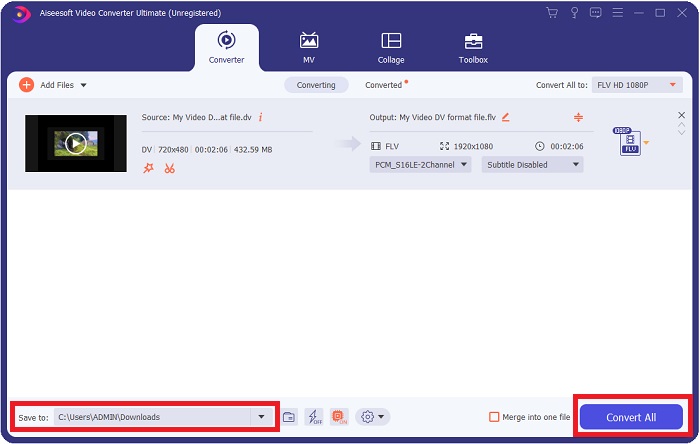
ステップ 5: いよいよ完了目前です。画面の反対側にある保存先欄で、変換後ファイルの保存場所を指定します。あとは、画面右下にあるすべて変換ボタンをクリックすれば、ファイルの変換が開始されます。
パート2。DVをFLVオンラインに変換する方法
インターネット上には、DV を FLV に変換するのに役立つさまざまなオンラインツールがあります。その中でも、Free Video Converter Online は、超高速で変換できる点で他のツールとは一線を画しています。わずか数秒でファイルを変換できるほか、MP4、FLV、MOV、M4A、TS、WMV、ASF、VOB、AAC、WMA など多くの形式をサポートしています。また、画質を落とすことなく HD 動画への変換も可能です。この無料動画変換ツールは、変換機能でよく知られており、ユーザーが手間なく動画を細かく調整できるのが特長です。それでは、このオンラインコンバーターの使い方をステップごとに見ていきましょう。
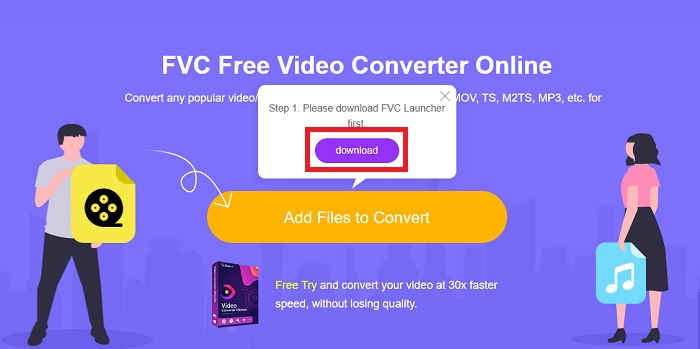
ステップ 1: このオンラインツールのメインページにアクセスするには、このリンクをクリックして進みます。パソコンのメイン画面で変換するファイルを追加ボタンをクリックし、このツールを利用するためのランチャーをダウンロードします。その後、もう一度同じボタンをクリックして、変換したいファイルをアップロードします。
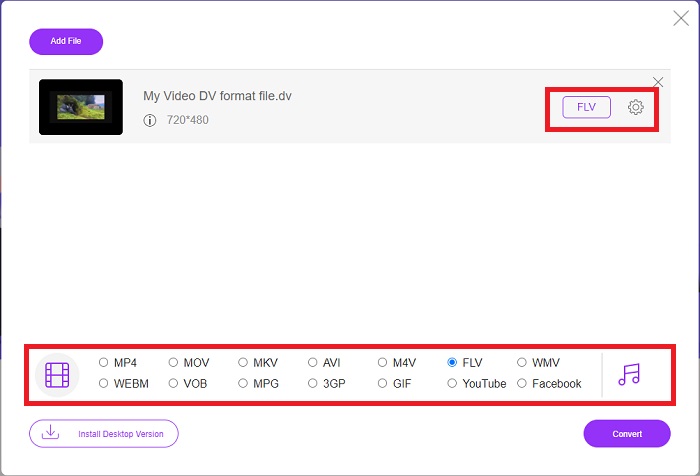
ステップ 2: 変換したいファイルを追加したら、画面下部の形式一覧からFLV 動画形式を選択します。さらに、歯車アイコンをクリックして、解像度やフレームレートなどの動画設定を変更し、動画の仕様を調整することもできます。
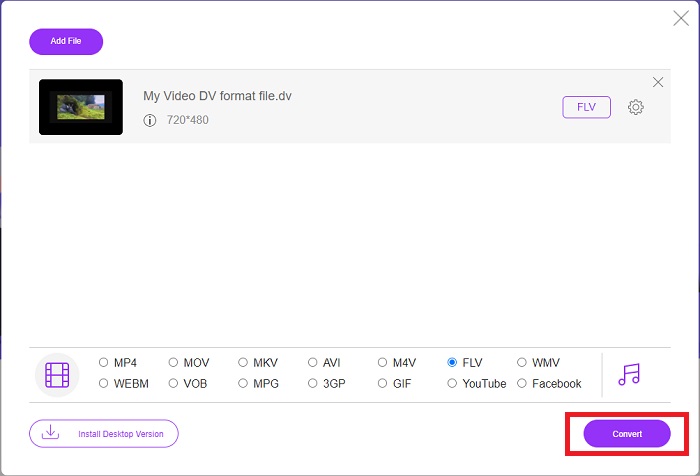
ステップ 3: 準備ができたら、ウィンドウ左下にある変換ボタンをクリックして、ファイルの変換を開始します。
パート3。比較チャート:DV対。 FLV
デジタルビデオ(DV)ファイルは、デジタルカメラによって作成され、ユーザーが常に使用するraw形式で保存されます。デジタルビデオ(DV)ファイルは、それぞれ80バイトを含むデジタルインターフェイスブロック(DIF)で構成されます。オーディオ、ビデオ、およびメタデータはすべてDIFブロックに含めることができます。 DIFブロックは、生の形式のコンピューターファイルとして、またはそれらをラップしたファイル形式として保存できます。つまり、ブロックを150ブロックのシーケンスに多重化します。ビデオフレームには、最大10または12のシーケンスを含めることができます。
なお、YouTube、Hulu、Vevo などの動画配信サービスは、オンライン動画に Adobe Systems の Flash Video 形式を利用しています。Adobe Flash Player(ブラウザプラグインを含む)やサードパーティ製ソフトウェアは、ほぼすべてのオペレーティングシステム(iOS を除く)で FLV ファイルを読み取り、再生できます。iPhone や Android でも、オープンソースソフトウェアや特定のブラウザを利用することで FLV ファイルを再生することが可能です。一方で、iOS にとって Flash は依然として問題があり、FLV ファイルは専用の FLV プレーヤーソフトでしか再生できません。なお、ユーザーは画面キャプチャ・録画ソフトを使用して FLV 動画を録画することもできます。
| ファイル拡張子 | DV(.dv) | FLV(.flv) |
| ファイル名 | デジタルビデオ | Flashビデオファイル |
| によって開発された | 複数のビデオカメラプロデューサー | Adobe System Incorporated |
| 長所 | ◆標準のMiniDVは19.5GBを保持します。これは、ストレージ1GBあたり約0.25セントになります。 ◆直感的なHDから標準への変換 ◆テープはラベル付けが簡単で、長期保管に最適です。 | 動的でインタラクティブなWebページを作成する場合、AdobeFlashは大きな資産になる可能性があります。プロセスは単純ですが、結果は重要になる可能性があります。全盛期には、Flashは単純なビデオゲームにも広く使用されていました。 |
| 短所 | ◆ファイアワイヤ接続が必要です(ほとんどのストックPCにはこれがありません)。 ◆録音の品質は、後続のパスごとに低下します。 ◆一度に60〜90分しか録音しません。 | FLVの人気が何年にもわたって衰えてきたことは不利です。 FLVコンテンツの作成には時間がかかり、多額の費用がかかる場合があります。さらに、ユーザーはiOSデバイスでFlashコンテンツを表示できないため、新しいフォロワーを引き付ける能力が大幅に制限されます。 |
| ファイルをサポートするプログラム | ◆VLCメディアプレーヤー | ◆RealPlayer ◆AppleQuickTime Player ◆VLCメディアプレーヤー ◆MPlayer |
パート4。DVからFLVへの変換に関するFAQ
DVとはどの解像度ですか?
DVを使用すると、標準解像度では、60Hzの電流を使用する国で720の水平ピクセルと480のインターレースラインが記録され、50Hzの電流で576のラインが記録されます。高解像度バージョンのデジタルビデオ(HDV)は公式のHDV標準であり、パナソニックのDVCPRO HDはそのようなフォーマットの例です(HDVおよびDVCPROを参照)。
DVビデオはインターレースされていますか?
最初は常に一番下にたくさんのDV映像があります。他の映像が最初に表示される場合があります。インポートされたクリップをフィールドセパレーションをオンにして再度解釈し、最初に下に移動して(ファイル>フッテージの解釈>中央)、インターレースされているかどうかを確認します。次に、プロジェクトのウィンドウで、Altキーを押しながらダブルクリックしてショートカットにアクセスします。ページアップ/ Dnキーを使用して、ビデオ内を移動します。再生ボタンを押すたびにビデオが変わると、インターレースが発生します。けいれん動作は、フィールドの順序が正しくないことを示します。フッテージは、他のフィールドの順序を使用して再解釈する必要があります。
FLVは適切なビデオフォーマットですか?
Adobe Flash Playerは、ビデオファイルをFLV形式で保存します。すべてのビデオプラットフォームとブラウザは、サポートされているビデオ形式の1つとしてそれを受け入れます。 YouTubeなどのオンラインビデオストリーミングプラットフォームは、FLV形式を使用することでメリットがあります。ファイルサイズが小さいため、ダウンロードがすばやく簡単に行えます。
結論
この記事の内容をまとめると、最もおすすめするコンバーターは、ソフトウェアのVideo Converter UltimateとオンラインツールのFree Video Converter Onlineの 2 つです。これら 2 つのコンバーターは、ほかのツールを上回る性能を持ち、プロ向けの多彩な機能と、初心者にも扱いやすいユーザーフレンドリーなインターフェースを兼ね備えています。
-
 詳細な手順でDVファイルをAVI形式に変換する方法に関する最善の戦略
 DVファイルをAVIに変換しますか?次に、この記事を読んで、変換に使用できる独自のツールと、PCまたはMacでDVを再生するためのメディアプレーヤーを確認してください。
-
 デスクトップとオンラインで無料でDVファイルをMOVに変換する方法のトップ2の方法
 MacでDVファイルをMOVに変換する際に問題が発生しましたか?それがあなたの問題であるならば、私たちがこの記事を読めば、私たちは一緒にそれを解決することができます。
-
 MP4からFLV |トップ3無料コンバーター(オンライン/ Mac / Windows)
 この投稿は、MP4からFLVへの変換の詳細なガイドです。上位3つの無料コンバーターを使用して、WindowsまたはMacコンピューターでMP4をFLVにオンラインで簡単に変更できます。
