


 ビデオコンバーター究極
 スクリーンレコーダー
 ビデオ修復
ビデオ修復あなたが知っておくべきTRPをFLVに変換するためのオフラインおよびオンラインツール
TRP は、録画したテレビ番組ファイルを保存するためのファイル形式です。このファイル形式に元のまま対応できるプレーヤーはほとんどないため、再生する前に別の形式へ変換する必要がある場合があります。TRP ファイルを FLV ファイルに変換するには、適切なソフトウェアツールを使用しなければなりません。幸いなことに、当社のソフトウェア、またはそのオンライン版を使えば、この変換作業を通して一切不便を感じることなく、はるかに簡単に行えます。これから紹介する手順に沿って進めれば、TRP 動画を FLV 形式に変換することができます。

パート1。TRPをFLVに変換するオフライン方法
TRP ファイル形式は、一般的な動画視聴者にはほとんどなじみがなく、制作者にもあまり使われていません。そのため、多くのソフトウェアやオンラインツールは、この種類の動画ファイルに対応していません。そこで、さまざまな動画形式の相互変換が必要なときに検討したいのが Video Converter Ultimate です。このソフトは、ワンクリックで TRP ファイルをお好みの任意の形式に変換できます。
このビデオコンバータツールは、高度な編集機能を提供し、技術的な知識やスキルがなくても簡単に使用できるグラフィカルインターフェイスを備えています。このアプリケーションの助けを借りて、ファイルを変換し、超高速の変換時間と高品質の出力の恩恵を受けることができます。ここでは、従う必要のある簡単な手順を示します。
ステップ 1: お使いの OS に合わせて、下の 無料ダウンロード ボタンをクリックし、.exe ファイルをダウンロードします。ダウンロードが完了したら、ファイルを開いてインストールを開始します。インストールが完了するまで待ち、終わったらソフトを起動します。
無料ダウンロードWindows 7 以降に対応安全なダウンロード
無料ダウンロードMacOS 10.7 以降に対応安全なダウンロード
ステップ 2. ソフトが起動するとインターフェースが表示されます。中央の + ボタンをクリックして変換したい動画ファイルを読み込むか、ファイルをドラッグ&ドロップして追加します。
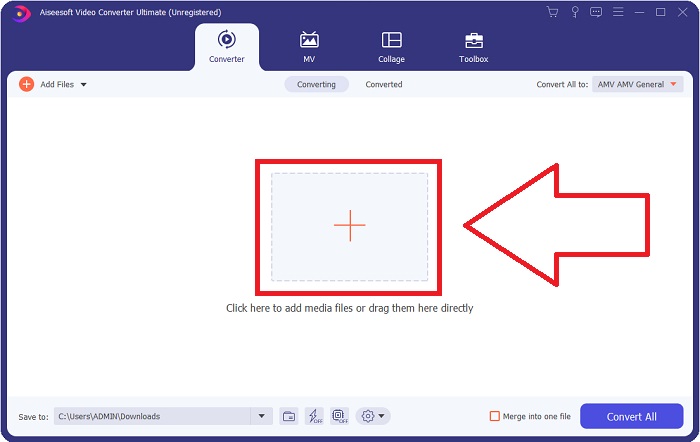
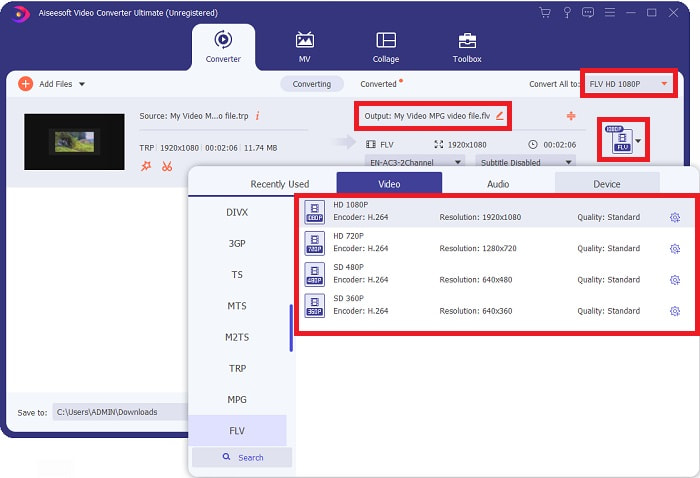
ステップ 3: 読み込んだファイルの右側に、動画の現在の形式が表示されます。変換後の形式を選ぶには、その部分をクリックすると、利用可能な形式がすべて表示されます。その中から FLV を探すか、検索バーに直接入力してください。右側には選択可能な画質プリセットも表示されます。
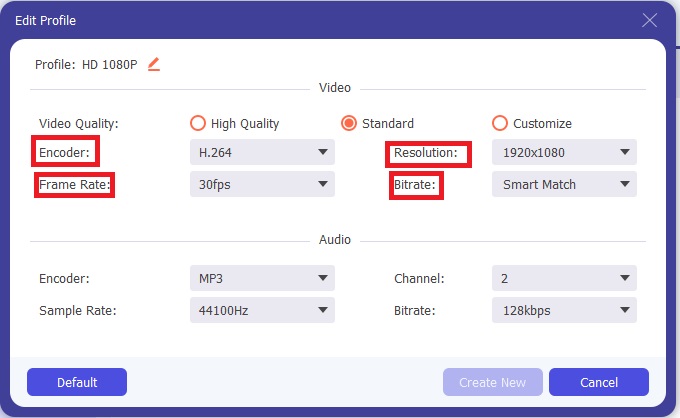
ステップ 4: 先ほど触れた追加機能を利用するには、選択した画質の右側にある歯車アイコンをクリックします。新しい画面が開き、ニーズに合わせてさまざまな動画・音声設定を編集できます。編集が終わったら、新規作成 ボタンをクリックして変更内容を保存します。
ステップ 5: すべての編集や調整が完了したら、画面右下の すべて変換 ボタンをクリックして変換を開始し、処理が終わるまで待ちます。
![[すべて変換]をクリックします](/images/2021/12/clicking-convert-all.jpg)
パート2。TRPをFLVに変換するオンライン方法
フル機能のソフトをインストールせず、ウェブツールを使って作業を完了したい場合は、動画ファイルの変換方法を別途検討することになります。そのような場合に利用できるのが、このソフトのオンライン版である FVC Free Video Converter Online です。デスクトップ版ほどではありませんが、このオンラインツールでも追加設定を利用できます。それでも、必要な処理を行うには十分な機能を備えています。このウェブツールを使うには、次の手順に従ってください。
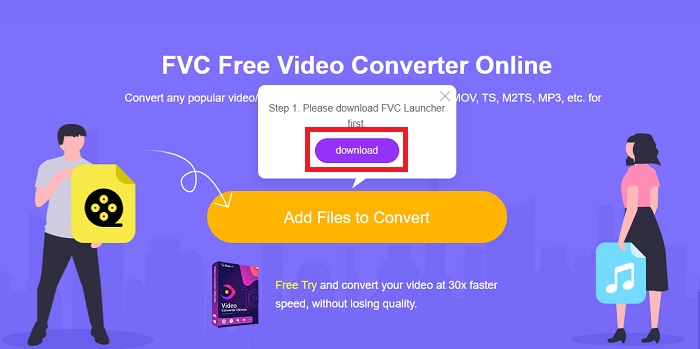
ステップ 1: こちらのリンクをクリックしてコンバーターのページにアクセスします。そこで、ファイルを取り込むために必要なランチャーをダウンロードします。ページ中央の 変換するファイルを追加 ボタンをクリックして、手順を開始します。
ステップ 2: 同じボタンをもう一度クリックして、変換したい動画ファイルをアップロードします。ファイルを読み込むと、新しい画面が表示され、選択可能な形式が一覧で表示されます。この中から FLV を選択してください。
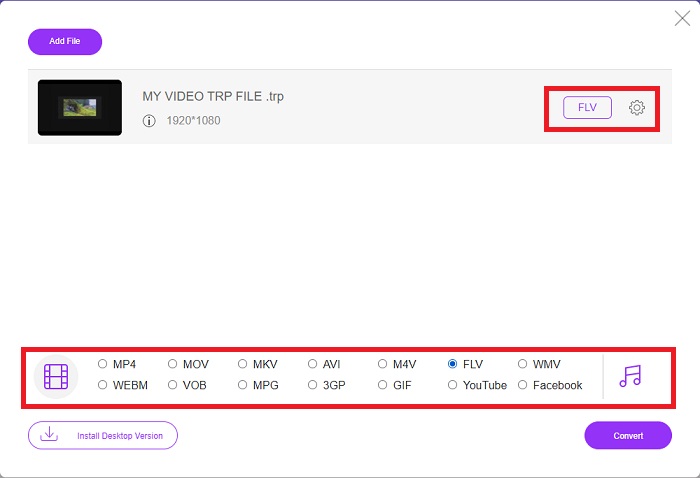
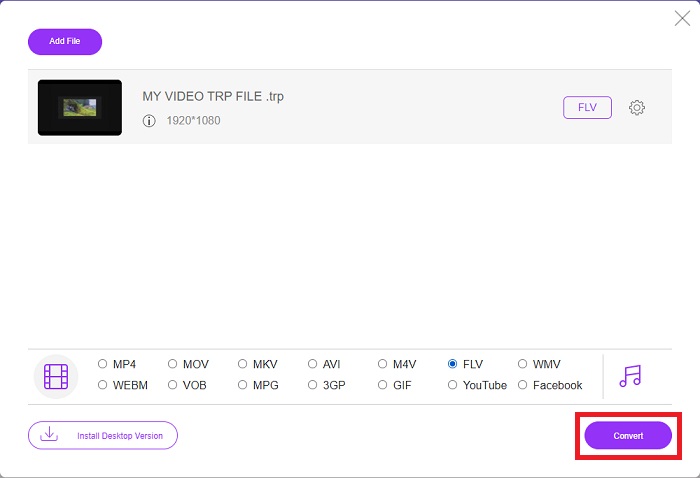
ステップ 3: ソフト版と同様に、追加オプションを利用するには右側の歯車アイコンをクリックします。解像度、フレームレートなど、動画と音声の設定が表示され、より細かく編集できます。設定が完了したら、OK をクリックして変更を保存します。最後に、右下の 変換 ボタンをクリックして変換を開始します。
関連記事:
パート3。TRPとFLVの拡張知識
上記の2つの形式について詳しく知るために、簡単な情報と2つの形式の比較を提供します。
TRPファイルは通常VideoLANのVLCに関連付けられています。 TRPファイル名拡張子は、高解像度フィルムを保持するMPEG-2パート1で収集できます。 TRPファイルには、デジタルビデオ放送ネットワーク、ラジオ周波数、またはビデオレコーダーなどの線形記録デバイスを介してデジタルビデオおよびオーディオとして送信されるデータパケットを含めて保存できます。 TRPファイルには、複数のオーディオストリームとビデオストリーム、およびエラー訂正コードが含まれています。ユーザーは、キャプチャ時間、カメラID、ソースなどのメタデータをファイルのコンテンツに含めることもできます。
一方、拡張子が.flvのファイルはFlashVideoの略です。 FLVファイル拡張子は、AdobeFlashPlayerまたはAdobeAirを使用してインターネット経由で送信されるビデオまたはオーディオファイルを指します。 Flash Videoは、YouTube、Hulu、およびその他のさまざまなサイトのビデオを含む、インターネット上のほぼすべての埋め込みビデオの主要なビデオ形式でした。一方、ストリーミングプロバイダーとソフトウェア開発者は、Adobeが正式に廃止されて以来、Flashを放棄してHTML5やその他の形式を採用しています。
| TRP | FLV | |
| ファイル拡張子 | .trp | .flv |
| 開発者 | VideoLANプロジェクトチーム | Adobe Systems Incorporated |
| 支援プログラム | ◆SMPlayer ◆VLCメディアプレーヤー ◆AppleQuickTime Player | ◆RealPlayer ◆AppleQuickTime Player ◆Mplayer ◆VLCメディアプレーヤー |
パート4。TRPからFLVへの変換に関するFAQ
VLCを使用してTRPビデオ形式を開く方法は?
VLC Media Playerがコンピューターにインストールされたら、ハードドライブでTRPビデオファイルを見つけ、マウスの右ボタンで選択します。 [プログラムから開く]ドロップダウンメニューから[VLCメディアプレーヤー]を選択します。システムは、起動されるとすぐに、このプログラムから再生されるビデオファイルを開きます。
FLVファイルをWindowsMediaPlayerに変換するにはどうすればよいですか?
まず、変換するFLVファイルを選択する必要があります。 FLVファイルを変換する形式としてWMVを選択できます。 FLVファイルを変換するには、ドロップダウンメニューから[変換]を選択します。
どこでもTRPをプレイできますか?
TRPファイルをどこでも、どのデバイスやメディアプレーヤーでも再生したい場合は、TRPを広く知られているMP4、AVI、MOV、MKV、FLV、WMV、およびその他の形式に変換することをお勧めします。
結論
全体として、Video Converter Ultimateとそれに対応するオンラインツールは、必要なすべての機能を提供しながら、変換プロセス全体を実行するために探しているものです。不便はありません。また、デスクトップにソフトウェアがインストールされていれば、いつでも利用できます。このようなコンバーターがいつ必要になるかわからないので、このソフトウェアを簡単に使用することをお勧めします。
-
 WindowsとMacでTRPをAVIに変換する方法に関する最も簡単なガイド
 たぶん、あなたはTRPビデオ形式に精通しておらず、TRPをAVIに変換する方法を知りたいですか?この記事をさらに読んで、問題に関係する詳細を確認してください。
-
 MTSをFLV無料およびオンラインに変換する3つのソリューション
 MTSをFLVに変換したいですか? Mac OSXおよびWindows10 / 8/7でMTSをFLVに変換するために試すことができる3つの無料のMTSからFLVへのコンバーターソフトウェアがあります。
-
 VOBをFLVに変換する最良の方法[無料およびオンラインで含まれる]
 VOBファイルをFLVファイルに変換したいですか?デスクトップまたはオンラインコンバーターを使用して、タスクを簡単に完了することができます。このガイドを読み、VOBをFLVに簡単かつ迅速に変換する方法を学びます。
